By the end of this course you will be able to
- Explain the IAAA model and clearly distinguish identification, authentication, authorization and accountability.
- Select and justify an authentication factor type (something you know/have/are) and design relevant multi-factor authentication.
- Interpret biometric error rates FAR (Type 2), FRR (Type 1) and the crossover error rate (CER) to compare sensors.
- Compare the authorization models DAC, MAC, RBAC, RuBAC and ABAC and map them to a classification context.
- Design single sign-on and federated identity (FIM) with Kerberos, SAML, OAuth or OpenID Connect, identifying the client, SP/RP and IdP roles.
- Drive the access provisioning life cycle, from identity proofing to deprovisioning, and prevent privilege creep through access reviews.
- Implement privileged account management (PAM) and monitoring/logging controls that produce a forensic audit trail.
- Tie IAM choices to compliance requirements (GDPR, HIPAA) and to the principle that due care and due diligence cannot be outsourced.
Prerequisites : It helps to have covered Domain 1 (risk management, the CIA triad, due care and due diligence), Domain 2 (data owner, data custodian and classification) and Domain 3 (security models and architecture concepts). These notions underpin the vocabulary and authorization decisions of Domain 5.
Suggested path
Three sessions of roughly three to four hours each, spreading the 9 modules. The progression moves from conceptual foundations toward mechanisms (factors, federation, authorization), then toward operations (life cycle, privileged accounts, authentication systems). Work through each checkpoint before moving to the next session.
-
Session 1 - Foundations and identity
MODULE 1 · MODULE 2 · MODULE 3
Access control vocabulary, identities as labels, and the IAAA model (identification, authentication, authorization, accountability) as the backbone of the domain.
-
Session 2 - Factors, federation and authorization
MODULE 4 · MODULE 5 · MODULE 6
Factors and biometrics (FAR, FRR, CER), single sign-on and federated identity management (Kerberos, SAML, OAuth, OIDC), then authorization models DAC, MAC, RBAC and ABAC.
-
Session 3 - Life cycle and systems
MODULE 7 · MODULE 8 · MODULE 9
Access provisioning life cycle and privilege creep prevention, privileged account management (PAM), then authentication systems and session management in production.
IAM foundations: assets, subjects/objects, IAAA, physical and logical access
Prerequisites : None. Entry point of Domain 5.
Every organization classifies and categorizes its information according to the value it represents for its activities. If one of the security characteristics of that information is compromised, the organization assesses the impact on that value. This is where the mission of identity and access management (IAM) is born : to create and manage identities, associate privileges with them, and then use this information to ensure that no unknown or unrecognized identity, human or non-human, accesses resources or performs operations on them.
This module lays the foundation of the domain. Here you will distinguish IAM from identity management (IdM), you will master the "triple A" summarized by the acronym IAAA (identification, authentication, authorization, accounting/accountability), and you will understand the fundamental subjects/objects vocabulary as well as CRUD operations. You will then see how to administer an access control system (centralized, decentralized, hybrid), how to combine administrative, physical and logical controls, and why physical security constitutes a distinct problem that no costly logical defense can replace.
The notions appear simple but the exam tests them on fine distinctions : IAM vs IdM, identification vs authentication, PACS as a general class vs a set of U.S. federal standards. By the end of the module, you will know how to connect the value of an asset and the result of risk management to the right mix of controls, and explain why information classification must precede the choice of controls.
1.1 IAM vs IdM, and the IAAA lifecycle
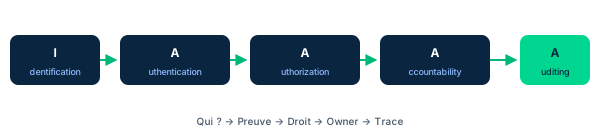
The market hesitates between two terms. Some sources, such as Gartner, reserve identity management (IdM) for the process of issuing and managing identities to control their access to the resources of a system, and keep IAM for the broader problem of identity and access in cloud and federated systems. The course adopts IAM as the encompassing term. An IAM system creates and manages identities, associates privileges with them, and then leverages this information so that no unknown or unrecognized identity accesses resources or acts on them. It must also track the entire life cycle of an identity and its access attempts.
Key point : not all users are human. IAM must manage humans but also non-humans - software, hardware, connected objects (IoT) and a growing number of robots. An application service, an automation script or an IoT sensor has an identity and requests access, exactly like a person.
At the heart of IAM is the "triple A" : authentication, authorization and accounting (AAA). With the identity management function that precedes it, we speak of the acronym IAAA : identification (declaring who you are), authentication (proving it), authorization (determining what you are allowed to do) and accounting/accountability (tracing and attributing actions). Without this cornerstone, no security control would know which activities to authorize and which to block.
- IAM is the umbrella term; IdM (Gartner sense) is limited to issuing and managing identities
- IAM manages humans AND nonhumans: software, IoT, robots
- IAAA = identification, authentication, authorization, accounting/accountability
- Identification claims, authentication proves: do not confuse them
1.2 Subjects, objects, and access operations
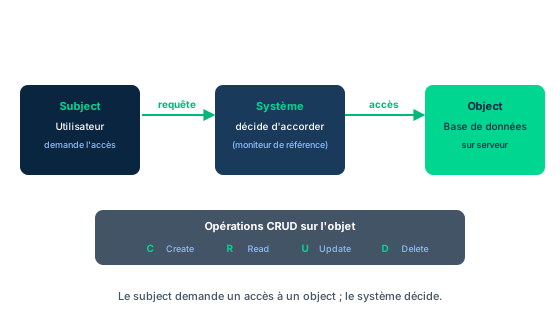
ISO/IEC 27000:2016(E) defines access control as a "means to ensure that access to assets is authorized and restricted based on business and security requirements." Stated more explicitly, access control consists of controlling the access of subjects to objects in a system. An object is an information asset or system resource to be protected : files, records or fields in a database, but also memory, CPU time, disk space, network interfaces, physical areas of a building, printed documents, even Wi-Fi channels. An object can even be another subject. A subject is any person, process, device or entity that wants to access an object.
Access is expressed in database terms by CRUD operations - create, read, update, delete - to which the data security life cycle of Domain 2 adds three explicit actions : share, archive and store. Identifying the right operation is essential : a read right is not an update right.
The figure illustrates the complexity of the ultimate requesting subject. A human often uses an intermediary computer, which may not belong to them, to reach a database on a server. The user launches an application on their device, to which the OS assigns process IDs ; one of these process IDs, for a given thread, issues system calls to open a connection to the remote database, soliciting other process IDs that act on its behalf. The server only sees the remote connection request and the access requests that follow. The DBMS must then receive credentials saying in essence : "user X, recognized and approved on their own system, requests access to these records to perform these CRUD actions on them ; can you approve?"
- Subject = who requests; Object = what is requested (sometimes another subject)
- CRUD plus share, archive, store describe the possible operations
- Identifying the ultimate requesting subject is hard because of chained process IDs
- ISO/IEC 27000: access is authorized AND restricted per business and security requirements
1.3 Administering IAM: centralized, decentralized, hybrid
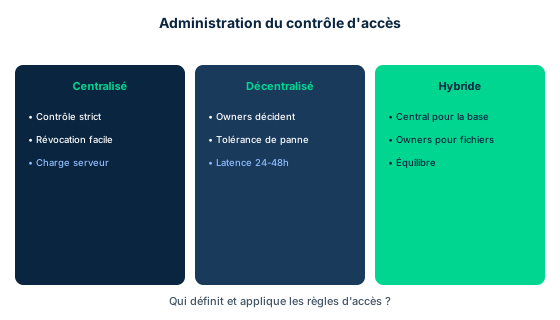
Information about access, whether logical or physical, is stored somewhere in the form of data. Its management is organized in three main ways. In centralized administration, a single function configures access controls ; any modification goes through this central administration, after approval by an established procedure and the competent authority. Advantages : strict control (few individuals can act), centralized oversight of every account, easy closure of all access for a departing person, uniform procedures easy to enforce. Trade-off : all authentication and authorization actions go through the central system, which makes updates immediately available on all nodes, but imposes strong performance constraints on this system.
In decentralized (or distributed) administration, access is controlled by the owners or creators of the files, wherever they are. Advantage : control is in the hands of the people most accountable for the information, most familiar with it and best placed to judge who should do what. Disadvantages : lack of consistency of procedures between owners, difficulty in obtaining a system-wide view of all access, risk of conflicts of interest introduced inadvertently, and difficulty in properly revoking access during a transfer or departure. Above all, pushing updates of the AC database to all servers can take 24 to 48 hours ; this latency opens a window in which an attacker can exploit privileges that management has decided to revoke but that not all nodes have yet applied.
In hybrid administration, centralized control applies to certain information and decentralized control to other information. Typical pattern : the central administration provides the broadest and most basic access, while the creators/owners of files manage access to their own files. A new hire thus receives from the central administrator permissions according to their department, their job classification and their task - for example read-only on a corporate SharePoint library, but read-write on their department's weekly report ; and if they leave a project, the project lead easily closes their access to the file concerned.
- Centralized: strict control, easy revocation, but heavy load on the central system
- Decentralized: owners decide, better fault tolerance, but 24-48 h latency
- Hybrid: central for the baseline, owners for their own files
- Decentralized latency opens a window to exploit revoked privileges
1.4 Access control as a system: administrative, physical, logical
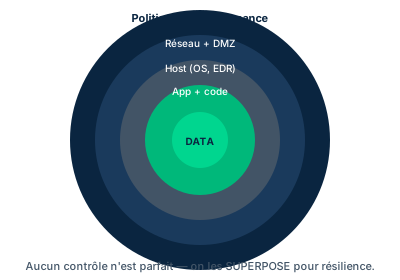
An access control system is built with the three categories of security controls. Administrative controls - policies, directives, procedures, training, standards and compliance requirements oriented toward the human - drive the design of workflows to meet security needs. From this design foundation, professionals choose the right mix of physical and logical (or technical) controls. NIST and ISO publications on AC refer as much to policies and procedures as to devices and software rules.
A physical control guides, prevents or permits the movement of people and devices in a defined space : the simplest example is a door that can be locked. A logical control acts within the data flows of the system : the login process is the illustration, it transforms the data generated by the user's physical actions (keystrokes, clicks) to decide whether or not to grant the next software step. A smart card mixes the two. The reader on the door does not directly actuate the locks : the data read on the card, plus any data entered, are sent over the network to an AC server. This server decides whether or not to grant access according to its rule base, then commands the entry controller to open or refuse. As part of accounting, it records the attempt and the decision ; the controller also logs on its side.
An essential precedence : before selecting and implementing the type of logical control, the data owner must classify and categorize their information. These complementary processes identify the type of protection required (in CIANA+PS terms) and its extent, to meet the organization's overall risk management needs. This step must come first. SMEs often push back this risk-based approach, believing it adds too much analysis and cost ; this is not inevitable.
- Three categories: administrative, physical, logical (technical)
- The smart card blends physical and logical via an AC server that decides and logs
- Classifying and categorizing information (CIANA+PS) MUST precede control choice
- Controls derive from risk management and asset value
1.5 Logical (FICAM) and physical (PACS) systems; protecting applications, services, devices
The U.S. FICAM roadmap (Federal Identity, Credential and Access Management) defines a Logical Access Control System as an automated system that : authorizes or denies use to an individual user ; authorizes or permits it ; relies on the fact that the user has an identity registered and approved by the system ; uses resources of the information system (endpoints, workstations, networks, applications, system software or data) ; and grants, for this access, the instances of permissions registered for that identity. The volume of remote users often imposes a logical AC system far more complex and nuanced than physical control : it is simpler in principle to restrict the movements of people than to control the multiple forms of remote access and resource sharing.
Physical Access Control Systems (PACS) generally use automated systems - thus logical elements - to manage the passage of people, material and equipment through defined entrances, or to authorize/prevent physical access to a specific device (endpoint, server, technical room). A purely physical example : the inside of a server rack configured to require two people, each opening their own combination padlock, with an administrative process ensuring that no single person knows both combinations. Specific authorization rules authenticate the identity that wants to cross the entrance (user ID, shipping manifest, device ID, inventory tag) ; NIST SP 800-53r4 specifies these aspects.
The acronym PACS has a double meaning : it designates the general class of physical AC systems, and also a precise set of policies, procedures and standards (such as NIST SP 800-53r4) used by U.S. federal agencies and their contractors. Finally, IAM protects three large families of assets with the principle of least privilege : applications (not all employees need the same resources or the same level of permission - example Microsoft 365/SharePoint, or an accounting application reserved for finance) ; services (offered by cloud providers via policies determining which subjects access which services) ; and devices.
- FICAM defines the Logical Access Control System as an automated system based on a registered identity
- PACS: dual meaning, general class of systems OR US federal standards (NIST SP 800-53r4)
- The two-person rack illustrates separation of knowledge in physical security
- Applications, services, and devices are protected with least privilege
Case studies
The U.S. Department of Homeland Security PACS
Context : The U.S. Department of Homeland Security (DHS) operates in government buildings, leased spaces, and contractor-provided facilities. Its approach to Physical Access Control Systems (PACS) illustrates several security concepts. The DHS PACS is divided into four areas operating independently under the PACS administrator's direction. Identification: PACS requires a person's personally identifiable information (PII) to authorize physical access; its sensors read the personal identity verification (PIV) card to verify authorization. Visitor management: visitors and contractors without a PIV card must be identified before any access. Parking permit management: the Office of the Chief Administrative Officer (OCAO) issues and tracks parking permits via PACS (name, email, permit number and type, dates). Alarm monitoring and intrusion detection: the alarm application lets OCAO monitor the intrusion detection system (IDS); each alarm activation or incident (communication or power failure) is recorded. The IDS combines sensors, lights, and mechanisms through which the Office of the Chief Security Officer (OCSO) detects intrusions; the only PII the IDS collects are the first and last name of the person authorized to arm/disarm the alarm and their PIN code.
Question : Name the logical or physical systems described in the PACS. What can be assumed about the nature of the identification information? And why does DHS view physical access control as a set of problems distinct from information-system access?
Show analysis and answer
PACS is a set of physical AC processes and technologies applicable to any organization, not just federal buildings. It describes the controls to apply to any entity entering a controlled space : employees, contractors, citizen or non-citizen visitors. In all cases, some form of pre-screening precedes admission.
The systems described mix physical and logical. A PACS begins with an identification and authorization process - turnstile, mantrap, barrier or retractable bollard for vehicles - which presents both a physical and a logical barrier. Then come physical sensors (CCTV, motion and acoustic sensors) for continuous surveillance of the space, and logical sensors (IDS, IPS) that monitor activity on the network and on critical hosts. Identification information (PII, PIV card, PIN codes) is sensitive and provides, given the degree of pre-screening required, reasonable assurance that no threat weighs on the security of the occupants or the data of the site.
The DHS is right to treat physical security as a distinct problem. Organizations spend enormously to protect networks, data and systems from external attacks, often with costly and complex technologies - but their existence sometimes creates a false sense of security. If a malicious actor obtains physical access to the site, and the occupants believe their site is safe, they let their guard down : physical access makes it possible to bypass many of these costly solutions.
Takeaway : A PACS combines physical AND logical barriers and sensors; physical security stays a distinct problem because physical access bypasses costly logical defenses.
- A PACS blends physical and logical barriers (mantrap, IDS/IPS) and requires pre-screening
- Identification information (PIV, PII, PIN) is sensitive and underpins authorization
- Physical access bypasses the costliest logical defenses; never lower the guard
Waxbill/MLZ Systems: controlling physical access to critical assets
Context : You are Chief Security Officer of MLZ Systems, pursuing a government contract to sell UAVs (drones). The federal project liaison contacts you about a review of your physical access controls. They want to understand how you regulate access to critical assets - equipment, servers, facilities -, your authentication and authorization processes for physical entry into restricted areas, your protocols for external personnel and contractors, your procedures for adjusting or revoking rights on role changes or terminations, and how your physical security policies are communicated and enforced.
Question : How is physical access to critical assets controlled, and what mechanisms prevent unauthorized entry, especially for external personnel and on a termination or role change?
Show analysis and answer
Authentication and authorization : MLZ applies a strict keycard system coupled with biometric authentication to regulate entry into sensitive areas. Access rights are assigned according to roles and responsibilities, ensuring that each employee only enters the areas relevant to their functions - a direct application of least privilege to the physical world.
External personnel : externals, suppliers included, undergo thorough background checks before any access. Escorted access and time-limited badges are imposed on third parties, minimizing the threat. This treatment reuses the logic of visitor management from the DHS case : pre-screening, identification, and temporal and spatial confinement of access.
Adjustment and revocation : rights are reviewed and updated in real time via a centralized AC system. Immediate revocation procedures apply to departures and role changes, preventing any unauthorized access. This point illustrates the advantage of the module's centralized model : revocation is immediate on all nodes, whereas a decentralized model would suffer a latency of 24 to 48 hours - a window exploitable by a disgruntled leaver. Finally, clear policies are communicated through regular training, accessible documentation, periodic reminders and quizzes that maintain a security culture (administrative control).
Takeaway : Keycard plus biometrics, escorted and time-limited access for externals, and real-time revocation via centralized AC: physical security applies least privilege and benefits from centralized immediacy.
- Strong physical authentication combines keycard and biometrics, with role-based rights
- Externals require background checks, escort, and time-limited badges
- Real-time revocation via centralized AC removes the latency window of a departure or role change
Identification vs authentication
The exam often contrasts these first two letters of IAAA. Identification is the mere claim of an identity: announcing a user ID, presenting a PIV card. Authentication is the proof of that identity: entering a password, validating a biometric. Claiming is not proving. If a question mentions "presenting a card" or "entering a username," that is identification; if it mentions "verifying," "proving," or "validating" the claim, that is authentication. Authorization (what the proven identity may do) comes next, then accounting/accountability (traceability).
PACS: dual meaning
The acronym PACS has two meanings and the exam plays on the ambiguity. On one hand, PACS denotes the general class of Physical Access Control Systems - any physical AC system, in any organization. On the other, it denotes a specific set of policies, procedures, and standards (such as NIST SP 800-53r4) used by U.S. federal agencies and their contractors. The question's context should orient you: do not dismiss PACS just because your organization has no tie to the U.S. federal market; the general class applies everywhere.
Physical security is a distinct problem
A recurring trap is to believe costly logical defenses are enough. On the contrary, they can create a false sense of security. Physical access to the site bypasses many of those solutions: an attacker who reaches a server, workstation, or wiring closet can short-circuit network controls. That is why physical access control needs its own policies, distinct from information-system access, and measures such as the two-person rack or the mantrap. Never answer that investing in logical defenses removes the need for physical ones.
Checkpoint — Knowledge check
-
Which considerations should primarily drive the implementation of physical and logical access controls?
- A The outcome of the risk management exercise and the asset value as set by the data owner
- B The mandatory use of NIST SP 800-53 in all cases
- C Log analytics services
- D The number of process IDs generated by the operating system
Answer & rationale
Answer : A — The outcome of the risk management exercise and the asset value as set by the data owner
Threats, their likelihood, and their impact (the risk management outcome) shape the control environment, and the asset value set by the data owner drives the level of investment. NIST SP 800-53 may be required for federal agencies but is not a general consideration. Historic log analytics may feed risk management but do not directly drive controls. The number of process IDs is unrelated to driving controls.
-
What is the difference between centralized and decentralized administration?
- A In centralized, a single function configures access control; in decentralized, it is managed by the owners or creators of resources
- B In decentralized, a single function configures access control; in centralized, it is managed by the owners or creators of resources
- C Centralized administration is widely implemented whereas decentralized is rarely used
- D Decentralized administration is widely implemented whereas centralized is rarely used
Answer & rationale
Answer : A — In centralized, a single function configures access control; in decentralized, it is managed by the owners or creators of resources
A central point of administration allows very strict controls to be configured and administered (answer A). Answer B reverses the definitions: in decentralized, control is in the hands of those most accountable for and familiar with the information. Answers C and D are wrong: both models are found in general use, the choice depending on the organization's infrastructure needs.
-
In Figure 5.1, a human uses an intermediary host to reach a database on a server. Why is it hard to know the ultimate requesting subject?
- A The application receives process IDs from the OS, and chained process IDs issue the requests on the requester's behalf
- B The server encrypts all identities before recording them
- C Subjects can never be processes, only humans
- D The database deletes the user's identity on every CRUD operation
Answer & rationale
Answer : A — The application receives process IDs from the OS, and chained process IDs issue the requests on the requester's behalf
The user launches an application to which the OS assigns process IDs; one of them opens the remote connection by calling other process IDs that act on its behalf, so the server only sees the remote connection. Answer B (encryption) is off-topic. Answer C is false: a subject can be a person, process, device, or entity. Answer D is invented and contrary to the described behavior.
-
Which statement correctly describes the dual meaning of the PACS acronym?
- A It denotes the general class of physical AC systems AND a specific set of standards (e.g., NIST SP 800-53r4) of the U.S. federal market
- B It denotes only a network encryption protocol
- C It denotes exclusively the logical AC systems defined by FICAM
- D It applies only to organizations with no tie to the U.S. federal market
Answer & rationale
Answer : A — It denotes the general class of physical AC systems AND a specific set of standards (e.g., NIST SP 800-53r4) of the U.S. federal market
PACS denotes both the general class of Physical Access Control Systems and a set of policies, procedures, and standards (such as NIST SP 800-53r4) used by U.S. federal agencies and their contractors. Answer B confuses it with a protocol. Answer C swaps physical and logical (FICAM concerns logical). Answer D inverts the logic: the general class applies everywhere, including outside the federal market.
Key takeaways
- IAM is the umbrella term (including cloud, federated); IdM, in the Gartner sense, is limited to issuing and managing identities.
- IAM manages human AND nonhuman users: software, hardware, IoT, robots.
- IAAA = identification (claim), authentication (prove), authorization (rights), accounting/accountability (traceability); the triple A is its core.
- Subjects access objects via CRUD plus share/archive/store; the ultimate requesting subject hides behind chained process IDs.
- Three administration models: centralized (strict control, immediate revocation, server load), decentralized (owners decide, fault tolerance, 24-48 h latency), hybrid (central for the baseline, owners for files).
- Access control is a system combining administrative, physical, and logical controls; the smart card blends physical and logical via an AC server.
- Classifying and categorizing information (CIANA+PS) MUST precede control choice; controls derive from risk management and asset value as set by the data owner.
- FICAM defines the Logical Access Control System; PACS has a dual meaning (general class OR U.S. federal standards).
- Applications, services, and devices are protected with least privilege; the two-person rack illustrates separation of knowledge.
- Physical security is a distinct problem: physical access bypasses costly logical defenses, hence the need for its own policies.
Identity, identity store and credential management
Prerequisites : Module M1 (IAAA lifecycle, subjects/objects distinction, and identification vs authentication).
Digital identity has undergone a radical evolution over two decades. This module places identity management back in its history (three successive eras), then explains the technical building blocks that make it possible today : the identity store and federation protocols, Credential Management Systems, and enrollment frameworks such as FICAM and the NIST SP 800-63 model.
The common thread is the notion of credential : a binding between an authenticator (what proves) and an identifier (who is proven). Understanding how a credential is sponsored, produced, issued and then managed throughout its life cycle is central to Domain 5. We connect this process to NIST's digital identity model, seen as the real-time implementation of the identity life cycle.
Finally, the module installs a reading grid that the exam loves to test : NIST 800-63-3's three assurance levels - IAL (strength of proofing), AAL (strength of authentication) and FAL (strength of the federated assertion). Knowing how to choose the right IAL for a given service (forum vs bank) is a directly assessed skill.
2.1 The three eras of digital identity
The use of identity during initial connections and authentication across multiple systems reflects an evolution, even a revolution, in the way markets, individuals and governments have had to deal with digital identity. Three major eras can be distinguished.
The first era, at the dawn of the internet age, modeled digital identity on existing business, governmental and personal practices : a single individual had multiple identity files, one per company or administration they dealt with, containing different information or frozen at different moments. The second era begins with the spread of online social networks : sites start accepting that a customer logs in with their social network identity (OSM). In a short time, Facebook, LinkedIn, Google, Apple and Microsoft become the leaders of this social login and establish relationships of transitive trust (the site trusts the OSM, which trusts the user).
The third era takes off between 2015 and 2020, driven by the demand for data sovereignty : individuals want to own the data about their habits, actions and transactions rather than leaving it to the colossal aggregators of social networks. New technologies such as blockchain open the way to sovereign digital identities ; nations such as Estonia and Canada, and the EU through several initiatives, are making notable progress toward citizen digital IDs. COVID-19 accelerated remote work, online buying and telemedicine, but also inventive frauds. None of these forces has yet imposed a single standard : current systems rely on technologies matured over 10 to 15 years, including the identity store, single sign-on (SSO) and federated identity management (FIM).
- Era 1: multiple identities, one per organization, inconsistent with each other
- Era 2: OSM and social login (Facebook, Google, Apple, Microsoft, LinkedIn) via transitive trust
- Era 3: data sovereignty, blockchain, sovereign IDs (Estonia, Canada, EU), accelerated by COVID-19
- No single standard imposed; SSO, FIM, and the identity store still dominate
2.2 The Identity Store and federation repositories
Over time, the multiplication of systems made the maintenance of separate identity stores costly and error-prone. Organizations therefore sought mechanisms to simplify credential management, reduce the burden on users (who had to juggle multiple credentials) and standardize identity services in heterogeneous environments.
The first federation systems relied on scripting to pass credentials between a central identity store and different systems. Scripting was simple to implement, but struggled to scale and remained vulnerable to credential interception and then spoofing. Several technical approaches then evolved to meet the competing demands of identity, authentication and authorization, following the evolution of communication protocols and the growing dependence on information systems.
A few well-known identity store repositories : Kerberos, RADIUS (Remote Authentication Dial-in User Service), LDAP (Lightweight Directory Access Protocol), OAuth / OAuth 2.0 (Open Authorization), SAML (Security Assertion Markup Language), OpenID, OpenID Connect, FIDO (FIDO U2F, FIDO UAF, FIDO2) and WebAuthn (Web Authentication). These protocols do not all play the same role : LDAP and RADIUS serve mainly as directory and network authentication, Kerberos delivers tickets, SAML and OpenID Connect carry federation assertions, OAuth handles delegated authorization, and FIDO/WebAuthn standardize strong passwordless authentication. We will detail them in the modules dedicated to federation.
- Separate identity stores are expensive and error-prone
- Script-based federation is simple but fragile (scale, interception, spoofing)
- Key repositories: Kerberos, RADIUS, LDAP, OAuth/OAuth2.0, SAML, OpenID, OpenID Connect, FIDO, WebAuthn
- Each protocol covers a distinct role: directory, authentication, authorization, or federation
2.3 Credential Management Systems: the credential as a binding
A credential is the binding between an authenticator and an identifier (user, service or system). In other words, it links what proves the identity (a secret, a key, a certificate) to who or what is identified. A Credential Management System (CMS) is an established, software-based form of credential issuance and management.
CMS software can be part of a public key infrastructure (PKI) and can serve to issue identities for two-factor authentication (2FA). Credentials can be collected and managed by a credential service provider (CSP). Examples of credentials include, but are not limited to, smart cards, private/public cryptographic keys and digital certificates.
The CMS is therefore not a simple password vault : it drives the entire life cycle of the credential, from its production (often backed by the PKI) to its revocation. Remember the exact definition of the credential for the exam : it is neither the identifier alone, nor the authenticator alone, but the verifiable link between the two. Confusing credential with identifier (or credential with password) is a frequent error.
- Credential = binding authenticator + identifier (neither one alone)
- A CMS issues and manages credentials in software
- A CMS can rely on a PKI and issue 2FA identities
- Credential examples: smart cards, private/public crypto keys, digital certificates
2.4 FICAM / ICAM: five-step enrollment
In 2009, the U.S. federal government found that an identity management framework was needed to ensure the compliance of the entire federal sector. It published the FICAM architecture, which provides common Identity Credential Access Management (ICAM) rules to build a sound credential architecture in federal agencies.
The FICAM Roadmap and Implementation Guidance Version 2.0 defines a five-step enrollment process. 1. Sponsorship : an authorized entity sponsors claimants for a credential with a CSP. 2. Enrollment : the sponsored claimant enrolls for the credential ; this step includes identity proofing, which may involve the capture of biographic and biometric data. 3. Credential Production : credentials are produced in the form of smart cards, private/public cryptographic keys or digital certificates. 4. Issuance : the claimant receives their credential. 5. Credential Life Cycle Management : credentials are maintained through activities including revocation, reissuance, reenrollment, expiration, suspension or reinstatement.
This architecture serves as a reference for implementing a CMS in various organizations. FICAM remains useful but its last major update dates from December 2011 ; in late 2020, the U.S. government CIO and the General Services Administration launched a migration and restructuring effort named Managing Federal Identity Programs Roadmap and Playbooks. Other more recent frameworks, such as the NIST Digital Identity Guidelines (SP 800-63) and ISO 27001 Annex 9 (Access Control), can also be used.
- FICAM (2009) provides the ICAM rules for US federal agencies
- Five steps: Sponsorship, Enrollment (with identity proofing), Credential Production, Issuance, Credential Life Cycle Management
- Proofing (biographic/biometric) sits in step 2, Enrollment
- FICAM is evolving into the Managing Federal Identity Programs Roadmap and Playbooks (since late 2020)
2.5 Proofing vs authentication, and the IAL / AAL / FAL levels
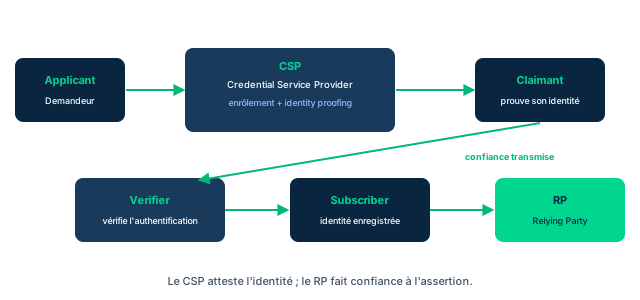
In 2018, NIST published SP 800-63 to update credential management. Its digital identity model (Figure 5.2) illustrates the use of PKI for certificate-based identity authentication services, and reads like the real-time implementation of the identity life cycle. The flow starts with a user in the role of applicant, who enters an enrollment and proofing process with a CSP (Google, Facebook, LinkedIn, Outlook Live, or an internal CSP sponsored by the organization). The user then becomes a claimant when they attempt to access a service as a potential subscriber, which makes them interact with the verifier to authenticate their credentials with the CSP. This elevates them to the role of subscriber, and ultimately the relying party (RP) - the one that performs the real work of the session - obtains the assurance it needs. Trust has passed from the CSP, via the verifier, to the RP.
Two decisions must be clearly distinguished. Identity proofing is the initial decision : proving that a person is indeed who they claim to be, during enrollment. Authentication is the real-time decision : verifying, at each access attempt, an identity claim of a user, process or device. Proofing creates the trust relationship ; authentication replays it at each session.
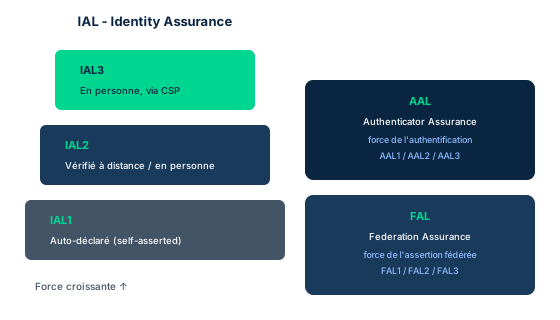
NIST SP 800-63-3 defines three assurance levels. The Identity Assurance Level (IAL) concerns proofing : at IAL1 the attributes (if any) are self-asserted ; at IAL2 they are verified in person or remotely according to SP 800-63A ; at IAL3 in-person proofing is required, with verification of attributes by an authorized CSP representative on physical documents. The Authenticator Assurance Level (AAL) concerns the strength of the authentication process. The Federation Assurance Level (FAL) concerns the strength of the assertion in a federated environment, used to communicate the authentication and, where applicable, the attributes to an RP. To remember : Facebook, LinkedIn or Gmail operate at IAL1 (self-asserted) at account creation, whereas opening a bank account falls under IAL3 (passport or license plus proof of address, verified in person).
- The NIST 800-63 model = real-time implementation of the identity life cycle
- Proofing = initial decision (enrollment); authentication = real-time decision (each access)
- IAL1 self-asserted, IAL2 verified remote/in-person, IAL3 in-person by the CSP
- IAL = proofing; AAL = authentication; FAL = federated assertion to the RP
Case studies
Choosing the right IAL: community forum vs online bank
Context : A company launches two services. The first is a free community forum where users post public messages and can sign in with their Google account. The second is an online bank that opens checking accounts and executes wire transfers. The CISO asks to set the required identity proofing level (IAL) at enrollment for each.
Question : Which IAL should be assigned to the forum and which to the bank, and why?
Show analysis and answer
For the forum, the risk associated with a false identity is low : a pseudonym suffices, the harm is limited to spam or unwanted messages. IAL1 is appropriate : attributes are self-asserted, the user has nothing to prove about their real identity. Logging in via Google does not change this level : Google itself operates at IAL1 for account creation, so the transitive trust inherits a self-asserted proofing.
For the bank, the stakes are entirely different : opening an account and moving money exposes one to fraud, money laundering and regulatory obligations (KYC). IAL3 is required : in-person proofing, verification of attributes by an authorized CSP representative on physical documents (passport or driver's license) and proof of address. IAL2 (remote verification) might be appropriate for intermediate products, but bank account opening is the canonical example of IAL3.
The pitfall would be to reason about password strength or MFA to set this level : that would be to confuse IAL and AAL. The IAL answers the question "prove to me who you are at registration" ; the AAL answers "prove to me it is you at each connection." Here we are sizing only the initial proofing, hence the IAL.
Takeaway : The proofing level (IAL) is chosen by service risk: IAL1 self-asserted for a forum, IAL3 in-person for a bank; do not confuse it with the AAL.
- The greater the harm from a false identity, the higher the required IAL
- Social login inherits the CSP's proofing level (often IAL1)
- Choosing the IAL is not the same as choosing the AAL or MFA
IAL vs AAL vs FAL
The three NIST 800-63-3 levels answer three different questions. IAL (Identity Assurance Level) measures the strength of identity proofing: how confident we are the claimed identity is real. AAL (Authenticator Assurance Level) measures the strength of the authentication process: how well the mechanism (password, MFA, FIDO) resists impersonation. FAL (Federation Assurance Level) measures the strength of the assertion passed to an RP in a federated environment. The exam muddies the waters by describing robust MFA to bait an IAL answer: strong MFA belongs to AAL, not IAL. Mnemonic: IAL = who are you (proofing), AAL = is it really you (authentication), FAL = what the federated assertion says.
Identity proofing (initial decision) vs authentication (real-time decision)
Identity proofing and authentication do not happen at the same time or with the same goal. Proofing is a single, initial decision at enrollment: proving a person is who they claim to be (FICAM's Enrollment step, measured by IAL). Authentication is a real-time decision, repeated at each access attempt during a session or workday: verifying an identity claim before granting access. If an exam question is about onboarding a new employee and capturing biometric data, it is proofing; if it is about checking the badge at each door, it is authentication.
CSP vs verifier vs relying party (RP)
In the NIST SP 800-63 model, do not confuse the three actors. The CSP (credential service provider) enrolls the applicant, performs proofing, and issues the credential. The verifier checks the claimant's credentials with the CSP at access time. The relying party (RP) is the one that consumes the assurance and runs the real work of the session with the subscriber. Trust passes from the CSP, through the verifier, to the RP: the RP does not redo proofing, it relies on the assertion. A question asking -who originally establishes identity- points to the CSP; -who runs the application session- points to the RP.
Checkpoint — Knowledge check
-
At which Identity Assurance Level (IAL) do organizations like Facebook, LinkedIn, or Gmail function when they let users create an account?
- A IAL1
- B IAL2
- C IAL3
- D IAL1 and IAL2
Answer & rationale
Answer : A — IAL1
IAL1 corresponds to self-assertion: the user need not present anything confirming their real identity. IAL2 would require verifying attributes remotely or in person (e.g., proof for a military or student discount). IAL3 requires in-person proofing by a CSP (e.g., opening a bank account with a passport or license plus proof of residence). These networks do not require IAL2 for simple account creation.
-
In the FICAM five-step enrollment process, in which step does identity proofing (possible capture of biographic and biometric data) occur?
- A Step 2: Enrollment
- B Step 1: Sponsorship
- C Step 3: Credential Production
- D Step 4: Issuance
Answer & rationale
Answer : A — Step 2: Enrollment
Identity proofing is part of step 2, Enrollment, where the sponsored claimant enrolls for the credential; this step may include capturing biographic and biometric data. Sponsorship (step 1) only authorizes the process. Credential Production (step 3) builds smart cards, keys, or certificates. Issuance (step 4) delivers the credential.
-
Which statement correctly distinguishes identity proofing from authentication?
- A Proofing is the initial decision (proving who you are at enrollment); authentication is the real-time decision repeated at each access
- B Proofing happens at each access; authentication only once at registration
- C Both are synonyms and interchangeable
- D Proofing approves the requested action; authentication measures asset value
Answer & rationale
Answer : A — Proofing is the initial decision (proving who you are at enrollment); authentication is the real-time decision repeated at each access
Proofing is a single, initial decision at enrollment, measured by IAL: it establishes that the person is who they claim to be. Authentication is a real-time decision, replayed at each access attempt during the session. The reversed, synonymous, or authorization/asset-value options are wrong.
-
What is a credential in identity-management terms?
- A The binding between an authenticator and an identifier
- B Only the user's password
- C Only the identifier (user/service/system)
- D The authorization policy applied to a resource
Answer & rationale
Answer : A — The binding between an authenticator and an identifier
A credential is the binding between an authenticator (what proves) and an identifier (user, service, or system). It is neither the authenticator alone (the password), nor the identifier alone, nor an authorization policy. A CMS issues and manages these credentials, often via a PKI.
Key takeaways
- Three eras of digital identity: multiple accounts per organization, then OSM/social login via transitive trust, then data sovereignty and sovereign IDs (blockchain, Estonia, Canada, EU), accelerated by COVID-19.
- Separate identity stores are expensive; script-based federation is fragile (scale, interception, spoofing).
- Identity-store repositories: Kerberos, RADIUS, LDAP, OAuth/OAuth2.0, SAML, OpenID, OpenID Connect, FIDO (U2F/UAF/FIDO2), WebAuthn.
- Credential = binding authenticator + identifier; a CMS issues and manages it in software, often via a PKI, and can produce 2FA identities.
- Credential examples: smart cards, private/public cryptographic keys, digital certificates; collected by a CSP.
- FICAM/ICAM (2009): five-step enrollment - Sponsorship, Enrollment (with identity proofing), Credential Production, Issuance, Credential Life Cycle Management.
- The NIST SP 800-63 model (Fig 5.2) is the real-time implementation of the identity life cycle: applicant, CSP, claimant, verifier, subscriber, RP; trust passes from the CSP to the RP through the verifier.
- Identity proofing = initial decision at enrollment; authentication = real-time decision at each access.
- IAL1 self-asserted, IAL2 verified remote/in-person, IAL3 in-person by the CSP; Facebook/LinkedIn/Gmail = IAL1 at account creation, a bank = IAL3.
- IAL (proofing), AAL (strength of authentication), and FAL (strength of the federated assertion) answer three distinct questions.
IAAA in detail: authentication, authorization, accounting, and session management
Prerequisites : Module M2 (digital identity model, enrollment, identity proofing) completed.
The core of IAM is summarized by the acronym IAAA : identification, authentication, authorization and accounting. The subset authentication, authorization, accounting is also called the triple A (AAA) and has long been recognized as the cornerstone of security. Without it, no control would know which activities to authorize and which to prohibit. This module dissects these functions one by one, then adds two modern operational building blocks : self-service identity management, password-less authentication and session management.
The pedagogical challenge is discrimination. The exam constantly contrasts authentication (proving that an identity is valid) with authorization (deciding what it is allowed to do), then accounting (tracing what it actually did). It also contrasts identity proofing (initial decision, outside real time) with authentication (real-time decision). Confusing these functions costs points even for experienced practitioners.
By the end of the module, you will know how to situate each function in the access cycle, explain why authentication never approves an action, connect accounting to non-repudiation and e-discovery, and secure a session against a session replay thanks to the nonce, the inactivity timeout and anomaly detection.
3.1 Authentication: verifying an identity claim, without approving the action
Authentication is the function that verifies an identity claim. When a subject presents an identifier, the system must validate three things : that the ID is indeed on file (an identity issued by the system), that it is correctly associated with the bearer who presents it, and that it is not suspended or revoked. This verification is a real-time decision : it occurs at each access attempt and can therefore happen several times during a single session, for example during a re-authentication before a sensitive operation.
The major exam point : authentication does NOT approve the requested action. It only answers the question "is this identity valid and indeed borne by the one who presents it?". Deciding whether the identity has the right to do what it requests falls under authorization, a distinct function that intervenes afterward. Proving who you are says nothing about what you are allowed to do.
Authentication must also be distinguished from identity proofing. Identity proofing is the initial decision, made during enrollment, that a user's identity claim can be validated by acceptable evidence or third-party attestation. Authentication is the real-time decision that an identity issued by the system and claiming access rights is (a) a valid identity issued by the system and (b) used or presented by the subject to whom it was delivered. One is done once, cold ; the other is replayed at each access.
- Authentication validates: ID on file, correctly bound to bearer, not suspended
- Real-time decision, can occur several times per session
- Authentication does NOT approve the action: that belongs to authorization
- Identity proofing = initial decision; authentication = real-time decision
3.2 Authorization and self-service identity management
Authorization has two meanings that must be separated. The first is the initial decision to grant certain permissions to an identity, concerning the actions it will be able to undertake in the future on particular objects : it is the granting of rights, set in advance. The second is the real-time confirmation that a request for an action, by a subject on a given object, is indeed permitted by the privileges defined for that subject, that object and any other criteria. The first meaning defines rights ; the second verifies them at the moment of use.
Self-service identity management gives users the ability to request modifications to their identity and associated permissions themselves. Common uses include : changing a password, passphrase or PIN or any other challenge parameter ; updating a physical address, phone numbers or other data ; requesting access to resources on a server, system, extranet or document repository ; requesting or attempting to use an application that requires the creation of a separate application identity.
The key to reading this : all these operations are in reality access requests. The user attempts to access services, which are objects, to modify values stored in other objects, such as the identity store. Seen from this angle, a PIN change is not a separate operation : it is a request for access to the identity store, which must therefore be governed by permissions, exactly like any other access attempt toward an object.
- Authorization meaning 1: initial decision to grant permissions
- Authorization meaning 2: real-time confirmation that a request is allowed
- Self-service: change password/PIN/address, request access, create an app identity
- Every self-service operation is an access request governed by permissions
3.3 Accounting: traceability, non-repudiation, and trigger events
Accounting is the identity management function that keeps track of every action involving every identity defined in the system. It is what, for example, provides the user with the date and time of their last successful or failed login. By capturing information on every attempt to access the system or its resources, and by recording whether it succeeded with access granted or the reasons for denial, accounting provides the details needed to assess, review and audit the security of a system.
In doing so, accounting implements non-repudiation : it establishes the proof that prevents a user from denying having performed or attempted a particular action. This data plays a role in many investigations, from simply troubleshooting an account problem all the way to cases of resource misuse. It can and should be treated as a source of evidence admissible in court, and is often the object of digital discovery (e-discovery) requests. It is also part of the data sets used in routine security monitoring : a basic user normally has no right to install software ; installation attempts may signal inappropriate behavior or the presence of a malware installer, and even if a blocking tool prevents the installation, accounting must keep a record of it.
Finally, accounting feeds trigger events : occurrences of actions that may require a human decision to be resolved. A typical example is an attempt to go beyond the limits set by an identity's privileges, that is, an authentication or authorization failure. These triggers can raise real-time alarms or feed routine status reporting produced by the accounting functions of the access control system.
- Accounting records every action by every identity (incl. last login)
- It implements non-repudiation: a logged action cannot be denied
- Data = admissible evidence, subject to e-discovery, basis for monitoring
- Trigger events = actions requiring a human decision, real-time alarms
3.4 Password-less authentication
Many breaches are caused by weak, reused or stolen passwords. Password-less authentication consists of verifying a user's identity by something other than a password. While some debate the benefits of this approach, the common denominator remains the problems that have always plagued passwords : they are easily compromised, costly and burdensome to manage, and offer a poor user experience.
Password-less authentication can take many forms depending on the use case. Two typical examples are push notifications, where the user approves a connection from a trusted device already enrolled, and biometric authentication, such as the fingerprint. The goal is to remove the memorized secret from the equation, and therefore to remove the target that attackers are best at stealing or guessing.
From an exam standpoint, password-less does not eliminate the need for authentication : it only changes the factor. It must be placed back within the logic of authentication factors (something you know, have, are) that the next module details : replacing a fragile know factor with a have factor (trusted device) or an are factor (biometrics) that is harder to compromise remotely.
- Many breaches stem from weak, reused, or stolen passwords
- Password-less = verify identity without a memorized password
- Drivers: easy compromise, management cost, poor UX
- Forms: push notifications, biometrics (e.g., fingerprint)
3.5 Session management: from nonce to session replay
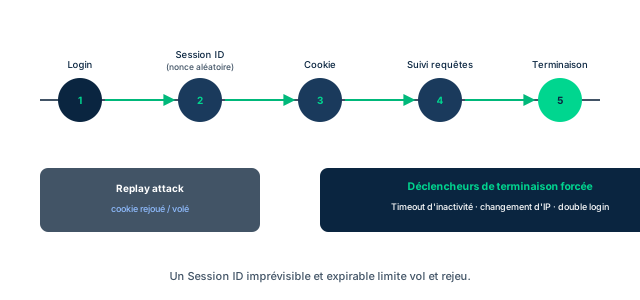
Sessions are created, managed, supported and then terminated by various protocols of the session layer, or Layer 5 of the 7-layer OSI model. From an IAM standpoint, authenticated session management is the set of activities that ensure the system maintains an uninterrupted protection path for resources throughout the session ; in most cases, this relies on x.509 certificates. Session management consists of tracking and securing multiple requests to a service coming from a single subject : first identifying it as a legitimate user, then tracing the when (date and time), the logical where (IP or MAC address) and the physical where (which door, which turnstile), and finally tracing the end of the session and the actions performed.
The number 2 threat in the OWASP Top 10 is broken authentication and session management. RFC 2965 shows how to maintain a session with cookies : the state of the interactions is kept in a session cookie, and each new connection is tied to this cookie, which provides non-repudiation through the audit trail. The submission of authentication provides a session identifier (session ID). These session IDs are long, random values, infeasible to guess, and single-use : hence the term nonce, a value that can be used only once. With most bank transfers, for example, a 30-digit number is created at initiation and then makes it possible to verify who, when and where the transfer began ; likewise, a login into a Kerberos realm generates event ID 4768, followed by the request and generation of an authentication ticket whose event codes ensure auditing.
An organization must track all session IDs and be ready to forcibly terminate sessions, either after an inactivity timeout (as in online banking), or when an anomaly arises. These anomalies include a sudden change of source, such as a change of IP address, multiple detected logins (typical of account sharing), or an access token reused twice without a prior logout. The major risk comes from the fact that the session ID is often stored in the cookie : if an attacker captures the session cookie, or if its transmission is delayed, they can simply replay the cookie to the system and connect with stolen credentials. This is session replay, or a replay attack. The countermeasures combine a single-use nonce, timeout, anomaly detection and cookie protection (HttpOnly and Secure attributes).
- Sessions handled by OSI Layer 5 (session) protocols; often via x.509
- OWASP Top 10 number 2: broken authentication and session management; RFC 2965 (cookies)
- Session ID = long, random, single-use value = nonce
- Track all session IDs; forcibly terminate on timeout or anomaly
- Anomalies: IP change, multiple logins, reused token
- Session replay: captured/delayed cookie then replayed = stolen credentials
Case studies
The stolen session cookie of the banking portal
Context : On NorthBank's internet banking portal, a customer logs in from a cafe over unencrypted public Wi-Fi. Their session cookie, which holds the session ID, travels in clear text. An attacker on the same network captures the request and delays its transmission. A few minutes later, from their own machine and a different IP address, the attacker replays the cookie to the portal and lands inside the customer's session, without ever knowing the password. The portal uses 24-character session IDs but never invalidates them after use, enforces no inactivity timeout, and does not compare the source IP address during the session. The cookies carry neither the HttpOnly nor the Secure attribute.
Question : Which attack is underway, and which session-management countermeasures would have prevented it?
Show analysis and answer
The attack is a session replay (replay attack). Since the session cookie was captured and then replayed, the attacker connects with what are, in effect, stolen credentials - without ever breaking the password. This is exactly the scenario described by OWASP at number 2 in its Top 10 (broken authentication and session management) and made possible here by storing the session ID in a cookie transmitted in clear text.
The first countermeasure is to make the session ID a true nonce : a long, random and above all single-use value, invalidated as soon as a session ends, so that a replayed cookie no longer corresponds to any active session. The second is the inactivity timeout : in online banking, the session must be forcibly terminated after a short period without activity, reducing the replay window. The third is anomaly detection : the change of source IP address between the client's login and the attacker's request, or multiple logins, must trigger a forced termination.
Finally, protecting the cookie itself : the Secure attribute prevents its transmission outside HTTPS (and therefore in clear text over public Wi-Fi), and the HttpOnly attribute keeps it away from JavaScript, reducing theft by script. Combined, these measures - single-use nonce, timeout, anomaly detection, HttpOnly and Secure - close the replay surface.
Takeaway : A session ID stored in a cookie is a replay surface: only a single-use nonce, plus timeout, anomaly detection, and HttpOnly/Secure cookies, neutralizes the replay.
- A replay attack needs no knowledge of the password: the cookie is enough
- The single-use nonce invalidates the replayed cookie
- IP change and multiple logins are anomalies to handle via forced termination
Authentication vs authorization vs accounting
The exam pits these three AAA functions against one another in the same question. Authentication verifies that a claim of identity is valid and indeed carried by the one presenting it : it proves WHO you are, but approves no action. Authorization decides what that identity has the right to do (initial grant then real-time confirmation of a request). Accounting traces what the identity actually did, providing the basis for non-repudiation. Mnemonic rule : authentication = who, authorization = what (is allowed), accounting = what (was done). If the question is about approving or denying an action, it is authorization, never authentication.
Identity proofing vs authentication
Do not confuse the initial decision with the real-time decision. Identity proofing happens only once, at enrollment : the identity claim is validated against acceptable evidence or third-party attestation, off-line. Authentication is replayed at each access attempt, in real time : it verifies that the identity issued by the system is valid and presented by its holder. Exam clue : "at each login", "in real time", "multiple times per session" point to authentication ; "during registration", "third-party proof", "initial decision" point to identity proofing.
The session ID in the cookie: a replay surface
A recurring trap : believing that a long, random session ID is enough. Its robustness against guessing does not protect it from replay. Since the session ID is often stored in the cookie, an attacker who captures that cookie (unencrypted Wi-Fi, delayed transmission) can replay it to connect with what are effectively stolen credentials : this is session replay. Protection does not come from length alone but from single use (nonce invalidated after the session), timeout, anomaly detection (IP change, double login, reused token) and the HttpOnly/Secure attributes on the cookie.
Checkpoint — Knowledge check
-
A system successfully confirms that a user presents a valid identity issued to them. The user then tries to delete a file they have no rights to, and the action is denied. Which function performed this denial?
- A Authorization
- B Authentication
- C Identity proofing
- D Accounting
Answer & rationale
Answer : A — Authorization
Authentication already succeeded (the identity is validated) but it approves no action. Deciding whether a request on an object is allowed is authorization, in its real-time confirmation meaning. Identity proofing is the initial enrollment decision; accounting merely records.
-
An employee denies having initiated a fraudulent transfer. Which IAM function provides the evidence that prevents this denial?
- A Accounting (non-repudiation)
- B Authentication
- C Authorization
- D Self-service identity management
Answer & rationale
Answer : A — Accounting (non-repudiation)
Accounting records every action by every identity and thereby implements non-repudiation: it establishes the evidence preventing a user from denying a performed action. This data is admissible in court and subject to e-discovery. Authentication and authorization decide; they do not keep the evidentiary trail.
-
Why must a session ID be a long, random, single-use value?
- A To be infeasible to guess and impossible to replay (nonce)
- B To shrink the transmitted cookie size
- C To speed up session encryption
- D To be human-readable in the URL
Answer & rationale
Answer : A — To be infeasible to guess and impossible to replay (nonce)
Long and random makes the session ID infeasible to guess; single use makes it a nonce (number used once), so a captured value cannot be reused. This closes both guessing and, combined with invalidation, replay. The other options are not the security objective.
-
During an active session, the source IP address changes abruptly and a second simultaneous login is detected on the same account. What should the system do?
- A Treat these as anomalies and forcibly terminate the session
- B Ignore it: an IP change is normal
- C Automatically extend the inactivity timeout
- D Ask the user to re-enroll their identity (identity proofing)
Answer & rationale
Answer : A — Treat these as anomalies and forcibly terminate the session
A sudden change of source (IP) and multiple logins are exactly the session anomalies that should trigger a forced termination. The organization tracks all session IDs to be able to terminate them. Extending the timeout would worsen exposure; identity proofing is unrelated to an ongoing session.
Key takeaways
- IAAA = identification, authentication, authorization, accounting; the AAA core is the cornerstone of security.
- Authentication verifies an identity is on file, correctly bound to the bearer, and not suspended; it is a real-time decision, possibly repeated within the session.
- Authentication does NOT approve the action: deciding the right belongs to authorization.
- Identity proofing = initial decision at enrollment; authentication = real-time decision at each access.
- Authorization has two meanings: initial grant of permissions, then real-time confirmation that a request is allowed.
- Every self-service operation (change password/PIN/address, request access, create an app identity) is an access request.
- Accounting records every action by every identity, implements non-repudiation, provides admissible and e-discovery evidence, and feeds monitoring and trigger events.
- Password-less authentication answers weak/reused/stolen passwords; forms: push notifications, biometrics.
- The session ID is a nonce (long, random, single-use value); OWASP Top 10 number 2 = broken authentication and session management.
- A session cookie captured then replayed = session replay; countermeasures: nonce, inactivity timeout, anomaly detection (IP, multiple logins, reused token), HttpOnly/Secure.
Authentication factors, MFA, tokens, and biometrics (FAR/FRR/CER)
Prerequisites : Module M3 (session management and the digital identity lifecycle) recommended: subject, object, identification, and authentication are assumed.
To authenticate is to present proof that an already-identified entity has the right to cross a control point. The strength of that proof depends on the number and nature of the factors required. This module distinguishes single-factor authentication (SFA) from multi-factor authentication (MFA), then details the three classic factors (know, have, are or do) and two emerging factors (location, node).
We then go down into the technologies : access control tokens (physical and logical) and biometrics, with their strengths and limits. Biometrics introduces an unavoidable reality : no sensor is perfect. Hence the module's central section on access control errors, the False Rejection Rate (FRR, Type 1) and False Acceptance Rate (FAR, Type 2), and their trade-off via the crossover error rate (CER).
The exam loves these fine distinctions : Type 1 versus Type 2, two methods of the same factor not making an MFA, and the myth of the CER as the ideal setting. By the end of the module, you will know how to choose a biometric threshold based on real business risk, not on a ready-made rule.
4.1 SFA vs MFA: count the factors, not the methods
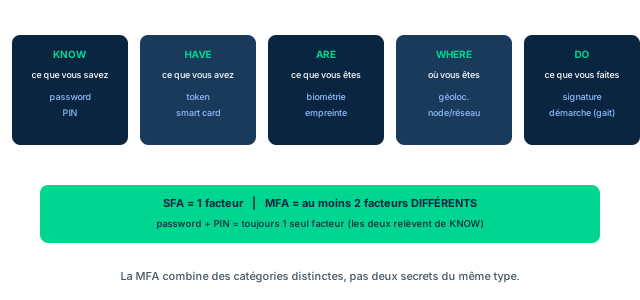
To authenticate is to present proof that an identified entity should be allowed to cross a control point. The standard proofs fall into three primary factors : something you know (password, PIN, answers to challenge questions), something you have (token, smart card) and something you are or do (biometrics, fingerprint). Single-factor authentication (SFA) consists of providing a single type of proof. A crucial point for the exam : a single factor can be proven by several methods. A password AND a PIN are two methods of the same factor (something you know) - so still an SFA, not an MFA.
Multi-factor authentication (MFA) requires more than one factor of proof : for example a password (know) plus an iris scan (are). Each factor adds an obstacle for an attacker ; as the factors stack up, the layers of defense in depth grow. The price to pay : an MFA can increase the management complexity of the system and reduce or disrupt the productivity of the user seeking to connect.
Two emerging factors complete the picture. Location authentication uses geolocation to allow or deny a connection depending on the geographic area : SPs like Netflix and Amazon use it to protect their content against intellectual property leaks. Node authentication recognizes the device type (a specific smartphone, laptop or desktop) as a means of authentication. From a risk standpoint, an SFA of the what-you-know type has proven inadequate : users choose passwords easy to remember and therefore easy to crack. 2FA is safer, and the most widespread 2FA mechanism is the one-time password (OTP) sent by SMS or generated by an application.
- SFA = 1 type of proof; MFA = more than one DIFFERENT factor
- Password + PIN = two methods of the same factor (know) = still SFA
- Each factor = one more hurdle, a layer of defense in depth
- MFA can increase management overhead and reduce productivity
- Emerging factors: location (geolocation) and node (device type)
4.2 Physical security tokens: something you have
Access control devices (systems or logical components) add a layer of protection to data access : hardware and software tokens, keys, cards. Combined with other identification methods, they provide an MFA. Access control tokens come in two distinct forms with distinct uses. The first, the physical security token, addresses the something-you-have part of an MFA challenge.
Many of these tokens today use cryptographic hash and pseudorandom number (PRNG) technologies that generate a new value each time the user activates the token. They are activated by pressing a button, by swiping or inserting the token into a suitable reader, or via near-field communication (NFC) technologies that scan them. The device works like a cryptographic one-time pad : the provider must initialize both the token (delivered as a key fob, smart card or other format) and the user's account data on its systems.
Access control applications can also be installed on users' smartphones or other endpoints, turning them into a bulkier but often more capable physical token. This is the principle behind authenticator apps : the phone becomes the have factor. Remember for the exam that reading the credentials of a physical token can be done by swipe (magnetic stripe), by insertion (chip), or by placing it on or near a reader (contactless chip) : depending on how the token stores the information, these three modes are all valid.
- A physical token covers the something you have factor
- Hash and PRNG produce a new value at each activation
- Read by button, swipe, insertion, or NFC near a reader
- One-time pad: token and account initialized together by the provider
- A smartphone with an authenticator app becomes a physical token
4.3 Logical access tokens: the privilege package
The second form of token is the logical access token. These are data packets generated by an access control system for an already-authenticated user ID. They contain information about that identity, the privileges granted to it and other metadata. Not to be confused with the physical token : the logical token is not an object you carry, it is a data structure internal to the system.
These tokens are then passed to various application programs or server systems, or embedded in the handshakes that establish sessions on the organization's networks. They almost invariably carry an expiration date and time, which can come down to a few minutes if security needs require it. This is the mechanism that limits the exploitation window of a stolen token : a short-lived access token reduces the value of a replay.
The exam distinction is clear : the physical token proves who you are at the moment of authentication (have factor) ; the logical token, for its part, carries what you have the right to do after authentication (identity plus privileges). One is a presented proof, the other a propagated authorization.
- Logical token = data generated for an authenticated user ID
- Carries identity, privileges, and other metadata
- Propagated to applications and session handshakes
- Often short expiry to limit replay
- Physical token = proof presented; logical token = authorization propagated
4.4 Biometrics: who are you?
Biometric devices measure physiological characteristics of the user : retinas, capillary patterns, geometry of the hands or face, fingerprints, even voice recording. These characteristics offer varying measures of uniqueness : out of billions of people, very few share the same fingerprints, and only a handful would have nearly identical retinal scans. This is what makes them something-you-are factors.
Each biometric technology has a different susceptibility to errors and measurement bias. For this reason, few systems rely on a single biometric technique as a sole authentication factor. Integrated into an MFA, however, biometrics strongly reduce the system's vulnerability to an intrusion. Enrollment is the step that establishes the baseline : the reference measurement to which future presentations will be compared is captured.
For the protection of biometric data, the reference is not stored in clear text : it can be hashed and kept on a smart card the user carries, rather than in a central database. This combines the are factor (the measurement) and the have factor (the card). Remember the exam trap : biometrics are rarely a sole factor ; their true value is within an MFA, and the quality of a sensor is judged by its error rates, the subject of the next lesson.
- Biometrics = something you are factor, based on uniqueness
- Retina, capillaries, hand/face geometry, fingerprints, voice
- Rarely a single factor; its value lies within MFA
- Enrollment = capture of the reference baseline
- Reference often hashed on a smart card (are + have)
4.5 Access control errors: FRR, FAR, CER
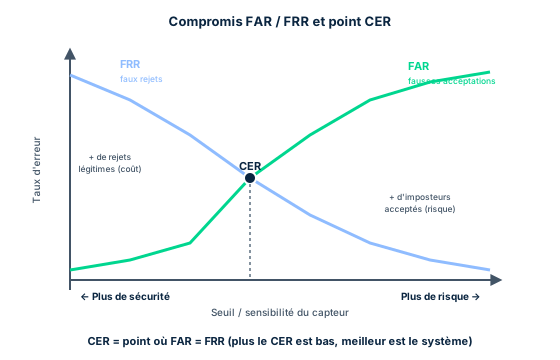
Whatever technologies are used, there will be errors : noise, sensor degradation or failure, miscalibration, misuse. Access control systems classify these errors into two broad types. The False Rejection Rate (FRR or Type 1) occurs when the system fails to recognize a legitimate identity attempting access ; it can occur during authentication as well as authorization. The False Acceptance Rate (FAR or Type 2) occurs when the system grants access (or authorizes an action) to an identity that is not and should not be approved. Although often discussed for biometric sensors, these rates apply to any event-detection system, not just biometrics.
Their impacts differ radically. A false rejection blocks legitimate and necessary work : a user who cannot connect, an update that is not run, a workstation that does not join the network, with a re-authentication cost. A false acceptance grants access to an impostor : it is an intrusion, potentially the entry point of an advanced persistent threat (APT). For the exam, FAR (Type 2) carries the highest risk, because it opens the door to an illegitimate actor.
Figure 5.5 shows the trade space. Increasing spending on access control technologies (full life-cycle cost, including labor) can lower the FAR while raising the FRR. The point where the curves cross is the crossover error rate (CER). The horizontal axis shows increasing risk toward the right and its logical inverse, security, increasing toward the left. Beware the myth : believing that the minimum of the CER is the sweet spot where costs and risks are best balanced is a widespread but false belief. The organization's real risk climate, its business imperatives and the risk tolerance of its customers and stakeholders may dictate a completely different mix of Type 1 and Type 2 errors.
- Type 1 = FRR = false rejection of a legitimate identity
- Type 2 = FAR = false acceptance of an illegitimate identity
- FAR (Type 2) = highest risk: intrusion, possible APT
- Applies to any detector, not just biometrics
- Spending lowers FAR but raises FRR; CER = crossover
- The CER minimum is NOT always the right setting
Case studies
Reading the CER curve: bank vault vs cafeteria
Context : A bank deploys the same fingerprint reader in two places. Site A: the vault room, where an admitted impostor could cause a massive loss and trigger an APT. Site B: the staff cafeteria, where the scan only authorizes meal payment. At the sensor's measured CER threshold, FAR = FRR = 1%. Moving the threshold toward more security drops FAR to 0.1% but raises FRR to 5%. Moving it toward less friction raises FAR to 4% but drops FRR to 0.2%.
Question : For each site, should you stay at the CER or pick another threshold? Justify with the numbers.
Show analysis and answer
The sweet-spot myth would say : set both sites to the CER (1%/1%), the balance point. This is wrong, because the impact of an error is not the same across sites. The right threshold depends on real business risk, not on the crossing of the curves.
Site A, the vault : a false acceptance is catastrophic (intrusion, theft, APT) ; a false rejection only costs an employee a re-authentication. So we accept raising the FRR in order to crush the FAR. Setting toward more security : FAR 0.1%, FRR 5%. We divide the risk of admitting an impostor by ten compared to the CER, at the cost of five times more legitimate rejections - an acceptable trade-off here, because the impact of a FAR dominates.
Site B, the cafeteria : a false acceptance at worst charges the wrong cafeteria account ; a false rejection blocks a hungry employee in the line and harms productivity and experience. So we favor convenience : FAR 4%, FRR 0.2%. The FAR multiplied by four remains without serious consequence, while we cut legitimate rejections by five. Conclusion : the same sensor, two opposite thresholds, dictated by business impact and risk tolerance, not by the CER.
- The right threshold depends on the impact of an error, not the curve crossing
- High stakes (vault): minimize FAR even if FRR climbs
- Low stakes, high frequency (cafeteria): minimize FRR for productivity
Type 1 = FRR, Type 2 = FAR, and which is worse
Never confuse the two types. Type 1 = False Rejection Rate (FRR): the system rejects a LEGITIMATE identity; impact = blocked work, re-authentication cost. Type 2 = False Acceptance Rate (FAR): the system accepts an ILLEGITIMATE identity; impact = intrusion, possible APT. If a question asks for the higher-risk error, answer Type 2 (FAR): granting access to an impostor is far worse than making an employee wait. Tip: Type 1 rejects the legitimate one first; Type 2 goes one step too far by accepting an intruder.
Two methods of the same factor are not MFA
Password + PIN, or password + a selection of passcode digits, remains SFA: all of it is something you know, a single factor, even if several secrets are requested. MFA requires DIFFERENT factors, e.g. know + have (token) or know + are (biometrics). If a question describes two proofs of the same type, answer SFA, never MFA. And do not fall for the OTP trap: if the underlying secret stays constant across logins, it is not a true one-time password.
The CER is not always the optimal setting
A common but false belief: the CER minimum is the sweet spot where costs and risks are best balanced. In reality, the actual risk climate, business imperatives, and stakeholders' risk tolerance can mandate a very different mix of false rejections and false acceptances. If a question frames the CER as the universal ideal setting, be wary: the right threshold is chosen by the business impact of each error, not by the mere crossing of the curves.
Checkpoint — Knowledge check
-
In a biometric implementation, which error type represents a false rejection?
- A Type 1
- B Type 2
- C Type 3
- D Type 4
Answer & rationale
Answer : A — Type 1
A Type 1 error is a false rejection of a valid assertion (FRR). Type 2 is a false acceptance of an invalid assertion (FAR). There is no Type 3 or Type 4.
-
Which error type presents an organization with the higher risk impact?
- A Type 1
- B Type 2
- C Type 3
- D All of them, equally
Answer & rationale
Answer : B — Type 2
A Type 2 (FAR) error is a false acceptance: it wrongly identifies an impostor as legitimate and grants access, opening the door to intrusion or even an APT. A Type 1 (FRR) merely denies a legitimate user. There is no Type 3, and one choice does carry higher risk than the others.
-
With physical access control tokens, how are the user's credentials read so they can be transmitted to the logical access control system?
- A Swiped (magnetic strip)
- B Inserted (chip)
- C Placed on or near a reader
- D All of the above
Answer & rationale
Answer : D — All of the above
All three are valid processes: swiping reads the magnetic strip, insertion reads the chip, and placing on or near a reader reads a contactless chip (NFC). The method depends on how the token stores the information, so the answer is all of the above.
-
Your bank asks you to register a passcode and a password. At login, the platform requests your password plus a random selection of digits from the passcode, which changes each login. Which authentication approach is represented here?
- A Single-Factor Authentication (SFA)
- B Multi-Factor Authentication (MFA)
- C Strong Authentication
- D One-Time Password (OTP)
Answer & rationale
Answer : A — Single-Factor Authentication (SFA)
This is SFA, not MFA: passcode and password are both something you know, hence a single factor. It is not MFA since no have or are factor is used. It is not strong authentication (usually password-less). And it is not a true OTP: the underlying passcode stays constant across logins, and the same digits may be requested again.
-
On the figure 5.5 curve, you move the sensor threshold to the left (Greater Security). What effect should you expect on the error rates?
- A FAR decreases and FRR increases
- B FAR increases and FRR decreases
- C Both FAR and FRR decrease
- D You necessarily reach the optimal setting at the CER
Answer & rationale
Answer : A — FAR decreases and FRR increases
Toward the left (more security), the sensor tightens: it accepts fewer impostors (FAR drops) but rejects more legitimate users (FRR rises). You cannot lower both at once, which is the whole trade-off. And the CER is not necessarily optimal: the right threshold depends on actual business risk, not the curve crossing.
Key takeaways
- SFA = a single factor; MFA = more than one DIFFERENT factor; password + PIN remain SFA (same know factor).
- Factors: something you know, have, are or do, plus location (geolocation) and node (device type).
- Each factor adds a defense in depth layer, but MFA can increase management overhead and reduce productivity; OTP via SMS or app is the most common 2FA mechanism.
- Physical security token (have): hash/PRNG, new value at each activation, read by button, swipe, insertion, or NFC; a smartphone with an authenticator app is one.
- Logical access token: a data package generated for an authenticated user ID (identity + privileges), propagated to apps and sessions, often with short expiry.
- Biometrics (are): retina, capillaries, geometry, fingerprints, voice; rarely a single factor, its value lies in MFA; reference is enrolled then hashed, often on a smart card.
- Type 1 = FRR = false rejection (legitimate blocked); Type 2 = FAR = false acceptance (impostor admitted); these rates apply to any detector, not only biometrics.
- FAR (Type 2) carries the higher risk: intrusion, possible APT; FRR mostly costs re-authentications.
- On the curve, spending lowers FAR but raises FRR; their crossing is the CER (crossover error rate).
- The CER minimum is NOT always the right setting: the threshold is chosen by actual risk, business imperatives, and risk tolerance.
SSO, federation (FIM), JIT identity, and third-party services
Prerequisites : Module M2 (identity store, credentials, identity proofing): you must know what an identity store is and how an identity claim is proven before tackling cross-domain sharing.
A modern organization never lives alone : its users access applications hosted at partners, in the cloud, at SaaS providers. This module covers the mechanisms that allow an identity to be shared and reused beyond the boundaries of a single system : Single Sign-On (SSO), Federated Identity Management (FIM), Just-in-Time identity and federation with a third-party service (IDaaS).
The common thread is trust. An authentication server must trust the credentials presented to it, but according to the principle "Trust, but verify". When these credentials come from another organization - your Facebook identifier used to connect to LinkedIn - verification becomes a problem of trust between security domains, solved by federation.
The exam tests mostly fine distinctions : SSO (a unified login experience) is not FIM (a trust relationship between domains), even though the two are often confused. The SP, and not the IdP, makes the final access decision. And due care as well as due diligence are never outsourced, even when the identity is managed by a third party.
5.1 Federated Identity Management (FIM): trust across domains
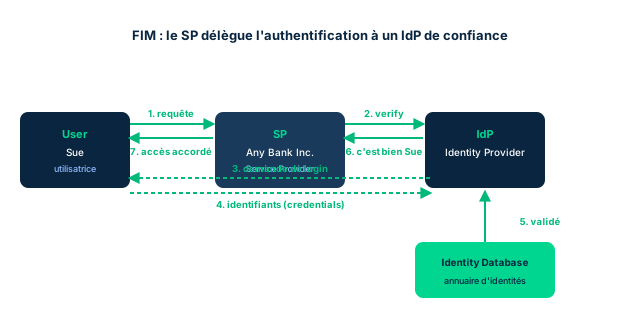
An identity federation applies when one or more systems allow users to connect by authenticating against one of the systems participating in the federation. The need arises when different organizations must share common information : think of platforms like LinkedIn and Twitter, with distinct business models but a shared customer base. FIM creates a trust relationship between distinct security (trust) domains, so that your Facebook credentials can be used to connect to LinkedIn.
Federation relies on three components : the client or principal (the user), the SP or RP (service provider / relying party) and the IdP (identity provider). The IdP is a brokering service : its role is to provide the assertion that the principal is indeed who or what they claim to be. The SP maintains an authorization server and remains responsible for the final accept/reject decision. We speak of a resident IdP (or local, incumbent) when its role is limited to attesting identities of its own trust domain ; it becomes a federated IdP when it attests the validity of credentials belonging to another security domain.
Figure 5.3 illustrates the seven steps for Sue, a customer of Any Bank Inc. : 1) Sue clicks "Login" and generates an access request to the bank (SP). 2) Any Bank sends a verification request to the IdP. 3) The IdP presents a login to Sue. 4) Sue provides her credentials, sent to the IdP's identity database. 5) The database returns the verification to the IdP. 6) The IdP notifies the bank that the person is indeed Sue. 7) The bank authorizes the connection. FIM relies on two widely adopted standards, SAML and OAuth, which produce human-readable and machine-processable statements about identity, authentication and authorization. OpenID Connect is built on one of them, and the Open Authentication organization promotes a reference architecture named OATH to move away from proprietary services. Major players like Microsoft and Apple no longer seek to monetize identity-as-a-service but see the opportunities created by a reliable and ubiquitous digital identity.
- FIM = trust relationship between distinct security domains
- Three components: principal, SP/RP, IdP
- The IdP asserts (brokers); the SP decides accept/reject
- Resident IdP = own domain; federated IdP = another domain
- Standards: SAML and OAuth; OpenID Connect built on one of them; OATH
5.2 Single Sign-On (SSO): one login for all resources
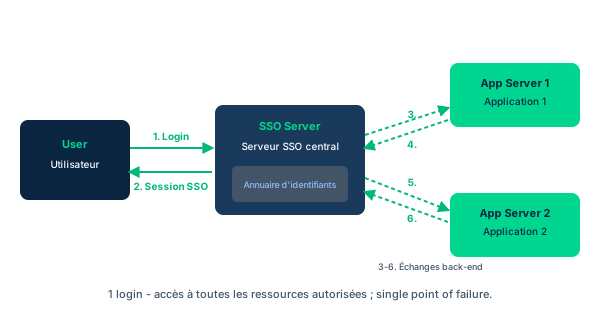
The idea of Single Sign-On is that a user authenticates only once with a single authorization provider, then is granted access to all the resources for which they have privileges : information assets, files, systems. SSO is sometimes called reduced sign-on, or confused with federated ID management. Classic SSO systems provide a central repository of user credentials (identifiers and passwords) associated with a suite of applications. The SSO client opens the appropriate application and sends it the right keystrokes, thus simulating the user typing their own ID and password.
Figure 5.4 shows how it works : the initial login request is authenticated by the SSO server (steps 1 and 2). Each attempt to access another server (web service, application platform) triggers a back-end authentication exchange between the SSO server and the applications server (steps 3 to 6). The SSO server packages the authenticated user's identity and a current application password drawn from its internal database, transmitted to the applications server. Access tokens can replace application passwords, depending on the applications' authentication needs. Technologies like SAML are used to implement SSO.
SSO has limits. Legacy systems do not always support it, and it is sometimes difficult to find experts able to work on it. Above all, the single point of failure : some experts see it as "all the eggs in the same basket". If an attacker obtains a single set of credentials in an SSO organization, they gain access to all of that user's resources ; and the SSO database itself becomes a coveted asset. This risk is mitigated by additional mechanisms such as 2FA and access limitation by time/geolocation. Finally, password synchronization is necessary : any password change must propagate to all integrated systems for the mechanism to work.
- A single login grants access to all authorized resources
- The SSO client simulates ID/password keystrokes to each application
- Steps 1-2 = auth to SSO server; 3-6 = back-end exchanges
- Single point of failure mitigated by 2FA and time/geo limitation
- Legacy systems and password synchronization are constraints
5.3 Just-in-Time (JIT) identity: privilege on demand
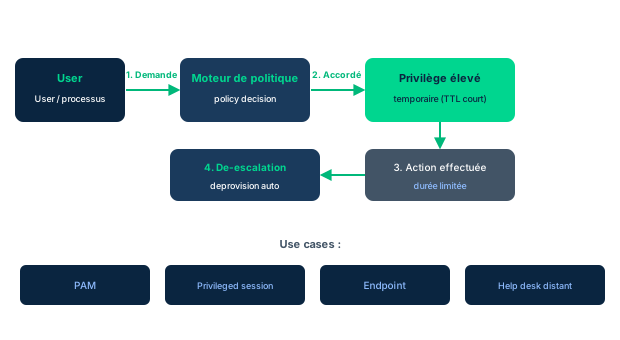
Just-in-Time identity (JIT identity, not to be confused with JITI) provides the on-demand creation and provisioning, in real time or near real time, of human and non-human user identities, their privilege escalation and de-escalation, then their deprovisioning, suspension or termination in each system. It is a full identity life cycle service on demand. Non-human users count : apart from input peripherals and removable media, everything a human does goes through software - agents, processes, mobile code - and organizational or functional identities, including robots that "learn" via the internet.
The most frequent and most demanding case is escalation and de-escalation : providing momentary privileges. Instead of privileges "on" 24/7 as in static PAM, JIT PAM caps privileges and grants only role-based subsets, temporarily elevated for a specific process ID, with a short TTL. Everything must execute on-demand, in real time, which imposes a triage model : the majority of cases is handled in a fully automated way, and exceptions are blocked with a notice to contact an administrator. JIT identity typically uses SAML and is found on world-class platforms : Azure, Amazon Web Services, OKTA, Salesforce, with integration to social IdPs (Windows Live, Facebook, Google, Yahoo, Twitter, LinkedIn).
The use cases serve to enforce least privilege, separation of duties and vulnerability management. PAM (privileged account management) is the most familiar : privileges become active only at the moment the identity requests the resource. Privileged session management is not reserved for administrators : even a humble read is the first step of a legitimate workflow or a reconnaissance, and JIT allows fine-grained attribution of privileges to session activities. Endpoint privilege management prevents running processes with the wrong privileges on an endpoint or pivoting to other nodes. Finally, the remote help desk relies on a trusted agent and a generic help desk ID, which requires a high degree of mutual trust : the user must trust the support, and the organization must ensure that the endpoint does not trap reusable credentials.
- JIT = real-time provisioning + escalation/de-escalation + deprovisioning
- Covers human and nonhuman users (agents, robots)
- JIT PAM caps privileges instead of leaving them 'on' 24/7
- Use cases: PAM, privileged session, endpoint, remote help desk
- Implemented via SAML on Azure, AWS, OKTA, Salesforce
5.4 Federation with a third-party service: IDaaS (5.3)
Federation based on mutual trust relationships between organizations can be implemented through third-party services. Infrastructure, platform, and software as-a-service providers almost always offer identity-as-a-service (IDaaS) with provisioning and administration, multi-factor authentication, Single Sign-On, and other capabilities. But IDaaS is not without risk: service outage, leakage, or disclosure of critical identity data. Third-party services can cover risk management, security assessment and testing, incident response, BC/DR planning, and identity management itself.
The central exam point: regardless of outsourcing, offboarding, or vendor relationships, the ultimate burden of due care and due diligence ALWAYS remains with your organization. You can delegate execution, never responsibility. Integrated IAM must always be considered in the context of the organization's overall information security requirements.
Three models exist. On-premises: management within your own infrastructure, offering customization and increased control, better security and compliance with internal policies; but you must weigh the CapEx vs OpEx trade-off, long setup and deployment times, the need for skilled IT resources, and limited on-demand scalability. Cloud: no initial acquisition cost or time, scalability, support for growth, access from anywhere; but with risks tied to multitenancy, outages, and the fact that sensitive identity data is held by an external provider. Hybrid: many on-premises IAM systems have not evolved, and cloud-only solutions do not always cover specific business needs; for a mixed infrastructure, solutions that integrate on-premises and cloud are beneficial.
- IDaaS = identity managed by a third party (MFA, SSO, provisioning)
- Due care and due diligence are never outsourced
- On-premises: control and customization, CapEx, long setup
- Cloud: scalable and accessible anywhere, but multitenancy/outage
- Hybrid: integrates on-premises and cloud for mixed needs
5.5 SSO or FIM? Sorting the building blocks of shared access
SSO, FIM, JIT identity, and IDaaS are often discussed together, but they answer different questions, and the exam requires keeping them clearly separate. SSO answers "how do I offer a unified login experience within a perimeter": a single login, a central credential repository, back-end exchanges. FIM answers "how do I trust an identity coming from another security domain": a trust relationship between organizations, carried by SAML or OAuth, with an IdP that attests and an SP that decides.
The two overlap in practice - a federation often produces an SSO experience across several SPs - but they are not equivalent. You can have a purely internal SSO with no federation at all, and a federation that does not offer a complete SSO experience. JIT identity layers on top of this: it provisions identity and privileges at the moment of need, and the user often triggers it without knowing through their SSO capabilities. IDaaS, finally, is the delivery mode: a third party provides all or part of these capabilities as a service.
A good way to memorize this: SSO is an experience (user side), FIM is a trust (between domains), JIT is a timing (at the moment of need), IDaaS is a delivery model (who operates it). On an exam question, first identify which of these four angles is being tested before choosing the answer.
- SSO = experience; FIM = trust; JIT = timing; IDaaS = delivery
- An SSO can be purely internal, without federation
- A federation relies on SAML/OAuth between security domains
- Identify the angle being tested before answering on the exam
Case studies
Activity 5.2: FIM at Aeros 3
Context : Aeros 3 manages systems both on-site and in the cloud, and has implemented Federated Identity Management to enable smooth and secure identity authentication across environments. Tamika is planning a review and updates to FIM standards; a knowledge gap appears among IT juniors, and a SETA session is scheduled before the changes are published. The session draws on the example in Figure 5.3 (Sue, Any Bank, IdP, identity database). Provenance: activity taken from the official D5 course (section 5.2).
Question : Who can play the IdP and SP roles? Why is the three-step process necessary and beneficial? What kinds of errors (false positive / false negative) occur, and which is worse for the bank or the customer?
Show analysis and answer
Roles: the SP is any organization providing a service to the customer - a bank, an online retailer, a travel agency. The IdP is more subtle: it is a third party providing identity verification services on behalf of the SP; examples are Facebook or Google, which accept their credentials at login and serve as the identity provider.
Necessity and benefit: the process is not always essential to the business, but it enables SSO across several service providers, so the customer has fewer credentials to memorize. It is beneficial because it provides an additional level of assurance that the requestor is indeed who or what they claim to be.
Errors: false positives and false negatives can occur. A false positive wrongly identifies an invalid user as valid; a false negative denies access to a valid user. With SSO, several accounts can be compromised simultaneously. In both cases, the outcome is likely worse for the customer: either a malicious actor accesses the account and steals their money, or the customer is denied access to their own account. These errors arise from credential sharing, credential theft at the IdP, or slow or broken network connections.
Takeaway : In a federation, the SP provides the service and the IdP asserts identity; the process brings SSO and assurance, but its errors (false positive/negative) fall mostly on the customer.
- The IdP is often a third party (Facebook, Google) asserting for the SP
- SSO reduces credential count but concentrates compromise risk
- A false positive lets in an imposter; a false negative blocks a legitimate user
Dropbox 2012: a stolen employee password
Context : The 2012 Dropbox data breach exposed vulnerabilities in the cloud storage service, affecting millions of users. Attackers exploited a Dropbox employee's stolen password to gain unauthorized access to a document containing user email addresses. Dropbox claimed that no account had been directly compromised, but the incident highlighted the risks of cloud services and the importance of strengthened security measures. Following the breach, Dropbox deployed practices such as two-factor authentication to reinforce protection and restore trust. The Waxbill Part 1 case sheds light on the context: several organizations (MLZ, Schneider-Antman, GTI) collaborate on a sensitive project. To store identities, Novell Directory Service (NDS) and Microsoft Active Directory (AD) were considered; since both use LDAP to query X.500 directories, choosing a central X.500 repository queried via LDAP yields a common directory service and reduces overhead - which is precisely what makes FIM necessary between partners. Provenance: case study and scenario taken from the official D5 course (section 5.3).
Question : What lessons does the Dropbox incident teach about MFA and about integrating third-party identification services with an IDaaS?
Show analysis and answer
The root cause is a single compromised factor: a stolen employee password was enough to access data. Multi-factor authentication requires two or more factors (for example a password plus a biometric), which strongly reduces the risk of unauthorized access even if one factor is compromised. This is precisely the measure Dropbox adopted afterward.
The incident also prompted a reassessment of integrating third-party identity services. When integrating such services with an IDaaS, the organization must assess the third party's security and compliance standards, ensure clean integration with existing systems, encrypt identity data in transmission and at storage, and regularly monitor and audit the third-party service. The Waxbill scenario is a reminder that as soon as several organizations share identities, you need a common repository and protocol (X.500 via LDAP) and a federation to verify each party's credentials, regardless of their employer.
Governance lesson: entrusting identity storage or verification to a third party does not transfer responsibility. Due care and due diligence remain with the organization, which must therefore govern the third party through controls, audits, and MFA.
Takeaway : A single stolen factor is enough to breach a cloud service; MFA and strict third-party oversight (assessment, encryption, audit) are essential, without ever delegating responsibility.
- MFA could have contained the impact of a stolen password
- Integrating a third-party IDaaS requires assessment, encryption, and regular audit
- Multiple organizations sharing identities need a common store (X.500/LDAP) and FIM
SSO is not FIM
The course sometimes calls SSO 'reduced sign-on' or even 'federated ID management,' which fuels confusion. For the exam, keep the distinction: SSO is a login experience (a single login grants access to all authorized resources within a perimeter), whereas FIM is a trust relationship between distinct security domains, carried by SAML or OAuth. A federation often produces an SSO experience, but the converse is not true: you can have a purely internal SSO without any federation. If the question is about trust between different organizations, it is FIM; if it is about one login to multiple applications within one perimeter, it is SSO.
Resident IdP vs federated IdP, and who decides
Two traps stack around the IdP. First terminology: a resident IdP (local, incumbent) is limited to asserting identities in its own security domain, whereas a federated IdP asserts the validity of credentials belonging to another security domain; do not swap them. Second the final decision: the IdP is only a brokering service that provides the assertion that the principal is who they claim to be; it is the SP (via its authorization server) that makes the accept/reject decision. A trick question will present the IdP as 'the one that authorizes': that is wrong, it asserts, it does not authorize.
Due care/diligence is never outsourced
When you hand identity to a third party (IDaaS), it is tempting to believe responsibility leaves with the service. Wrong. The course is explicit: regardless of outsourcing, offboarding, or vendor relationship, the ultimate burden of due care and due diligence always stays with your organization. You delegate the execution of a task, never the responsibility to ensure it is done well. On an exam question, if an answer suggests that picking a reputable provider relieves the organization of its legal responsibility, discard it: the organization must always assess, monitor, and audit the third party.
Checkpoint — Knowledge check
-
In the federated trust model, what are the three components that consume the common digital identities?
- A The client/principal, the SP/RP, and the IdP
- B The user, the firewall, and the database
- C The SSO server, the legacy system, and the token
- D CapEx, OpEx, and multitenancy
Answer & rationale
Answer : A — The client/principal, the SP/RP, and the IdP
Federation rests on three components: the client or principal, the SP or RP, and the IdP. The other options mix SSO architecture elements, economic constraints, or technical components unrelated to the federated trust model.
-
An SSO is described as 'all eggs in one basket.' Which mitigation of the single point of failure does the course explicitly cite?
- A Add 2FA and time/geolocation access limitation
- B Remove the central credential repository
- C Disable password synchronization
- D Replace SAML with plaintext
Answer & rationale
Answer : A — Add 2FA and time/geolocation access limitation
The risk that a single set of credentials opens all resources is mitigated by additional mechanisms such as 2FA and time/geolocation limitation. Removing the repository would break SSO, and disabling synchronization would prevent it from working.
-
An organization considers a cloud-based IDaaS. Which benefit/risk pair matches this model?
- A Benefit: scalability and access anywhere; risk: multitenancy and identity data held by the provider
- B Benefit: no provider involved; risk: high CapEx
- C Benefit: full on-premises control; risk: instant setup
- D Benefit: removal of due diligence; risk: none
Answer & rationale
Answer : A — Benefit: scalability and access anywhere; risk: multitenancy and identity data held by the provider
The cloud removes upfront cost and time, brings scalability and access from anywhere; its risks stem from multitenancy, outages, and sensitive identity data held by an external provider. The other options describe on-premises or are false (due diligence never disappears).
-
In a federation flow, who makes the final accept/reject access decision?
- A The SP, via its authorization server
- B The IdP, because it asserts identity
- C The principal themselves
- D The identity database
Answer & rationale
Answer : A — The SP, via its authorization server
The IdP is a brokering service: it provides the assertion that the principal is who they claim to be, but it is the SP that maintains the authorization server and remains responsible for the final accept/reject decision. Confusing the two roles is a classic trap.
Key takeaways
- FIM = trust relationship between security domains; three components: principal, SP/RP, IdP.
- The IdP is a brokering service that asserts; the SP (authorization server) decides accept/reject.
- A resident IdP asserts its own domain; a federated IdP asserts another domain.
- SSO = one login to all authorized resources; the client simulates ID/password keystrokes.
- The SSO single point of failure ('all eggs in one basket') is mitigated by 2FA and time/geo limitation.
- SSO is not FIM: login experience vs cross-domain trust; SAML and OAuth carry the federation.
- JIT identity provisions identity and privileges on demand, with escalation/de-escalation (PAM, session, endpoint, help desk).
- IDaaS = identity delivered as a service by a third party; models on-premises (control/CapEx), cloud (scalable/multitenancy), hybrid (integration).
- Due care and due diligence always remain with the organization, even when outsourcing.
- Dropbox 2012: one stolen employee password is enough; MFA and strict third-party oversight are essential.
Authorization models and mechanisms
Prerequisites : Module M1 (subjects, objects, and operations) and module M3 (authorization and access decisions).
Authorization is not just about ticking "access granted": it rests on formal models that translate a security policy into reproducible permit/deny decisions. This module first distinguishes two families of models that the exam often conflates. Security models (Biba, Bell-LaPadula, Clark-Wilson, reviewed in Domain 3) govern what a subject is allowed to do to an object, particularly to protect integrity. Access control models, by contrast, translate these concepts into concrete functions that authorize or deny an operation.
We then walk through the design decision tree. The first structuring choice opposes MAC, DAC, and NDAC: should the policy be imposed centrally on everyone, or left to the discretion of local owners and managers? From there branch RBAC (roles by business function), RuBAC (when/where/if rule lists), ABAC (subject/resource/environment attributes), and risk-based access control (dynamic thresholds based on current risk).
By the end of the module, you will be able to connect a business requirement to the right model, distinguish RBAC from RuBAC, understand why RuBAC is an implementation of DAC and NDAC a mandatory application of RBAC, and describe the chain of policy enforcement (PDP, PEP, context handler) per NIST SP 800-162.
6.1 Two model families: security models and access control models
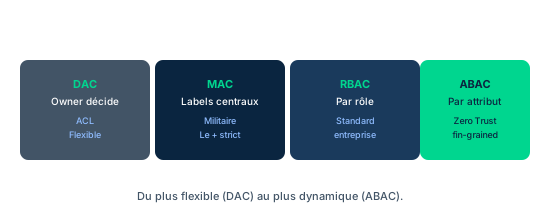
Two types of models underpin access control implementations. Security models focus on the actions a subject can perform within a system, or must be restricted from performing. They are linked to the information-handling procedures of Domain 2 and were reviewed in Domain 3: Biba, for instance, protects integrity. Access control models, in turn, translate the concepts of a chosen set of security models into concrete functions that permit or deny an action. They provide formal, conceptual frameworks addressing a system's security needs.
A library example blends the two. A library keeps an extensive collection of digital documents, all already published in print. Their content is not confidential, but it must not be changed by anyone other than properly trained and authorized archivists. Confidentiality is not at stake here; data integrity is paramount: a security model such as Biba is relevant. A librarian may handle collection management, user access, cataloging, and quality, but only the last two functions require the ability to modify a document's content.
To strictly enforce these controls under a no-exceptions policy, one turns to mandatory access control. A role-based access control can then force the librarian to change roles, via a separate login, to obtain the permissions needed for document alterations. This example shows how an access control model translates the integrity policy of a security model into operational access decisions.
- Security models govern what a subject can do (Biba protects integrity)
- Access control models translate policy into permit/deny decisions
- Library example: integrity > confidentiality, hence Biba + mandatory RBAC
- Switching roles (separate login) to gain modification rights
6.2 Atomic operations and the NIST definition of AC models
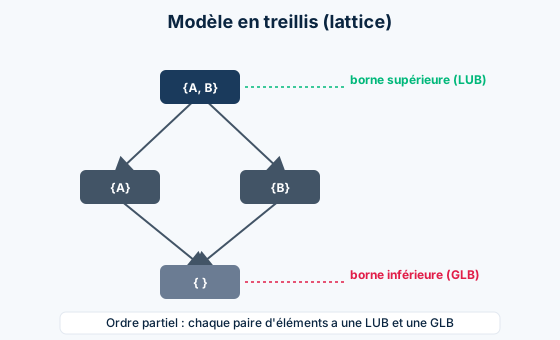
NIST SP 800-192 defines access control models as the "formal presentations of the security policies enforced by access control systems," useful for proving the theoretical limitations of systems. These models bridge the abstraction gap between policy and mechanism. Domain 5 addresses DAC, MAC, NDAC (nondiscretionary access control), RBAC (role-based), RuBAC (rule-based), and ABAC (attribute-based); NIST SP 800-192 provides the definition of each.
Each model offers a different strategy to control which subjects can perform basic functions on objects. These fundamental or atomic operations usually include reading (read), writing or modifying (write/modify), creating (create), deleting (delete), and loading for execution as a program (execute). Complex system functions, such as mounting or dismounting a virtual disk, are nothing more than sequences of these atomic operations.
Other fundamental operations managed by AC systems include the ability to read, define, or change the security parameters associated with an object, or to affect how those properties are inherited by other objects or subjects that use it. Understanding this atomic foundation is essential: an access control model only ever permits or denies a combination of these elementary operations.
- NIST SP 800-192: AC model = formal presentation of the enforced policy
- Atomic operations: read, write/modify, create, delete, execute
- Complex functions are sequences of atomic operations
- Six models covered: DAC, MAC, NDAC, RBAC, RuBAC, ABAC
6.3 The first choice: MAC, DAC, or NDAC
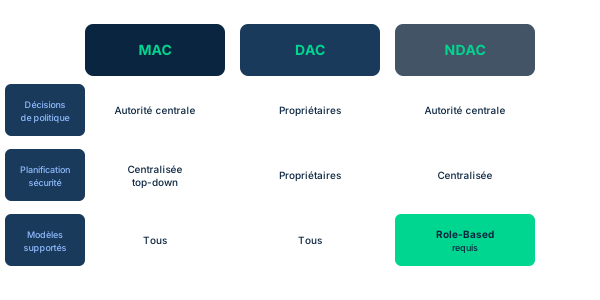
The systems security designers' first decision reflects a large-scale access control strategy. Choosing between MAC, DAC, and NDAC means deciding whether policies must be centrally set and enforced on all users, or whether circumstances let users or local managers make those choices. Figure 5.6 summarizes these three options by Policy Decisions, Security Planning, and Models Supported.
In MAC (Mandatory Access Control), policy decisions are made by a central authority, not by the individual owner of an object, and the user cannot change access rights. Military example: a data owner does not decide who holds a top-secret clearance, nor can the owner reclassify an object from top-secret to secret. Planning is centralized top-down, and any security model is supported.
DAC (Discretionary Access Control) leaves some control to the discretion of the object's owner, or anyone authorized to manage its access. The owner determines who gets which rights. DAC offers the greatest flexibility but is also the most vulnerable form: the owner can pass on weaknesses contributing to access and privilege aggregation. Windows and Android use forms of DAC so purchasers can tailor controls. NDAC (Nondiscretionary Access Control) applies role-based access control in a mandatory fashion, with a central authority deciding policy; users and line-level managers cannot change rights. NDAC highlights that RBAC, RuBAC, and ABAC can all be implemented in a mandatory or discretionary fashion.
- MAC: central authority, user cannot change (e.g., military top-secret)
- DAC: owner discretion, most flexible BUT most vulnerable (Windows, Android)
- NDAC: mandatory RBAC, central authority, line-level managers excluded
- RBAC, RuBAC, ABAC: can be implemented as mandatory or discretionary
6.4 Role-Based Access Control (RBAC) and its None/Limited/Hybrid/Full usage
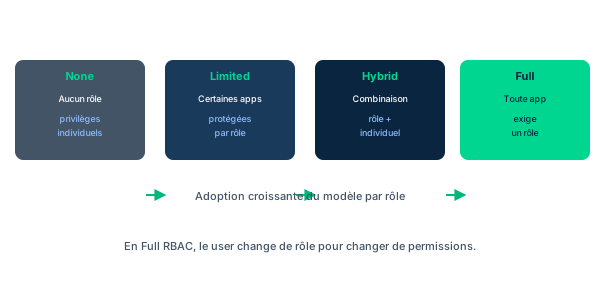
RBAC is an access policy that restricts system access to authorized users through roles defined by job function. The organization creates roles based on job functions and associates the authorizations (privileges) needed for operations. Access can be granted by the owner as in DAC and applied per policy as in MAC: RBAC comes in varying amounts (Figures 5.7, 5.8, 5.9).
RBAC is deployed in four usage levels. None: no access is role-protected; individual privileges must be defined and managed one by one (for example, accounts payable staff are blocked per user ID from running Visual Studio). Limited: some apps are RBAC-protected (the accounts payable role can run QuickBooks, the developer role tests other apps), others are not (office productivity apps and browsers like Firefox or Chrome stay open). Hybrid: any combination of features; an individual may hold one or more roles, each permitting one or more applications, with Role A's rights differing from Role B's even for the same application.
Full: every app, including office apps and browsers, requires role-based permission. Point-of-sale example: salesclerk and sales supervisor roles exist, but only the supervisor can run price override or transaction void. HR example: an HR manager signs in with their HR role to access personnel files, then signs out and signs back in with their office role for routine correspondence. The key principle: to change permissions, the user changes roles.
- RBAC: roles by job function, privileges attached to the role
- Four usage levels: None, Limited, Hybrid, Full
- Limited: QuickBooks for accounts payable, office apps open
- Full: point-of-sale supervisor (price override) vs salesclerk; HR switches roles
6.5 Rule-Based (RuBAC) and Attribute-Based Access Control (ABAC)
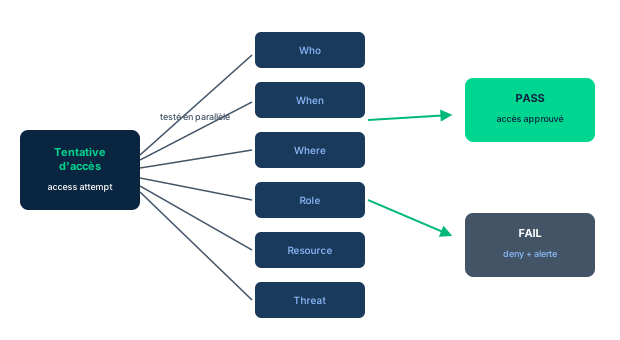
RuBAC (Rule-Based Access Control) is a predefined list of rules that determine access with added granularity: when, where, and if the system will allow read, write, or execute under special conditions. It is managed by the system owner and represents an implementation of DAC. The rules are often expressed in Boolean logic and can be complex. Example: a CFO normally has broad permissions to view finance and authorize very large payments; RuBAC can restrict the use of these privileges over remote access to a narrow set of IP addresses, to specific days and times. If the CFO travels to risky areas, this protects the organization in case of kidnapping or a stolen smartphone.
ABAC (Attribute-Based Access Control) grants rights through policies that combine attributes: user, resource, and environment attributes. It is a simpler form of RuBAC. Figure 5.10 shows an access attempt tested in parallel across several attributes (Who, When, Where, Role, Resource, Threat, Recent actions), leading to PASS (access approved) or FAIL (deny, further challenge, or alert). The decision depends not only on the usual subject and object attributes but also on environmental variables.
Thus the same data on an archive server may require different restrictions than on the production system. Remotely connecting users may be restricted by their exact geographic location at the time of the request, which helps spot connections through VPNs like TOR that mask the IP by constant hopping: a user does not change countries packet by packet. PayPal and many banks use this kind of control.
- RuBAC: predefined when/where/if rules, managed by the system owner = a DAC implementation
- CFO example: IP, days, and times restrictions, protection during risky travel
- ABAC: user/resource/environment attributes, a simpler form of RuBAC
- ABAC adds environment: archive vs production, geolocation, TOR/VPN detection (PayPal, banks)
6.6 Risk-Based Access Control and policy enforcement (PDP/PEP)
A recurring criticism of most AC models is that they assume risks are relatively static over weeks or months. This lets the rule bases or parameter sets driving RuBAC, RBAC, or ABAC be built, tested, then validated, and changed only as new subjects and objects are created. Risk-based access control breaks with this assumption: it gives administrators parameters to dynamically raise or lower the thresholds for filtering access requests.
In low-risk, stable circumstances, the system may settle for dual-factor authentication with two layers of challenge. When administrators see external risk conditions increasing, they turn on additional challenges or filters that users must clear. Example: international wire transfers. Under routine risk, a client may submit requests up to a cap with no restriction; risk-based AC requires extra verification if the transfer targets a group of countries showing high fraud levels. Likewise, challenges are tightened during peak online shopping seasons, which are also card-fraud seasons, then loosened afterward. Emerging approaches use behavior modeling via internal feedback loops, and even smart contracts to bind user behavior to risk management.
Every access policy must be enforced by a mechanism. Per NIST SP 800-162, this mechanism assembles authorization information: the protected object, the requesting subject, the governing policies, and any needed context. By evaluating each element, it relies on a policy decision point (PDP) to render the decision, a policy enforcement point (PEP) to enforce it, and a context handler (workflow coordinator) to manage the collection of attributes required to decide.
- Most models assume static risk; risk-based AC adjusts thresholds dynamically
- Low risk: 2FA; rising external risk: additional challenges/filters
- Examples: international wire transfers, fraud seasons, behavior modeling, smart contracts
- NIST SP 800-162: PDP decides, PEP enforces, context handler collects attributes
Case studies
Activity 5.4: modernizing Aeros 3's Limited RBAC
Context : Aeros 3 has implemented Limited Role Based Access Control for several years. Tamika wants to keep this implementation, but the policies and enforcement mechanisms need significant updates after recent reports of unauthorized access. During review, Tamika reaches out to trusted colleagues in sectors beyond aviation to discuss the access control model and its policies.
Question : How can RBAC be used effectively as an authorization mechanism in an enterprise? What are its advantages and potential challenges in the context of Aeros 3 managing access to critical assets?
Show analysis and answer
RBAC assigns permissions based on business roles, which streamlines access management and ensures that everyone only accesses the resources they need - a direct application of least privilege. There are several ways to implement it: None (no role-based access), Limited (some apps protected by role), Full (every app requires a role), and Hybrid (a combination), where administrators define roles with specific permissions.
The advantage for Aeros 3 is readability: rights follow the function, not the individual, which simplifies auditing and revocation. The central challenge, highlighted by the observed unauthorized access, is drift: obsolete or overly broad roles accumulate privileges. Regular reviews and role updates are necessary to maintain their relevance and security.
The key discipline: every change in employment status, function, or responsibility must trigger a review of the associated permissions. For Aeros 3, this means coupling Limited RBAC with a review process triggered by HR events (joiner, mover, leaver), and tightening enforcement mechanisms to close the detected unauthorized access paths.
Takeaway : RBAC is only effective if it stays alive: every status change triggers a role review, otherwise privileges drift and open unauthorized access.
- RBAC aligns permissions with job function and eases auditing
- Without regular review, roles drift and cause unauthorized access
- Every change in employment or responsibilities triggers a permissions review
RBAC vs RuBAC: role versus rule
The acronyms look alike but the models differ. RBAC (Role-Based) grants access by the user's job role: you change roles to change permissions. RuBAC (Rule-Based) grants access by a predefined list of Boolean-logic rules with when/where/if granularity (IP, days, times), managed by the system owner. Remember the extra R: RuBAC = Rule. On the exam, if the decision depends on the person's function, it is RBAC; if it depends on time, geographic, or logical conditions, it is RuBAC.
RuBAC = a DAC implementation; NDAC = mandatory RBAC; ABAC = enriched RuBAC
Three relationships trap candidates. RuBAC, managed by the system owner, is an implementation of DAC, not inherently mandatory. NDAC applies RBAC in a mandatory fashion via a central authority - so NDAC is not the opposite of RBAC but a way to enforce it. ABAC is a simpler form of RuBAC, yet richer in its decision since it adds environment attributes (location, time, threat) to subject and object attributes. Do not say these models exclude one another: they compose.
Domain Access Control does not exist
The access control types covered are DAC, MAC, NDAC, RBAC, RuBAC, and ABAC. Domain Access Control is not an access control type: it is an exam distractor. When a question asks you to spot the impostor in a list of models, beware of plausible but invented labels. RuBAC, MAC, and DAC are real; Domain AC is not.
Checkpoint — Knowledge check
-
In modern access control implementations, which model maps users to applications and then to roles?
- A RBAC
- B Limited RBAC
- C RuBAC
- D DAC
Answer & rationale
Answer : B — Limited RBAC
In Limited RBAC, the user is first granted access permission to an application, then a given role within that application: they may reach a financial application but only as a user, not a developer. Plain RBAC places users into groups by function without this app-then-role mapping. RuBAC relies on rules, DAC on the owner's discretion.
-
Which of the following is NOT an access control type?
- A Domain Access Control
- B Rule-Based Access Control (RuBAC)
- C Mandatory Access Control (MAC)
- D Discretionary Access Control (DAC)
Answer & rationale
Answer : A — Domain Access Control
Domain Access Control is not an access control type, it is a distractor. RuBAC relies on a predefined list of rules giving fine granularity. MAC has a central authority decide, not individual owners. DAC leaves some discretion to the object's owner or their delegate.
-
In a military environment, a data owner can neither grant a top-secret clearance nor reclassify an object. Which model is applied?
- A MAC (Mandatory Access Control)
- B DAC (Discretionary Access Control)
- C RuBAC (Rule-Based Access Control)
- D ABAC (Attribute-Based Access Control)
Answer & rationale
Answer : A — MAC (Mandatory Access Control)
In MAC, policy decisions are made by a central authority and the user cannot change rights or an object's classification: exactly the military case described. DAC would leave that discretion to the owner. RuBAC and ABAC rely on rules and attributes respectively, not on this strict ban on owner reclassification.
-
Which access control model offers the greatest flexibility but is the most vulnerable form?
- A DAC (Discretionary Access Control)
- B MAC (Mandatory Access Control)
- C NDAC (Nondiscretionary Access Control)
- D RBAC (Role-Based Access Control)
Answer & rationale
Answer : A — DAC (Discretionary Access Control)
DAC lets the owner decide access, offering the greatest flexibility but also the greatest vulnerability: the owner can pass on weaknesses and enable privilege aggregation (Windows, Android). MAC and NDAC centralize the decision, hence less flexible but more robust; RBAC structures by role.
-
A bank denies a transfer based on connection location, time, and the destination country's fraud level, combining environment attributes. Which model is at play?
- A ABAC (Attribute-Based Access Control)
- B RBAC (Role-Based Access Control)
- C MAC (Mandatory Access Control)
- D NDAC (Nondiscretionary Access Control)
Answer & rationale
Answer : A — ABAC (Attribute-Based Access Control)
ABAC grants access by combining user, resource, and environment attributes (location, time, threat), exactly the banking scenario described. RBAC would decide by job role, without environmental variables. MAC and NDAC centralize the decision but do not rely on this combination of contextual attributes.
Key takeaways
- Two families: security models (Biba, integrity, Domain 3) and access control models (translate policy into permit/deny).
- NIST SP 800-192: an AC model is a formal presentation of the enforced policy, bridging the policy/mechanism gap.
- Atomic operations managed by an AC system: read, write/modify, create, delete, execute.
- First MAC/DAC/NDAC choice: central authority or local discretion (Fig 5.6: Policy Decisions, Security Planning, Models Supported).
- MAC: central authority, user changes nothing (military). DAC: most flexible but most vulnerable (Windows, Android).
- NDAC: RBAC applied in a mandatory fashion; RBAC, RuBAC, and ABAC can be mandatory or discretionary.
- RBAC: roles by job function, None/Limited/Hybrid/Full usage; to change rights, you change roles.
- RuBAC: list of when/where/if rules, managed by the system owner, an implementation of DAC.
- ABAC: a simpler yet richer form of RuBAC; adds environment attributes (PayPal, banks, TOR detection).
- Risk-based AC: dynamic thresholds by risk; NIST SP 800-162: PDP decides, PEP enforces, context handler collects attributes.
Identity life cycle and provisioning (JML)
Prerequisites : Completion of M2 (identity concept and identity proofing) and M6 (MAC/DAC/RBAC/ABAC authorization models).
In an organization, every identity should hold the exact set of permissions its assigned duties require - no more and no less. The rule looks obvious, yet maintaining it over time is an ongoing process: people join and leave projects, project stages, or even positions. Managing that flow is the purpose of the identity life cycle, often summarized by the acronym JML (Joiner, Mover, Leaver).
Two counterintuitive ideas frame this module. First, identities are not just for humans: a network interface card has a MAC address, a CPU a serial number, installed software a unique identifying key, a running process a process ID. Second, they are not just for the permanent party of staff: guests and visitors access part of the premises or systems, and the organization must be able to differentiate today's visitors on the parking-lot Wi-Fi from yesterday's onsite guests.
Permissions are not static: they must follow changes in job, tasks, and responsibilities. Periodic AND event-driven reviews are therefore essential to avoid privilege creep, the unwanted accumulation of privileges beyond what the assigned duties require. By the end of the module, you will be able to run the provisioning -> management -> offboarding cycle, map each step to the right role (data owner vs data custodian), and design an account access review that surfaces inactive accounts, excessive permissions, and accounts without permissions.
7.1 The identity life cycle: provisioning, management, offboarding
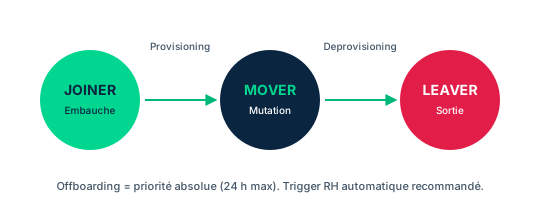
An identity is a label and data construct that every subject and object in a system must have to be referred to clearly and unambiguously. Traditionally, IAM focused on humans: access privileges are associated with an identity so that run-time enforcement of security policies is possible. But identities are neither limited to humans nor to permanent staff. At the hardware level, a network interface card has a MAC address and a CPU a serial number, burned into firmware (resettable or spoofable). Installed software receives a unique identifying key; each instance spawned as a process receives a process ID. Guests and visitors also need identities, and the organization must differentiate today's parking-lot visitors from yesterday's onsite guests.
Providing an identity to each human or nonhuman user and attaching privileges to it requires a cycle of provisioning, management (review), and offboarding, shown in Figure 5.11. This cycle revolves around a central store holding information about identities and their privileges, and which also tracks how each one behaves. Every identity starts its life at the provisioning stage and ends when it is disabled and then deprovisioned.
The tempo, however, differs from one identity to another. A pattern of inappropriate or suspicious activity by one user may trigger frequent, urgent reviews to decide on corrective action, while another may rarely require one. Some change role or function infrequently; others initiate many self-service changes. The guiding principle stays constant: the exact set of permissions, neither excessive nor insufficient, so as not to expose the organization and its assets.
- Every identity starts at provisioning and ends deprovisioned, but review tempo varies
- Identities cover humans AND nonhumans (MAC, CPU serial, software key, process ID)
- Guests and visitors have identities to differentiate day by day
- The central store keeps identities, privileges, and behavior
7.2 Provisioning: who requests, who approves, who implements
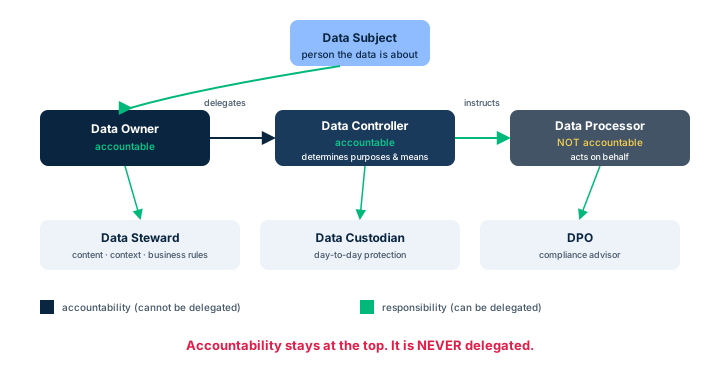
Provisioning follows a precise chain of responsibility. The access request usually originates with the hiring manager or work-unit supervisor, who then engages IT security and administrators to validate and implement. The requester provides supporting evidence of identity (government-issued documents or digital ID); identity proofing authenticates them to ensure the person is uniquely and unambiguously who they claim to be, and not an impostor.
Next comes the authorization decision. The data owner (or asset owner, or responsible functional-area manager) reviews the request and passes an approval or rejection to the data custodian. This is the key exam point: the data owner is accountable - they decide and set the granularity of permissions, whether in very broad terms (for example all operational environments, but not development ones) or finely detailed per security procedures. The data custodian is responsible: they create the account with the appropriate permissions. Depending on the system, environment, and privileges, this may require creating multiple accounts with distinct credentials, and pushing (populating) those account IDs into various application platforms, other systems, or other infrastructure domains.
Finally the data custodian notifies the user and the data owner of the account creation. The user then begins accessing systems and resources within the granted permissions. Do not confuse this trio with the data processor: the processor handles data on behalf of the data controller; it is responsible but not accountable for the access decision.
- The request starts with the hiring manager; the requester provides evidence (identity proofing)
- The data owner approves and sets granularity; they are accountable
- The data custodian creates the account (sometimes multiple) and pushes it to platforms
- User and data owner are notified at creation
7.3 User Behavior Review: detecting behavioral deviations
Once the account is active, the management phase begins with defining patterns of acceptable and expected behavior in most circumstances. These patterns derive from job and task descriptions, which identify the access to protected assets the user needs. By definition, all other access attempts should be prohibited. As with any control, the first decision is administrative: policy directives set the boundaries, then technical and physical controls are implemented on a cost-benefit basis.
Most compliance regimes mandate a periodic review of all accounts to determine whether abuse of privileges was attempted or succeeded, or whether an action taken within the bounds of permissions resulted in a security violation. A user behavior review can reveal several circumstances requiring intervention: inappropriate use of resources (not necessarily endangering information); visitor or guest identities repeatedly attempting to exceed permissions; rogue devices trying to connect or to masquerade as approved devices (for example fake Wi-Fi access points); attempts to circumvent configuration management and control systems, or to sidestep allowed/blocked lists; frequent misuse of applications (invalid or incomplete input data); use of allowed resources but at times of day, days of the week, or circumstances abnormal for that class of identity.
Each of these signals may indicate either an employee needing reorientation to proper procedures, or a concerted attacker probing, fingerprinting, or penetrating the system via a purloined identity. The latter may require more sophisticated behavioral modeling, especially with remote and mobile work. A review and adjudication process may be needed to protect both the organization and the employee from wrongful accusation, particularly if other signals (interactions with coworkers or supervisors) suggest a risk of becoming an insider threat.
- Acceptable patterns come from job/task descriptions; the rest is prohibited
- Periodic review is mandated by compliance
- Signals: inappropriate use, guest exceeding rights, rogue device, bypass, abnormal hours
- Deviant behavior may signal an insider threat or a purloined identity
7.4 Job or Duties Review: containing privilege creep
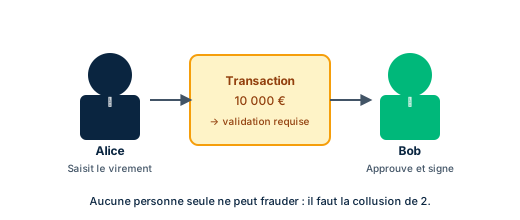
Changes in business needs, threats, risk assessments, and the activity profiles of specific identities - whether people, virtual constructs, or devices - are all triggers for modifying permissions. Privilege creep occurs when an identity collects the permissions needed for new tasks but does not relinquish those no longer required. Left uncontrolled, it exposes the organization: an over-entitled user may, wittingly or not, disrupt operations or expose assets.
Identities change functions, jobs, duties, or responsibilities as the organization assigns them. These changes alter the assets the user must access, which should drive adjustments to their permissions. Completing a major project, for instance, is grounds for downgrading the access and modification rights tied to that project. Increased management responsibility may require access to higher-level supervisory information while curtailing access to the detailed operational data of the earlier role. The canonical example: an accounting clerk whose career grows into the CFO position should no longer hold the permissions needed to originate a payment.
All of this illustrates the combined application of need to know and separation of duties as design imperatives. Concretely, each change in employment status, assigned jobs, duties, or responsibilities should trigger an associated permissions review. That is precisely what prevents privilege creep: not an isolated calendar review, but an event-driven review attached to every transition of the identity.
- Privilege creep = rights accumulated and not relinquished across role changes
- Every status/role change must trigger a permissions review
- Clerk turned CFO: remove the right to originate a payment (separation of duties)
- Need to know + separation of duties guide permission changes
7.5 Disable and Deprovision: disable, do not delete
All identities come to an end. Human and nonhuman users may become redundant or move to other organizations and environments. A human who leaves employment or changes association should no longer have an active system identity (death likewise leads to disablement then deprovisioning). Nonhuman users may be decommissioned and removed from active use. Management decisions may also mandate temporary disablement, for example for an employee about to be separated or believed to be under stress, duress, or impairment. Security professionals must work with HR to ensure procedures support prompt account disablement when needed.
Deprovisioning propagates the deactivation of permissions across all systems. A major exam point: accounts are not deleted but disabled. The data custodian or IAM administrators perform these tasks. Disabling is reversible and preserves traces; deletion destroys the history.
Data retention and archiving are a crucial part of this stage. Legal and regulatory regimes may dictate both minimum AND maximum retention periods for data about an individual. Investigation of ongoing events, after an identity has been disabled and the person has left, may require digging into the archives. Advanced persistent threats (APTs) have shown their tendency to intrude, install reconnaissance and command-and-control capabilities, then lie dormant until needed: archive data is sometimes the only way to detect such a presence. This is why disable rather than delete directly serves investigative capability.
- Disable, do not delete: reversible, traces preserved
- Temporary disable for a stressed or departing employee; work with HR
- Deprovisioning propagates deactivation to all systems
- Legal min/max retention; archives useful against dormant APTs
7.6 Account Access Review: inactive, excessive, permissionless accounts
Account access review - regular, structured, and systematic - is an imperative part of the provisioning life cycle. It is generally organized by groups of accounts, for example all system administrators of a domain or business unit. These are planned reviews, not to be confused with the event-triggered reviews of an individual account discussed earlier. They identify discrepancies between roles and permissions of users, devices, processes, and systems, and reveal irregular activities that, though permitted, warrant further review.
Three families of anomalies typically surface. Inactive accounts not revoked: an employee terminated voluntarily or involuntarily, or who went on extended leave and then left, whose account stays active. Accounts with excessive permissions: when an employee changes positions and gets new rights without revoking the old ones - this is permission aggregation, a cousin of privilege creep. And, more surprisingly, accounts without permissions: because if an individual needs rights for their role but they are not allocated, they will find a way to do their job, sometimes by borrowing another user's credentials, which destroys our ability to use non-repudiation.
These reviews must be conducted on an ongoing basis to catch suspicious activity in time; scheduled and regular, they reveal vulnerabilities calling for revocation, disablement, or deletion of permissions, or even of an entire account. It is vital to include privileged accounts - system accounts such as administrator, sudo, or root - highly desirable to attackers seeking to elevate their capabilities. The review thus covers three natures of accounts: user, system, and service.
- Planned group review, distinct from the individual event-triggered review
- Detects unrevoked inactive accounts and permission aggregation
- Accounts without permissions = risk: borrowed credentials, lost non-repudiation
- Include privileged and service accounts (administrator, sudo, root)
Case studies
Activity 5.5: describing the key life-cycle stages at Aeros 3
Context : After the discussions on access control models and policies, Tamika revisits the identity life cycle to ensure that Aeros 3's IAM processes align with best practices. She must describe the key stages of the access provisioning life cycle and their significance for maintaining security.
Question : What are the key stages of the identity and access life cycle, and why is each significant for security?
Show analysis and answer
The cycle includes stages such as onboarding, role changes, and offboarding. Onboarding ensures new users get the necessary access - no more and no less - through provisioning driven by the data owner and executed by the data custodian.
Role changes adapt permissions to evolving responsibilities: each status change should trigger a review to avoid privilege creep and permission aggregation, applying need to know and separation of duties.
Offboarding promptly revokes access for departed employees, minimizing the risk of unauthorized access; accounts are disabled rather than deleted to preserve archives. Finally, regular reviews and audits (user behavior review and account access review) keep the cycle effective over time.
Takeaway : Onboarding, role changes, and offboarding, supported by regular reviews, form a cycle that keeps each identity at the exact level of rights required.
- Each stage serves a distinct security goal (right access, adaptation, revocation)
- Regular reviews are what keep the cycle effective over time
Profile 5.5: account access review after high turnover
Context : Aeros 3 experienced significant employee turnover over the past year. Tamika discovers that, during that period, the organization conducted no account access review separate from event-triggered reviews. She must define how to conduct and manage these reviews, focusing on user, system, and service accounts.
Question : How can Tamika conduct and manage account access reviews at Aeros 3, covering user, system, and service accounts? What frequency, processes, and key considerations ensure ongoing compliance and security?
Show analysis and answer
Tamika should establish planned reviews, structured by groups of accounts (for example all administrators of a business unit), distinct from individual event-triggered reviews. Given the high turnover, the priority is to detect unrevoked inactive accounts of departed employees, excessive permissions from permission aggregation during role changes, and accounts without permissions that push users to borrow credentials and destroy non-repudiation.
Frequency should combine a regular cadence (aligned with compliance regimes) and ongoing triggering to catch suspicious activity in time. The process reconciles roles with effective permissions, then recommends revocation, disablement, or deletion of rights, or of an entire account.
A vital point: include privileged accounts - system accounts such as administrator, sudo, or root - highly desirable to attackers, plus nonhuman service accounts, often overlooked. Coordination with HR ensures departures trigger prompt disablement.
Takeaway : After high turnover, a planned, group-based account access review covering user, system, and service accounts is essential to eliminate orphaned accounts and residual rights.
- Planned group reviews complement, not replace, event-triggered reviews
- Privileged and service accounts must be included, not only user accounts
Data owner vs data custodian vs data processor
Classic trap question: who approves an access request? The correct answer is the data owner, because they are accountable and decide; they also set the granularity of rights. The data custodian is only responsible: they implement the decision by creating the account. The data processor handles data on behalf of the data controller and does not decide access. If an option says only senior managers, it is wrong: a data owner may be a senior manager, but not always.
Disable vs delete
At offboarding, the exam expects disable, not delete. Disabling is reversible and preserves traces; deletion destroys history. This nuance directly serves data retention (legal min AND max periods) and future investigations, notably against dormant APTs whose presence only archives may reveal. A temporary disable also fits an employee under stress or about to depart. Never answer delete the account immediately to an offboarding question.
Privilege creep, permission aggregation, and accounts without permissions
Privilege creep and permission aggregation describe the same ailment: rights accumulated across role changes without revoking the old ones; the cure is a review triggered at every status change, guided by need to know and separation of duties. A subtler trap: an account WITHOUT permissions is also a risk. Deprived of the needed rights, the user borrows a colleague's credentials to do their job, which destroys non-repudiation. The exam may ask why lacking permissions is dangerous: the answer is credential borrowing and loss of accountability.
Checkpoint — Knowledge check
-
Which of the following steps are required in the onboarding process when managing identities?
- A Creation only
- B Allocation only
- C Defining only
- D All of the above (the three are required)
Answer & rationale
Answer : D — All of the above (the three are required)
Identity management always starts with account creation (Creation), manual or self-provisioning. Then the role and necessary rules are set (Defining), and finally access to resources is allocated per that definition (Allocation). No single one suffices: all three are required, hence all of the above.
-
In the identity management process flow, an individual requests access to resources such as data. Who is responsible for approving that request?
- A The data processor
- B The data owner
- C The data custodian
- D Only senior managers
Answer & rationale
Answer : B — The data owner
Access is always approved by the data owner: this role is accountable and therefore decides on access. They may be a senior manager, but not necessarily. The request is then passed to the data custodian, who is responsible for implementation but does not decide. The data processor handles data for the controller, without deciding access.
-
An accountant promoted to CFO keeps the old right to originate payments while gaining new supervisory rights. What is this accumulation called and how is it prevented?
- A Identity proofing; via a review at hiring
- B Privilege creep; via a permissions review triggered at every status change
- C Single sign-on; via account centralization
- D Deprovisioning; via immediate account deletion
Answer & rationale
Answer : B — Privilege creep; via a permissions review triggered at every status change
Rights accumulated and not relinquished across role changes is privilege creep (here also permission aggregation). The cure is a job or duties review triggered at each status change, applying separation of duties: the CFO must no longer be able to originate a payment.
-
When offboarding an employee leaving the organization, what action is recommended for their account?
- A Delete the account immediately to free space
- B Disable the account without deleting it, and propagate deprovisioning
- C Leave the account active in case the employee returns
- D Transfer the credentials to a colleague
Answer & rationale
Answer : B — Disable the account without deleting it, and propagate deprovisioning
Accounts are disabled, not deleted: disabling is reversible and preserves the traces needed for data retention and investigations (including against dormant APTs). Deprovisioning then propagates the deactivation across all systems. Transferring credentials would destroy non-repudiation.
-
An account access review reveals that an employee who changed positions gained new rights without the old ones being revoked. What is this anomaly called?
- A Permission aggregation
- B Inactive account
- C Account without permissions
- D Identity proofing
Answer & rationale
Answer : A — Permission aggregation
Accumulating new rights without revoking the old ones at a position change is permission aggregation (a form of privilege creep). Distinct from an inactive account (a departed user's unrevoked account) and an account without permissions (which prompts credential borrowing and destroys non-repudiation).
Key takeaways
- The guiding principle: each identity holds the exact set of rights needed - no more and no less.
- Identities cover humans AND nonhumans (MAC address, CPU serial, software key, process ID) and include guests/visitors to differentiate day by day.
- The life cycle runs from provisioning to management to offboarding, around a central store (Fig 5.11).
- At provisioning: the hiring manager requests, the requester proves (identity proofing), the data owner approves (accountable), the data custodian creates the account (responsible).
- Permissions are not static: periodic AND event-driven reviews, triggered at every status change.
- Privilege creep and permission aggregation = rights accumulated without revocation; need to know and separation of duties contain them (clerk turned CFO can no longer originate a payment).
- At offboarding you disable, you do not delete: reversible, traces preserved, min/max data retention, archives useful against dormant APTs.
- The account access review is planned, by groups, distinct from event-triggered reviews; it covers user, system, and service accounts.
- Key anomalies: unrevoked inactive accounts, excessive permissions, and accounts without permissions (which prompt credential borrowing and destroy non-repudiation).
- A user behavior review detects off-hours use, rogue devices, guests exceeding rights, and flags a possible insider threat.
Privileged accounts (PAM), escalation and service accounts
Prerequisites : Module M7 (account access review and periodic permission review).
Account review does not stop at ordinary users. It must imperatively cover privileged accounts - system accounts such as administrator, sudo, or root - because they are precisely the ones attackers covet most. Obtaining one of these accounts is the attacker's "holy grail": once in hand, they can roam the network, read, copy, alter, or destroy data, configuration files, and processes.
This module connects three topics the exam likes to test together: protecting privileged accounts (renaming, obscuring attributes and SIDs, MFA), the mechanics of privilege escalation (vertical vs horizontal) and its prevention, then the place of IAAA in the extended CIANA+PS model. It ends on service accounts, those non-human accounts often oversized that must be brought back to least privilege.
By the end of the module, you will be able to distinguish a vertical escalation (level elevation) from a horizontal escalation (lateral movement), explain why security by obscurity alone is not enough, and apply least privilege to service accounts.
8.1 Privileged accounts in the access review and security by obscurity
When we talk about account review, it is vital to include privileged accounts: system accounts such as administrator, sudo, or root. These accounts are highly desirable to attackers, who seek them out precisely to elevate their ability to act within the organization's network. Reducing their visibility is therefore the first line of defense.
It is advisable to avoid tying the account name to its function, as this increases the chances of it being targeted. Changing the name of a privileged account is thus the first layer of defense. But security by obscurity here requires more than renaming a user or system account: other attributes, such as the static numeric identifier assigned by the system (the SID under Windows), can reveal the true nature of an account to the attacker. These attributes must therefore be changed as well.
On Microsoft Windows systems, several built-in account security identifiers (SIDs) can and should be obscured: Administrator (the only account with full control of the system by default), Default Account (a neutral account introduced with Windows 10 and Windows Server 2016 to run multi-user or agnostic processes), Guest (a passwordless account for people without an individual account, disabled by default), and Domain Administrators (a global group whose members administer the domain and are the default owners of any created object). Remember the exam principle: obscurity is never a sufficient control on its own; it complements, but does not replace, fundamental controls.
- The access review MUST cover privileged accounts, not just ordinary users
- Renaming an account is the first layer; do not link the name to the function
- Obscure attributes too (the static SID), otherwise obscurity is illusory
- Windows SIDs to obscure: Administrator, Default Account, Guest, Domain Administrators
8.2 Privilege escalation: the attacker's holy grail
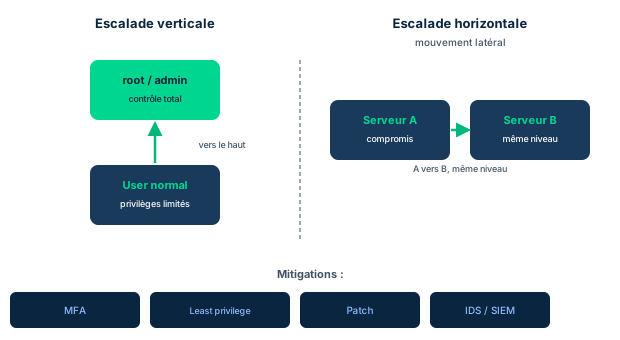
Privilege escalation is the act of raising one's access permissions to protected resources by exploiting a bug, a design flaw, or a configuration oversight in an OS or application. An escalation attack occurs when an attacker obtains a regular user account, bypasses the normal authorization channel, and ends up granting themselves elevated permissions.
Obtaining elevated privileges is the attacker's "holy grail." If they succeed in seizing a privileged account, they can then access various parts of the organization, then examine, copy, alter, or simply delete important data, configuration files, or processes. If the organization realizes it has been compromised, it is vital to determine which permissions the attacker managed to obtain, and which processes and resources may have been impacted and how.
Many organizations add extra protections on users considered privileged, such as domain admins and database administrators, by adding multi-factor authentication (MFA) to reduce the risk of these accounts being used in an escalation attack. Beware the trap: because users can aggregate permissions over the course of their employment (permission aggregation), and because they are considered "regular," the reinforced access controls may not be applied to them. These accounts with aggregated permissions can then be exploited by an attacker while escaping the controls reserved for privileged accounts.
- Escalation exploits a bug, design flaw, or configuration oversight
- Obtaining a privileged account = holy grail; ability to read/alter/destroy
- MFA on domain admins and DBAs reduces escalation risk
- Trap: a regular user with aggregated permissions bypasses hardened controls
8.3 Vertical vs horizontal, and how to prevent escalation
There are two approaches to carrying out an escalation attack. Vertical privilege escalation (also called privilege elevation) occurs when the attacker uses an account they already have access to (or have obtained unauthorized use of) to run applications or services at higher permission levels. This happens when developers made poor assumptions about the use cases of privileged functions, or when the application allows the injection of commands or exploits. Phishing attacks that push the victim to enter their credentials frequently serve as a stepping stone to vertical escalation.
Horizontal privilege escalation (also called lateral movement within a system) occurs when the attacker uses an account they have access to in order to discover, fingerprint, and access other resources. For example, a user of applications and data on a server may jump to another server and access its data or resources. These attacks require elevating the privileges associated with the abused accounts and generally demand a higher degree of technical sophistication.
Preventing escalation requires acting on human, system, and process vulnerabilities. On the human side: security awareness training and phishing simulations. To this are added access controls such as two-factor authentication (2FA), continuous patch and vulnerability management, and detection-response through IDS, IPS, and SIEM. These layers combine to break the chain phishing -> regular account -> elevation -> lateral movement.
- Vertical = level rise (privilege elevation), often via phishing/injection
- Horizontal = lateral movement, jumping across resources, more technical sophistication
- Phishing is a classic stepping stone to vertical escalation
- Prevention: awareness, phishing simulations, 2FA, patch/vuln mgmt, IDS/IPS/SIEM
8.4 IAAA implements CIANA+PS
The previous domains identified the critical capabilities that security programs and controls must address, summarized by the acronym CIANA: confidentiality, integrity, availability, non-repudiation, and authenticity, plus privacy and safety. Correctly implemented, an IAM system meets these needs through its integrated functions of identity, authentication, authorization, and accounting (IAAA).
Take integrity as an example. It requires high confidence that only trusted processes, invoked by trusted subjects (human or non-human users), modify information assets. Providing this confidence rests on three pillars: identity management solutions that create and prove identities then manage the associated privileges; authentication controls that restrict access to valid identities only; and authorization controls that allow authenticated and trusted identities to use only trusted tools to perform only the actions permitted by their permissions.
Safety and privacy often add requirements for strong non-repudiation and authenticity. The accounting controls of an IAAA system provide the auditable proof that non-repudiation requires. And ensuring that commands modifying sensitive information can only be authentic - issued by a competent authority - results from the combination of IAAA functions. In other words, it is IAAA taken as a whole that materializes CIANA+PS in the system.
- IAAA (identity, authentication, authorization, accounting) implements CIANA+PS
- Integrity requires that only trusted processes modify assets
- Non-repudiation relies on accounting (auditable evidence)
- Authenticity = command issued by competent authority
8.5 Service accounts and applying least privilege
Some system accounts are predefined as service accounts. These non-human accounts can hold extensive privileges within a computer system and behave like the system itself within the network. They often have unabated access and control over most objects in the system.
In some cases, these accounts are active without requiring any authentication method and are not associated with any logged-in user account, which poses a significant risk: no identifiable human owner, no interactive session, hence an ideal attack surface for anyone who wants to "behave like the system." This is precisely the link an escalation seeks to reach.
Yet many service accounts do not need the elevated privilege levels granted to them by the default configuration: they are oversized. When this is the case, reducing privileges to the lowest possible level is an appropriate application of the principle of least privilege. In practice: inventory service accounts during the access review, remove unused rights, require strong authentication where possible, and trace their activity. Least privilege turns an account that acts "like the system" into one that has "just what it needs for its service."
- Service accounts have extensive privileges and behave as the system
- Risk: sometimes active without authentication, not tied to a logged-on user
- Often oversized by default configuration
- Remedy: apply least privilege and reduce to the strictly necessary level
Case studies
From phishing to domain admin: anatomy of an escalation
Context : At a regional distributor, an accountant receives an email impersonating the HR portal and enters credentials on a fake page. The attacker thus obtains a regular user account. From that workstation, they discover that an internal application runs under a service account "svc-backup" whose default privileges grant near-total control over the file servers, with no MFA and no human owner. They abuse this service account to run commands at a higher level, then hop from one file server to another. The organization notices only three weeks later, during a belated access review.
Question : Identify the escalation phases at play and list the missing controls that would have broken the attack chain.
Show analysis and answer
The chain follows a classic exam pattern. Phishing serves as the stepping stone: it provides a regular account. Abusing the oversized service account to run commands at a higher permission level is vertical privilege escalation (privilege elevation). The subsequent hop from one file server to another to discover and access other resources is horizontal privilege escalation, that is, lateral movement.
Several missing controls made the attack possible. On the human side, the absence of security awareness training and phishing simulations let the initial email through; 2FA would have prevented direct reuse of the stolen credentials. On the account side, the "svc-backup" service account was oversized: least privilege should have reduced its rights to the strict minimum, and strong authentication should have been imposed on it rather than operation with no authentication and no owner. On the detection side, a SIEM correlating abnormal logins and inter-server hops would have alerted well before three weeks.
Finally, security by obscurity of the privileged accounts (renaming and masking attributes such as the SID) would have made spotting the service account harder, while never constituting a sufficient control on its own. The governance lesson: regular access reviews, not only event-triggered ones, would have detected both the oversized service account and the exploited aggregated permissions.
Takeaway : A real escalation combines vertical elevation and lateral movement; each link (phishing, oversized service account, missing SIEM) is a control that could have stopped it.
- Phishing is a stepping stone to vertical escalation; 2FA breaks credential reuse
- An oversized service account becomes the elevation vector; apply least privilege
- Lateral movement is detected by a SIEM correlating cross-server hops
- Regular (not just event-triggered) access reviews would have revealed the oversized account
Vertical vs horizontal
The exam often contrasts the two escalation types. Vertical privilege escalation (privilege elevation) is a level rise: running at a higher permission level, for example moving from a regular user to root or admin. Horizontal privilege escalation is lateral movement: moving across same-level resources, hopping from server to server to discover and access other data. If the stem says "higher level of permissions," it is vertical; if it says "jumping to other resources/servers," it is horizontal.
Security by obscurity is never enough on its own
Renaming the "Administrator" account is the first layer, but the exam expects you to know it is not enough: the static numeric ID (the Windows SID) remains an attribute that betrays the account's real function. You must therefore obscure those attributes as well. More broadly, security by obscurity is never a sufficient control on its own: it complements least privilege, MFA, and detection, it does not replace them. An answer offering "rename the account" as the only measure is incomplete.
Aggregated permissions bypass hardened controls
Subtle trap: domain admins and DBAs are protected by MFA, but a "regular" user may have accumulated permissions over the years (permission aggregation). Because they remain classified as "regular," the hardened access controls reserved for privileged accounts are not applied to them. An attacker who seizes that account inherits broad power while escaping the protections. The right answer stresses regular access reviews to spot and revoke these aggregated permissions.
Checkpoint — Knowledge check
-
Which type of escalation attack occurs when a legitimate user (account holder) attempts to gain higher permission levels?
- A Vertical escalation
- B Horizontal escalation
- C Privilege spoofing
- D Privilege manipulation
Answer & rationale
Answer : A — Vertical escalation
Vertical escalation (privilege elevation) occurs when an actor uses an account they already have (or have gained use of) to run applications or services at higher permission levels. Spoofing means pretending to be someone else, not raising one's own rights. Horizontal escalation is lateral movement toward other same-level resources. "Privilege manipulation" is a generic term, not this specific type.
-
Which of the following is a type of privilege escalation attack?
- A Vertical
- B Domain
- C Root
- D Admin
Answer & rationale
Answer : A — Vertical
Vertical is the valid type: an actor elevates a regular user's credentials to a higher level such as root or admin. "Domain" is a collection of objects (users, machines), not an escalation type. "Root" and "Admin" are accounts already at the highest level: there is no point escalating on them.
-
An attacker who took an account on one server uses it to discover, fingerprint, and access other servers at the same privilege level. What is this technique called?
- A Horizontal escalation (lateral movement)
- B Vertical escalation (privilege elevation)
- C Permission aggregation
- D Security by obscurity
Answer & rationale
Answer : A — Horizontal escalation (lateral movement)
Discovering, fingerprinting, and accessing other resources by hopping server to server defines horizontal privilege escalation, also called lateral movement. Vertical escalation would instead target a higher permission level. Permission aggregation is the buildup of rights over time. Security by obscurity is a defensive measure, not an attack technique.
-
An access review finds a service account whose default configuration grants near-total control over all file servers, far beyond its real need. What is the most appropriate measure?
- A Reduce its privileges to the strictly necessary level (least privilege)
- B Rename it to apply security by obscurity
- C Leave it as is because service accounts must act as the system
- D Grant it more permissions to avoid blockers
Answer & rationale
Answer : A — Reduce its privileges to the strictly necessary level (least privilege)
Many service accounts are oversized by their default config. When that is the case, reducing privileges to the lowest possible level is the appropriate application of least privilege. Renaming (obscurity) does not reduce excessive rights. Leaving the account untouched perpetuates the risk. Adding permissions worsens the exact problem.
Key takeaways
- The access review must include privileged accounts (administrator, sudo, root), highly coveted as the attacker's holy grail.
- Security by obscurity requires renaming the account AND obscuring attributes; otherwise the static SID betrays the function.
- Windows SIDs to obscure: Administrator, Default Account, Guest, Domain Administrators.
- Vertical escalation (privilege elevation) = running at a higher permission level; frequent stepping stone: phishing.
- Horizontal escalation = lateral movement: discovering and accessing other resources, more technical sophistication.
- Prevention: awareness training, phishing simulations, 2FA, ongoing patch/vuln mgmt, IDS/IPS/SIEM.
- Trap: a regular user with aggregated permissions escapes the hardened controls reserved for privileged accounts.
- IAAA (identity, authentication, authorization, accounting) implements CIANA+PS; accounting underpins non-repudiation.
- Integrity requires that only trusted processes, invoked by trusted subjects, modify assets.
- Service accounts are often oversized and sometimes unauthenticated: apply least privilege.
Authentication systems: Kerberos, SAML, OAuth/OIDC, RADIUS/TACACS+, LDAP/AD
Prerequisites : M2 (identity store and identity proofing) and M5 (single sign-on and federation).
Access controls have been implemented in many ways. Some originated from proprietary vendor designs that later went open source or were licensed; others started from open-source implementations based on published standards. What the systems that have lasted have in common is their ability to adapt and improve in the face of an evolving threat landscape. Whatever the approach, they all deliver the same basic functions expected of an integrated identity management and access control system, and all are closely tied to the notion of session.
This module reviews the authentication methods in use, from the simple username/password pair to MFA and modern centralized methods. Linux- or Unix-based infrastructures often combine Kerberos and LDAP; Microsoft infrastructures rely almost invariably on Active Directory. Most of these products are platform-agnostic and OS-agnostic, and almost all use the X.500 Directory Access Protocol or a variant of it.
By the end of the module, you will be able to situate each protocol on the authentication vs authorization axes, distinguish RADIUS from TACACS+, explain the Kerberos ticket flow (TGT then ST), describe the SAML and OAuth/OIDC roles, and reason about the responsibility model of an IDaaS offering.
9.1 Early concepts: from password to MFA, Linux vs Microsoft
Several authentication methods coexist today, from a simple username/password pair to MFA, up to the most complex modern centralized methods. Some, like RADIUS, may look legacy but remain very much in use in the marketplace. The choice of stack largely depends on the ecosystem: Linux- or Unix-based infrastructures often combine Kerberos and LDAP, while Microsoft-centric infrastructures almost invariably rely on Active Directory.
Most of these products are, to varying degrees, platform-agnostic and OS-agnostic: they support almost any device or network system able to speak their protocol. A structuring point for the exam: nearly all of them use the ITU-T X.500 Directory Access Protocol, or a variation of it. LDAP is its lightweight heir adapted to the IP suite, and Active Directory builds on LDAP.
This module therefore covers a coherent family: directories (LDAP, AD), network AAA protocols (RADIUS, TACACS+), ticket-based authentication (Kerberos), and modern federation/delegation (SAML, OAuth, OIDC). All are bound to the session concept seen in M3.
- Methods from simple username/password to MFA and centralized systems
- Linux/Unix = Kerberos + LDAP; Microsoft = Active Directory
- Nearly all systems derive from the X.500 Directory Access Protocol
- These products are largely platform-agnostic and OS-agnostic
9.2 RADIUS and TACACS+: network AAA protocols
RADIUS (Remote Authentication Dial-In User Service) originated in the early 1990s to authenticate dial-up customers and long served classical remote access. When queried by a client supplying candidate credentials, a RADIUS server replies with an Access-Accept, Access-Reject, or Access-Challenge message. This lightweight structure allows fast, simple authentications when possible, or a move to MFA and challenge-response dialogs when required. RADIUS supports extensions such as EAP (Extensible Authentication Protocol) and its many variations, and it provides support for roaming users and devices.
TACACS (Terminal Access Controller Access Control System) grew out of the need to automate authentication of remote users at the Department of Defense. By 1984 it saw widespread use on Unix servers; in 1990 Cisco developed a proprietary version, Extended TACACS (XTACACS). Neither TACACS nor XTACACS were open standards, and they are largely replaced today, though you may still see them on older systems.
TACACS+ is an entirely new protocol based on some concepts of TACACS, also developed by the DoD then enhanced and marketed by Cisco. It splits authentication, authorization, and accounting into separate functions, giving administrators greater control and visibility over each. It uses TCP for a higher-quality connection and encrypts its packets to and from the TACACS+ server. It defines policies based on user type, role, location, device type, or time of day, integrates well with Active Directory and LDAP (useful for SSO), and offers stronger command logging and central management to meet the network's AAA needs.
- RADIUS: lightweight, Access-Accept/Reject/Challenge, EAP, roaming, 1990s
- TACACS/XTACACS: DoD then Cisco, proprietary, largely replaced
- TACACS+: new protocol, splits A/A/A, TCP, encrypted packets
- TACACS+: policies by type/role/location/time, integrates AD/LDAP
9.3 LDAP and Active Directory: directory services
LDAP (Lightweight Directory Access Protocol) is a directory service based on the ITU-T X.500 Directory Access Protocol standard, designed to leverage the IP suite that evolved after X.500 was adopted. It is often compared to an old-fashioned telephone directory: an LDAP server holds information about users in a directory tree, and clients query it for details. Large enterprises maintain replicated LDAP servers at various points of the network for quick response.
Each entry in the LDAP tree is a collection of information about an object, pointed to by a unique identifier called a Distinguished Name (DN): the DN represents the complete path in the tree to the desired entry. Named component parts called attributes hold the entry's data (phone numbers, physical, postal, and email addresses). LDAP can also authenticate credentials via the bind command: in the simplest case, bind checks the candidate password against the user's password attribute and returns a success code or the error invalid credentials.
Microsoft's Active Directory, developed for Windows domain networks, uses LDAP versions 2 and 3. It is a proprietary directory service. A server running Active Directory Domain Services (AD DS), called a domain controller, authenticates users and authorizes actions, verifies their credentials and defines their access rights. AD DS provides structured hierarchical data storage for users, printers, and services. On a larger, multinetwork or multienterprise scale, Active Directory Federation Services (AD FS) can share information between trusted partners and provide SSO to federated partners, just as other FIM systems do.
- LDAP derives from X.500; replicated tree directory, client queries
- DN = full path; attributes = data; bind authenticates a password
- Proprietary Active Directory uses LDAP v2/v3, authenticates and authorizes
- AD FS brings federated SSO to trusted partners
9.4 OAuth 2.0 and OpenID Connect: authorization and authentication
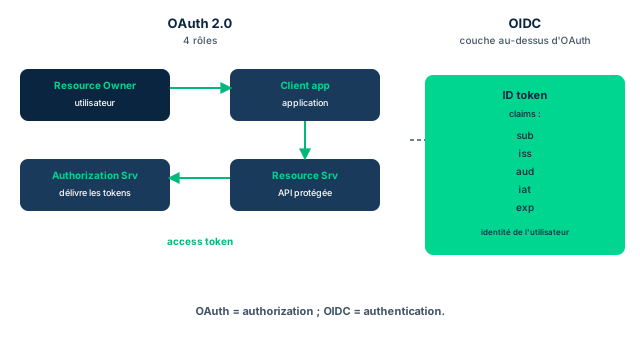
OAuth 2.0 is itself an authorization protocol. With it, a client application can request access to a protected resource from the entity that owns it. The request goes to an authorization server, which must authenticate the owner, validate the request, obtain authorization from the resource owner, then relay an authorization token to the resource server hosting the protected resource. Its four components are the resource owner (the user), the client application, the authorization server, and the resource server.
OpenID Connect (OIDC) is an implementation on top of the OAuth 2.0 authorization framework: it is an authentication layer. The RP (relying party) is an OAuth 2.0 application requesting an ID token from an OpenID Connect Provider (OP). The token's fields contain data called claims about the user (the subject, or sub, identified by a locally unique identifier) and about the timing of the authentication event: issued at time (iat) and expiration time (exp). The token also contains the issuer identifier (iss) of the OP and the client identifier (audience, or aud) registered for the RP at the issuer. Claims can carry more information, such as first_name, last_name, and so on.
One way to view this extension of OAuth 2.0: OpenID Connect effectively allows an application to request authorization to authenticate a user. Where SAML specifically relays requests from a website, OIDC can effect authentication with either a website or a mobile application as the requester. This is the key exam discrimination: OAuth = authorization (delegate access), OIDC = authentication (prove who the user is).
- OAuth 2.0 = authorization; 4 components, the user = resource owner
- Authorization server authenticates the owner and relays a token to the resource server
- OIDC = authentication layer over OAuth; RP requests an ID token from an OP
- Key claims: sub, iss, aud, iat, exp (plus first_name/last_name)
- OIDC works with website OR mobile; SAML relays from a website
9.5 Kerberos: KDC, TGT and service ticket
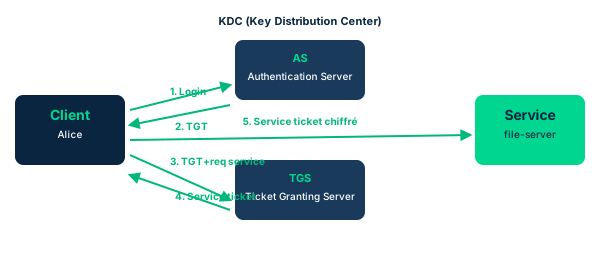
The name Kerberos comes from Greek mythology: it is the three-headed dog that guarded the entrance to Hades. The Kerberos system guards a network with three elements: authentication, authorization, and auditing. It is essentially a network authentication protocol designed to provide strong authentication for client/server applications using secret key cryptography (symmetric encryption). It relies on the interaction of three systems: the requesting system (the principal), the destination endpoint server (where the application or resource resides), and the Key Distribution Center (KDC). A principal is any entity interacting with the Kerberos server (workstation, application, service). The KDC serves two functions, authentication server (AS) and ticket-granting server (TGS), and maintains a database of secret keys for all principals.
Principals have a preregistered account with a secret key in the KDC. When a principal is added to the realm, it is provided a realm key for initial trusted communications; for a user, Kerberos commonly uses a hash of the password as the user key. Once incorporated, the user is authenticated by the AS, which returns an authentication ticket (TGT) passed blindly to the TGS. Possession of the TGT proves the client completed authentication and has the right to request a service/session ticket (ST). The TGT is encrypted with a key shared only by AS and TGS. The TGS decrypts it, then creates an ST encrypted with a different key. STs are valid longer, typically eight to ten hours, after which the user must reauthenticate. Once the TGT is issued, no further password use occurs: when a resource needs access, it requests a copy of the ST, encrypted with a key known only to the TGS and the resource; if the resource decrypts the ST, access is granted.
Key ticket points and limits: the analogy is the passport (the TGT certifies you are a legal citizen but does not grant entry to another country). Tickets are stored in the Kerb Tray, a non-pageable memory area. Kerberos is extremely time-sensitive and often requires NTP daemons: desynchronization causes authentication failures, an attractive DoS vector. Its primary goal is private communications between systems; however, Kerberos provides no secure mechanism for transmitting data, which would require IPSec or MACSec. Its drawbacks: the KDC is a single point of failure (mitigated by multiple KDCs; in AD DS, all domain controllers are KDCs, removing the SPOF), the KDC must be physically secured, key length is critical (too short = brute force, too long = overload), and the Achilles' heel remains that encryption is ultimately based on passwords, hence vulnerable to password-guessing.
- Kerberos: 3 elements (authentication, authorization, auditing), symmetric encryption
- KDC = AS + TGS and secret-key database; principal, endpoint server
- AS issues the TGT (right to request); TGS issues the ST (access), valid 8 to 10 h
- Highly time-sensitive (NTP); desync = auth failure = DoS vector
- Kerberos does not transmit data securely: needs IPSec/MACSec
- Drawbacks: KDC = SPOF (mitigated by multiple KDCs/AD), key length, password-guessing
9.6 SAML and IDaaS: XML federation and identity as-a-service
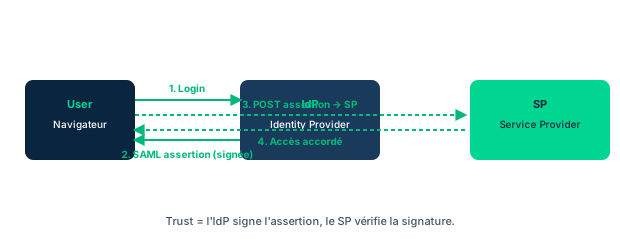
SAML (Security Assertion Markup Language) defines an XML-based framework to describe and exchange security information between online business relationships. This information is carried by SAML assertions that work across trust domain boundaries. SAML has three roles: the IdP (identity provider), the SP/RP (service provider or relying party), and the user agent. It rests on four components: Assertions (how attribute, authentication, and authorization request-response messages are exchanged), Bindings (how assertions and message exchanges are conducted as request-response pairs), Protocols (which protocols are used, including SOAP and HTTP), and Profiles (the use cases combining assertions, bindings, and protocols for a specific functional need). Figure 5.13 illustrates web browser SSO support in eight numbered steps between the service provider, the user agent, and the identity provider.
On the audit and compliance reporting side, identity-as-a-service (IDaaS) became widespread: Gartner and others defined it as a predominantly cloud-based service, multi-tenant or dedicated hosted, mixing identity management, provisioning, governance, and administration. Functions fall into three families: Identity governance and administration (IGA) - provisioning identity into cloud systems, managing privileges, password reset; Access - real-time authentication of users and devices (SSO), authorization, federation support via SAML or OAuth; Intelligence - logging, monitoring, reporting, and alerting, which is the accounting of AC systems.
More and more security services are delivered as-a-service. To clarify often muddled terminology, focus on two determinants. First, who employs (and hires/fires) the administrators doing the IAM tasks: in-house management (direct employees) or third-party management (via SLA and contract with an outside organization). Second, where the systems and AAA databases are physically hosted: on-premises (at your facilities), cloud-hosted (public, private, or hybrid cloud), or hybrid (a mix of on-premises and cloud, quite common). Vendors are not always precise in naming their services; remember the essential: the bottom-line responsibility for the correct use of these services remains with your organization's leadership, whether the people are in-house or third-party, on-premises or in the cloud. Do not lose sight of this.
- SAML: XML framework, 3 roles (IdP, SP/RP, user agent), assertions across trust domains
- 4 SAML components: Assertions, Bindings, Protocols (SOAP/HTTP), Profiles
- SAML web SSO in 8 steps (Figure 5.13)
- IDaaS: IGA, Access, Intelligence (=accounting), predominantly cloud
- Two determinants: in-house vs third-party (SLA), on-premises vs cloud vs hybrid
- Bottom-line responsibility stays with your organization
Case studies
Activity 5.6: OAuth vs OpenID Connect
Context : During a discussion about the suitability of different protocols within Aeros 3, Tamika's team raises a few clarifying questions about OAuth versus OpenID Connect. The group wants to understand each actor's role and know when to prefer one over the other.
Question : Considering the four components of OAuth, what part does the user play? Give examples of OAuth use, then OpenID Connect use. What opportunities and challenges arise for organizations transitioning to OpenID or OAuth?
Show analysis and answer
First, the user is the resource owner. When an application tries to access a protected resource, it is the user who decides to allow or deny access. This is the point that anchors OAuth as an authorization protocol: access is delegated on behalf of the resource owner.
Second, the examples. OAuth: automatically sourcing contacts from a phone's contact list or via social media apps, or using a third-party mobile application to connect to multiple bank accounts. OpenID Connect: signing into TripAdvisor (or a similar site) using Gmail credentials. The nuance is clear: OAuth delegates access to data, OIDC proves identity for a sign-in.
Third, opportunities and challenges. In short, they lie in security and usability. Both OpenID Connect and OAuth use tokens, so token management can become an issue. And if authentication fails, it can be difficult to identify which component failed, which complicates diagnosis.
Takeaway : The user is the resource owner; OAuth delegates access, OIDC authenticates; both rely on tokens whose management and failure diagnosis are the real challenges.
- In OAuth, the user is the resource owner who allows or denies
- OAuth = access delegation (contacts, third-party bank accounts)
- OIDC = federated authentication (TripAdvisor sign-in via Gmail)
- Token management and failure diagnosis are the main challenges
OAuth (authorization) vs OIDC (authentication)
The most frequent 5.6 trap: OAuth 2.0 is an authorization protocol, it delegates access to a resource on behalf of the resource owner. OpenID Connect is an authentication layer over OAuth that issues an ID token proving who the user is. If the question is about proving identity or sign-in (logging into a site with your Google account), the answer is OIDC; if it is about granting an application access to data (contacts, bank accounts), the answer is OAuth. Memory hook: OIDC lets an application request authorization to authenticate a user.
TGT vs ST: passport vs visa
In Kerberos, do not confuse the TGT and the ST. The TGT (authentication ticket) only proves you completed authentication and grants you the right to request a service/session ticket; it is the passport analogy, certifying your citizenship but not letting you enter another country. The ST (service/session ticket) is what opens actual access to a resource, after the resource decrypts the ST, and it is typically valid eight to ten hours. On the exam: who issues what? The AS issues the TGT, the TGS issues the ST, and both live in the same KDC.
RADIUS vs TACACS+ and Kerberos time sensitivity
Two classic discriminations. First RADIUS vs TACACS+: RADIUS is lightweight, combines the AAA functions, and replies with Access-Accept/Reject/Challenge; TACACS+ uses TCP, separates authentication, authorization, and accounting into distinct functions, and encrypts its entire packets (RADIUS historically encrypts only the password). If the question stresses AAA separation, fine command logging, or packet encryption, it is TACACS+. Then Kerberos: it is extremely time-sensitive and relies on NTP; a clock desynchronization causes authentication failures, making it an attractive DoS vector. Remember too that Kerberos does not secure transmitted data (you need IPSec or MACSec) and that its KDC is a single point of failure mitigated by multiple KDCs.
Checkpoint — Knowledge check
-
An online retailer wants CIAM enabling self-provisioning and simple enrollment, letting customers reuse existing accounts. Which protocol fits best?
- A OAuth to federate existing accounts
- B A separate LDAP implementation for customers
- C SAML to integrate a self-enrollment web-service with Active Directory
- D A helpdesk supporting each user through enrollment
Answer & rationale
Answer : A — OAuth to federate existing accounts
OAuth is commonly used to let users reuse existing credentials (for example authorizing access via a social media account), which serves CIAM self-provisioning perfectly. A dedicated LDAP would work but is not optimal; SAML to AD could work but stays non-optimal; a dedicated helpdesk supports neither the targeted simplicity nor self-provisioning (Check 5.6).
-
In the OAuth 2.0 flow, which role authenticates the owner, validates the request, and relays a token to the resource server?
- A Authorization server
- B Relying party
- C Service provider
- D KDC
Answer & rationale
Answer : A — Authorization server
It is the authorization server that authenticates the owner, validates the request, obtains authorization, and relays the token to the resource server. Relying party and service provider are SAML roles (and RP is also on the OIDC side), and the KDC belongs to Kerberos (Quiz Q9).
-
In Kerberos, what are the two functions performed by the KDC?
- A Authentication server (AS) and ticket-granting server (TGS)
- B Identity provider and service provider
- C Resource owner and resource server
- D Domain controller and federation service
Answer & rationale
Answer : A — Authentication server (AS) and ticket-granting server (TGS)
The KDC performs two functions: authentication server (AS), which authenticates the principal and issues the TGT, and ticket-granting server (TGS), which exchanges the TGT for an ST. The other pairs belong to SAML, OAuth, or Active Directory.
-
A Kerberos user holds a valid TGT but has no ST yet for the target server. What does this situation mean?
- A He may request access to the resource, but actual access is not yet granted
- B He already has access to all resources in the realm
- C His authentication failed and he must restart
- D The KDC is down
Answer & rationale
Answer : A — He may request access to the resource, but actual access is not yet granted
The TGT alone does not grant access: it only allows requesting an ST, like a passport certifying citizenship without granting entry to another country. Actual access comes only with an ST decrypted by the resource.
-
Which statement correctly distinguishes OAuth 2.0 from OpenID Connect?
- A OAuth is an authorization protocol; OIDC is an authentication layer on top of OAuth
- B OAuth is an authentication layer; OIDC is an authorization protocol
- C Both are equivalent authentication protocols
- D OAuth issues ID tokens; OIDC issues authorization tokens
Answer & rationale
Answer : A — OAuth is an authorization protocol; OIDC is an authentication layer on top of OAuth
OAuth 2.0 is an authorization protocol (delegating access); OIDC is an authentication layer built on top of OAuth that issues an ID token carrying claims. The ID token (sub, iss, aud, iat, exp) belongs to OIDC, not to OAuth.
Key takeaways
- Linux/Unix = Kerberos + LDAP; Microsoft = Active Directory; nearly everything derives from X.500.
- RADIUS: lightweight, combined AAA, Access-Accept/Reject/Challenge, EAP, roaming; TACACS+: TCP, separated AAA, encrypted packets, command logging.
- LDAP: DN = full path, attributes, bind authenticates a password; AD DS on a domain controller, AD FS = federated SSO.
- OAuth 2.0 = authorization, user = resource owner, authorization server relays a token; OIDC = authentication, RP requests an ID token from an OP.
- OIDC claims: sub, iss, aud, iat, exp (plus first_name/last_name); OIDC works with a website or mobile.
- Kerberos: KDC = AS + TGS, symmetric encryption; AS issues the TGT (right to request), TGS issues the ST (access), valid 8 to 10 h.
- Kerberos is highly time-sensitive (NTP); does not secure transmitted data (IPSec/MACSec); KDC = SPOF mitigated by multiple KDCs.
- SAML: XML framework, 3 roles (IdP, SP/RP, user agent), 4 components (Assertions, Bindings, Protocols SOAP/HTTP, Profiles).
- IDaaS: IGA, Access, Intelligence (=accounting); in-house vs third-party (SLA), on-premises vs cloud vs hybrid.
- The bottom-line responsibility for IDaaS stays with your organization, whatever the actors and hosting.
Domain summary
IAM sits at the heart of maintaining information security: it is a critical component of an organization's overall security posture. Effective IAM practices ensure that only authorized individuals can access sensitive information and resources, while preventing unauthorized access and ensuring that access is granted through organizationally determined policies and procedures. IAM rests on four key components: identification (identifying users and their associated roles and privileges), authentication (verifying identity through passwords, biometrics or other methods), authorization (granting access based on role and level of privilege) and accountability (tracking and monitoring access to ensure it remains appropriate).
Several technologies and processes are used to implement IAM: access controls restrict access based on user identity and level of privilege; identity and access management systems manage the entire process (user provisioning, access management, monitoring); single sign-on (SSO) solutions let users reach multiple systems with a single set of credentials, improving efficiency and reducing the risk of unauthorized access. IAM also involves policies and procedures that support the organization's overall security posture: the creation and management of access control policies, and procedures for managing user access and removing access when necessary.
Finally, IAM carries legal and regulatory considerations, such as the General Data Protection Regulation (GDPR) and the Health Insurance Portability and Accountability Act (HIPAA), which require organizations to protect the privacy and security of personal information. To protect information, physical and logical access controls are implemented so that access to assets is managed and secure. The essential elements of an access provisioning life cycle include the full range of system management related to people, devices and resources; identification, authentication and authorization ensure that the right users access the system and that resource usage remains correct.
Glossary (Terms & Definitions)
The key Domain 5 terms, to master in English for the exam.
| Term | Definition |
|---|---|
| Access Control System | Means to ensure that access to assets is authorized and restricted based on business and security requirements for logical and physical systems. |
| Access Control Tokens | Credentials (hardware or software); the system grants or denies access based on token validity at the read point (time, date, day, condition). Supports MFA. |
| Accounting | Access control process that records information about all access attempts by all identities to system resources. See authentication, authorization. |
| Authentication | Process that validates a claimed identity by comparing one or more identification factors (something you are, have, know). SFA uses one; MFA two or more. |
| Authorization | Process of defining the specific resources a user needs and determining the type of access to those resources the user may have. |
| Identification | Claiming a unique identity (username, ID) to the system; the first step before authentication. |
| IAAA | Access control model: Identification, Authentication, Authorization, Accounting (sometimes Auditing/Accountability). |
| Crossover Error Rate (CER) | Point where FAR (Type 2) equals FRR (Type 1) for a given sensor; FAR and FRR vary inversely with sensitivity, CER measures biometric quality (lower is better). |
| False Acceptance Rate (FAR / Type 2) | Incorrectly authenticating a claimed identity as legitimate and granting access on that basis. The more security-critical error. |
| False Rejection Rate (FRR / Type 1) | Incorrectly denying authentication to a legitimate identity, thus denying it access. Affects usability. |
| Type 1 Authentication Factor (something you know) | Knowledge factor: password, PIN, passphrase, answers to challenge questions. |
| Type 2 Authentication Factor (something you have) | Possession factor: hardware token, smart card, smartphone, OTP, FIDO key. |
| Type 3 Authentication Factor (something you are) | Inherence factor: a biometric characteristic (fingerprint, iris, face, voice). |
| Biometrics | Authentication via physiological or behavioral traits; subject to FAR/FRR/CER and enrollment. Additional factors: something you do, somewhere you are, some time you are. |
| Fingerprint Biometric | Reads fingerprint minutiae; common and low-cost, vulnerable to spoofing. |
| Iris vs Retina Scan | Iris: colored patterns, highly accurate, low CER, contactless. Retina: ocular blood vessels, accurate but intrusive and reveals health data. |
| Facial Recognition | Analyzes facial geometry; contactless but sensitive to lighting and changes. |
| Vein / Voice Biometric | Vein: reads vein patterns via infrared, hard to spoof. Voice: voiceprint, vulnerable to noise and replay. |
| Data Custodian | Individual who manages permissions and access day-to-day per the data owner's instructions; protects the asset in their custody. |
| Data Owner / Data Controller | Individual or entity responsible to classify, categorize, and permit access to data; most familiar with its importance. |
| Discretionary Access Control (DAC) | Access control in which the system (or resource) owner decides who gets access. |
| Mandatory Access Control (MAC) | Access control where the system itself enforces access per security policies (labels/clearances). |
| Non-Discretionary Access Control (NDAC) | Access control managed centrally by an authority rather than the owner; encompasses RBAC and RuBAC. |
| RBAC (Role-Based Access Control) | Permissions assigned to roles, which are assigned to users; simplifies large-scale administration. |
| RuBAC (Rule-Based Access Control) | Access governed by global rules (e.g., firewall ACLs, time windows) applied to all regardless of identity. |
| ABAC (Attribute-Based Access Control) | Access decision computed from attributes of subject, object, action, and context (dynamic policies). |
| Least Privilege | Grant each identity exactly the permissions needed for its duties, no more and no less. |
| Separation of Duties (SoD) | Split a sensitive task across multiple people so none can act alone; prevents fraud and errors. |
| Need-to-Know | Restrict access to only the information required for one's mission, even when clearance would allow more. |
| Entitlement | The set of rights and privileges actually granted to an identity over resources. |
| Privilege Creep | Unnecessary accumulation of access privileges, typically by failing to remove no-longer-needed rights. |
| Access Review / Recertification | Periodic review of permissions to revoke, disable, or delete superfluous rights and detect anomalies. |
| Identity Lifecycle | Identity life cycle: provisioning, management/changes, review, then disablement and deprovisioning. |
| Provisioning | Creation and activation of an identity and its access at the start of the life cycle. |
| Deprovisioning | Disablement and removal of an identity and its access at the end of the life cycle (offboarding, change). |
| JIT Provisioning (Just-in-Time) | On-demand, real-time creation of an identity and its access at the moment of need (reduces standing accounts). |
| SCIM (System for Cross-domain Identity Management) | REST/JSON standard automating provisioning and deprovisioning of identities across providers and applications. |
| Identity Proofing | Collecting and verifying a person's information to prove they are who they claim and establish a trusted link to the credential. |
| IAL (Identity Assurance Level) | Confidence level in identity proofing (NIST SP 800-63A): IAL1 self-asserted, IAL2 remote, IAL3 in-person. |
| AAL (Authenticator Assurance Level) | Strength of the authentication process (NIST SP 800-63B): AAL1 SFA, AAL2 MFA, AAL3 hardware crypto MFA. |
| FAL (Federation Assurance Level) | Strength of federated assertions (NIST SP 800-63C): FAL1 to FAL3 per assertion protection and encryption. |
| Identity as-a-Service (IDaaS) | Cloud-based services that broker IAM functions to target systems on-premises, in the cloud, or both. |
| Self-Service Identity Management | Life cycle elements the end user can initiate alone (password reset, address update, challenge questions). |
| Logical Access Control System | Automated systems that authorize or deny access to an information system and its assets by verifying the presented identity matches the approved one. |
| Single-Factor Authentication (SFA) | Use of only one of the three available factors to carry out authentication. |
| Multi-Factor Authentication (MFA) | Authentication combining two or more factors of different categories; more factors, more trust. |
| Mutual Authentication | Two-way authentication where both client and server prove their identity (e.g., mutual TLS). |
| Password Policy | Rules for length, complexity, history, expiration, and lockout governing passwords. |
| Salting | Adding a unique random value to a password before hashing to defeat rainbow tables and collisions. |
| Credential Management | Secure life cycle of authenticators: issuance, storage, rotation, recovery, and revocation. |
| Certificate-Based Authentication | Authentication via an X.509 digital certificate proving possession of the matching private key (PKI). |
| Smart Card | Chip card storing credentials/certificates; a possession factor, often paired with a PIN. |
| FIDO2 / WebAuthn / Passkey | Strong passwordless authentication standards using origin-bound public-key cryptography, phishing-resistant. |
| SSO (Single Sign-On) | Mechanism letting a user authenticate once to access multiple systems; reduces the number of credentials. |
| FIM (Federated Identity Management) | Creates trust relationships among distinct security domains using common digital identities (client, SP/RP, IdP). |
| Federation Trust | Trust relationship established between IdP and SP/RP enabling acceptance of cross-domain identity assertions. |
| Identity Provider (IdP) | Entity that authenticates the user and issues identity assertions/tokens to service providers. |
| Service Provider (SP) / Relying Party (RP) | Application or service consuming the IdP's identity assertion to grant access; RP is the OAuth/OIDC term. |
| Subjects and Objects | Subject: active entity requesting access (user, process); object: passive resource accessed (file, table). |
| Open Authorization (OAuth) | OAuth 2.0 authorization framework letting a third-party app obtain limited access to an HTTP service on behalf of the resource owner or on its own behalf. |
| OpenID Connect (OIDC) | Identity layer atop OAuth 2.0 adding authentication via a signed ID Token (JWT) from the IdP. |
| SAML | Security Assertion Markup Language: XML standard exchanging authentication and authorization assertions for federated web SSO. |
| JWT (JSON Web Token) | Compact signed (optionally encrypted) JSON token carrying identity claims; used by OIDC and APIs. |
| Token (Bearer / Access / Refresh) | Access token: short-lived resource access; refresh token: renews the access token; bearer: usable by any holder (must be protected). |
| Kerberos | Ticket-based network authentication protocol using a KDC and symmetric cryptography; no passwords sent over the network. |
| KDC (Key Distribution Center) | Central Kerberos component (AS + TGS) that authenticates principals and issues tickets. |
| TGT (Ticket-Granting Ticket) | Ticket issued by the KDC after initial authentication, used to obtain service tickets without re-authenticating. |
| LDAP | Lightweight Directory Access Protocol: protocol to query and modify hierarchical identity directories. |
| Active Directory | Microsoft directory service built on LDAP, Kerberos, and DNS; manages identities, GPOs, and authentication in a Windows domain. |
| RADIUS | Remote Authentication Dial-In User Service: centralized AAA protocol (UDP) that encrypts only the password; common for network access. |
| TACACS+ | Cisco AAA protocol (TCP) that encrypts the whole payload and separates authentication, authorization, and accounting. |
| Diameter | Successor to RADIUS, a more robust and extensible AAA protocol (reliable transport, security), used in mobile/IMS. |
| Session Management | Secure creation, maintenance, and termination of sessions: unpredictable session IDs, expiration/timeout, invalidation on logout. |
| Privileged Account | High-privilege account (administrator, root) requiring heightened monitoring and controls. |
| Service Account | Non-human account used by an application or service; often privileged, must be monitored and rotated. |
| Shared Account | Account used by multiple people; breaks accountability, generally discouraged. |
| PAM (Privileged Access Management) | Set of controls managing privileged accounts: secrets vault, JIT access, controlled elevation, session recording. |
| Zero Trust | "Never trust, always verify" model: no implicit trust, continuous verification of each request by identity, device, and context. |
| Centralized vs Decentralized vs Hybrid Access Control | Three methods of managing physical/logical access: centralized (single authority), decentralized (local), or hybrid. |
| CIANA+PS | Protection types to provide: Confidentiality, Integrity, Availability, Non-Repudiation, Authenticity, Privacy, Safety. |
Domain key takeaways
What you must remember
- IAM is about managing the life cycle of user accounts, from creation (provisioning) to deletion (deprovisioning).
- Identification, authentication and authorization are the three key components of access control; accountability complements them with tracking and logging.
- Authentication mechanisms include passwords, tokens, biometrics and multi-factor authentication; the more factors combined, the greater the trust in authenticity.
- Authorization mechanisms include access control lists (ACL), role-based access control (RBAC) and mandatory access control (MAC), alongside DAC, RuBAC and ABAC.
- Privileged accounts (administrator accounts) require special attention and dedicated management (PAM) to prevent misuse.
- Single sign-on (SSO) and federated identity management (FIM) simplify access control and reduce the number of accounts and passwords users manage; FIM relies on three roles: client/principal, service provider (RP) and identity provider (IdP).
- Access control monitoring and logging are essential to detect and prevent unauthorized access and to provide an audit trail usable in forensic analysis.
- Identities are labels and data constructs that every subject and object must have to be referred to clearly and unambiguously.
- Any change in employment status or assigned responsibilities should trigger a permissions review to prevent privilege creep.
- Permissions access reviews must be conducted on an ongoing, scheduled basis to reveal vulnerabilities requiring revocation, disablement or deletion of an access or an entire account.
- Outsourcing or offboarding security functions never transfers responsibility: the ultimate burden of due care and due diligence stays with the organization.