By the end of this course you will be able to
- Run a digital investigation by the book: order of volatility, chain of custody, evidence admissibility.
- Design an effective logging and monitoring chain (IDS/IPS, SIEM, SOAR, ISCM, DLP, UEBA) and know its limits.
- Apply foundational operations concepts: need-to-know, least privilege, separation of duties, PAM, job rotation, mandatory vacation.
- Drive incident management from detection to lessons learned (NIST 800-61, ISO 27035), CSIRT/SOC and root cause analysis.
- Select and size a recovery strategy: 3-2-1 backups, RAID, high availability, cold/warm/hot sites, RTO/RPO/MTD.
- Test a disaster recovery and continuity plan, and secure the physical perimeter and personnel.
Prerequisites : Having gone through Domain 1 (risk management, investigations, BCP) and Domain 5 (IAM: least privilege, PAM, JIT) helps. Network background (D4) and architecture (D3) help with IDS/IPS, RAID and recovery sites. No hard prerequisite.
Suggested path
Suggested path: 5 sessions of about 3 to 4 hours, spread over 3 to 4 weeks. Redo each module's checkpoints before moving to the next session, then the full quiz (150+ Q) as a final review.
-
Session 1 - Investigations & monitoring
MODULE 1 · MODULE 2 · MODULE 3
Forensics, order of volatility, chain of custody; logging, IDS/IPS, SIEM, SOAR, ISCM, DLP, UEBA.
-
Session 2 - Configuration, operations & resources
MODULE 4 · MODULE 5 · MODULE 6
Change/config management, baselines; least privilege, SoD, PAM; media protection and sanitization.
-
Session 3 - Incidents & defenses
MODULE 7 · MODULE 8
Incident response cycle, CSIRT, RCA; firewalls, honeypots, anti-malware, patch & vuln management.
-
Session 4 - Recovery & continuity
MODULE 9 · MODULE 10
3-2-1 backups, RAID, HA; recovery sites, DR tests, BIA, RTO/RPO/MTD, BCP.
-
Session 5 - Physical & personnel
MODULE 11
Perimeter, CPTED, sensors, fire; personnel safety, travel, duress codes, MDM. Then the full quiz.
Investigations and digital forensics
Prerequisites : Domain 1 fundamentals (CIA, accountability) and basic notions of legal evidence.
An investigation is not triggered only after a cyberattack : it can be administrative, criminal, civil or regulatory, each with its own standard of proof and its own legal rules. The security professional must be able to recognize the type of investigation under way, because it conditions everything else : who leads it, what rigor of proof is required, and what legal obligations apply.
This module covers the operational core of forensics : the four tenets for presenting evidence (admissibility, accuracy, comprehensibility, objectivity), the order of volatility, the chain of custody, write-blocking, the trade-off between response speed and evidence preservation, as well as the four-phase NIST forensic cycle and the ISO 27037 to 27050 standards.
By the end, you will know how to order a collection according to volatility, document a chain of custody that is defensible in court, decide when to outsource to a certified professional (or even one licensed as a private investigator, depending on the jurisdiction), and place each forensic ISO standard within the investigation life cycle.
1.1 Investigation types and eDiscovery
Not every investigation has the same purpose or standard of proof. An administrative investigation is internal to the organization: it aims to establish facts tied to a policy violation or an HR issue; its standard of proof is low and its outcome ranges from a warning to termination. A criminal investigation is run by law enforcement when a criminal law is broken; it requires the highest standard of proof (beyond a reasonable doubt) and can lead to penal sanctions. A civil investigation opposes private parties (breach of contract, commercial dispute) with a lower standard (preponderance of evidence). A regulatory investigation is conducted by an authority (sector regulator, data-protection authority) to verify compliance with a regulation, with administrative penalties at stake.
The investigation type conditions everything: who leads, which evidence is admissible, which legal obligations apply. Confusing an internal inquiry with a criminal proceeding - or the reverse - exposes the organization to invalidated evidence or violated individual rights.
eDiscovery (electronic discovery) is the process of identifying, preserving, collecting, and producing electronically stored information (ESI) in response to a request during litigation or an investigation. ISO 27050 governs eDiscovery, consistent with models such as the EDRM. Exam trap: eDiscovery is not forensics; it is the framework for managing the ESI to be produced, whereas forensics is the technical analysis of media. A preservation obligation (legal hold) may require freezing data as soon as litigation is anticipated, on pain of spoliation.
- Four types: administrative, criminal, civil, regulatory - distinct standards of proof
- Criminal = beyond a reasonable doubt; civil = preponderance of evidence
- The investigation type conditions who leads, admissibility, and legal obligations
- eDiscovery (ISO 27050) manages the ESI to produce; a legal hold prevents spoliation
1.2 Evidence types, admissibility, and the four tenets
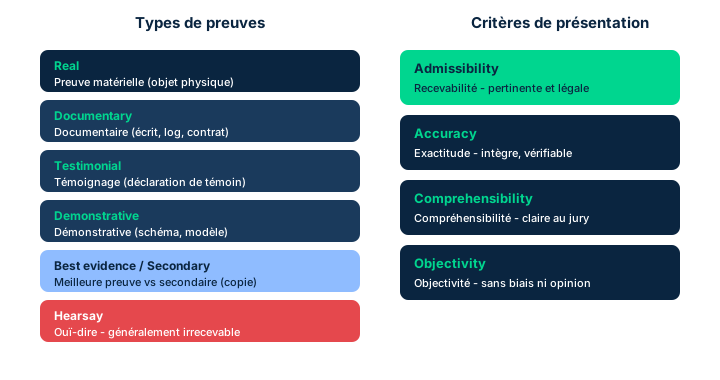
Taking a digital case to court raises a decisive question: admissibility. Evidence is only useful if the court accepts it. Yet not every altered piece of evidence is automatically inadmissible, and not every unaltered piece is automatically accepted: it all depends on how it was documented, preserved, and presented. That is precisely why the manual recommends relying on dedicated forensics and evidence-gathering professionals.
The manual states four tenets the security professional must follow when presenting evidence, especially to a court. Admissibility: only evidence acceptable to the court may be presented; the court will inform the professional what is unacceptable. Accuracy: the evidence should be true and clear. Comprehensibility: even though the organization is trying to tell one coherent story, it cannot withhold evidence contrary to that story; keeping contrary evidence out of consideration may, in some cases, be a crime. Objectivity: the evidence should stand for itself on a factual basis; unless called upon by the court or counsel, the professional should not introduce subjective opinion.
Exam trap: do not confuse admissibility (the court accepts or not) with accuracy (the evidence is true); and remember that comprehensibility forbids hiding exculpatory items, which surprises candidates who picture the investigator as a partisan advocate. Documentation is the common thread that secures all four tenets.
A founding principle explains why digital evidence exists at all: Locard's exchange principle states that every contact leaves a trace. Applied to the digital world, every attacker action (login, command, transfer) deposits artifacts (logs, temp files, registry entries, metadata) and removes others. This is what makes investigation possible: there is no intrusion without traces, only traces we have not yet managed to collect or correlate.
- The four tenets: admissibility, accuracy, comprehensibility, objectivity
- Altered evidence is not necessarily inadmissible; unaltered is not necessarily accepted
- Comprehensibility forbids hiding contrary (exculpatory) items
- Objectivity bars subjective opinion unless the court requests it
- Locard's exchange principle: every contact leaves a trace; no intrusion is artifact-free.
1.3 Order of volatility and preservation vs speed of response
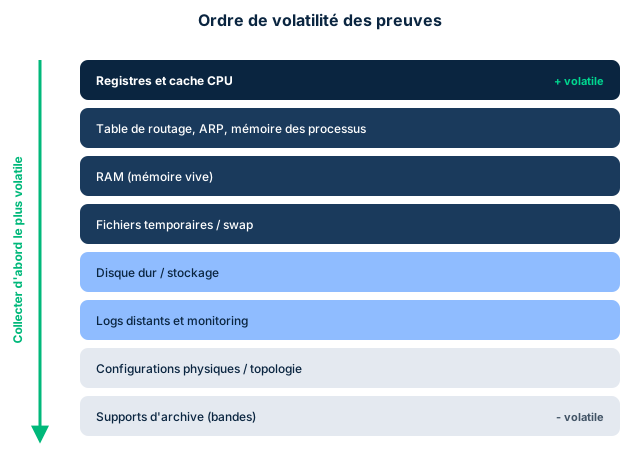
Not all data survives time and handling equally. Order of volatility ranks evidence sources from most volatile to most durable, dictating the order in which to collect them. At the top sit CPU registers and caches, then RAM, then network state and connection tables, then temporary files and active disk space, and finally durable storage media (disks, archives, backups). You collect the most volatile first.
RAM volatility is a crucial but often overlooked detail. Data in random-access memory is extremely volatile: as soon as power is removed or the system is shut down, RAM contents become unrecoverable by ordinary means. Hence a central dilemma: during an incident, shutting machines down can stop malware from spreading, but it can also destroy key evidence needed for a later investigation.
This is the trade-off between speed of response (limiting damage and risk) and preserving evidence. Evidence collection is a sensitive process: acting too fast to contain the attack can wipe volatile memory; acting too slowly lets damage spread. The right forensic reflex is often to capture RAM (a memory dump) before any power-down, when compatible with human safety and risk limitation. Exam trap: if a question pits "shut down fast to stop the malware" against "preserve volatile evidence," the expected reasoning is to capture the volatile first, absent immediate danger. Order of volatility = order of collection, from most ephemeral to most durable.
- Collect from most volatile (registers, cache, RAM) to most durable (disks, archives)
- RAM is unrecoverable once powered off: capture a memory dump first
- Key trade-off: speed of response (contain) vs preservation (volatile evidence)
- Capture the volatile before powering down, absent immediate danger to people
1.4 Chain of custody, write-blocking, and conducting interviews
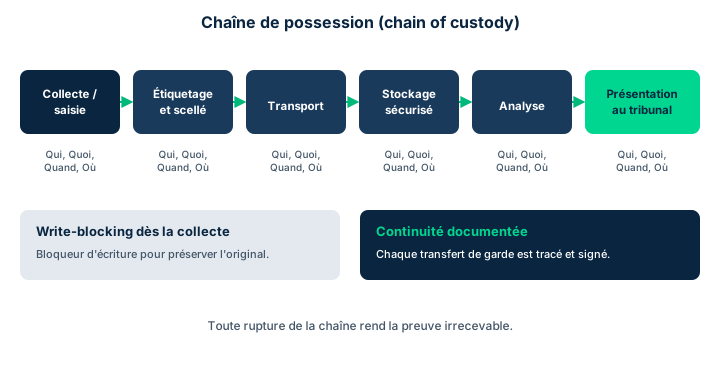
The chain of custody is the documented traceability of evidence from collection to presentation. It must answer the imperative questions - who, what, where, why, when - for every handling of the evidence. The documentation should be so thorough that another person, starting from the same original material, could follow the documented process and reach the same analysis. It includes all steps: evidence collection/capture, analysis, and storage.
Preserving the original is a cardinal principle. The professional must avoid any unrecorded or unintended modification. This relies on write-blocking technology, which prevents any write to the seized medium during copying; on controlling external access; and on managing electromagnetic emissions. Analysis should, whenever possible, be done on copies (bit-level copies) rather than on the original. All these preservation efforts must themselves be documented.
Interviews follow precise best practices: record when possible (notifying the subject and recording the notification, per local laws); never have a sole interviewer (multiparty interviews); preserve the subject's rights, inform them they may refuse the interview (even if refusal may lead to termination) and, if law or contract requires it, allow them to be accompanied. Exam trap: a write-blocker guarantees integrity (hence admissibility), not confidentiality; and the chain of custody breaks the moment a link of traceability is missing, making the evidence challengeable.
- Chain of custody = who/what/where/why/when, at every handling
- Preserve the original: write-blocking, analysis on bit-level copies, access control
- Document the preservation efforts themselves as well
- Interviews: record, multiparty, preserve rights and the option to refuse
1.5 The NIST forensic cycle and forensic readiness
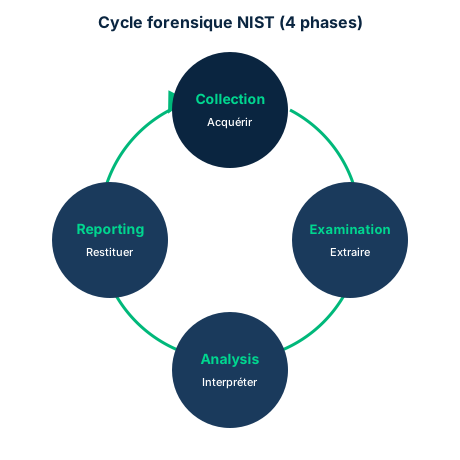
Once an investigation is initiated, it unfolds in four phases, consistent with NIST's simplified model (SP 800-86, Guide to Integrating Forensic Techniques into Incident Response), shown in Figure 7.11. Collection: the scene is secured; data related to the event is identified, labeled, recorded, and collected, while preserving its integrity. Examination: the data is processed with appropriate forensic tools and techniques to identify and extract the relevant information while protecting its integrity. Analysis: the results of the examination are inspected to obtain information that addresses the questions that caused the investigation. Reporting: the results are reported, describing the actions performed, determining what further actions are needed, and recommending improvements to the forensic process.
This conduct rests on several organizational prerequisites. The organization should have a structured, resourced forensic program with appropriate support and authority. Individuals with forensic responsibilities should be designated and trained ahead of the incident, with the right tools. Practices must conform to the legal system of the relevant jurisdiction. Finally, business practices should be structured in advance of an incident to support forensic analysis: this is forensic readiness.
Collection requires specialized tools (bit-level disk copies, system-state capture, log copying) that must be maintained and recognized as valid methods by the legal system. Virtualization and the cloud complicate identification and collection, often requiring coordination with a provider. Exam trap: the NIST order is Collection -> Examination -> Analysis -> Reporting; do not confuse examination (extracting the information) with analysis (interpreting it against the investigation's questions).
- NIST cycle (SP 800-86): Collection -> Examination -> Analysis -> Reporting
- Examination extracts the information; Analysis interprets it
- Forensic readiness: structured program, staff trained in advance, legal conformity
- Cloud and virtualization often require collection coordinated with the provider
1.6 ISO forensic standards and use of certified professionals
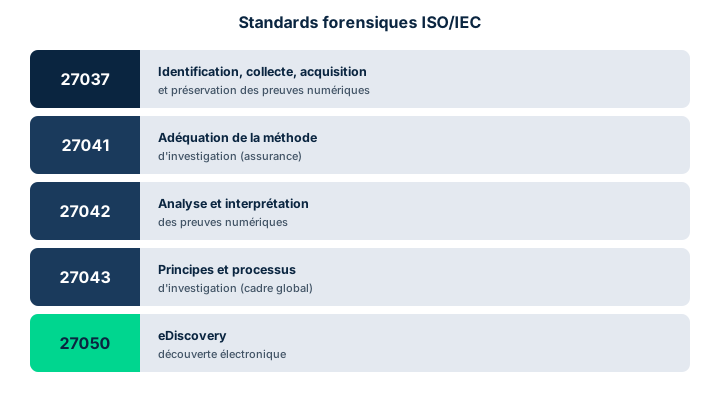
NIST's simplified model is consistent with a family of ISO standards covering the lifecycle of digital evidence, shown in Figure 7.10. ISO/IEC 27037 covers identification, collection, acquisition, and preservation of digital evidence: it is the reference standard for the collection field. ISO/IEC 27041 addresses assurance and the suitability of investigation methods. ISO/IEC 27042 covers analysis and interpretation of digital evidence. ISO/IEC 27043 describes general incident-investigation principles and processes. ISO/IEC 27050 governs eDiscovery (management of the ESI to produce). National standards also exist, influenced by each jurisdiction's rules of evidence and legal systems.
Most organizations do not keep trained forensic professionals on staff: it is a very specific discipline, requiring training and experience, for an activity uncommon in most lines of business. Faced with a forensic need, the temptation is to assign the task to a security or IT team member: this is not recommended. It is better to use a certified - and licensed if needed - external contractor.
In some jurisdictions (for example the U.S. states of Texas and Michigan), forensic analysis cannot be performed as a paid service unless the analyst is licensed by the state, under the profession of private investigator. So all applicable laws must be built into the evidence collection, analysis, and presentation policy. Reminder about first responders: during fire, police, or medical situations, first responders have higher priorities (safety of human life) that may lead them to disturb the scene; and many anomalies are first handled by the help desk, not as a potential crime scene. Exam trap: outsourcing to a certified/licensed professional is not a luxury, it is what secures admissibility and respects local legal constraints.
- 27037 collection/preservation, 27041 assurance, 27042 analysis, 27043 process, 27050 eDiscovery
- The NIST model is consistent with these ISO standards
- Outsource to a certified professional rather than the IT/security team
- Some jurisdictions require a private investigator license for paid forensics
Case studies
An investigation spanning two jurisdictions
Context : A French company detects data exfiltration from an application server hosted at a cloud provider in Texas. The compromised machine is still running: RAM likely holds the active malicious processes and decryption keys in cleartext. The IT team, pressed by management, wants to immediately power off the server to stop the exfiltration, then hand the analysis to an internal system administrator. The DPO warns that proceedings could follow, in both France and the United States.
Question : In what order should evidence be collected, and who should conduct the analysis given the jurisdictions involved?
Show analysis and answer
Powering off the server first would destroy the RAM, unrecoverable by ordinary means, and with it the active processes and cleartext keys: that would sacrifice the most volatile evidence for the sake of speed of response. The right forensic reflex is to follow order of volatility: capture a memory dump and network state first, then only isolate/shut down the machine, taking a bit-level disk copy through a write-blocker. Every action is logged in the chain of custody (who/what/where/why/when).
The choice of analyst is not neutral. Assigning the task to an internal administrator is discouraged: forensics requires specific skills and, above all, the server is in Texas, where paid forensic analysis requires a private investigator license. So a certified external contractor is needed, licensed in the relevant jurisdiction if required.
Finally, the DPO is right: with two jurisdictions, you must involve legal counsel, trigger a legal hold to prevent spoliation, and ensure collection methods are recognized as valid by both the French and Texan legal systems - consistent with ISO 27037 (collection/preservation) and 27042 (analysis).
Takeaway : Capture the volatile before powering off, outsource to a certified/licensed professional in the right jurisdiction, and document the chain of custody: the most valuable evidence is often the most fragile.
- RAM is captured before any power-down, absent immediate danger to people
- A cross-border inquiry needs legal counsel, legal hold, and recognized methods
- Paid forensics may require a private investigator license depending on the state
- The chain of custody is documented at every handling
Examination is not Analysis
In the NIST cycle (SP 800-86), Examination and Analysis are two distinct phases. Examination extracts relevant information from the collected data using forensic tools. Analysis interprets that information against the questions that triggered the investigation. Examination yields the raw material; analysis derives meaning. The full order is Collection -> Examination -> Analysis -> Reporting. Swapping or merging these two phases is a frequent trap.
Speed of response vs volatile evidence
Powering a machine off fast can stop malware from spreading, but it destroys RAM, unrecoverable by ordinary means. If a question pits "contain as fast as possible" against "preserve the evidence," the expected reasoning is to capture the volatile first (memory dump), per order of volatility, absent immediate danger to people's safety. Evidence collection is a trade-off between speed of response and preservation, not an automatic choice in favor of speed.
Comprehensibility: do not hide exculpatory evidence
The comprehensibility tenet often surprises: even though the organization wants to present a coherent story, it cannot withhold evidence contrary to that story. Keeping unfavorable evidence out of consideration may, in some cases, be a crime. The security professional is not a partisan advocate: combined with objectivity (no subjective opinion unless the court asks), this principle requires a complete, factual presentation, not a slanted selection.
Checkpoint — Checkpoint
-
When presenting evidence to a court, which tenet requires not withholding evidence contrary to the story the organization wants to tell?
- A Comprehensibility
- B Admissibility
- C Accuracy
- D Objectivity
Answer & rationale
Answer : A — Comprehensibility
Comprehensibility forbids withholding contrary evidence, which can even be a crime. Admissibility concerns the court's acceptance of evidence. Accuracy requires evidence to be true and clear. Objectivity bars subjective opinion. Only comprehensibility targets the hiding of exculpatory items.
-
A security professional adds their personal interpretation of the attacker's intent to their testimony, without the court or counsel asking. Which tenet do they breach?
- A Objectivity
- B Comprehensibility
- C Admissibility
- D Accuracy
Answer & rationale
Answer : A — Objectivity
Objectivity requires evidence to stand on a factual basis; unless the court or counsel asks, the professional should not introduce subjective opinion. Comprehensibility targets non-concealment, admissibility the court's acceptance, accuracy truthfulness. Adding unsolicited opinion breaches objectivity.
-
According to the manual, what in practice determines whether evidence will be accepted by the court (admissibility)?
- A How it was documented, preserved, and presented
- B Solely the fact that it was never altered
- C Its quantity, the more the better
- D The age of the evidence relative to the incident
Answer & rationale
Answer : A — How it was documented, preserved, and presented
The manual states that altered evidence is not necessarily inadmissible and unaltered evidence is not necessarily accepted: it all depends on documentation, preservation, and presentation. Integrity alone (never altered) is thus insufficient, invalidating the second option; quantity and age are not relevant criteria.
-
Which tenet is directly engaged when the court signals that part of the submitted evidence is unacceptable and may not be presented?
- A Admissibility
- B Objectivity
- C Accuracy
- D Comprehensibility
Answer & rationale
Answer : A — Admissibility
Admissibility means only evidence acceptable to the court may be presented, and the court informs the professional of what is unacceptable - exactly the scenario described. Accuracy is about truthfulness, objectivity about the absence of opinion, comprehensibility about non-concealment: none describes rejection by the court.
Key takeaways
- Four investigation types: administrative, criminal, civil, regulatory, with distinct standards of proof (beyond a reasonable doubt vs preponderance of evidence).
- The four presentation tenets: admissibility, accuracy, comprehensibility, objectivity; documentation secures them all.
- Order of volatility: collect from most volatile (RAM) to most durable; capture RAM before powering off, absent immediate danger.
- Chain of custody: who/what/where/why/when at every handling; preserve the original via write-blocking and bit-level copies.
- NIST forensic cycle (SP 800-86): Collection -> Examination -> Analysis -> Reporting; forensic readiness is prepared in advance.
- ISO standards: 27037 (collection/preservation), 27041 (assurance), 27042 (analysis), 27043 (process), 27050 (eDiscovery).
- Outsource to a certified, even licensed professional (private investigator depending on jurisdiction), rather than the internal IT team.
Logging and intrusion detection
Prerequisites : Command of the CIA triad, the IAAAA lifecycle, and defense in depth (Domain 1).
You can only defend what you observe. This module links two complementary pillars of Security Operations: logging, which produces the raw material of any investigation, and intrusion detection, which turns that stream of signals into actionable alerts. You will learn to tell a plain event from a precursor, an indicator, and an indicator of compromise (IoC), to structure a log-management program along NIST SP 800-92 and ISO 27001 A.12.4, and to reason about intrusion through the extended CIA triad (CIANA+PS).
The second half of the module covers IDS and IPS: their definitions, their placement (perimeter, host-based, network-based) illustrated by Figure 7.1, and the four main detection methods (deviation, signature, pattern matching, heuristic). You will also see how threat hunting, threat modeling, MITRE ATT&CK, and EDR/XDR solutions extend detection toward a proactive posture.
The exam mostly tests fine distinctions (IDS vs IPS, signature vs deviation, precursor vs indicator) and placement choices. The goal is to link each signal to the right detection mechanism and each asset to the right monitoring layer.
2.1 Why log: events, precursors, indicators, and IoC
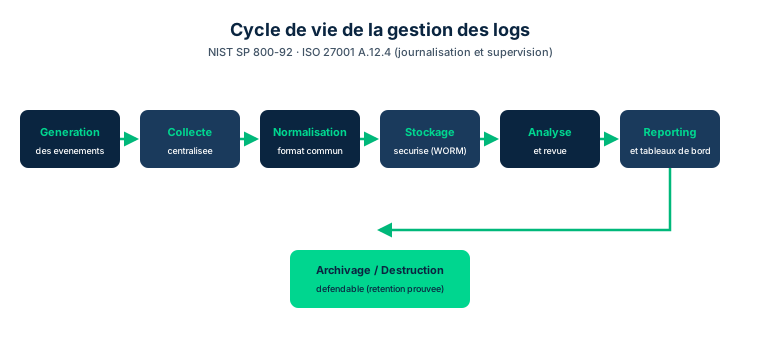
Logging is not a compliance formality: it is the organization's memory. Without logs, you cannot detect an attack in progress, reconstruct the sequence of an incident, or produce admissible evidence for a forensic investigation. Signals captured by systems, applications, and network devices let you reconstruct a sequence of events for troubleshooting, recovery, and post-incident legal investigation. It is also the basis of accountability seen in Domain 1: with no trace, no action can be attributed.
Everything starts with the event, that is, any observable fact in a system. Events (or the signals they produce) are then classified into two families. A precursor is a signal suggesting a possible change of conditions, internal or external, that may alter the threat landscape: rising social tensions, employee or customer grievances going viral on social media. Precursors are used to adjust alarm thresholds and sensor sensitivity in near real time, and even to raise the level of challenge required at authentication. An indicator, by contrast, suggests that an unauthorized action is about to occur, is underway, or has already happened.
The most critical case is the indicator of compromise (IoC): a signal that an intrusion, malware, or a predefined set of hostile events is occurring or has occurred. Examples: an attempt to bypass an allowed/blocked list (a sign of malware installation), or logins from IPs or regions where no authenticated user should be located. IoCs must be the SOC humans' immediate priority. Exam trap: a precursor anticipates a context change, an indicator signals unauthorized activity, and an IoC is a high-confidence indicator proving a compromise is underway or confirmed.
Logging everything without a filter drowns the analyst in noise. The clipping level is the threshold below which repetitive, benign events do not raise an alert: for example, tolerating three failed logons and flagging the fourth. Tuned well, it cuts false positives and surfaces real anomalies; tuned poorly, it hides a low-and-slow attack beneath the threshold. The clipping level is set from a baseline of normal activity and refined with experience.
- Without logs: no detection, no incident reconstruction, no forensic evidence, no accountability
- Event -> precursor (upcoming context change) or indicator (unauthorized activity)
- IoC = high-confidence indicator of an ongoing or confirmed compromise
- IoCs are the priority for immediate human handling at the SOC
- Clipping level: anti-noise threshold; set too high, it hides a low-and-slow attack.
2.2 The log-management lifecycle: NIST SP 800-92 and ISO 27001 A.12.4
Every security framework addresses logging in some fashion. Two references dominate the exam. NIST SP 800-92, Guide to Computer Security Log Management, describes a log-management practice broadly applicable to any information system. ISO 27001 covers the topic in its Annex A, control A.12.4 Logging and Monitoring. Knowing these two anchors lets you answer questions asking for the normative source of a logging best practice.
A well-structured log-management program covers a full lifecycle: logging compliance and standards; logging policies across the systems and information lifecycles; logging infrastructure; log generation, collection, and normalization; log protection from creation to disposition (archiving or defensible destruction); finally log review, analytics, and reporting. Each stage has its security rationale: normalization makes heterogeneous formats comparable, protection guarantees the integrity and non-alteration of evidence, archiving and defensible destruction meet legal retention requirements.
Most indicators and some precursors can be captured and logged by hardware, OSs, applications, and network-management devices. But accumulating logs is not enough: without centralized collection, normalization, and review, volume drowns the analyst. That is precisely the role of a SIEM (Security Information and Event Management), which aggregates, normalizes, correlates, and stores these logs - the subject of a later module. Exam trap: log protection "from creation to disposition" includes defensible destruction, not just archiving; and NIST SP 800-92 is THE dedicated log-management guide, not to be confused with SP 800-137 (continuous monitoring).
- NIST SP 800-92 = dedicated log-management guide; ISO 27001 A.12.4 = Logging and Monitoring
- Lifecycle: compliance -> policies -> infrastructure -> generation/collection/normalization -> protection -> review/reporting
- Log protection "from creation to disposition": archiving OR defensible destruction
- The SIEM aggregates, normalizes, correlates, and stores; it does not replace logging policy
2.3 Intrusion: CIANA+PS, zero trust, insiders and outsiders
An unauthorized entry into an organization's environment, especially its information systems, can affect every element of the CIA triad, or the broader CIANA+PS set (Confidentiality, Integrity, Availability, Nonrepudiation, Authenticity + Privacy, Safety). Intrusion is therefore not only about confidentiality: an attacker pushing applications into fail states to seize control also attacks availability. The exam expects you to link a given intrusion to the right compromised attribute, sometimes several at once.
Traditionally, "intrusion" meant unauthorized access by external attackers, as opposed to internal threats. That view is now seen as naive given the growth of the insider threat. As systems grow more complex and adopt the principles of a zero trust architecture, intrusion should be redefined as any non-authenticated and unauthorized movement or attempt to enter a controlled zone, system, subsystem, domain, or subdomain, by a user (human or nonhuman) or a subject in access-control terms.
Some in the zero trust community argue that the words "insider" and "outsider" divert attention from the real issue: proper access-control implementation. In an organization compartmentalized by ethical walls separating sensitive areas, a Subject 1 authorized for one area but not the others is at once an "insider" of the organization and an "outsider" of those other areas. In IAM terms, the insider/outsider labels carry no meaning: what matters is the subject's authenticated and authorized state toward the resource. Exam trap: under zero trust, you reason not "internal vs external" but "authenticated and authorized, or not" for every access attempt, regardless of network position.
- An intrusion can touch all of CIANA+PS, not only confidentiality
- Zero trust redefines intrusion: any non-authenticated/unauthorized access, wherever it is
- The insider/outsider labels have no meaning in IAM terms
- A single subject can be an insider of the organization and an outsider of a zone
2.4 IDS vs IPS and their placement (Figure 7.1)
Two conceptual classes of anti-intrusion mechanisms exist. An IDS (intrusion detection system) monitors the environment and automatically recognizes malicious attempts at unauthorized access, then alerts a human (often the SOC or IT) for analysis and follow-up: it detects but does not act. An IPS (intrusion prevention system) monitors likewise but acts automatically as soon as it recognizes a malicious attempt, then notifies that action has been taken. Most modern solutions can run in IDS or IPS mode, the organization choosing the optimal behavior. The exam distinction is clear: IDS = detect and alert; IPS = detect and block.
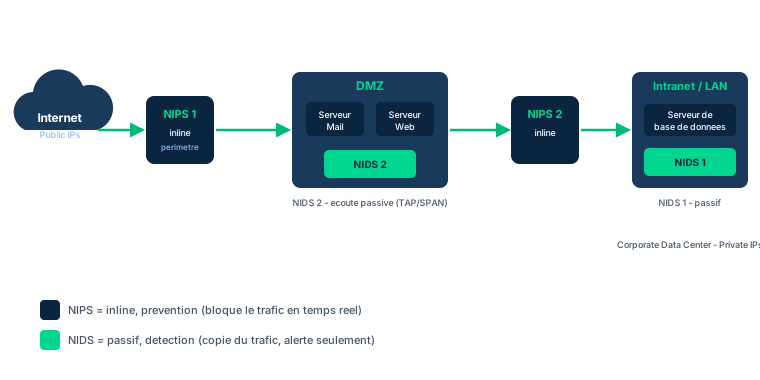
Placement comes in three families, illustrated by Figure 7.1. Perimeter placement positions the sensor at the network edge, in the DMZ, to inspect inbound and outbound traffic; depending on the technology, it works with the gateways or replaces them. Host-based installs HIDS/HIPS agents on endpoints to detect suspect traffic between hosts: it is a defense-in-depth layer if the attacker has crossed the perimeter, and it can also reveal internal threats. Network-based places NIDS/NIPS elements at various network points to monitor internal traffic and spot lateral malicious activity.
The organization is not limited to a single placement: combining several is recommended, as Figure 7.1 shows with NIPS in the DMZ (north-south) and NIDS on internal LAN segments (east-west). Exam traps: a poorly tuned IPS can block a legitimate transaction (loss of availability), whereas an IDS at worst raises an alert to triage; and host-based protects a specific host, while network-based watches a segment - you combine them, you do not oppose them.
- IDS detects and alerts; IPS detects and blocks automatically
- Three placements: perimeter (DMZ), host-based (HIDS/HIPS), network-based (NIDS/NIPS)
- Host-based protects a host; network-based watches a segment; combine them
- A poorly tuned IPS can block legitimate traffic and harm availability
2.5 Detection methods, threat hunting, MITRE ATT&CK, and trade-offs
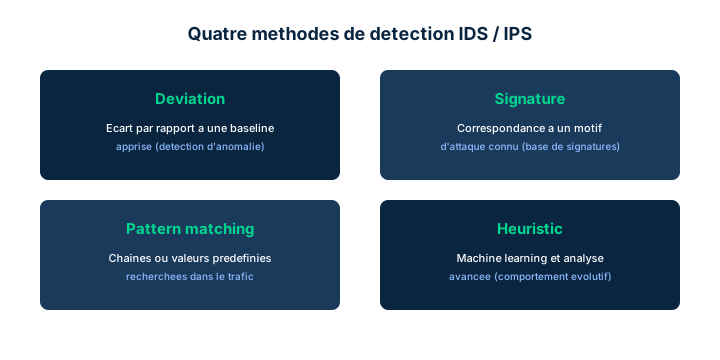
An IDS/IPS detects malicious activity in several ways. Deviation learns a baseline of normal activity for the organization, then treats any departure as suspect. Signature recognizes known attack patterns in traffic and activity. Pattern matching scans traffic for predefined data-value patterns (fragments of names, words, combinations or proximities, occurrence frequencies, watermarks) that may betray a sensitive-data leak, whether east-west (lateral) or north-south (to or from the outside). Heuristic goes further: machine-learning algorithms continuously enrich knowledge of the environment, an advanced form of deviation analysis. Classic trap: signature only catches the known (weak against a zero-day); deviation/heuristic can catch the unknown but at the cost of false positives.
Modern detection extends into proactive threat hunting, now a mission in its own right with the rise of next-generation Wi-Fi, IoT, and edge/fog computing. Threat modeling builds patterns or typologies describing threat actors' behavior and their actions; many such typologies are published by MITRE, notably via the ATT&CK framework (attack.mitre.org). These typologies feed EDR (endpoint detection and response) and XDR (extended detection and response), which span a wider time reach than classic HIDS/NIDS: their case files can stretch over months or years, and their ML models draw on the entire cyber community's experience, filterable to the organization's own context. EDR and XDR share much with user and entity behavior modeling (UEBA).
Every system imposes trade-offs. Maintenance: signature-based systems need regular signature updates, baseline-based ones need updating whenever the baseline changes. Overhead: any deployment burdens productivity, capacity, and performance, hence the choice to prioritize high-value assets. False positives: each response has a cost (lost functionality or handling effort), to be weighed against the benefit of risk avoided. Agility: attackers learn faster than defenders, though community sharing (the SUNBURST/SolarWinds case) can rebalance. Learning period: any tool that must "learn" the norm produces many false positives at first. Latency: IDS/IPS often add notable latency to traffic. Exam trap: weighing the cost of responses (false positives included) against the expected benefit is a risk-management decision, not a purely technical setting.
- Signature = known only; deviation/heuristic = unknown but false positives
- Pattern matching spots east-west and north-south data leaks (DLP)
- MITRE ATT&CK provides typologies feeding EDR/XDR and threat hunting
- Trade-offs: maintenance, overhead, false positives, agility, learning period, latency
Case studies
Bangladesh Bank / SWIFT: the detection that was missing
Context : In February 2016, attackers infiltrate the network of the central bank of Bangladesh and issue fraudulent SWIFT transfer orders for nearly one billion dollars from the bank's account at the New York Federal Reserve. To cover their tracks, custom malware alters the SWIFT Alliance Access application, deletes transaction records, and tampers with the printer generating the paper confirmations. Several transfers succeed (USD 81 million stolen) before the fraud is spotted, partly thanks to a typo in a beneficiary name.
Question : Which logging and detection mechanisms (file integrity monitoring, DLP, SIEM, IDS/IPS) could have detected the attack earlier, and to which CIANA+PS attribute does each relate?
Show analysis and answer
The tampering with the SWIFT application and the deletion of records target integrity: file integrity monitoring (FIM) would have raised an IoC by detecting the unauthorized modification of binaries and application logs, a high-confidence signal of compromise.
The outbound fraudulent orders to unusual accounts (in the Philippines and Sri Lanka) are abnormal north-south traffic: a deviation-based IDS/IPS, comparing activity to the baseline of the bank's usual SWIFT flows, would have flagged the departure; a pattern-matching/DLP engine could have spotted suspicious value combinations. These flows touch confidentiality (order exfiltration) and the availability/integrity of the payment system.
A SIEM would have correlated these disparate signals (FIM, SWIFT logs, off-hours connections, log deletion) into a single high-probability alert, where, in isolation, each event went unnoticed. The very deletion of logs should have triggered an alert: a SIEM with secure, off-host storage prevents the attacker from erasing evidence locally. Finally, connections from unusual sources over a weekend were classic indicators.
Governance lesson: no single control would have sufficed; it is the combination of FIM (integrity), DLP/pattern matching (confidentiality), deviation-based IDS (availability), and SIEM (correlation) in defense in depth that turns scattered events into an actionable IoC.
Takeaway : Effective detection arises from correlating multiple signals (FIM, DLP, deviation-based IDS, SIEM); secure off-host log storage is crucial because log deletion is itself an IoC.
- Unauthorized modification of binaries/logs is an integrity IoC detectable by FIM
- A deviation-based IDS spots an out-of-baseline outbound SWIFT flow
- The SIEM correlates isolated events into a single high-confidence alert
- Log deletion is an IoC; store logs out of the attacker's reach
Precursor vs indicator vs IoC
Three levels not to confuse. A precursor heralds a possible context change that could alter the threat landscape (social tensions, viral grievance): it tunes thresholds, it proves nothing. An indicator suggests that an unauthorized action is imminent, ongoing, or past. An IoC is a high-confidence indicator proving an intrusion or malware is occurring or has occurred (attempt to bypass an allowed/blocked list, login from a forbidden region). Keyword: "possible change of conditions" -> precursor; "confirmed compromise" -> IoC.
IDS detects, IPS blocks
The IDS detects and alerts a human; it does not interrupt traffic. The IPS detects AND automatically acts to block. Exam consequence: a poorly tuned IPS can block a legitimate transaction (costly false positive, availability impact), whereas an IDS at worst floods the analyst with alerts. If the question favors zero false-blocking (critical environment with no tolerance for interruption), lean IDS; if it favors automatically stopping a known attack, lean IPS. Most products do both: it is a configuration choice, not a product choice.
Signature vs deviation: the zero-day
Signature detection only recognizes known attacks: it is blind to a zero-day threat and requires regular signature updates. Deviation detection (and its advanced heuristic form) learns a baseline and can thus spot the unknown, but pays for that power with false positives, especially during the initial learning period. On the exam: "new, never-seen attack" -> deviation/heuristic; "known attack, up-to-date signature base" -> signature. Pattern matching, for its part, targets data leaks (a DLP role), not attack patterns.
Checkpoint — Checkpoint
-
The SOC observes several login attempts from an IP range in a country where no authenticated employee should be located. How should this signal be classified?
- A An indicator of compromise (IoC)
- B A precursor
- C A plain event with no meaning
- D A deviation baseline
Answer & rationale
Answer : A — An indicator of compromise (IoC)
A login from a region where no authenticated user should be located is the textbook IoC: a high-confidence signal that an intrusion is occurring. A precursor would herald a context change (tensions, viral grievance), not direct unauthorized activity. A "meaningless" event is wrong here. The deviation baseline is the learned reference, not a signal.
-
A bank requires that no legitimate transaction ever be blocked automatically, but wants to be alerted to any suspicious activity for human analysis. Which solution should be preferred?
- A An IDS, which detects and alerts without interrupting traffic
- B An IPS, which automatically blocks any suspicious activity
- C An inline stateless firewall
- D Disabling all logging to reduce latency
Answer & rationale
Answer : A — An IDS, which detects and alerts without interrupting traffic
The IDS detects and alerts a human without blocking: it avoids any false-blocking of a legitimate transaction, the scenario's requirement. The IPS would block automatically, risking a costly false positive on a valid transaction. A stateless firewall does not meet the behavioral-detection need. Disabling logging would remove the very detection and evidence capability.
-
An organization wants to detect entirely new, never-cataloged attacks. Which detection method is best suited, and what is its main drawback?
- A Deviation/heuristic; drawback: more false positives
- B Signature; drawback: too many false positives
- C Pattern matching; drawback: only detects data leaks
- D Signature; drawback: requires a learning period
Answer & rationale
Answer : A — Deviation/heuristic; drawback: more false positives
Deviation detection (and its ML heuristic form) learns a baseline and can spot the unknown, including zero-days; its price is a higher false-positive rate, especially during the learning period. Signature only recognizes the known, so it is unfit for the new. Pattern matching targets data leaks, not attack novelty. The learning period concerns baseline systems, not signature.
-
In Figure 7.1, a sensor monitors internal traffic between LAN segments to spot lateral movement by an attacker who has already crossed the perimeter. What placement type is this?
- A Network-based (NIDS/NIPS) on an internal segment
- B Perimeter placement in the DMZ
- C Host-based (HIDS/HIPS) on a single endpoint
- D No placement covers internal traffic
Answer & rationale
Answer : A — Network-based (NIDS/NIPS) on an internal segment
Monitoring internal inter-segment traffic to detect lateral (east-west) movement is the role of a network-based NIDS/NIPS placed on an internal segment. Perimeter placement inspects north-south traffic at the edge/DMZ. Host-based protects a specific host, not a whole segment. The claim that no placement covers the internal side is false: NIDS/NIPS and HIDS/HIPS do, and they are combined in defense in depth.
Key takeaways
- Without logs, there is no detection, no incident reconstruction, no forensic evidence, and no accountability.
- Event -> precursor (context change) or indicator; an IoC is a high-confidence indicator of a compromise.
- NIST SP 800-92 is the dedicated log-management guide; ISO 27001 A.12.4 covers Logging and Monitoring.
- Under zero trust, intrusion is any non-authenticated/unauthorized access (CIANA+PS); insider/outsider have no IAM meaning.
- IDS detects and alerts; IPS detects and blocks; perimeter, host-based (HIDS/HIPS), and network-based (NIDS/NIPS) placements combine.
- Signature = known; deviation/heuristic = unknown but false positives; MITRE ATT&CK, EDR/XDR, and threat hunting extend detection; trade-offs: maintenance, overhead, false positives, agility, learning period, latency.
Monitoring, SIEM/SOAR, and threat intelligence
Prerequisites : Familiarity with logging, IDS/IPS, and data classification. Domain 7 Module M2 recommended.
Collecting logs is pointless if no one correlates, understands and acts on them. This module describes the modern security operations monitoring chain : the SIEM that aggregates and correlates, the SOAR that orchestrates and automates response, continuous monitoring (ISCM) that never sleeps, the DLP that watches data leaving, threat intelligence that anticipates, and UEBA that spots the abnormal through machine learning.
The exam mainly tests your distinctions : SIEM vs SEM vs SIM, playbook vs runbook, ingress vs egress, data at rest vs in motion vs in use, external vs internal threat intelligence, strict vs loose enforcement. It also tests your clear-sightedness : none of these technologies is infallible, as SolarWinds/SUNBURST demonstrated.
By the end of the module, you will know how to position each tool in the defensive chain, choose the right responsibility model (self-hosted, cloud, hybrid, SIEMaaS) and explain why automation never replaces the human analyst.
3.1 SIEM: SEM + SIM, and its seven functions
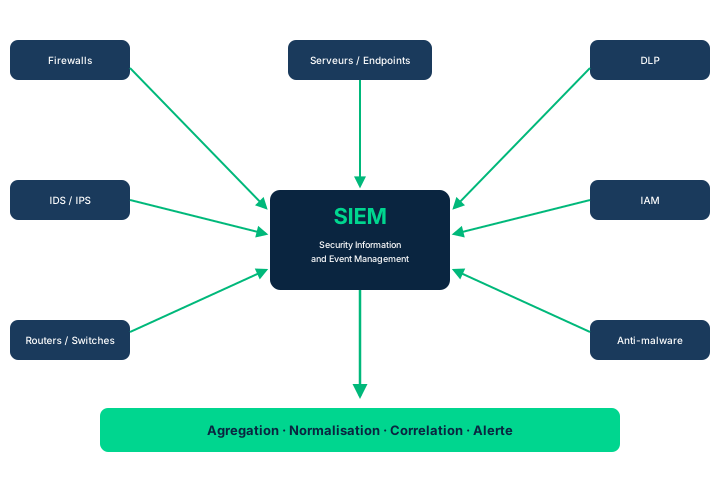
A typical organization runs a multitude of detection systems (firewalls, IDS, IPS, Windows and UNIX hosts) spread across network segments and critical hosts. The sheer number and diversity of these sources make manual monitoring unmanageable. SIEM (Security Information and Event Management) answers this by centralizing security data into a single interface. SIEM is actually a marketing descriptor that merges two earlier tool families: SIM (Security Information Management), focused on log collection and after-the-fact analysis, and SEM (Security Event Management), focused on real-time incident detection and response. Understanding this lineage explains why a SIEM does both historical archiving and real-time alerting.
A SIEM has seven common functions. Aggregation: it gathers information from across the environment (firewalls, IDS/IPS, IT performance tools, network devices, hosts/endpoints, anti-malware) into a centralized repository. Normalization: it harmonizes heterogeneous formats into a standardized representation, sparing analysts from repeating log reviews on each system. Correlation: it mathematically assigns weight and probability to activities to automatically estimate whether a log stream is a real attack, and whether it spans multiple hosts or networks. Secure storage: it securely archives logs that are valuable both to the organization and to attackers.
The last three functions: Analysis (automated analysis via scripts and heuristics), Reporting (historical and current depiction of activity), and Real-time monitoring (real-time surveillance and threat detection enabling rapid response). Figure 7.2 depicts physical servers, but in practice all these functions often run on VMs hosted in a private on-premises, public, or hybrid cloud.
Exam trap: do not confuse the components. SEM captures real-time events (it can serve as a DLP building block); SIM manages log information over time. SIEM is their sum, not a distinct third model.
- SIEM = marketing term combining SEM (real-time) and SIM (historical)
- Seven functions: aggregation, normalization, correlation, secure storage, analysis, reporting, real-time monitoring
- SIEM often runs on VMs in private, public, or hybrid cloud
- Correlation weights events to estimate a multi-host attack
3.2 SIEM-as-a-service: splitting responsibilities
As with cloud service models, SIEM as a service (which does not yet have a widely recognized acronym) confronts the organization with a total set of responsibilities and functions that must be performed, but different ways to allocate them between in-house and a third-party provider. The full defensive chain follows the same steps as any IT system: requirements identification and analysis, build/buy/rent, deployment, and operation. The allocation slider can sit at several points along the spectrum.
Self-hosted, self-managed: the organization does everything, which can require a daunting array of key skill sets to support in-house. Cloud SIEM, self-manage: a cloud-hosted MSSP (Managed Security Services Provider) handles the middle operational layer (collecting and aggregating SIEM data); the organization handles placement and operation of detection sensors, then correlation and response actions. Overall management of the threat-vulnerability-response chain stays with the organization.
Hybrid self-hosted: the organization chooses, installs, and maintains the SIEM systems, sensors, and hardware; the MSSP shares collection, aggregation, and correlation with it as a partner in the overall process. SIEM as a Service: the provider handles all tasks up to the point where the organization responds to or uses SIEM data in its incident management and other security processes.
Exam trap: the more you delegate, the fewer in-house skills you need, but final responsibility for using the data and deciding on response almost always stays with the organization, except in the fullest SIEMaaS model. This is a direct instance of the cloud shared-responsibility model applied to security.
- Four models: self-hosted/self-managed, cloud self-manage, hybrid self-hosted, SIEMaaS
- The MSSP handles the operational layer per the chosen model
- More delegation means fewer in-house skills required
- The response decision stays with the organization except in full SIEMaaS
3.3 SOAR: orchestration, automation, and response
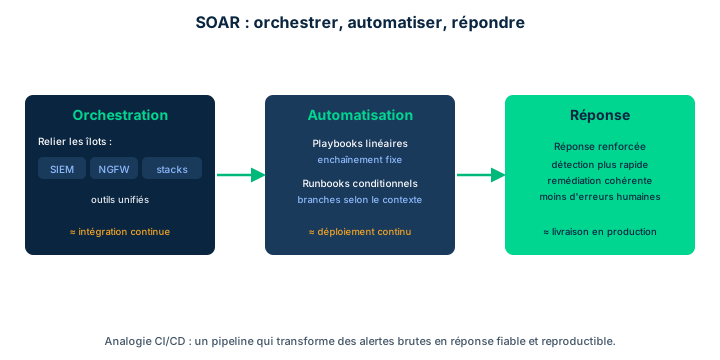
Many incidents have known causes and well-defined solutions. Automating these responses reduces the burden on incident response teams and speeds recovery. SOAR (Security Orchestration, Automation, and Response) is in some respects comparable to CI/CD: both rely heavily on the detailed process data generated by the many tools in their domain, and both provide a greater degree of process automation and integration. CI/CD does this for the integration, testing, and delivery of software units; SOAR provides a similar service to security professionals by bringing together all monitoring and control data and integrating it into workflows that automate processes that would otherwise require human coordination.
SOAR rests on three main processes. Security Orchestration: bringing together the various "islands of security automation" already in use (next-generation firewalls, SIEMs, other technology stacks), often supplied by different vendors, which makes manual orchestration difficult and time-consuming; workflows specify the task sequences of each orchestration activity. Security Automation: turning these workflows into conditionally triggered execution of playbooks or runbooks.
The playbook / runbook distinction is a classic exam point. Playbooks are generally linear sequences of tasks. Runbooks contain conditional logic that controls the execution of branches and sequels of activities. Some SOAR systems even bring varying degrees of ML to bear on developing, executing, and monitoring the performance of runbooks and playbooks. Security Response: providing the full suite of these orchestration and automation capabilities to strengthen incident response.
Exam trap: playbook = linear, runbook = conditional (branching logic). And SOAR does not invent detection: it orchestrates and automates response from data the SIEM and other tools have already produced.
- SOAR = Orchestration + Automation + Response, analogous to CI/CD
- Orchestration links existing automation islands via workflows
- Playbook = linear; runbook = conditional with branches
- SOAR automates response from already-collected data
3.4 Continuous monitoring and ISCM (NIST SP 800-137)
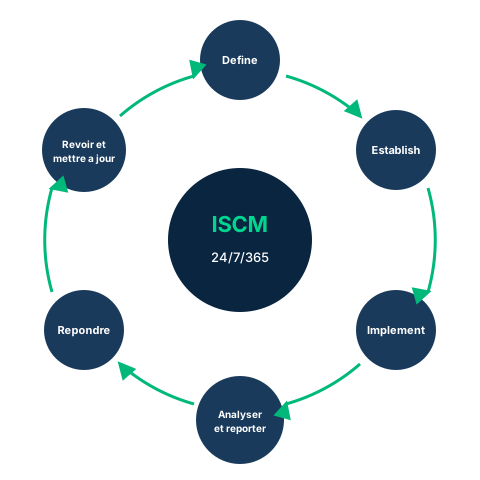
Continuous monitoring, formalized as Information Security Continuous Monitoring (ISCM) and coupled with automation, is now the norm for enterprise operations. ISCM maintains ongoing awareness of information security, vulnerabilities, and threats to support risk-management decisions. It assumes information assets are exposed to risk 24 hours a day, 7 days a week, all year (holidays and work-stoppage days included), and that the organization must plan, resource, maintain, and monitor its systems from that perspective.
NIST SP 800-137 provides a six-phase framework for implementing an ISCM strategy (Figure 7.3). The term ISCM is not used by ISO, but the concept appears in ISO/IEC 27004:2016 (Monitoring, Measurement, Analysis and Evaluation) as "continuous quantitative measurement of ISMS relevance." Other frameworks - COBIT (Control Objectives for Information and Related Technology) and PCI DSS (Payment Card Industry Data Security Standard) - also expect continuous monitoring of control performance.
The difference from the past is subtle but testable. Previously, frameworks suggested these phases could overlap or that some occurred more often than others. In ISCM, these phases are all conducted continuously throughout the day, overlapping, as events raise new precursors and indicators. The business processes enabling ISCM include comprehensive inventories, establishment of performance metrics for controls, incident response processes, and continuous process improvement. Still, the organization must have the tools and infrastructure to gather, analyze, and report on the monitored environment.
Exam trap: ISCM = NIST SP 800-137 (six phases), continuous and ongoing; the term is not ISO, but ISO 27004, COBIT, and PCI DSS carry the same continuous-monitoring spirit. Do not tie ISCM directly to ISO.
- ISCM = ongoing risk awareness, 24/7/365
- NIST SP 800-137 = six phases, all conducted continuously and overlapping
- ISO 27004, COBIT, and PCI DSS carry the same spirit, without the term ISCM
- Prerequisites: inventories, control metrics, incident response, continuous improvement
3.5 Egress monitoring and DLP: leaving is not harmless
Depending on whether the risk comes from inbound or outbound traffic, different tools apply. Ingress monitoring surveils and assesses all inbound traffic and access attempts; its logging and alerting tools include firewalls, gateways, remote authentication servers, IDS/IPS, SIEM, and anti-malware, which must be maintained and patched (signatures, configurations). Egress monitoring regulates data leaving the IT environment. The term used is "DLP" - a marketing descriptor without a standard definition, sometimes "data leak protection" or "data loss protection" - used here as a synonym for egress monitoring.
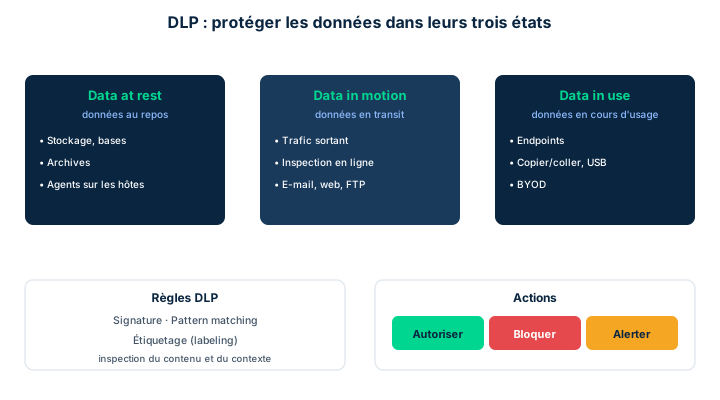
DLP compares outgoing data against a rule set to decide whether the action is allowed. This rule set can rely on three mechanisms. Signature: some data types follow readily identifiable strings (a DLP set against credit-card egress searches for and sequesters any 15-to-20-digit numeric string). Pattern matching: the DLP looks for patterns, e.g., two words each starting with an uppercase letter to restrict the export of proper names, or the frequency of a word in a document to block proprietary information. Labeling: sensitive assets are tagged ("copyright," "proprietary," "confidential") and recognized by the tool.
DLP deploys across three data states. Data at rest: agents placed in storage locations (databases, archives). Data in motion: software inspecting outbound traffic. Data in use: agents on endpoints, crucial in BYOD and cloud where the user processes the organization's data on their own devices. The overall protection effort includes data discovery/classification, monitoring (email and attachments, copy to portable media, FTP, web posting, applications/APIs), and enforcement, calibrated to the risk/benefit appetite: training (policy reminder), attribution (the user confirms intent and accepts responsibility), or stringency/prevention (halt, account lock, alert to management).
Exam trap: DLP = egress (outbound), not ingress. The functions DLP serves (compliance, security, training/awareness, due diligence, asset management) are not its states (at rest / in motion / in use) nor its rule mechanisms (signature / pattern / labeling). A current challenge: deploying DLP and ISCM within a zero trust architecture, not just at the perimeter.
- Ingress = inbound; egress = outbound; DLP is egress monitoring
- DLP rule sets: signature, pattern matching, labeling
- States: data at rest, in motion, in use (BYOD/cloud)
- Enforcement: training, attribution, stringency/prevention per risk appetite
3.6 Threat intelligence, UEBA, and monitoring limitations
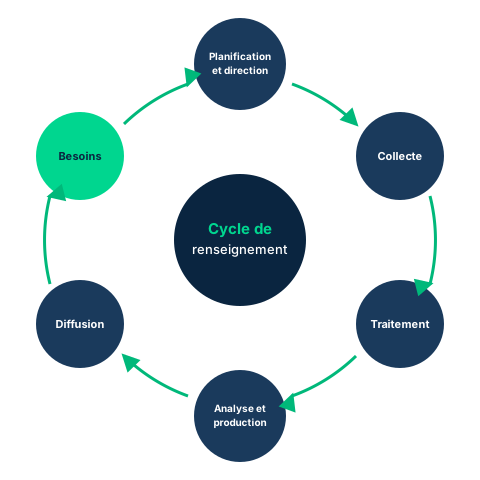
Threat intelligence is the structured process of identifying an organization's threats from external and internal sources. External threat intelligence includes open-source research, threat modeling, and information supplied by third parties: vendors, governmental entities, or ISACs (Information Sharing and Analysis Centers) and similar organizations; it surfaces threats already identified elsewhere. Internal threat intelligence results from monitoring the environment's systems and activities: system/event/application logs, incident reporting, forensic investigation results, the CMDB and inventories (which spot attractive targets), and the IAM environment (elevated privilege, unusual activity). Large organizations structure this into an intelligence cycle; the reference example is the FBI intelligence cycle (Figure 7.4), which organizes collection, refinement, and distribution.
UEBA (User and Entity Behavior Analytics) adds the "e" for entity (Gartner, 2017) to behavioral analysis historically centered on users. The reason: a sophisticated attacker uses multiple stolen user IDs while moving laterally, but often from a small handful of device-level identities (a MAC or IP address). UEBA relies on ML and AI and has three components: use cases, analytics, and data (Figure 7.5, with the traffic cop and magnifying glass playing the analytics and intervention roles). It builds a template of normal behavior by observing over time, populated with use cases representing known attack typologies (malicious insider, compromised identity, zero-day) - the MITRE ATT&CK framework supplies many such use cases to train UEBA.
UEBA enforcement is tuned between strict (more false positives, interferes with legitimate work) and loose, a light hand on the "kill switch" (more false negatives, may let an intruder through). UEBA relies on data collected by logging and SIEM and is often implemented as an analytical function of the SIEM environment: the distinction seems blurred because both use the same data. They are in fact complementary - SIEM provides incident response and automation, UEBA focuses on analyzing large data volumes; anomalous activity detected by UEBA is passed to the SIEM for action. Some analysts believe SIEM and UEBA are converging to the point where distinguishing them may become moot.
Finally, monitoring is never perfect. Attackers defeat correlation by manipulating system clocks or deleting logs, or execute attacks slowly to stay under alerting thresholds. Legacy logging environments did not encrypt or authenticate logging traffic, exposing it to undetected tampering. The cloud poses its own challenges: heavy virtualization, dependence on APIs and the CSP's willingness to share logs, prohibitive cost of extracting logs. The most striking example is SolarWinds / SUNBURST: the attacker operated inside environments monitored by the DHS Einstein 2 IDS without triggering alerts, by delaying payload initialization, leveraging trusted systems, and using digital certificates suggesting legitimacy. The lesson: automation, AI, and massive collection are not enough; trained staff are needed to relate events to their meaning for risk.
- External threat intelligence (ISAC, vendors, OSINT) vs internal (logs, IAM, forensics)
- UEBA = user + entity; three components: use cases, analytics, data; trained by MITRE ATT&CK
- Strict enforcement (false positives) vs loose (false negatives); SIEM and UEBA converge
- Limits: log tampering, slow attacks, cloud/CSP, SolarWinds/SUNBURST; humans remain essential
Case studies
Waxbill UAV: the CSO arbitrates between SIEM and UEBA
Context : Waxbill UAV designs surveillance drones for government clients. Its CSO already runs a mature SIEM that aggregates and correlates logs across the fleet and triggers response playbooks. Yet an audit reveals that a trusted engineer exfiltrated flight plans over six months, moving laterally with several borrowed credentials and staying under the SIEM's alerting thresholds. Leadership asks the CSO whether investing in a UEBA platform would bring real benefit, and how to futureproof the architecture against patient, stealthy attackers.
Question : What benefit does UEBA bring that the SIEM alone does not in this case, and how should both be positioned to futureproof detection?
Show analysis and answer
The SIEM excels at aggregating, normalizing, and correlating known events, then triggering response. But it reasons by thresholds and rules: a slow attack, spread across several borrowed credentials and below thresholds, raises no alert - exactly this engineer's profile, and an echo of the SUNBURST pattern.
UEBA fills that gap. By adding the entity dimension to user analysis, it spots that one attacker uses several user IDs from a handful of device identities (MAC/IP). Through ML/AI it builds a template of normal behavior and detects deviation: an engineer suddenly accessing plans outside their usual scope, at abnormal hours, is a yellow card (Figure 7.5). Populated with MITRE ATT&CK use cases (malicious insider, compromised identity), it identifies typologies the SIEM never encoded as rules.
The two are not opposed: they are complementary. UEBA is often an analytical function of the SIEM environment; it analyzes large volumes and passes anomalous activity to the SIEM for action (response, automation). The CSO's right call: not to replace the SIEM but to add UEBA, tuning enforcement between strict (more false positives, hampers engineers) and loose (more false negatives, risk of letting an intruder through) per risk appetite. Futureproofing: SIEM and UEBA are converging, so investing in that convergence prepares detection of the unknown, stealthy attacks to come.
Takeaway : SIEM correlates the known via rules and thresholds; UEBA detects the abnormal and unknown via ML. Complementary and converging, they deploy together - UEBA as the analytical function passing anomalies to the SIEM for action.
- SIEM cannot detect what no rule or threshold encodes; UEBA spots deviation from normal behavior
- UEBA links several user IDs to one entity (device) identity to unmask lateral movement
- MITRE ATT&CK supplies training use cases (malicious insider, zero-day)
- Add UEBA to the SIEM, do not replace it; the anomaly escalates to the SIEM for action
- Tune enforcement (strict/loose) to risk appetite, and bet on convergence to futureproof
SIEM vs SEM vs SIM
SIEM is a marketing term merging two families: SIM (Security Information Management), centered on log collection and after-the-fact analysis, and SEM (Security Event Management), centered on real-time detection and response. SIEM is their sum, not a distinct third model. On the exam, if a question contrasts "historical information management" with "real-time events," think SIM vs SEM; the SEM component can serve as a DLP building block by capturing events in real time.
Playbook vs runbook, ingress vs egress
Two often-swapped pairs. Playbook = linear sequence of tasks; runbook = conditional logic with branches and sequels. Ingress monitoring = inbound traffic (firewalls, gateways, IDS/IPS, SIEM); egress monitoring = outbound traffic, where DLP operates. Remember: DLP regulates what LEAVES (egress); it compares outgoing data against a rule set (signature, pattern matching, labeling).
ISCM is not an ISO term
The term ISCM comes from NIST SP 800-137 (six continuous phases). It is not used in ISO publications, but the concept is there: ISO/IEC 27004:2016 speaks of "continuous quantitative measurement of ISMS relevance." COBIT and PCI DSS also expect continuous monitoring of controls. Trap: do not tie "ISCM" directly to ISO; tie it to NIST, and know the spirit (continuous monitoring) cuts across several frameworks.
DLP: do not confuse states, mechanisms, and functions
DLP breaks down along three distinct axes the exam loves to mix. Data states: at rest (storage), in motion (transit), in use (endpoint, BYOD/cloud). Rule-set mechanisms: signature, pattern matching, labeling. Functions served: compliance, security, training/awareness, due diligence, asset management. A "data in use" DLP agent is not a "compliance function"; these are three different lenses on the same tool.
Checkpoint — Checkpoint
-
Which statement best describes the nature of SIEM?
- A A marketing term merging SEM (real-time) and SIM (historical)
- B An ISO standard defining log correlation
- C An exclusively real-time tool with no archiving
- D A log-exchange protocol between firewalls
Answer & rationale
Answer : A — A marketing term merging SEM (real-time) and SIM (historical)
SIEM is a marketing descriptor combining SEM (real-time detection/response) and SIM (historical collection/analysis). It is not an ISO standard, not a merely real-time tool (it also archives via secure storage), and not a protocol.
-
In a SOAR, what is the difference between a playbook and a runbook?
- A The playbook is a linear sequence; the runbook contains conditional logic
- B The playbook is conditional; the runbook is linear
- C The playbook concerns ingress, the runbook egress
- D The playbook is human, the runbook is necessarily AI-driven
Answer & rationale
Answer : A — The playbook is a linear sequence; the runbook contains conditional logic
Playbooks are linear task sequences; runbooks add conditional logic controlling branches and sequels. Option 2 swaps them. Ingress/egress and AI do not define this distinction (some SOAR apply ML to both).
-
Which framework provides the six phases of Information Security Continuous Monitoring (ISCM)?
- A NIST SP 800-137
- B ISO/IEC 27004:2016
- C PCI DSS
- D COBIT
Answer & rationale
Answer : A — NIST SP 800-137
NIST SP 800-137 defines the six-phase ISCM framework. ISO/IEC 27004 expresses the concept (continuous measurement of ISMS relevance) without using the term ISCM. PCI DSS and COBIT expect continuous monitoring but do not provide these six phases.
-
A DLP is set to block any 15-to-20-digit numeric string leaving the network. Which rule-set mechanism and data state are at play?
- A Signature, on data in motion
- B Labeling, on data at rest
- C Pattern matching, on data in use
- D Signature, on data at rest
Answer & rationale
Answer : A — Signature, on data in motion
Recognizing an identifiable numeric string (credit-card style) is signature. Since the data is leaving the network (outbound traffic inspected), it is data in motion. Labeling relies on tags; pattern matching looks for patterns (uppercase, frequency); data at rest concerns storage, not outbound traffic.
-
Why was the "E" (entity) added to UEBA, and what does it bring versus SIEM alone?
- A An attacker uses multiple user IDs from few device identities; UEBA detects the abnormal via ML where SIEM reasons by rules/thresholds
- B Entity replaces the SIEM by archiving historical logs
- C Entity refers to firewalls; UEBA only serves ingress
- D UEBA uses neither ML nor AI, unlike SIEM
Answer & rationale
Answer : A — An attacker uses multiple user IDs from few device identities; UEBA detects the abnormal via ML where SIEM reasons by rules/thresholds
The "E" recognizes that a sophisticated attacker borrows multiple user IDs while moving laterally from a handful of device identities (MAC/IP). UEBA, via ML/AI and MITRE ATT&CK use cases, detects deviation from normal behavior, where SIEM correlates the known via rules and thresholds. They are complementary and converging, not substitutes; it is UEBA (not SIEM) that relies on ML/AI.
Key takeaways
- SIEM is a marketing term merging SEM (real-time) and SIM (historical); seven functions: aggregation, normalization, correlation, secure storage, analysis, reporting, real-time monitoring.
- SIEM-as-a-service comes in self-hosted/self-managed, cloud self-manage, hybrid self-hosted, and SIEMaaS, depending on in-house skills and the MSSP's role.
- SOAR = orchestration + automation + response (CI/CD analogy); playbook = linear, runbook = conditional.
- ISCM (NIST SP 800-137, six continuous phases) maintains ongoing risk awareness; the concept recurs in ISO 27004, COBIT, and PCI DSS, but the term is NIST's.
- Ingress = inbound, egress = outbound; DLP performs egress monitoring with rule sets (signature, pattern, labeling), states (at rest/in motion/in use), and graduated enforcement.
- External threat intelligence (ISAC, vendors, OSINT) and internal (logs, IAM, forensics) organize into an intelligence cycle (e.g., FBI).
- UEBA (user + entity, ML/AI, three components, MITRE ATT&CK) detects the abnormal and converges with SIEM; strict enforcement (false positives) vs loose (false negatives).
- Monitoring is never perfect: log tampering, slow attacks, cloud/CSP challenges, SolarWinds/SUNBURST; the trained human analyst remains essential.
Configuration & change management
Prerequisites : Asset-management concepts (Domain 2) and system lifecycle. Familiarity with least privilege and separation of duties.
Configuration management defines the known and approved state of systems, while change management governs the transition from one state to another. Together, they answer two recurring exam questions: 'how do we ensure that a system stays in a safe and documented configuration?' and 'how do we modify that system without introducing uncontrolled risk?'
This module covers Configuration Items (CIs), the CMDB, the five types of baselines, automation through SCAP, IaC and CI/CD, and then the organization of Change Management Boards (CMB/CCB). It moves on to change management itself: the distinction between change management and change control, regression testing, the ITIL v4 Change Enablement levels, standards (NIST SP 800-128, ISO 27001 A.12.1.2), and the full cycle from the RFC to rollback.
The common thread is documentation: each phase produces records, and the manual stresses that all phases of the process require accurate and complete documentation.
4.1 Configuration Items, change set, and CMDB
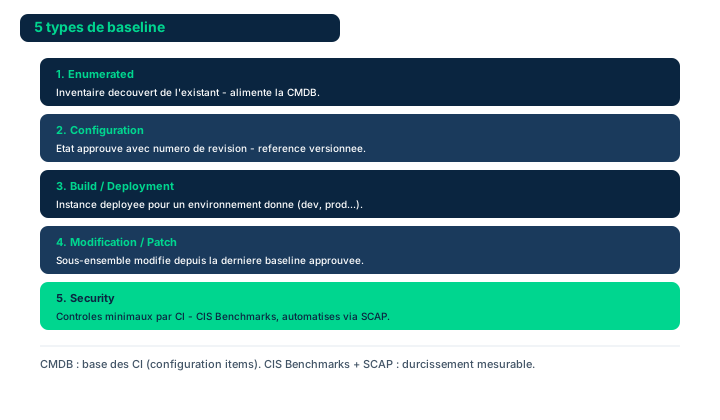
Configuration management is the discipline that establishes and maintains the known and approved state of a system. Its basic unit is the Configuration Item (CI): any component that is named, owned and managed by the change management process. A CI can be a server, a software package, a configuration file, a deployment script, mobile code or executable content. The manual stresses that change management is not only about software; hardware, firmware, data, wetware (the tacit knowledge of humans) and explicit knowledge (procedures, training, materials) must all be assessed for the impact of a change and managed together as CIs of the same change package.
A change set (or change package) groups together all the CIs affected by a given change, so that they can be approved and deployed in a consistent manner. This notion of grouping is independent of the development methodology used: whether working in waterfall or agile, changes are bundled into packages for the purposes of development, testing, deployment and release planning.
The Configuration Management Database (CMDB) is the repository that lists the CIs, their attributes and their relationships. Provisioning tools automatically record in it the creation or deployment of a system, specifying the approved script used. The CMDB is therefore the source of truth that links configuration and change management: without it, it is impossible to know what the approved state is or what has actually changed.
Exam pitfall: a CI is not only a technical object. A procedure or a human skill (wetware) can be a CI; forgetting this leads to underestimating the impact of an organizational change.
- A CI is any named component managed by change management
- Hardware, firmware, software, data, wetware, and explicit knowledge can be CIs
- A change set groups the CIs of a single change, independent of methodology
- The CMDB is the source of truth linking configuration and change management
4.2 The five baseline types
A baseline is a total, reference inventory of a system's components at a given point in time. It serves as a point of comparison: any deviation from the baseline is a change that must be explained. The manual distinguishes five types of baselines, and the exam expects you to be able to enumerate and differentiate them.
The enumerated baseline is the exhaustive inventory of all of a system's components (the 'total inventory'). The configuration baseline freezes the approved configuration state: parameter values, enabled services, hardening settings. The build or deployment baseline is the reference image from which an instance is built and deployed, often received from a supply chain and then validated. The modification, update or patch baseline captures the state after fixes or updates have been applied, and is used to produce a deployment package suited to the local environment. Finally, the security baseline defines the minimal set of security controls, dictated by a compliance requirement or defined internally by the organization.
Security baselining deserves particular attention: it sets the minimum set of controls that every system must satisfy. The manual recommends staying focused on how compliance authorities or contractual partners perceive threats and the minimal response expected, rather than being driven solely by the external threat landscape.
Exam pitfall: question 7.3 Check Your Understanding is exactly about this enumeration. Do not confuse the build/deployment baseline (build image) with the modification/patch baseline (state after fixes); and remember that the security baseline is a controls-oriented subset, not the complete inventory.
- Five baselines: enumerated, configuration, build/deployment, modification/patch, security
- The baseline is the comparison point; any deviation is a change
- Security baselining sets the minimum controls (compliance or internal)
- Build/deployment (construction) is not modification/patch (after patching)
4.3 Automation: CIS, SCAP, gold images, and IaC/CI-CD
Managing a security baseline manually on a single system is simple, but complexity explodes with the number of systems, the diversity of business needs and compliance requirements, and the proliferation of CIs. Determining the right span of control for the baseline (from one to thousands of systems) becomes a management challenge in its own right. This complexity has led organizations to automate baselining.
Reference catalogs and tools exist. The CIS benchmarks provide hardened configurations by technology; the manual also cites the Microsoft Security Compliance Toolkit, the NIST macOS security framework, the U.S. government's Secure Host Baseline and the German BSI's IT-Grundschutz. The Security Content Automation Protocol (SCAP) standardizes the expression and assessment of compliance: vendor tools assess a system against the baseline, ingest configuration changes via SCAP, and can restrict the use of the system as long as the baseline is not satisfied, while providing compliance reporting.
In the cloud, the approach has evolved. Organizations used to rely on gold images, configured cleanly and then copied on demand. But image sprawl - the uncontrolled proliferation of divergent images - made this method unmanageable in the enterprise. Now, the provisioning and promotion of configuration changes into production through Infrastructure as Code (IaC) and CI/CD ensure consistent deployment of baselines. The scripts or 'recipes' are themselves tracked as CIs and approved for deployment.
Exam pitfall: gold images are not the 'modern right answer'. The manual presents them as superseded by image sprawl; the expected answer in a cloud environment is provisioning via IaC/CI-CD, where recipes are versioned and approved CIs.
- Automation manages the baseline's span of control across many systems
- SCAP standardizes evaluation; CIS benchmarks provide hardened configs
- Image sprawl made gold images unmanageable in the enterprise
- IaC/CI-CD provisioning deploys baselines; recipes are approved CIs
4.4 Change Management Board, span of control, and Figure 7.6
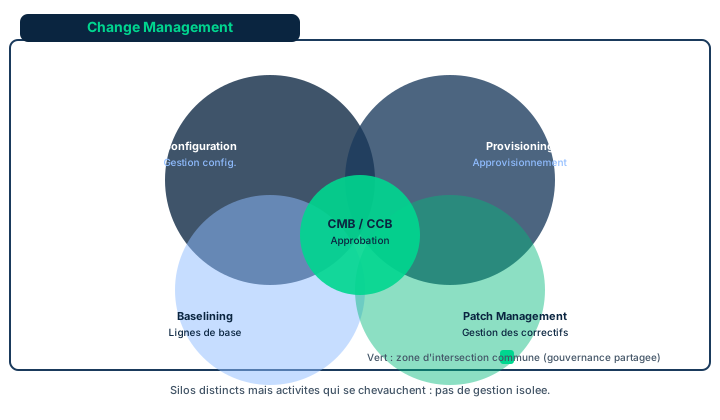
Most organizations have a hierarchy of approval authorities, calibrated according to the level of risk a change presents. The Change Management Board (CMB), also called the Configuration Control Board (CCB), centrally oversees change-related activities: it structures stakeholder engagement, formalizes approval, and ensures that changes are properly resourced and implemented. The CMB's responsibilities and span of control vary greatly from one organization to another.
The CMB's scope of interest can encompass all aspects of change management that concern the security team. Figure 7.6 illustrates that these activities - provisioning, baselining, patch, configuration and vulnerability management - overlap. Some organizations do not distinguish these activities, others compartmentalize them into separate silos; the CMB coordinates them within the context of broader change management practices. The CMB must also aim for continuous improvement of the processes and tools it controls, with automation providing the metrics to measure the gains.
A key effectiveness indicator is the level of deviation of the production estate from the baselines, as well as the number of exceptions granted: a growing number of exceptions signals that the baselines no longer meet business needs and must be reassessed. Finally, the manual is categorical: senior management remains the key. If management exempts itself from compliance or refuses to enforce the standards, the message is clear - change management does not matter. Conversely, its exemplary behavior ensures consistent application of controls.
Exam pitfall: the decisive role of senior management is not symbolic. The exam values the 'tone at the top' answer: without exemplary leadership from management, no tool or CMB is enough.
- CMB = CCB: oversees, formalizes approval, and resources changes
- Figure 7.6: provisioning, baselining, patch, configuration, and vulnerability management overlap
- Rising baseline exceptions = baselines to reevaluate
- Senior management is the key: without its example, change management fails
4.5 Change management vs change control, regression testing, standards, and ITIL levels
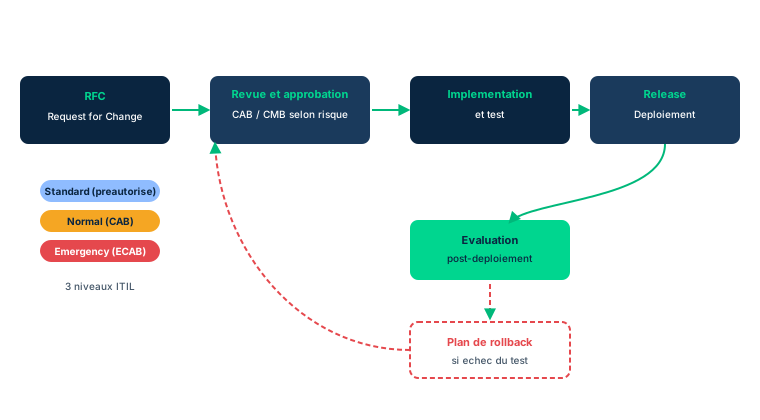
Change management is the discipline that moves from the current state to the future state. It comprises three main activities: deciding to change, making the change, and confirming that it was correctly accomplished. Change management focuses on the decision to change and culminates in the approvals given to support teams, developers and users to begin the modifications. Change control, on the other hand, designates the detailed accounting processes that identify each affected component and then verify that the appropriate actions have indeed been carried out. Regression testing confirms that the system's behavior has only been altered by the approved change, with no additional abnormal behavior.
Some cultures separate change management and change control into two distinct processes, others do not. Likewise, whether or not regression testing is formal - integrated into the process or 'left to the end user' - depends on local practices, unless there is an explicit contractual or compliance requirement. Key point: change management is not only about bug fixes or closing vulnerabilities. Adding a feature or changing the appearance of a display are also changes; every change must be managed.
Several standards frame the practice. NIST SP 800-128 guides security-focused configuration management; ISO 27001 Annex A 12.1.2 makes change management a necessary control for changes affecting information security; PRINCE2 and the PMI's PMBOK address it from a project management angle. The most widely adopted on the IT side is ITIL v4, under the name Change Enablement, which provides broad guidelines adaptable to the culture and constraints of each organization.
ITIL distinguishes three levels of change according to urgency and risk: standard changes (relatively low risk, following established procedures, often pre-approved), emergency changes (to be implemented immediately), and normal changes (all the others). This flexibility reflects that each organization has different approval processes depending on the risk. Exam pitfall: a standard change is not 'an ordinary change' - it is a low-risk, repeatable and pre-authorized change. The 'ordinary change' is precisely the normal change.
- Change management = deciding; change control = accounting and verifying
- Regression testing confirms the absence of anomalous behavior
- Standards: NIST SP 800-128, ISO 27001 A.12.1.2, PRINCE2, PMBOK, ITIL v4
- Three ITIL levels: standard (pre-approved), emergency (immediate), normal (the rest)
4.6 From RFC to rollback: major phases and release/deployment
All the major change management practices handle a common core of activities that starts with a Request for Change (RFC) and progresses through the development, testing and release stages up to making it available to users. Each stage is subject to a formalized decision and produces records documenting its results.
Change Initiation produces the RFC, which can arise from user suggestions, help desk tickets or other inputs. It covers the identification of change needs, risk assessment, prioritization and documentation of the RFC. Change Review and Approval assesses the completeness of RFCs, assigns them to the right authorization process according to risk, organizes stakeholder reviews and resource allocation, and then issues approvals or rejections - all documented. Implementation and Evaluation plans and tests the change, verifies the rollback procedures, implements, evaluates proper operation, and documents the change in production. The rollback plan defines the authority to roll back, which can be immediate or scheduled as a later change if monitoring reveals insufficient performance. Release and Deployment Planning and Control manages the movements between environments (prototyping, development, integration, acceptance testing, security assessment).
Three terms are regularly confused on the exam. Deployment is the controlled, inventoried and managed movement of a system between environments (for example from developer integration to system testing). Delivery is deployment into the end user's environment for their use. Release is the movement of a system or change package into production for immediate use by end users.
Exam pitfall: do not reduce rollback verification to a formality. Verifying the rollback procedures is part of Implementation and Evaluation, before implementation. And remember the answer to 7.9 Check Your Understanding: all phases of the process require accurate and complete documentation, not only initiation.
- Major phases: initiation (RFC), review & approval, implementation & evaluation, release & deployment planning
- Rollback verification precedes implementation
- Deployment (between environments) is not delivery (at the user) nor release (immediate production)
- All phases require accurate and complete documentation (7.9)
Case studies
An emergency baseline exception
Context : An operational office wants to put a new business system into production that does not meet one parameter of the organization's security baseline (a network service the application requires is normally disabled by the baseline). Business leadership deems the need urgent. The security professional is asked to push the change through as fast as possible.
Question : How should this baseline exception be structured without short-circuiting governance, and who must concur?
Show analysis and answer
Urgency does not eliminate documentation: even an emergency change in the ITIL sense produces records. The correct approach is to open an RFC that documents the operational risks, the way deviations from the security baseline are structured, and the cost of the alternative controls (compensating controls) that will cover the exposed network service.
Exempting the system requires the concurrence of the business owner of the deployed system, because it is they who bear the associated operational risks. The CMB then works with the system owner to identify an acceptable level of control: the point is not to ignore the baseline, but to grant a tracked and compensated exception.
Finally, this exception must be accounted for. The number of exceptions granted is an effectiveness indicator: if they multiply, it is the security baseline itself that must be reassessed. Giving in to pressure without an RFC or the business owner's agreement would amount to letting production drift out of any approved state.
Takeaway : A baseline exception goes through a documented RFC (risks, deviations, alternative controls) and the business owner's concurrence via the CMB; urgency never waives documentation.
- Exempting a system requires the business owner's concurrence as risk holder
- The RFC documents risks, deviations, and the cost of alternative controls
- The CMB sets an acceptable control level with the system owner
- Tracking exceptions serves as an indicator of baseline relevance
Change management vs change control
Do not confuse them. Change management = the decision to change (from current state to future state) that yields the approvals. Change control = the detailed accounting that identifies each affected component and verifies that appropriate actions were taken. Regression testing belongs to that verification: it confirms only the approved change altered behavior. If the question is about deciding/approving, it is management; if it is about identifying components and verifying execution, it is control.
Standard change is not the ordinary change
Classic ITIL trap. A standard change is not the "usual" change: it is a low-risk, repeatable change following an established procedure and often pre-approved (no CMB pass each time). The "ordinary" change that is neither pre-authorized low-risk nor urgent is the normal change. The emergency change must be implemented immediately. Three levels: standard, emergency, normal.
Gold images outpaced by image sprawl
Do not pick "gold images" as the modern cloud best practice. The manual presents them as an approach made unmanageable by image sprawl (proliferation of divergent images). The expected cloud answer is provisioning via IaC and CI/CD, where scripts/recipes are tracked as CIs and approved, ensuring consistent baseline deployment.
Documentation: all phases, not just one
To the question "which phase of the change management process includes a documentation phase?", the correct answer is neither initiation, nor review/approval, nor implementation alone: it is "all phases require accurate and complete documentation." RFCs, approvals, rejections, and production-environment changes are all documented. This is the 7.9 Check Your Understanding answer.
Checkpoint — Checkpoint
-
A baseline is a total inventory of a system's components. Which of these sets matches the baseline types recognized by the manual?
- A Enumerated, configuration, build/deployment, modification/patch, security
- B Hot, warm, cold, mobile, mirror
- C Standard, emergency, normal, urgent, deferred
- D Preventive, detective, corrective, deterrent, compensating
Answer & rationale
Answer : A — Enumerated, configuration, build/deployment, modification/patch, security
The manual (7.3) lists five baselines: enumerated, configuration, build/deployment, modification/update/patch, and security. Hot/warm/cold are recovery sites (BCP/DRP). Standard/emergency/normal are ITIL change levels. Preventive/detective/corrective are control functions. Only the first list matches the baseline types.
-
In the change management process, which stage includes a documentation phase?
- A All phases require accurate and complete documentation
- B Initiation only, because it produces the RFC
- C Review and approval only, because it records approvals
- D Implementation only, because it modifies production
Answer & rationale
Answer : A — All phases require accurate and complete documentation
Answer to the 7.9 Check Your Understanding: documentation is vital and present at all phases. RFCs, approvals, rejections, and production-environment changes are all documented. Each isolated phase does include documentation, but none is the only one: the correct answer encompasses them all.
-
ITIL v4 Change Enablement distinguishes three change levels by urgency. Which one describes a low-risk, repeatable change following an established procedure?
- A Standard change
- B Emergency change
- C Normal change
- D Request for Change
Answer & rationale
Answer : A — Standard change
The standard change is relatively low-risk and follows established procedures (often pre-approved). The emergency change must be implemented immediately. The normal change is anything that falls into neither of the other two levels. The RFC is not a level but the document initiating the cycle. The trap is equating standard with "ordinary": the ordinary one is the normal change.
-
An organization moves a system from developer integration into systems test, then later puts it into production for immediate end-user use. Which terms respectively name these two movements?
- A Deployment then release
- B Release then deployment
- C Delivery then baselining
- D Provisioning then rollback
Answer & rationale
Answer : A — Deployment then release
Deployment is any controlled, inventoried, managed movement between environments (here integration to test). Release is the movement into production for immediate end-user use. Delivery would be deployment into the end user's environment. Provisioning and rollback name other activities (instance creation, reverting). Order and definitions are common traps.
Key takeaways
- A Configuration Item (CI) is any named component managed by change management; hardware, software, data, and even wetware can be one; the CMDB records them.
- Five baselines: enumerated, configuration, build/deployment, modification/patch, security; the security baseline sets the minimum controls.
- Image sprawl outpaced gold images; IaC/CI-CD provisioning, driven by SCAP and CIS benchmarks, deploys baselines consistently.
- The CMB (= CCB) oversees and approves; Figure 7.6 shows the overlap of activities; senior management is the key to effectiveness.
- Change management (deciding) is not change control (accounting and verifying); regression testing confirms the absence of anomalous behavior.
- Standards: NIST SP 800-128, ISO 27001 A.12.1.2, PRINCE2, PMBOK, ITIL v4; three ITIL levels: standard, emergency, normal.
- Cycle from RFC to rollback: initiation, review & approval, implementation & evaluation, release & deployment; all phases require accurate and complete documentation.
- Distinguish deployment (between environments), delivery (at the user), and release (immediate production).
Foundational security operations concepts
Prerequisites : Access-control basics (RBAC, MFA, zero trust) and defense in depth.
Security operations do not rest on tools alone: they rely on a small set of structuring principles that drive the design of access controls, workflows, and privilege management. This module covers those foundations: least privilege, need-to-know, separation of duties, privileged account management (PAM), job rotation, mandatory vacations, dual control, and service-level agreements.
The common thread is defense in depth (layered defense) applied to access control: none of these principles is sufficient alone, but their combination drastically reduces the chances of fraud, error, and privilege abuse. The exam mostly tests your ability to distinguish neighboring principles (least privilege vs need-to-know, SoD vs dual control) and to pick the measure suited to a given risk.
By the end of the module, you will be able to link an operational objective (limit access, prevent fraud, contain a privileged account) to the right principle and the right access-control mechanism.
5.1 Defense in depth as the access-control models framework
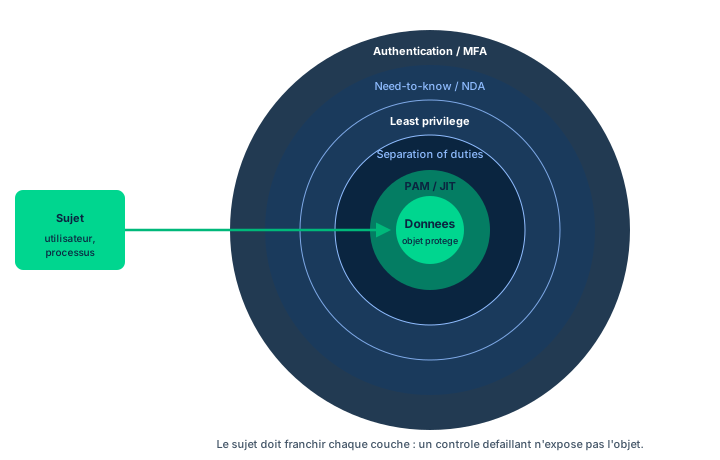
No single access-control model is sufficient by itself. Defense in depth (layered defense) stacks several models and mechanisms - RBAC, MAC, DAC, MFA, zero trust - so that a failure of one layer is caught by the next. Applied to access control, it integrates administrative policies, technical mechanisms (ACLs, authentication, logging), and physical barriers into one coherent scheme.
The manual's Figure 7.7 illustrates this integration: foundational principles (least privilege, need-to-know, separation of duties) are implemented across the different layers rather than by a single control. For instance, need-to-know is expressed administratively through an NDA, technically through RBAC on an isolated virtual domain, and physically through a secured room.
The key message for security operations: you do not pick ONE principle against the others, you combine them in layers. Exam trap: believing that a single mechanism (for example RBAC alone) is enough to enforce both least privilege AND need-to-know. It is the combination of layers that truly achieves defense in depth.
- No access model is sufficient alone: stack them in layers
- Figure 7.7 shows principles implemented across administrative, technical, and physical
- Need-to-know is realized via NDA + RBAC on a virtual domain + secured room
- Combine the principles, do not oppose them
5.2 Least privilege, need-to-know, and two-person integrity
Least privilege requires that each subject receive only the rights strictly necessary for their function, no more and no less. Typical example: an invoice clerk should be able to create an invoice, but not approve a payment nor edit the vendor list. Restricting their rights reduces the surface for error and fraud.
Need-to-know is the information-side counterpart: a subject accesses only the information they have a legitimate, demonstrated need for to perform their task. The exam distinction is crucial: least privilege concerns actions/permissions (what may I do), need-to-know concerns information (what may I know). You can have the privilege to read a directory without having a need to know each file in it.
Need-to-know is implemented through devices such as the ethical wall (a Chinese wall separating teams with conflicting interests), legally binding NDAs, and technically through virtualization combined with RBAC: for competing clients served by the same firm, each client is isolated into separate virtual networks, servers, and data, with access restricted by RBAC to validated team members only who have signed the NDA.
Two-person integrity adds a requirement: certain actions cannot be carried out unless at least two individuals are involved, so that none can act alone on a critical asset. Exam trap: do not confuse least privilege (scope of rights) with need-to-know (scope of information).
- Least privilege = scope of RIGHTS; need-to-know = scope of INFORMATION
- Invoice clerk: create an invoice yes, approve a payment no
- Need-to-know is applied via ethical wall, NDA, virtualization + RBAC
- Competing clients: separate virtual domains, RBAC access for NDA signatories
- Two-person integrity: no critical action by a single individual
5.3 Separation of duties and approval workflows
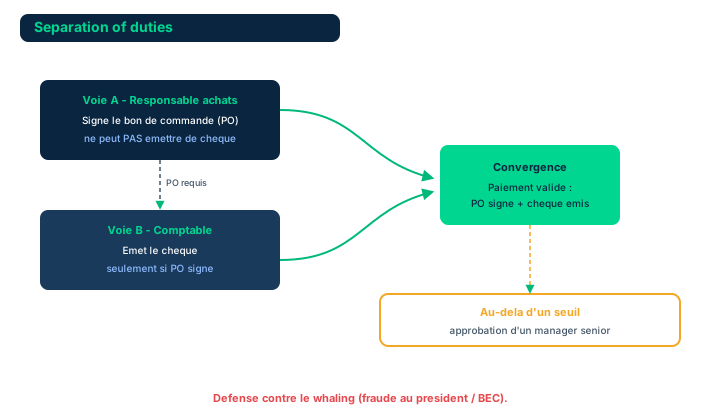
Separation of duties (SoD) means that no single person can complete a sensitive end-to-end process alone. Its purpose is to reduce the chances of fraud by requiring collusion of at least two actors. The classic example is bifurcated purchasing: the purchasing manager signs the purchase order (PO) but cannot issue a check; the accountant can issue the check, but only on the basis of a PO signed by a manager.
Thresholds reinforce the scheme: payments exceeding predefined limits, or unusual fund transfers, require approval by a more senior manager. This SoD, enforced by the access-control mechanisms of financial applications and their databases, contributes to defending against whaling attacks - phishing attacks aimed at tricking senior officials into authorizing large transfers to unknown entities.
Implementing SoD starts with workflow and task design: you identify the critical steps requiring approval by a second or even third person. This requires control flows (information flows up to the approver, who approves, rejects, or refers the action to a higher authority) and control loops, which must be closely examined to ensure they are correctly designed. You then select the right mix of access-control technologies to implement them. Exam trap: SoD does not prevent fraud through collusion; collusion is precisely how it is bypassed, which is why it is complemented by job rotation and mandatory vacations.
- SoD: no single person completes a sensitive process alone
- Bifurcated purchasing: signing the PO and issuing the check are separated
- Thresholds + senior approval for unusual payments = anti-whaling defense
- Design: workflows, control flows, and control loops to review
- SoD is bypassed by collusion -> complement with rotation/vacations
5.4 Privileged account management (PAM) and just-in-time identity
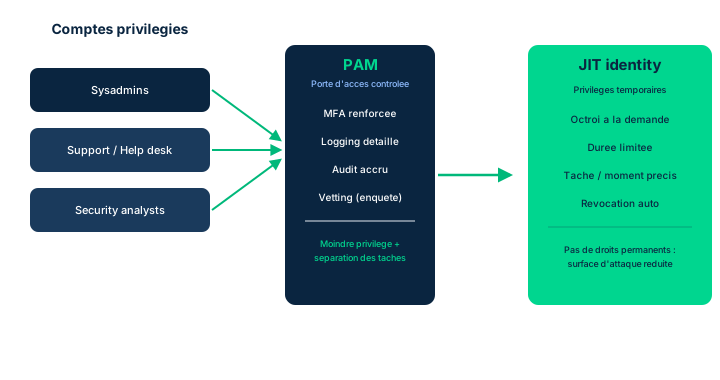
Privileged accounts hold permissions beyond those of normal users. Several classes use them: systems administrators (responsible for OSs, application deployment, and performance), the help desk / IT support (who must view or manipulate endpoints, servers, and application platforms), security analysts (who may need rapid access to the entire infrastructure), as well as accounts created per client or per project to give a team greater control over its data and applications.
This delegation assumes high trust, since abuse of these privileges can harm the organization. Typical mitigation measures are: more detailed logging than for ordinary accounts (auditable deterrent and administrative control); stricter access control, with MFA for everyone and stronger authentication before privileges are granted; just-in-time (JIT) identity, which restricts privilege use to specific tasks and the moments the user executes them; treating privileged accounts as temporary (duration limited to a need and a project, from days to months); deeper trust verification (thorough background checks, stricter NDAs, reinforced acceptable-use policies, willingness to undergo financial investigation, periodic re-checks); and increased audit of activity.
PAM illustrates the granularity-of-controls problem. At one extreme, a zero trust paradigm validating every atomic action has a real cost; at the other, a single authentication at first sign-on then authorizing all actions is a total-trust architecture, far too risky. The security professional recommends where to set this threshold knob during planning, implementation, and real-time operational use. Exam trap: JIT identity does not remove privileged accounts, it narrows their usage window to the moment and the task.
- Classes: sysadmins, help desk, security analysts, per-client/project accounts
- Mitigations: detailed logging, stricter AC + MFA, JIT identity, temporary accounts, deeper vetting, increased audit
- JIT identity restricts privileges to the specific task and moment
- Granularity: between zero trust (costly) and total trust (too risky)
- The professional sets the trust threshold knob
5.5 Job rotation and mandatory vacations
Job rotation has employees change roles and tasks regularly. It strengthens security in several ways: an employee engaged in wrongdoing may be found out when their replacement takes over the position after rotation; the organization has no single point of failure, since many staff will have gained operational experience of most business processes (valuable for business continuity and disaster recovery); and morale and team cohesion improve through skill sharing, fostering a climate where each protects the others and the organization.
Access-control systems play an essential role here. The rotation strategy must clearly describe how an individual gains and loses assigned tasks, and the associated authorities, as they transition from one role to the next. Collaboration between human resources management (HRM) and IAM (provisioning) reflects these changes in systems and privileges. Access accounting and account-use audits verify that the handoff of tasks has indeed been completed from the standpoint of access attempts.
Mandatory vacations aim to reduce fraud and embezzlement and to uncover wrongdoing. The concept comes from the financial sector: each employee must take several consecutive days off while a colleague covers their responsibilities, increasing the chances of detecting wrongdoing by the absent person. Some organizations go further with a forced vacation program imposing time off on specific dates. The most often overlooked aspect: you must temporarily suspend some or all of the access privileges of the employee on leave, and place heightened alarm thresholds on the use of their identity and the resources they normally use. Exam trap: if access stays active during the leave, the mechanism loses its detection value.
- Job rotation: exposes fraud, removes the single point of failure, improves morale
- Transitions reflected by HRM + IAM; usage audits verify the handoff
- Mandatory vacation: consecutive leave covered by a colleague, detects fraud
- Forced vacation: leave imposed on fixed dates
- Suspend access during leave, otherwise detection is ineffective
5.6 Dual control and service-level agreements (SLAs)
Dual custody, also called dual control, provides a more secure access-control architecture by requiring two or more people to simultaneously perform separate actions to complete a critical action. Many military systems, for example, cannot arm and fire a weapon without two distinct actions (turning a key, entering a command) taken by two physically isolated people within a second or two of each other; overrides of safety-critical processes often rely on dual control.
Another use protects highly sensitive information or unique physical assets: they are placed in a specially built room, requiring at least two people to maintain vigilance or act jointly. These areas are called no lone zones; R&D laboratories often use them. In more mundane use, banks encrypt card data via hardware security modules (HSMs): decrypting this information requires independent actions by two security administrators (sometimes more) physically present at the HSM. Exam distinction: separation of duties splits successive steps among several people, whereas dual control requires simultaneous actions by several people for one and the same action.
The service-level agreement (SLA) is a documented, legally binding agreement between a service provider and one or more customers. It defines the expected service level and the penalties if those levels are not met. An SLA may cover various metrics: availability, reliability, and response time. Key point: having an SLA does not guarantee the provider will always comply with it. The customer gains assurance of compliance through reviews, assessments, and monitoring. Exam trap: an SLA is a commitment backed by penalties, not a technical guarantee of availability.
- Dual control: two SIMULTANEOUS actions by distinct people
- No lone zones and HSMs: decryption by two administrators present
- SoD = split successive steps; dual control = simultaneous actions
- SLA: binding agreement, metrics availability/reliability/response time
- An SLA is not a guarantee: assurance via reviews/assessments/monitoring
Case studies
Balancing need-to-know, least privilege, and SoD via layered defense
Context : While reviewing security data, Keiko and the SneakerNet team find that employees across the organization frequently access proprietary information that should be limited to specific teams. Management wants to reduce this unauthorized-access risk without paralyzing daily operations.
Question : How can Keiko balance the principles of need-to-know / least privilege, separation of duties, and responsibilities to mitigate the risk of unauthorized access?
Show analysis and answer
The answer is not a single control but a layered defense, consistent with Figure 7.7. Administratively, Keiko maps which teams have a legitimate need-to-know for each proprietary dataset and has NDAs signed. Technically, she enforces least privilege via RBAC: each role receives only the necessary rights, and proprietary information is isolated (where needed via per-team or per-client virtualization). On the process side, she introduces separation of duties on sensitive actions (for example, granting access requires a request plus approval by a distinct person), with traced control flows and control loops.
The delegation of the ability to manage and protect information assets goes to various personnel - management, support, leadership - with differing levels of authority and responsibility. This delegation remains contingent on the trustworthiness of those involved. Access control, logging, and usage audits provide the visibility needed to verify that access actually matches needs.
No principle suffices alone: need-to-know bounds information, least privilege bounds rights, SoD prevents one person from acting alone, and layered defense integrates them into a coherent, auditable scheme.
Takeaway : Mitigating unauthorized access requires a layered defense combining need-to-know, least privilege, and SoD, contingent on trustworthiness.
- Implement each principle across several layers rather than a single control
- Delegation remains contingent on people's trustworthiness
- Logging and usage audits verify the access/need fit
Least privilege vs need-to-know
These two principles are neighbors but distinct. Least privilege concerns RIGHTS and actions (what the subject can do: read, write, execute), need-to-know concerns INFORMATION (what the subject has a legitimate need to access). An administrator may hold the technical privilege to read an entire share without having a need to know each file. On the exam: if the question is about scope of permissions, it is least privilege; if it is about information compartmentalization (ethical wall, NDA, per-client isolation), it is need-to-know.
Separation of duties vs dual control
Do not confuse these two controls. Separation of duties splits SUCCESSIVE steps of a process among several people (one signs the PO, another issues the check): the goal is that none completes the process alone. Dual control (dual custody) requires SIMULTANEOUS actions by two people for one and the same critical action (two keys turned at once, two administrators at the HSM). SoD = split sequence; dual control = simultaneity. Both reduce fraud, but dual control targets a single atomic action.
The forgotten access during mandatory vacation
A mandatory vacation has detection value only if the absent employee's access privileges are temporarily suspended (or placed under heightened alarm thresholds). If the employee keeps active access and continues acting remotely during the leave, the fraud you sought to uncover stays hidden. This is the most often overlooked aspect of such a policy. Tie it also to JIT identity: cut access when the need disappears.
An SLA is not a guarantee
A service-level agreement defines an expected service level (availability, reliability, response time) and penalties, but in no way guarantees the provider will always achieve it. It is a contractual commitment backed by sanctions, not a technical guarantee. The customer gains assurance of compliance through ongoing reviews, assessments, and monitoring. On the exam, beware of an answer claiming an SLA by itself ensures availability.
Checkpoint — Checkpoint
-
A consultant has the technical right to read an entire file share, but the organization wants to limit what they may actually view to the folders of the project they work on. Which principle does this information compartmentalization illustrate?
- A Need-to-know
- B Least privilege
- C Dual control
- D Job rotation
Answer & rationale
Answer : A — Need-to-know
Limiting the INFORMATION accessible to what the subject legitimately needs is need-to-know. Least privilege would concern the scope of RIGHTS (what they can do), already granted technically here. Dual control requires two simultaneous actions, job rotation rotates positions: off-topic. The trap is equating need-to-know with least privilege.
-
To decrypt card data protected by an HSM, two security administrators must simultaneously perform separate actions, both physically present. Which control is being used?
- A Dual control
- B Separation of duties
- C Least privilege
- D Mandatory vacation
Answer & rationale
Answer : A — Dual control
Two people SIMULTANEOUSLY performing separate actions for one critical action = dual control (dual custody). Separation of duties would split SUCCESSIVE steps of a process (sign the PO then issue the check), not simultaneous actions. Least privilege and mandatory vacation do not describe this mechanism.
-
A security team wants to limit an administrator's privilege use to only the tasks in progress and the precise moments they execute them, rather than leaving permanent rights. Which PAM measure best meets this need?
- A Just-in-time (JIT) identity
- B More detailed logging of privileged accounts
- C Thorough background check
- D Stricter acceptable-use policy
Answer & rationale
Answer : A — Just-in-time (JIT) identity
Just-in-time identity grants privileges task by task, moment by moment, then revokes them: this is exactly the temporal restriction requested. Detailed logging, background checks, and acceptable-use policy are other useful mitigations, but none narrows the privilege usage WINDOW the way JIT identity does.
-
Why must a mandatory vacation policy necessarily include temporarily suspending the access of the employee on leave?
- A Otherwise the employee can keep concealing fraud by acting remotely during the leave
- B To reduce the cost of unused software licenses
- C Because the GDPR forbids any access during leave
- D To force the replacement to use their own credentials
Answer & rationale
Answer : A — Otherwise the employee can keep concealing fraud by acting remotely during the leave
A mandatory vacation has detection value only if a replacement actually takes over the position without the absent person being able to intervene. If their access stays active, they can keep masking wrongdoing remotely, and the mechanism fails. The other answers are wrong: it is not about license cost, a GDPR prohibition, or the replacement's credentials.
Key takeaways
- Defense in depth integrates access-control models in layers (Figure 7.7): no principle suffices alone.
- Least privilege bounds RIGHTS, need-to-know bounds INFORMATION; do not confuse them.
- Separation of duties splits successive steps (bifurcated purchasing) to block single-actor fraud and counter whaling attacks.
- PAM mitigates privileged accounts: detailed logging, strict AC + MFA, JIT identity, temporary accounts, deeper vetting, increased audit; set the threshold knob between zero trust and total trust.
- Job rotation and mandatory vacations are HR detective controls; suspending access during leave is essential.
- Dual control requires two simultaneous actions (no lone zones, HSMs); an SLA is a penalty-backed commitment, not a guarantee of availability.
Resource protection and media management
Prerequisites : Notions of information classification (Domain 2) and the data life cycle.
Preserving the operational security of resources means continuously protecting information against disclosure, alteration and destruction, regardless of its location and format. Media protection combines technical and non-technical controls stacked across several layers to meet security objectives.
This module follows the media life cycle : inventory and classification from the moment of collection, marking and labeling that inform handling and distribution, storage, access, environmental and transport controls, then sanitization proportionate to the classification at the time of disposal. It also covers restricting media types (flash drives) through technical controls and the encryption of data at rest and data in transit.
By the end, you will know how to align each media control with the NIST SP 800-53 Media Protection family and choose a sanitization method (the clear / purge / destroy scale) based on the classification and the eventual fate of the medium.
6.1 Media management: inventory, classification, and policies
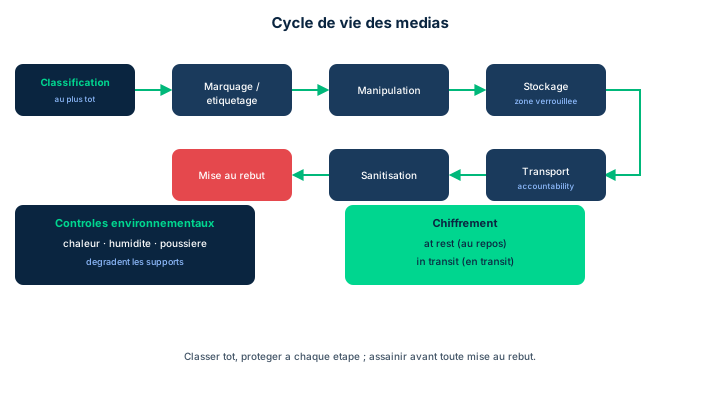
Actively managing organizational assets starts with an up-to-date inventory of those assets. You can only properly protect what you know about: without a reliable inventory of media (disks, tapes, USB keys, backups), no protection control can be applied exhaustively. Protecting valuable or sensitive information as an asset requires defending it against disclosure, alteration, and destruction, regardless of its location or format.
Data classification must be addressed as early as possible in the data life cycle, ideally when the data is collected or generated. Classifying late means letting unmarked data circulate without knowing its required protection level; classifying early conditions all the rest of the cycle (marking, handling, storage, sanitization). This is a classic exam trap: the right answer to "when to classify?" is always "as early as possible," at creation.
When developed, documented, and maintained, media protection policies and procedures set the tone, provide direction, and outline a step-by-step set of actions for media protection. These controls must address several requirements: marking and labeling, handling, storage, and destruction, to safeguard sensitive information throughout its life.
- Media management starts with an up-to-date asset inventory
- Protect against disclosure, alteration, and destruction, whatever the location or format
- Classify as early as possible: at data collection or generation
- Protection policies address marking, handling, storage, and destruction
6.2 Marking, labeling, and distribution limits
Media containing sensitive information should be marked appropriately. Marking is not an administrative detail: it informs the subjects (users, carriers, recipients) of the specific handling and protection requirements needed and, where applicable, indicates distribution limitations. A backup tape labeled "Confidential - internal use" immediately tells whoever handles it what level of care to apply and to whom it must not be given.
You should distinguish marking (classification information made visible, human-readable, on the label or packaging) from labeling in the metadata sense, but in the D7 manual both serve the same goal: making the required treatment known to anyone handling the media. Without marking, a sensitive medium blends in with an ordinary one and falls outside the scope of handling and distribution controls.
Marking is thus the articulation point between classification (done upstream) and the operational controls that follow: it translates a classification decision into a practical handling instruction. Exam trap: marking does not itself apply protection; it informs and triggers the appropriate handling, storage, and distribution controls.
- Marking informs of handling and protection requirements
- Marking also indicates distribution limitations
- Without marking, a sensitive medium escapes the appropriate controls
- Marking translates classification into an operational instruction without applying protection itself
6.3 Protection controls: storage, access, handling, environment, transport
The physical and operational protection of media rests on five complementary control families. Storage means keeping media in locked areas and, more generally, in physically secure locations. Access is restricted by role: access is granted according to need-to-know principles and each access is logged, which makes later accountability possible.
Handling requires manipulating media, where applicable, with a level of care that prevents exposing the medium to contamination sources. Environmental protection defends the medium against various conditions: heat, humidity, liquids, dust, and smoke, while also accounting for threats from extreme weather, floods, earthquakes, and fires. A fireproof, climate-controlled safe directly addresses these requirements.
Transport of media outside the controlled area, when it occurs, must ensure accountability: you know at all times who holds the medium, whose hands it passed through, and you trace the chain of responsibility. Exam trap: these controls are not alternatives but cumulative - this is a direct application of defense in depth to physical media. Restricting access does not exempt you from protecting against fire, and vice versa.
- Storage: locked areas and physically secure locations
- Access: roles + need-to-know + access logging
- Handling: care avoiding contamination sources; environment: heat, humidity, liquids, dust, smoke, weather, flood, quake, fire
- Transport outside the controlled area: accountability and chain of responsibility
6.4 Sanitization, media type restriction, and encryption
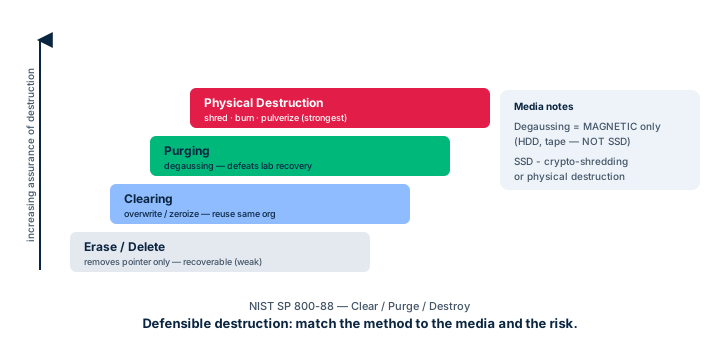
Sanitization may be required prior to disposal at the end of the life cycle. It is particularly important if the media is leaving the organization's control or if it will be recycled for future use. Sanitization must be performed using appropriate tools and techniques commensurate with the security category or classification of the medium. Depending on the categorization, there may be specific requirements for reviewing, approving, tracking, documenting, and verifying sanitization and disposal actions: a secret medium is not handled like a public one, and each step must leave a trace.
For policy compliance reasons, the use of particular types of media (for example flash drives) may be restricted or completely prohibited in certain environments or on specific systems. These restrictions are enforced through technical controls (blocking USB ports, device allowlisting, DLP), not by written instruction alone. Likewise, if compliance requires it, the use of unauthorized and non-compliant devices may be prohibited.
Sensitive data can be exposed both at rest and in transit. Sensitive data resting on backup media, USB thumb/flash drives, and external hard drives may be subject to encryption, by internal policy or external mandate. Encryption is a major technical control, valid regardless of the data state (at rest or during transmission): it is the cross-cutting answer that protects confidentiality even if the medium is stolen or intercepted.
- Sanitization is commensurate with classification or security category
- Traced process: review, approve, track, document, verify
- Restricting flash drives goes through technical controls, not mere policy
- Encryption protects data both at rest and in transit
6.5 NIST SP 800-53 Media Protection, 800-88, and data remanence
NIST SP 800-53 groups media protection controls into a dedicated family, Media Protection (MP). According to the D7 manual, the controls related to media protection include: policies and procedures, access, marking, storage, transport, sanitization, use, and downgrading. This list is the official answer to the "Check Your Understanding" 7.5.2 question and structures this whole module: each previous lesson maps to one or more of these controls. Downgrading (lowering a medium to a lower level) and use (governing the authorized use of a media type) complete the storage, transport, and sanitization already seen.
As a supplement to the manual, NIST SP 800-88 (Guidelines for Media Sanitization, a CBK/cheat supplement) defines a three-level sanitization ladder, by increasing severity. Clear applies standard logical techniques (overwrite, reset) to prevent recovery by simple tools. Purge applies stronger techniques (cryptographic erase, degaussing for magnetic media) that make recovery infeasible even in a laboratory. Destroy physically destroys the medium (shredding, incineration, pulverization), the only absolute guarantee, but one that prevents any reuse. The choice climbs the ladder with the classification and the medium's fate.
The underlying notion is data remanence (a CBK concept): data does not really disappear when you "delete" it or format a disk; magnetic or electronic residue remains and can be recovered. All sanitization aims precisely to neutralize this remanence. Exam trap: a simple delete or format does not sanitize - it only removes the pointers, the data stays recoverable until a suitable clear, purge, or destroy is applied.
- NIST SP 800-53 MP: policies, access, marking, storage, transport, sanitization, use, downgrading
- NIST SP 800-88 (CBK): clear -> purge -> destroy ladder by increasing severity
- Method choice rises with classification and the medium's fate
- Data remanence: delete/format only removes pointers, data stays recoverable
Case studies
Decommissioning a batch of retired drives
Context : A bank decommissions three batches of drives. Batch A: SSDs that held "Secret"-classified customer data, slated for destruction with no reuse. Batch B: magnetic HDDs classified "Confidential," to be recycled internally on other workstations. Batch C: training-room drives holding only public data, to be donated to a charity. The manager asks for a sanitization method tailored to each batch.
Question : Which clear / purge / destroy method should be chosen for each batch, and why does degaussing fit batch B but not batch A?
Show analysis and answer
The choice must be commensurate with classification and account for the medium's fate (reuse or not) and its technology. Batch A (Secret, no reuse): destroy. The top classification and the absence of reuse justify physical destruction, the only absolute guarantee against data remanence; the operation is documented, approved, and verified.
Batch B (Confidential, internal recycling): purge. The medium must stay usable, so destroy is ruled out. On magnetic HDDs, degaussing (purge) erases the magnetic field and makes recovery infeasible. Caution: degaussing does NOT work on SSDs (non-magnetic flash memory) - that is why it would fit batch B but be ineffective on the batch A SSDs, where destroy is used (or a cryptographic erase if reuse).
Batch C (public, external donation): clear is enough. A logical overwrite prevents recovery by simple tools; the low classification level does not justify a costlier method. In all cases, the bank must review, approve, track, document, and verify each action, in line with requirements proportional to the categorization.
Takeaway : Climb the clear -> purge -> destroy ladder with classification and no-reuse; and technology matters (degaussing for magnetic, not for SSD).
- Sanitization method is commensurate with classification
- The medium's fate (reuse) does or does not rule out destroy
- Degaussing only works on magnetic media
- Each action is review/approve/track/document/verify
When to classify data?
The manual is explicit: classification is addressed as early as possible in the data life cycle, at collection or generation. If a question offers "at archival," "before destruction," or "during audit," these are distractors. The right answer is always "as early as possible," because classification conditions the marking, handling, storage, and sanitization of all the rest of the cycle.
Delete and format are not sanitization
Because of data remanence, deleting a file or formatting a disk only removes pointers: the data is still physically present and recoverable. True sanitization requires clear (overwrite), purge (cryptographic erase, degaussing), or destroy (physical destruction), chosen commensurate with classification. Common trap: confusing "formatted disk" with "sanitized disk," or believing degaussing works on an SSD (false: non-magnetic flash).
Policy vs technical control
Banning flash drives via a memo is a policy; it only becomes an effective control if enforced by technical controls (USB port blocking, device allowlisting, DLP). Likewise, encryption of data at rest / in transit is a technical control that protects confidentiality even if the medium is stolen or intercepted. The manual stresses: media type restrictions "can be enforced through technical controls," not by the written rule alone.
Checkpoint — Checkpoint
-
According to NIST SP 800-53, which of these sets corresponds to the Media Protection family controls?
- A Policies and procedures, access, marking, storage, transport, sanitization, use, downgrading
- B Firewall, IDS, antivirus, encryption, logging
- C Identification, authentication, authorization, accountability, auditing
- D Confidentiality, integrity, availability, authenticity, nonrepudiation
Answer & rationale
Answer : A — Policies and procedures, access, marking, storage, transport, sanitization, use, downgrading
This is the exact answer from section 7.5.2: the Media Protection family covers policies and procedures, access, marking, storage, transport, sanitization, use, and downgrading. Option 2 lists generic technical controls outside the MP family. Option 3 is the IAAAA access lifecycle. Option 4 lists the five security pillars, not an 800-53 control family.
-
At which point in the data life cycle should classification ideally be performed?
- A As early as possible, at data collection or generation
- B At the time of long-term archival
- C Just before sanitization and destruction
- D During the first annual compliance audit
Answer & rationale
Answer : A — As early as possible, at data collection or generation
The manual states classification is addressed earliest, when data is collected or generated, because it conditions marking, handling, storage, and sanitization. Archiving, destroying, or auditing are too late: the data would already have circulated without a defined protection level.
-
Magnetic HDDs classified "Confidential" must be reassigned internally. Which NIST SP 800-88 method is most appropriate?
- A Purge, via degaussing, because the medium must stay reusable
- B Destroy, by physically shredding the disk
- C Clear, sufficient because the data is only confidential
- D A simple quick format of the disk
Answer & rationale
Answer : A — Purge, via degaussing, because the medium must stay reusable
The medium must stay reusable, ruling out destroy. For a confidential magnetic HDD, purge via degaussing makes recovery infeasible while (generally) allowing reuse after reformatting. Clear is weaker than the confidential level warrants given reuse. A quick format is not sanitization: data remanence leaves the data recoverable.
-
An organization wants to ban flash drive use on its sensitive workstations. Which approach matches the manual's recommendation?
- A Enforce the restriction via technical controls (USB blocking, allowlisting)
- B Circulate a memo banning flash drives
- C Ask employees to sign an acceptable use charter
- D Label the workstations with a "no flash drives" sticker
Answer & rationale
Answer : A — Enforce the restriction via technical controls (USB blocking, allowlisting)
The manual states media type restrictions "can be enforced through technical controls." USB port blocking or device allowlisting truly enforce the rule. A memo, charter, or sticker are useful administrative controls but not binding: a user can ignore them, whereas a technical control physically prevents the use.
Key takeaways
- Media management starts with an up-to-date inventory; classification happens earliest, at collection or generation.
- Marking informs of handling, protection, and distribution limits, without applying protection itself.
- Protection controls are cumulative: storage (locked areas), access (need-to-know + logging), handling, environment (heat, humidity, liquids, dust, smoke, weather, flood, quake, fire), transport (accountability).
- Sanitization is commensurate with classification and follows a review/approve/track/document/verify process.
- The NIST SP 800-53 Media Protection family: policies, access, marking, storage, transport, sanitization, use, downgrading.
- NIST SP 800-88 (CBK): clear -> purge -> destroy ladder; data remanence: delete/format does not sanitize.
- Restricting media types and encrypting data at rest / in transit are technical controls.
Incident management
Prerequisites : Kill chain and IoC concepts (Domain 4), forensics basics (Module 1 of this domain).
In any environment, incidents will occur: the question is not whether, but how the organization will respond. An event is simply a change in a system's state; it becomes an incident as soon as there is a possibility of harm. How the organization detects, assesses, escalates, communicates, contains, and learns from the event determines the magnitude of its impact on business functions.
This module covers the normative and operational framing of incident management: reporting obligations (GDPR, HIPAA Breach Notification, PIPEDA, the GLBA 36-hour rule, critical-infrastructure reporting), the two lifecycle frameworks - NIST SP 800-61 in four phases and ISO/IEC 27035 in five phases - then the concrete sequence of response activities: Preparation, Detection, Analysis, Response, Mitigation, Recovery, Reporting, and Review.
Two ideas structure the whole. First, organizational culture and risk appetite weigh as much as formal procedures. Second, the SOC escalates but does not decide alone: it is management that declares the return to normal. Forensics was already covered in Module 1; here we focus on root cause analysis, communications, and continuous improvement.
7.1 Event vs incident, standards and reporting obligations
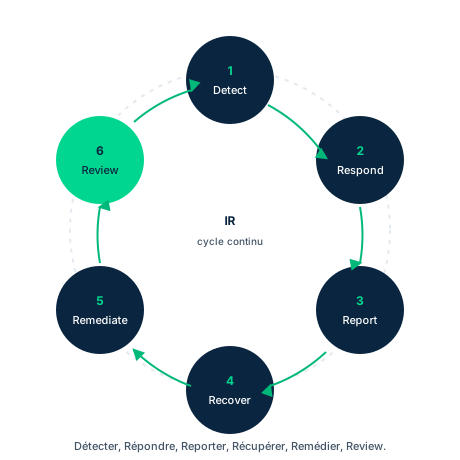
An event is a change in a system's state; it becomes an incident as soon as there is a possibility of harm. This distinction is not merely academic: it triggers the response process and, above all, legal notification obligations. Mature organizations have established practices for detection, assessment, escalation, communication, recovery, and learning.
Incident response processes are mandated by many regulatory frameworks. The EU GDPR imposes strict time frames to report a breach of personal data (PII). In the U.S., the HIPAA Breach Notification Rule governs notification of health-data compromises; in Canada, PIPEDA (Personal Information Protection and Electronic Documents Act) creates a legal duty to report compromises. Critical-infrastructure operators are typically required by national statute to report cyber incidents to authorities. Key exam point: under the Gramm-Leach-Bliley Act (GLBA), U.S. financial-services organizations must now report any cyber-related intrusion of their infrastructure to their regulators within 36 hours.
Security frameworks also treat incident response as an essential control. Standards that mandate it include PCI DSS, COBIT, the SOC Trust Services Criteria (SOC 2), the EU NIS Directive 2016/1148, and European Central Bank regulations. Exam trap: time frames, consequences, and procedures differ across jurisdictions, but the legal obligation itself is clear for each. The professional cannot master these issues alone: legal counsel and senior leaders must be engaged.
- Event = state change; incident = possibility of harm
- GLBA: report a cyber intrusion within 36 hours to regulators
- GDPR, HIPAA Breach Notification, PIPEDA mandate breach notification
- PCI DSS, COBIT, SOC 2, NIS 2016/1148 treat incident response as an essential control
7.2 Lifecycles: NIST SP 800-61 and ISO/IEC 27035
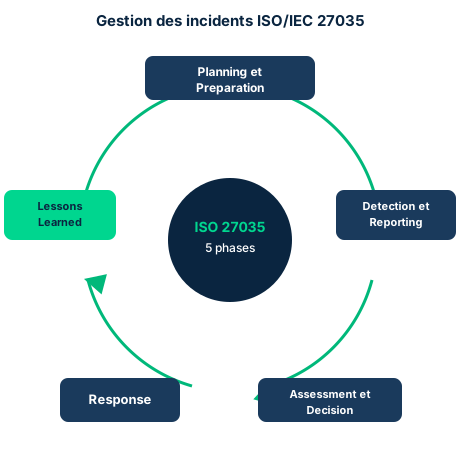
Several frameworks guide the conduct of incident management, but each organization must tailor its approach to its compliance obligations, mission, structure, and culture. Disagreements mostly concern the number of steps; the substance stays consistent.
NIST SP 800-61 (Computer Security Incident Handling Guide) structures activities in a four-phase cycle (Figure 7.8): Preparation; Detection and Analysis; Containment, Eradication, and Recovery; Post-Incident Activity. Note the cycle is iterative: lessons from the last phase feed back into Preparation, strengthening posture for future incidents.
ISO/IEC 27035 (Information Security Incident Management) codifies the process in five phases (Figure 7.9): Planning and Preparation; Detection and Reporting; Assessment and Decision; Response; Lessons Learned. The mapping to NIST is direct: ISO's Response phase covers NIST's Containment/Eradication/Recovery triplet, and Lessons Learned matches Post-Incident Activity. Where NIST merges Detection and Analysis, ISO splits Detection/Reporting from Assessment/Decision to stress the decision to qualify an event as an incident.
Exam trap: if a question asks for the ISO/IEC standard defining incident management in five phases, it is ISO 27035. If it asks for the four-phase cycle, it is NIST SP 800-61. Also do not confuse these lifecycle standards with the purely forensic standards (ISO 27037, 27041, 27042, 27043, 27050) covered in Module 1.
- NIST 800-61: Preparation -> Detection & Analysis -> Containment/Eradication/Recovery -> Post-Incident
- ISO 27035: Planning & Preparation -> Detection & Reporting -> Assessment & Decision -> Response -> Lessons Learned
- Response (ISO) = Containment/Eradication/Recovery (NIST); Lessons Learned = Post-Incident
- The cycle is iterative: lessons feed back into preparation
7.3 Culture, risk appetite and the SOC/CSIRT role
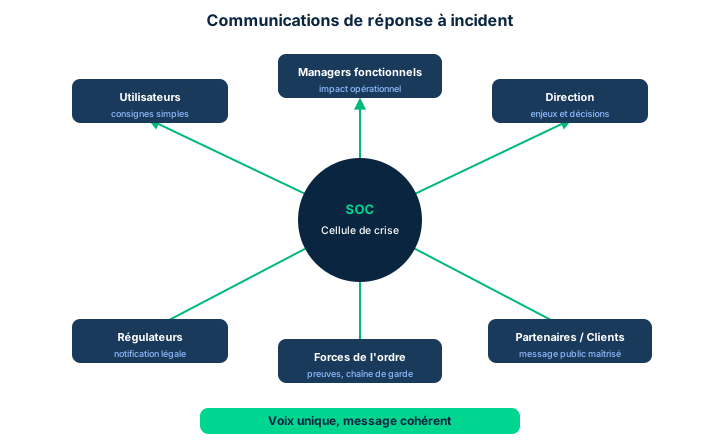
No regulation can erase the weight of organizational culture. The personalities of leaders and advisers, formal or informal, set a tone and a tacit understanding that determine both how the organization prepares for incident response and how rigorously it follows through on those preparations when the time comes. This culture frames discussions of risk tolerance and risk appetite; it can outweigh formalized governance processes.
This factor has concrete and sometimes harmful effects. Fear of losing face, reputation, or market trust can push teams either to quash an investigation to get back into operations quickly, or to overheat it by demanding fast rather than accurate and defensible findings. Laws, standards, and compliance regimes do not remove this cultural element; at best they provide guide rails to keep the organization on a sound trajectory.
Many organizations have a Security Operations Center (SOC); others assign this function to network or systems operations. Wherever it sits, its primary role is to help leadership make informed decisions about emergency actions. Critical exam point: the SOC does not unilaterally decide to activate a backup site or halt operations. It escalates the event and the need for an urgent decision to the designated responsible managers - or to the next rung in the chain in their absence. The SOC (or CSIRT) acts in real time per its procedures, but always escalates the fact that it acted.
- Culture weighs as much as, or more than, formal governance
- Reputational pressure can quash or overheat an investigation
- Culture frames risk appetite and risk tolerance
- The SOC/CSIRT escalates and never unilaterally activates a backup site or halts operations
7.4 Preparation, Detection and Analysis
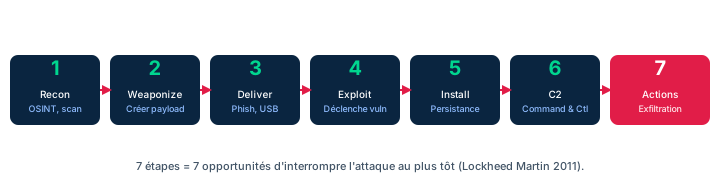
Before any incident, the organization must have a well-defined response policy. This policy identifies compliance obligations, reporting responsibilities, and notification expectations; it assigns, resources, and communicates activities. Above all it must specify how incidents are prioritized, since this drives escalation, information sharing, and decision authority. Preparation includes training responders, acquiring specialized software in advance (so responders gain experience with the tools), supplies, and storage areas. Everyone must know their responsibilities so an event can be properly assessed and escalated.
Detection is the most critical step: spotting the first signs of a kill chain in action. You must hunt for alarms, indicators of compromise (IoC), and even precursors. Suspicious event types to watch: input buffer overflows (SQL injection attempts), antivirus detecting an infection, filenames with unusual or unprintable characters, a device lacking current malware definitions trying to connect, an unplanned restart, an unmanaged host joining the network, a change to a configuration-baseline element, repeated failed logins from an unfamiliar IP, a rise in bounced or quarantined emails, unusual network-traffic deviations. IDS/IPS, firewalls, and logging systems detect these events but must be tuned (signatures, thresholds) to minimize false positives.
Analysis is often the weak point: detection captures events on time, but qualifying them as an incident lags for want of rapid analysis. Event correlation is decisive here and relies on solid log and configuration management: synchronizing time (time sync), normalizing DNS information, inventorying acceptable MAC addresses. These data let you associate one event with another. Once the event is qualified as an incident, prioritize it by impact and urgency, then document it in standardized reporting and track it through resolution.
- The preparation policy prioritizes incidents and drives escalation
- Detection = spot the kill chain early via IoC, precursors, and suspicious events
- Tune IDS/IPS and logs (signatures, thresholds) to limit false positives
- Analysis = event correlation: time sync, DNS normalization, MAC inventory
7.5 Response, Mitigation, Recovery and root cause analysis
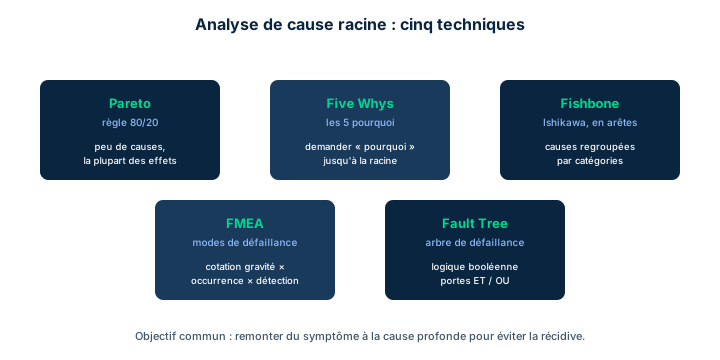
NIST 800-61 calls these activities Containment, Eradication and Recovery; ISO 27035 groups them under Response. The core is the same: isolate the damage, eliminate the cause, restore systems. Caution: your actions in this phase can strengthen or erase the organization's legal ability to respond, because legal remedies depend on preserved evidence. Documentation, communication, escalation decisions, and evidence preservation apply throughout.
Mitigation combines two logically distinct but often-joint tasks: containment and eradication. Containment is quarantine: isolating suspect elements to stop spread and examine the causal agent more safely. Typical tactics: logically or physically disconnecting systems/segments, cutting off key servers (DNS, DHCP, access control), severing ISP links, disabling Wi-Fi and remote access, closing connections to known or all external services, disconnecting extranets/VPNs, suspending partners' federated access, disabling internal users or applications. MITRE mitigation sets (enterprise and mobile) help before, during, or after to close a loophole. Eradication identifies and removes every instance of the causal agent: for malware, scrubbing all CPU memory, local and cloud storage, and backups, sometimes down to a low-level reformat. Containment and eradication often blur together.
Recovery restores infrastructure, applications, data, and workflows to their normal pre-incident state, ideally after eradication is complete. Remediation gathers the urgent configuration changes that limit recurrence (adjusting thresholds and alarms, resetting passwords). Every recovery step must be validated as correctly performed. Finally, eliminating the source is as essential as treating the effects: otherwise the team forever fixes the same problem. Hence root cause analysis applied in the response phase, with formal techniques (Figure 7.13): Pareto (80% of value from 20% of effort), Five Whys (ask "why?" until the cause), Fishbone/Ishikawa (visualize causes), FMEA (Failure Mode Effects Analysis, systematically identify component failures), Fault Trees (Boolean logic to identify failures).
- Response (ISO) = Containment + Eradication + Recovery (NIST)
- Containment = quarantine; eradication = remove every trace of the causal agent (including backups)
- Every recovery step must be validated; remediation limits recurrence
- Root cause analysis in the response phase: Pareto, Five Whys, Fishbone/Ishikawa, FMEA, Fault Trees
7.6 Reporting, Review and continuous improvement
One of the response team's last tasks is to signal that recovery operations are complete. This notification is a major transition point. Critical exam point: the response team notifies management that systems are ready for normal use, then management and leaders decide to move the organization from "incident response" back to normal operations. The SOC does not make this decision nor own the responsibilities that go with it: management does. Once the notification is endorsed and distributed to those who must act, the SOC shifts to post-incident activities.
Review rests on rigorous documentation and evidence handling. If the organization considers civil or criminal sanctions, this phase may be delayed or conducted so as not to compromise legal action; otherwise, review must be performed promptly and consistently. A lessons-learned meeting clarifies the sequence of events and identifies areas for improvement, but the organization must set the tone. If participants believe the process will lead to punishment, they will participate less. A lessons-learned meeting is not an inquisition: it is a learning event, non-punitive, and management must honor that expectation.
Once lessons are documented and reported, the report drives process improvement - which is particularly challenging, because lessons often highlight management's need to behave differently. Introspection is hard, and all levels of management must assess their own willingness to change. Common trap: producing voluminous minutes and changes to administrative controls does not ensure the organization truly learns. Learning must result in verifiable changes in behavior. Communication, documentation, and a willingness to change failing processes are critical.
- Management - not the SOC - decides the return to normal operations
- Review may be delayed if civil/criminal sanctions are considered
- The lessons-learned meeting is non-punitive, otherwise participation drops
- Learning must produce verifiable behavior changes
Case studies
SneakerNet's SOC facing a global intrusion
Context : SneakerNet, the world's foremost athletic-footwear manufacturer, has a high risk profile due to its globally connected operations. At 02:00, the SOC simultaneously observes: repeated buffer overflows on the e-commerce web server (SQL injection attempts), a spike in quarantined emails to executives, and an unmanaged host joining the R&D segment. Keiko, the security lead, must prioritize detection, response, and mitigation actions for a swift, coordinated response.
Question : How should Keiko prioritize and structure the response, and what is the limit of the SOC's authority?
Show analysis and answer
Prioritization follows impact and urgency. SQL injection on e-commerce threatens customer data (PII) and may trigger GDPR/PCI DSS reporting: high priority, immediate containment (isolate the web server, cut suspicious connections). The unmanaged host on the R&D segment is a propagation IoC: containment by quarantine (logical disconnection of the segment). The quarantined emails are already blocked: monitor and analyze, lower priority.
Event correlation is decisive: synchronizing clocks, normalizing DNS logs, and cross-checking MAC addresses determine whether these three events belong to a single coordinated kill chain or to separate incidents. Without correlation, Keiko risks treating one attack as siloed events.
Key limit: the SOC contains and escalates but does not unilaterally decide to halt global e-commerce or activate a backup site. Keiko escalates the need for an urgent decision to designated managers. For mitigation, MITRE mitigation sets provide countermeasures aligned with the observed attack patterns. Evidence preservation must accompany every action, since litigation is plausible given the value of the PII.
Takeaway : Prioritize by impact/urgency, correlate events before concluding, contain by quarantine - and escalate the decision to management, never make it alone.
- Prioritization underpins an effective coordinated response
- Without correlation, three events may mask a single kill chain
- The SOC acts in real time but escalates strategic decisions
- Evidence preservation protects the organization's legal capability
The SOC escalates, it does not decide
Recurring trap: believing the SOC activates a backup site, halts operations, or declares the return to normal. False. The SOC contains in real time per its procedures but escalates the need for an urgent decision to designated responsible managers. Management decides to halt operations and decides to move from "incident response" back to normal operations. If an exam question assigns these decisions to the SOC, that is the option to rule out.
NIST 4 phases vs ISO 27035 5 phases
Do not confuse the two cycles. NIST SP 800-61 = 4 phases: Preparation; Detection and Analysis; Containment, Eradication and Recovery; Post-Incident Activity. ISO/IEC 27035 = 5 phases: Planning and Preparation; Detection and Reporting; Assessment and Decision; Response; Lessons Learned. ISO's Response phase bundles NIST's Containment/Eradication/Recovery. If the question asks for "the ISO standard in five phases," answer ISO 27035; "the four-phase cycle," NIST SP 800-61.
Containment is not eradication
Containment = quarantine: isolating suspect elements to stop spread (network disconnection, cutting DNS/DHCP servers). Eradication = removing every instance of the causal agent, even from memory, the cloud, and backups (sometimes a low-level reformat). The two often overlap in practice but remain logically distinct. Above all: eliminating the source (root cause) is as vital as treating effects, otherwise the team forever fixes the same incident.
Checkpoint — Checkpoint
-
Under the Gramm-Leach-Bliley Act (GLBA), how long does a financial-services organization have to report a cyber compromise of customer PII to its regulators?
- A 36 hours
- B 72 hours
- C 24 hours
- D 30 days
Answer & rationale
Answer : A — 36 hours
GLBA now requires U.S. financial organizations to report any cyber intrusion of their infrastructure within 36 hours. 72 hours is closer to the GDPR notification deadline (to the supervisory authority); 24 hours and 30 days are not the GLBA rule.
-
Which ISO/IEC standard defines security incident management in five phases?
- A ISO/IEC 27035
- B ISO/IEC 27037
- C ISO/IEC 27001
- D NIST SP 800-61
Answer & rationale
Answer : A — ISO/IEC 27035
ISO/IEC 27035 codifies incident management in five phases: Planning and Preparation, Detection and Reporting, Assessment and Decision, Response, Lessons Learned. ISO 27037 concerns digital evidence (forensics). ISO 27001 is the ISMS. NIST SP 800-61 is a four-phase U.S. standard, not an ISO/IEC standard.
-
What are the four primary steps of a cyber-forensic investigation per NIST?
- A Collection, Examination, Analysis, Reporting
- B Preparation, Detection, Response, Recovery
- C Identification, Containment, Eradication, Recovery
- D Planning, Assessment, Decision, Lessons Learned
Answer & rationale
Answer : A — Collection, Examination, Analysis, Reporting
The NIST forensic cycle (SP 800-86) has four steps: Collection, Examination, Analysis, Reporting. The other options mix phases from the incident response cycle (NIST 800-61) or ISO 27035, which are not the forensic cycle itself.
-
Among these standards, which identify incident response as an essential security control?
- A PCI DSS, COBIT, SOC 2 (Trust Services Criteria), NIS Directive 2016/1148
- B ISO 9001, ITIL, TOGAF, Zachman
- C FIPS 140-2, Common Criteria, FedRAMP only
- D None; incident response is never a mandatory control
Answer & rationale
Answer : A — PCI DSS, COBIT, SOC 2 (Trust Services Criteria), NIS Directive 2016/1148
PCI DSS, COBIT, the SOC Trust Services Criteria (SOC 2), and the EU NIS Directive 2016/1148 all mandate incident response as an essential control. ISO 9001/ITIL/TOGAF/Zachman do not specifically target this control. The last option is false: incident response is indeed mandated by many frameworks.
-
After an intrusion, which root cause analysis technique consists of repeatedly asking "why did this happen?" until reaching the deep cause?
- A Five Whys
- B Pareto Analysis
- C Fishbone (Ishikawa)
- D Fault Trees
Answer & rationale
Answer : A — Five Whys
Five Whys means repeatedly asking "why?" to trace back to the root cause. Pareto identifies 80% of value in 20% of effort. Fishbone/Ishikawa is a cause-visualization tool. Fault Trees apply Boolean logic to identify failures. FMEA, not listed here, systematically identifies component failures.
Key takeaways
- An event becomes an incident as soon as there is a possibility of harm; the response determines its magnitude.
- Reporting obligations: GDPR (PII), HIPAA Breach Notification, PIPEDA, GLBA (36 h), critical infrastructure. PCI DSS, COBIT, SOC 2, NIS 2016/1148 mandate IR as a control.
- NIST SP 800-61 = 4 phases; ISO/IEC 27035 = 5 phases; ISO's Response covers Containment/Eradication/Recovery.
- Culture and risk appetite weigh as much as procedures; the SOC/CSIRT escalates but does not decide alone.
- Detection = spot the kill chain via IoC/precursors; Analysis = event correlation (time sync, DNS, MAC).
- Containment = quarantine; eradication = remove every trace of the causal agent; root cause analysis (Pareto, Five Whys, Fishbone, FMEA, Fault Trees) in the response phase.
- Management - not the SOC - decides the return to normal; the lessons-learned is non-punitive and must produce verifiable behavior changes.
Detective/preventive measures and patch management
Prerequisites : Familiarity with defense in depth, SOC/SIEM, and change management (earlier Domain 7 modules).
Operating and maintaining detective and preventative measures (objective 7.7) requires professional judgment : no list of tools is exhaustive, and each control is chosen based on the organization's risk posture, its obligations and the limits of the products. This module reviews the operational arsenal - firewalls and NGFW integrating IDS/IPS, allowed/blocked listing, third-party security services, sandboxing, honeypots, anti-malware and ML/AI tools - then moves on to patch management (objective 7.8).
Patch management is not purely a technical matter : it ties into vulnerability management and change management, and it carries its own pitfalls (interoperability, poorly designed patches, downtime, immutable infrastructure). The exam tests your ability to sequence the patch process and to distinguish detection (vulnerability management) from remediation (patch management).
By the end of the module, you will know how to justify the choice of an operational control, compare anti-malware approaches, run a patch process end to end and prioritize patches across a heterogeneous infrastructure.
8.1 Firewalls, NGFWs, IDS/IPS and the SOC's real-time decisions
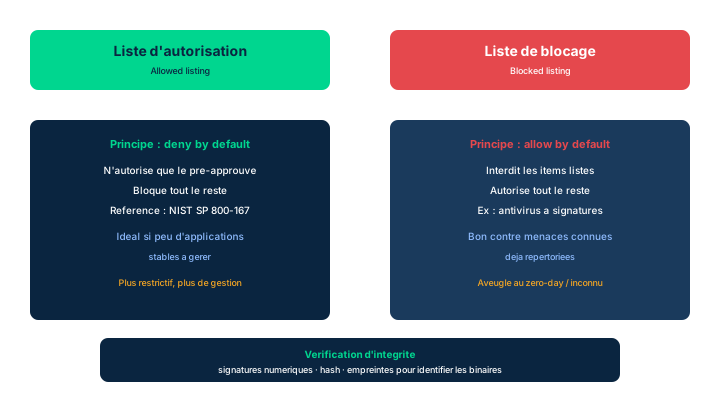
The operational value of firewalls cannot be overstated: a rapidly evolving threat environment forces the organization to constantly evaluate their performance and to modify rules according to new attack vectors. The SOC must be ready to make real-time decisions when a threat or the architecture changes. These immediate needs may justify an approval path distinct from the usual one, but proper documentation, testing, and deployment must stay consistent with the organization's change management requirements.
Fourth-generation and next-generation firewalls (NGFWs) now absorb many functions of earlier IDS and IPS generations, as host-based or network-based solutions. The candidate should recognize the basic functions of an IDS (detect and alert) and an IPS (detect and actively block), without getting focused on shopping for specific products. The exam expects understanding of the principle, not a commercial comparison.
An important subtlety: because an NGFW reconfigures itself from its machine learning and AI algorithms, applying a traditional change management approach hobbles the device's effectiveness. Instead, integrate the NGFW into the organization's logging infrastructure to track its performance: monitoring its automatic changes is part of the monitoring strategy, not of a classic change procedure that would freeze the adaptation.
Exam trap: do not confuse IDS (detects and alerts) with IPS (detects and acts by blocking). And remember that for self-adapting devices the right reflex is logging/monitoring, not freezing them with rigid change control.
- The SOC adjusts firewall rules in real time per new attack vectors
- NGFWs now integrate IDS/IPS functions (host or network)
- IDS detects and alerts; IPS detects and actively blocks
- A self-adapting (ML/AI) device is tracked by logging, not by rigid change control
8.2 Allowed listing vs blocked listing
Filtering activities from lists of allowed or blocked items is one of the most effective controls for minimizing malware compromises. For decades the terms whitelisting and blacklisting were used; allowed and blocked are now preferred, even though prior and some current works keep the old terminology.
Allowed listing permits only previously approved items to execute and blocks all others. This control appears in both the ISO and NIST frameworks; NIST provides SP 800-167 (Guide to Application Whitelisting) to support its implementation. Software allowed lists detect and prevent any attempt to load and execute a program file and alert security staff if the code is not preapproved. The concept of prohibiting unauthorized software execution also extends to user actions, ports and protocols, IP addresses/ranges, websites, and MAC addresses. The organization can verify the integrity of authorized programs via digital signatures, cryptographic checksums, or hash functions, before execution or at system startup.
The technique is effective when the number of permitted applications is small: by its nature it blocks unknown threats, a major asset. But as the diversity of systems and missions grows, allowed listing can become too restrictive for business needs. Conversely, blocked listing explicitly prohibits the listed applications; anything not listed is allowed, subject to other controls. This approach is particularly effective against specific, known threats and is often used to keep out nuisance applications that consume resources.
Exam trap: allowed listing = deny by default, ideal in a homogeneous environment and blocks the unknown; blocked listing = allow by default, effective against known threats but useless against the unknown. Allowed-listing and anti-malware products are converging and now embed each other's functions.
- Allowed listing = deny by default; blocks unknown threats by nature
- Blocked listing = allow by default; effective against known threats
- NIST SP 800-167 guides application whitelisting (also in ISO)
- Program integrity verified by signatures, checksums, or hash
- Allowed listing becomes too restrictive as estate diversity grows
8.3 Third-party security services and contractual due diligence
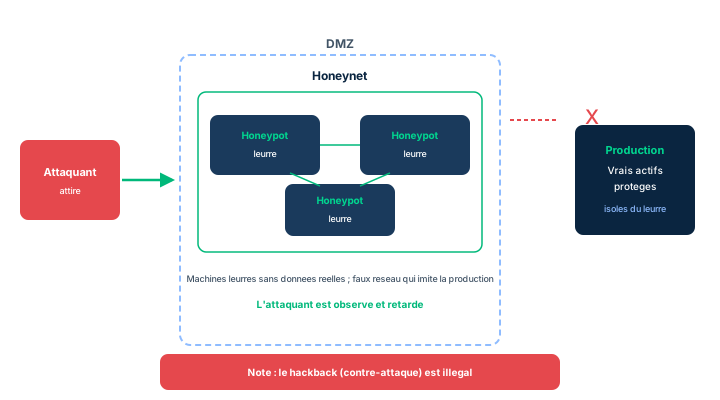
An organization for which security is not a core competency may turn to external services. The manual's example: an agricultural retailer has neither the expertise nor the tools to build a comprehensive security program; this may make economic sense, since its competency is selling agricultural goods, not securing data. Commonly offered services include: threat intelligence (open-source monitoring or proprietary investigations into threats targeting a region, sector, product, or specific client); network monitoring (remote or on-site, since detecting network attacks requires analysis and expertise); physical security (guard services avoiding hiring and staffing costs); network management (often tasked with security functions - usage-policy enforcement, monitoring, patch management, asset inventory, cloud hosting); and audit (verification/validation, vulnerability scanning, compliance certification, configuration maintenance).
Whatever the service, due diligence is mandatory to confirm the provider's actual ability to meet the contract terms - all the more so since security demands strong trust. Due diligence activities include: review of governance (the provider's security policy and procedures); SLAs (explicit agreement on what constitutes full and accurate performance); NDAs (the provider protects the client's data and agrees not to benefit from it); insurance/bonding (liability insurance and sometimes a performance or surety bond guaranteeing completion and compensation for negligence); audit/testing (allowing the client to run on-site audits, performance monitoring, or penetration testing); strong contract language (enforceable and legitimate terms across all jurisdictions, reviewed by both parties' legal counsel); and regulatory approval (informing and obtaining regulators' acceptance if the service affects compliance).
The public sector differs sharply from the private one: procurement rules are complex and serve goals beyond best service at lowest cost (preferences for certain groups, political constraints such as embargoes, fostering local industry, and strong accountability over public funds). Landmarks: in the U.S., the Federal Acquisition Regulations (FAR) - thousands of pages, not directly applicable to states and sub-jurisdictions; in Canada, the Government Contracting Regulations augmented by the SACC (Standard Acquisition Clauses and Conditions) manual; in the EU, the Public Procurement Policies setting minimums augmented by national requirements.
Exam trap: due diligence is about the provider's actual capability (governance, SLA, NDA, insurance, audit, contract language, regulators), not just price. And remember that public-sector contracting follows its own rules (FAR, SACC, EU procurement), distinct from the private sector.
- Third-party services: threat intel, network monitoring, physical security, network management, audit
- Due diligence: governance, SLA, NDA, insurance/bonding, audit/testing, contract, regulators
- Security demands strong trust, hence reinforced due diligence
- Public contracting is distinct: FAR (U.S.), SACC (Canada), EU procurement
8.4 Sandboxing, honeypots, and honeynets
When the SOC recognizes a threat, decisions are needed in real or near-real time. The organization should have policies to evaluate the threat and to decide whether to use an isolated test environment - a sandbox - to separate the threat from the rest of the network. Sandboxes are often implemented in virtual environments: easy to provision, and if the environment is compromised, the damage stays minimal. A limit to know: many attackers can detect they are in a sandbox and adapt their behavior to avoid analysis. Sandboxing also isolates potentially malicious activity before presenting information to the user: several email engines, notably Microsoft's Office365, can sandbox messages and detonate the URLs; if inappropriate activity is detected, the link is disabled before the message is shown.
A honeypot is a machine present on the network but containing no sensitive or valuable data; several honeypots linked as a network or subnet form a honeynet. Honeypots distract and occupy intruders to delay their access to production data, and offer the chance to observe the attack live (without appreciable risk) to better grasp its nature, possibly identify the attacker, assess their tools and skill, and gather evidence for legal action. They are typically placed in the DMZ and should mimic the architecture of a real environment, with simulated assets mimicking production content, to convince the attacker the target is genuine. Some providers offer entire simulated networks (hundreds of devices, fake accounts, fake card data).
A crucial governance point: honeypots and honeynets are generally not meant to lure or attract malicious actors. While security researchers and anti-spam vendors sometimes structure them for exactly that, it is counterproductive for most organizations to actively solicit attacks against their infrastructure. Finally, in almost all jurisdictions, hackback (hacking back the attacker who hacked you) is illegal, often severely punished: in the U.S. and the U.K. it is just another form of hacking, chargeable as a felony, even though some jurisdictions, including the U.S., are considering allowing it under limited circumstances.
Exam trap: sandbox = analysis isolation (but detectable by the attacker); honeypot = decoy placed in the DMZ to observe and collect evidence, not to bait; hackback = illegal. Do not confuse the honeypot's defensive observation purpose with an offensive move.
- Sandbox = analysis isolation, but detectable by some attackers
- Office365 sandboxes emails and detonates URLs before display
- Honeypot/honeynet = DMZ decoys to observe and collect evidence
- They must not bait attackers; hackback is illegal (felony)
8.5 Anti-malware: approaches, zero-day, and reputation monitoring
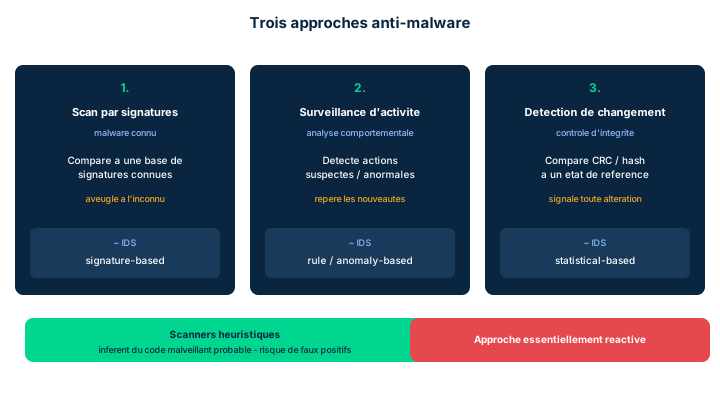
A realistic DiD strategy includes anti-malware solutions (hardware, software, or mixed), on network devices, individual systems, and mobile endpoints. Most frameworks identify endpoint anti-malware as a necessary defense-in-depth component, managed via dedicated platforms integrated with logging, the SOC, and the SIEM; tight integration with a SIEM or SOAR is vital. Because malware spreads largely through social engineering, awareness, education, and training of all members are the first line of defense: email, attachments, and removable media are major vectors. Many professionals are dropping annual training (long click-through videos) in favor of microtraining - short one-minute sessions spread across the year - combined with phishing awareness testing to measure effectiveness. For SMBs, the manual points to common-sense cyber hygiene measures, including the CIS Implementation Group 1 (IG1) for the SOHO segment.
All antivirus is essentially reactive: it exists only because malware came first. One must distinguish known-signature scanning from generic measures. The manual describes three approaches, likened (not identically) to IDS types: known signature scanning (like a signature-based IDS) - looks for strings characteristic of known viruses, often able to clean the object (but replacement is safer); activity monitoring (like a rule-based or anomaly-based IDS) - watches and flags suspicious activity, e.g., a disk-format call or alteration of program files by a program other than the OS; and change detection (like a statistical-based IDS) - regularly compares files and configurations via a checksum or CRC, sometimes a hash/digest. Change detection is also called integrity-checking, but the term can mislead: if integrity was already compromised before the baseline was set, the technique is ineffective; it also has the highest probability of false alarms because it cannot tell whether a change is malicious or authorized. Separately, heuristic scanners analyze unknown code looking for suspicious sections (close to activity monitoring), at the cost of many false positives.
A zero-day (or zero-hour) gets its name from surprise: an attacker discovers an unreported vulnerability, builds an exploit, and uses it before any defense exists; the countdown pits black hats (attackers) against white hats (defenders) and gray hats (white hats using offensive techniques within a legal, ethical frame, like ethical penetration testing). During the zero-hour, no antivirus engine protects a visitor to a site hosting new malicious content. The counter: web reputation monitoring, which assesses sites and assigns a reputation score, typically 0 to 100. The five example bands: High Risk (1-20), Suspicious (21-40), Moderate Risk (41-60), Low Risk (61-80), Trustworthy (81-100) - enough to block, proceed with caution, or allow access.
Finally, ML/AI tools spot malicious patterns not preestablished by rule sets, KPIs, and KRIs, and alert on more threats; they must be tuned to the organization's needs, otherwise they make ill-fitting decisions at excessive cost. The flip side: ML/AI are also available to attackers (open-source projects), hence a permanent arms race. Exam trap: signature -> known; activity monitoring/heuristics -> behavior and unknown; change detection -> integrity via CRC/hash but false alarms and a possibly already-corrupted baseline.
- Three approaches: signature (known), activity monitoring (behavior), change detection (CRC/hash integrity)
- Heuristic scanners target unknown code but generate false positives
- Zero-day/zero-hour: element of surprise; white/black/gray hats
- Web reputation: 0-100 score, bands High Risk -> Trustworthy
- ML/AI must be tuned; arms race since attackers also have access
8.6 Patch management: challenges and process
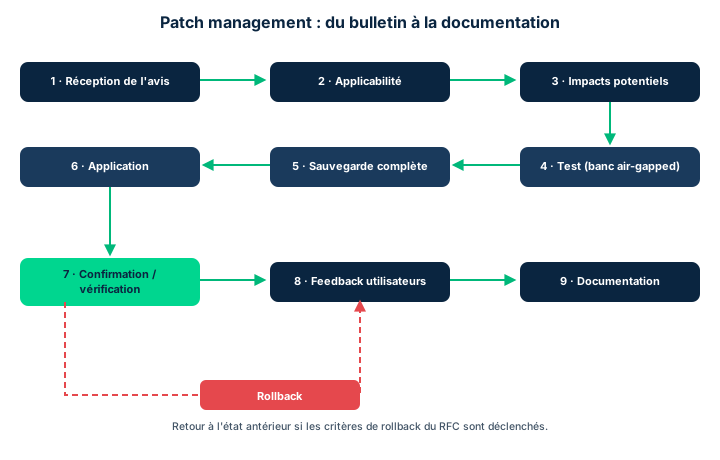
Weaknesses identified by risk assessment, threat modeling, or scanning are addressed through configuration changes, software patches, or environment modifications (firewall rules, DLP settings). Exam distinction: vulnerability management emphasizes detecting and evaluating weaknesses, then often hands remediation to another process based on the effort required; patch management is the part that applies and verifies patches. Any change to production software follows the organization's change management procedures.
Patching is necessary but carries its own challenges: interoperability (a patch may conflict with an interdependent system and cause an outage; vendors cannot anticipate every environment); poorly-crafted patches (a badly designed patch may degrade performance, cause interoperability problems, or even introduce new vulnerabilities - heightened for reactive patching); required downtime (frequent reboots interrupt operations and add cost); virtualization-specific concerns (in the cloud, practice has shifted to immutable infrastructure: apply the patch to a brand-new instance and shift load, under CI/CD with tools like Puppet, Chef, or Ansible deploying security baselines); and timing (multi-time-zone organizations risk non-uniform patch application).
The industry responded with a standard patch process; each organization creates its own policy considering these steps (Figure 7.14): receive notice (vendor, anti-malware/threat-intel third party, or news - at least daily watch); determine applicability/evaluation (not everyone uses the product the same way; change management requires an applicability and urgency analysis); determine potential impacts on other systems and additional risks; test on an isolated air-gapped test bed reproducing production interdependencies (without 1:1 replication), also testing rollback procedures; perform a full backup before application (to roll back without loss); apply per vendor instructions, best practices, and the formal process; confirm installation on all targets with automated tools, verify the patch performs, and update monitoring metrics; solicit user feedback (the help desk is a stakeholder); roll back to the prior state if the patch fails or has unacceptable effects, per criteria defined in the Request for Change (RFC) and triggered automatically; and document everything, adding patch records to the asset inventory.
Exam trap: do not confuse vulnerability management (detect/evaluate) with patch management (apply/verify). And remember the logical order - notify, assess applicability, gauge impact, test air-gapped, back up, apply, confirm, gather feedback, roll back if needed, document - testing on an isolated bed and a full backup always precede production application.
- Vulnerability management detects/evaluates; patch management applies/verifies
- Challenges: interoperability, poorly-crafted patches, downtime, immutable infra, timing
- Always test air-gapped and take a full backup BEFORE applying in production
- Cloud: immutable infrastructure and CI/CD (Puppet, Chef, Ansible)
- Roll back per RFC criteria; document everything in the asset inventory
Case studies
Prioritizing patching across a heterogeneous infrastructure (SneakerNet)
Context : Keiko finds that SneakerNet has no defined process for evaluating and testing patches, and that employees are not consistently notified about necessary patches. The infrastructure is diverse: on-prem servers, cloud workloads, workstations, network gear, and sites spread across several time zones.
Question : How can Keiko prioritize and coordinate the timely application of security patches, and what patch and vulnerability management strategy should she propose?
Show analysis and answer
First, distinguish the two disciplines: vulnerability management that detects and evaluates weaknesses (regular scans, threat modeling), feeding a patch management that remediates. Prioritization rests on actual applicability (not every asset uses the product the same way) and urgency (vulnerability criticality, exposure, asset value) - the very analysis change management requires.
Next, formalize the Figure 7.14 process: daily watch of notifications (vendors, threat intel), applicability and impact assessment, testing on an air-gapped test bed reproducing interdependencies, full backup, application per instructions, automated confirmation on all targets, user feedback via the help desk (a stakeholder), rollback per criteria written into the RFC, and documentation in the asset inventory.
To coordinate across a diverse, multi-time-zone estate: segment by asset type and maintenance window to avoid non-uniform application (timing risk); for cloud workloads, adopt immutable infrastructure under CI/CD (Puppet, Chef, Ansible) to patch a fresh instance and shift load, reducing downtime; centralize notifications and metrics in the SIEM. Governance ties it all to formal change management, with internal remediation SLAs per criticality level.
Takeaway : Priority = applicability x urgency; a formalized patch management (Figure 7.14) relies on vulnerability management for detection and change management for approval, with immutable infrastructure/CI/CD for the cloud.
- Detection (vulnerability) precedes and feeds remediation (patch)
- Change management mandates applicability and urgency analysis
- The help desk is a stakeholder of the patch process
- The cloud favors immutable infrastructure to limit downtime
Allowed vs blocked listing: the default direction
Allowed listing = deny by default: only preapproved items run, so the unknown (including novel threats) is blocked by nature - but becomes too restrictive as estate diversity grows. Blocked listing = allow by default: everything is admitted except listed items, so effective against known threats but blind to the unknown. On the exam, tie allowed listing to defending against the unknown and NIST SP 800-167, and blocked listing to nuisance applications and known threats.
Honeypot for observation, not bait - and hackback is illegal
A honeypot (or honeynet) aims to distract, observe, and collect evidence, not to actively bait attackers: soliciting attacks is counterproductive for most organizations. Place it in the DMZ with credible simulated assets. Above all, never cross the offensive line: hackback is illegal in almost all jurisdictions (a felony in the U.S. and the U.K.), even if some are considering allowing it under conditions.
Vulnerability management vs patch management
Vulnerability management = detect and evaluate weaknesses, then hand off remediation. Patch management = apply and verify patches. If the question is about scanning, evaluating, or prioritizing weaknesses, think vulnerability management; if it is about applying, testing, confirming, or rolling back, think patch management. And remember that air-gapped test-bed testing and a full backup always precede production application.
Change detection / integrity-checking: a misleading name
Change detection (often called integrity-checking) compares files and configurations via a checksum, CRC, or hash. But the term integrity-checking misleads: if integrity was already compromised before the baseline was set, the technique is ineffective. It also has the highest probability of false alarms, since it cannot tell whether a change is malicious or authorized. Liken it to a statistical-based IDS.
Checkpoint — Checkpoint
-
An organization with a small, homogeneous application estate wants a control that blocks any unknown threat by nature. Which approach fits best?
- A Allowed listing (deny by default)
- B Blocked listing (allow by default)
- C Heuristic scanning alone
- D Web reputation monitoring alone
Answer & rationale
Answer : A — Allowed listing (deny by default)
Allowed listing permits only preapproved items and blocks everything else, hence the unknown by nature; it excels when permitted applications are few (homogeneous estate) - see NIST SP 800-167. Blocked listing lets the unknown through (allow by default). Heuristic scanning and web reputation complement but do not guarantee blocking the unknown.
-
Which of these is a valid example of a 7.7 tool or technique for addressing threats?
- A Honeypots and honeynets
- B Proactive hackback against the attacker
- C Removing all NGFW logging
- D Disabling change management
Answer & rationale
Answer : A — Honeypots and honeynets
The 7.7 Check Your Understanding lists allowed/blocked listing, firewalls/IDS/IPS, sandboxing, honeypots/honeynets, and anti-malware. Hackback is illegal almost everywhere. Removing NGFW logging contradicts the monitoring strategy. Disabling change management is not a security control.
-
Which anti-malware approach regularly compares files and configurations via a CRC or hash and has the highest probability of false alarms?
- A Change detection (integrity-checking)
- B Known signature scanning
- C Activity monitoring
- D Web reputation monitoring
Answer & rationale
Answer : A — Change detection (integrity-checking)
Change detection (likened to a statistical-based IDS) compares via checksum/CRC/hash and cannot tell whether a change is malicious or authorized, hence the most false alarms; if integrity was already compromised before the baseline, it is ineffective. Signature scanning targets the known, activity monitoring targets behavior, web reputation scores sites.
-
In the patch management process, which step must imperatively precede applying a patch in production?
- A Test on an air-gapped test bed then perform a full backup
- B Solicit user feedback via the help desk
- C Document the patch in the asset inventory
- D Automatically trigger the rollback
Answer & rationale
Answer : A — Test on an air-gapped test bed then perform a full backup
The manual (Figure 7.14) places testing on an isolated, air-gapped test bed, then the full backup, before production application. User feedback and documentation come after application; rollback triggers only on failure, per the RFC criteria.
-
Which statement correctly distinguishes vulnerability management from patch management?
- A Vulnerability management detects and evaluates weaknesses; patch management applies and verifies patches
- B Patch management detects weaknesses; vulnerability management fixes them
- C Both denote exactly the same process
- D Vulnerability management concerns only the cloud
Answer & rationale
Answer : A — Vulnerability management detects and evaluates weaknesses; patch management applies and verifies patches
Vulnerability management emphasizes detection and evaluation, then often hands off remediation; patch management is the part that applies and verifies. Option 2 swaps the roles; the two are not identical; vulnerability management is not limited to the cloud.
Key takeaways
- The SOC tunes firewalls in real time; NGFWs absorb IDS/IPS and are tracked via logging, not rigid change control.
- Allowed listing = deny by default (blocks the unknown, NIST SP 800-167); blocked listing = allow by default (known threats).
- Contracting a third-party service requires due diligence: governance, SLA, NDA, insurance/bonding, audit, contract language, regulators; public contracting (FAR, SACC, EU) is distinct.
- Sandbox = analysis isolation; honeypot/honeynet = DMZ decoys to observe, not bait; hackback is illegal.
- Three anti-malware approaches: signature (known), activity monitoring/heuristics (behavior/unknown), change detection (CRC/hash integrity, high false alarms).
- Zero-day/zero-hour: element of surprise; web reputation score 0-100; ML/AI must be tuned in an arms race.
- Vulnerability management detects/evaluates; patch management applies/verifies; air-gapped testing and full backup precede production (Figure 7.14).
Recovery strategies: backups, RAID & high availability
Prerequisites : BCDR basics (RPO/RTO), the availability facet of the CIA triad, business-continuity vocabulary.
Ensuring the availability of information is one of the pillars of the security profession. Designing systems resilient enough not to fail is essential, but planning their recovery when they do fail matters just as much. This module covers the full set of Domain 7 recovery strategies : backups (3-2-1, full/differential/incremental types, journaling, snapshot, CDP), choice of storage location, alternate recovery sites (mirrored, hot, warm, cold, mobile, cloud), system resilience and high availability (clustering, power, UPS, generators) and storage options (RAID, SAN, NAS).
Here the exam tests your command of fine operational distinctions : how the archive bit behaves depending on the backup type, what data is lost if a differential is corrupted, which recovery site meets a given RTO, or which RAID level tolerates the loss of two disks. These notions are concrete and quantifiable.
By the end of the module, you will know how to size a backup strategy (how many versions, which media, which location), choose a recovery site based on the acceptable activation delay, and select a storage architecture that eliminates single points of failure.
9.1 The 3-2-1 storage strategy and media
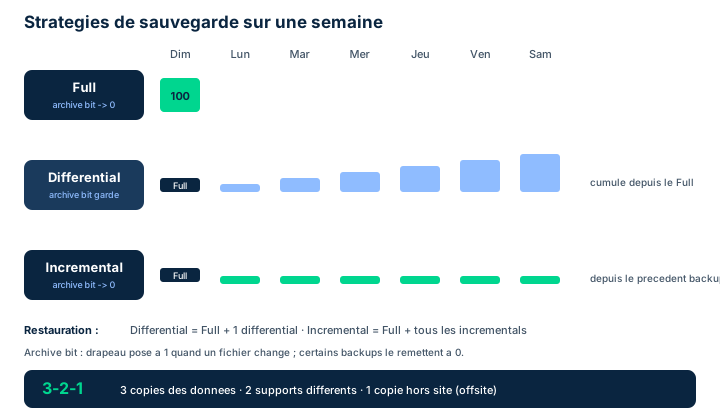
Accurate, comprehensive backups are the central instrument of business continuity and disaster recovery (BCDR): it is the availability facet of the CIA triad put into practice. Backup data must be stored so it is available when needed. The minimal protection, honed over decades of experience, is captured in the 3-2-1 strategy.
Three digits, three requirements. "3": three copies of the data, that is the original plus two backups. "2": two different media types, for example magnetic tape, WORM (Write Once, Read Many) drives, removable disks, or cloud. Media choice depends on storage cost, backup and restore speed, backward compatibility with legacy practices, and the integrity guarantees offered. "1": one offsite copy, because you cannot replicate an infrastructure inside the very infrastructure you are trying to protect.
WORM drives deserve special exam attention: their "write once, read many" property prevents any later alteration, making them a prime medium for regulatory retention and protection against ransomware or tampering.
Exam trap: 3-2-1 = three copies, two media types, one offsite copy. Do not confuse it with "three locations" or "two locations": the correct phrasing is about the number of copies, the number of media types, and one offsite copy, not the number of places.
- 3-2-1: 3 copies (original + 2), 2 media types, 1 offsite copy
- WORM = write once, read many: ideal against tampering and for retention
- Media choice depends on cost, speed, and integrity guarantees
- Offsite protects against a disaster striking the production site itself
9.2 Backup locations: onsite, offsite, and cloud
Where the media is kept structures the whole backup strategy. Three broad choices exist. Onsite: the organization keeps full control of and responsibility for the data, stored in the production facility and immediately available for recovery. Cost may be proportionally higher, especially if a small or midsize business lacks the datacenter capacity and internal skill set to secure its backups properly.
Offsite: the data is transported to a location distant and robust enough not to be affected by a catastrophic failure of the production site. It is then exposed to additional risk in transit and may need extra controls to guarantee usability on arrival; the organization sometimes loses part of the security governance to the provider. Transport may be physical (moving the media) or rely on data vaulting, which uses data networks to transfer information to remote media.
Cloud Backup-as-a-Service: some CSPs offer backup as a service. This differs from the physical onsite/offsite approaches because the data is replicated several times inside the CSP's environment and stays available on demand. These services typically offer online (near-immediate access) and near-line (deferred, cheaper access) tiers, with distinct costs and availabilities.
Exam trap: data vaulting means network-based offsite transfer, not to be confused with simple physical transport of tapes. Online and near-line are two cloud service tiers, not two backup types.
- Onsite: immediate availability, full control, sometimes high cost
- Offsite: shielded from local disaster but exposed in transit, shared governance
- Data vaulting = network-based offsite transfer, not physical transport
- Cloud BaaS: replication at the CSP, online and near-line tiers
9.3 Backup types and the archive bit
Backup approaches differ in the time needed to back up and restore, and in their effect on the archive bit. In most OSs, the file system flags that a file has changed via this archive bit: it is 1 at file creation, a backup task flips it to 0 to indicate the file was archived, and any file created or modified afterward sets the bit back to 1.
Full: all data in the environment is copied. The most expensive and time-consuming option, but the most complete; it resets the archive bit to 0 (Figure 7.15). Differential: all data modified or created since the last full (bit = 1) is copied, but the bit is NOT reset to 0 (Figure 7.16). As a result, each differential is cumulative and grows until the next full. Incremental: all new or changed files since the last full or last incremental are copied, then the archive bit is reset to 0 (Figure 7.17). Each incremental thus captures only a defined subset, of manageable size.
The trade-off is central for the exam. Incremental makes the backup fastest (little data each night) but the restore slowest: you need the last full plus all successive incrementals. Differential makes the backup heavier as the week goes (cumulative) but the restore simpler: the last full plus a single differential.
Exam trap: it is the archive-bit reset that distinguishes differential (does NOT reset it, hence cumulative) from incremental (resets it, hence non-cumulative). Memorize: differential leaves the bit alone, incremental resets it to 0.
- Full: everything copied, archive bit reset to 0 (Figure 7.15)
- Differential: since the full, bit NOT reset, cumulative (Figure 7.16)
- Incremental: since the last backup, bit reset to 0 (Figure 7.17)
- Incremental = fast backup but slow restore; differential = the reverse
9.4 Journaling, snapshot, CDP, and the number of versions
Two backup strategies look at data rather than files. Journaling, originally designed for granular database recovery, writes each transaction to a log at commit time; these journals let an instance be rolled forward to the last committed transaction. It is now widespread in file systems (NTFS, HFS+) and offers high reliability against momentary power or storage-connectivity interruptions. Journaling does not affect the archive bit. Snapshot, specific to virtualized environments, captures a mirror of data blocks without disrupting production; it usually stays on the production media until copied elsewhere, and its restore times are very fast. The snapshot captures the archive bit in its production position (it does not change it). It is often confused with cloning or mirroring, which protect data but mainly provide real-time failover if primary storage fails.
Continuous Data Protection (CDP) is a form of snapshotting: every time a block changes, the block is snapshotted, allowing recovery to a precise transaction point, quickly and granularly. The duplication has a performance cost, but the recovery granularity is worth it in some environments.
How many versions to keep? Reusing the same volume by overwriting each previous backup leaves only ONE version: data changed between backups is unrecoverable, and a faulty process makes production the only accurate copy - the backup becomes a single point of failure. Conversely, creating a new version each time consumes vast storage and breeds confusion about the most recent version. You must find a happy medium: enough versions not to lose all recovery capability, without making management unmanageable.
Validation: after each backup, whatever the type, the organization must validate that the copy is thorough and accurate, usually via an integrity check and, depending on the data set's size, by sampling.
Exam trap: journaling and snapshot do not affect the archive bit; CDP snapshots each changed block; never skip the validation step, because an unverified backup can be a silent single point of failure.
- Journaling: log of committed transactions; does not affect the archive bit
- Snapshot: block mirror, fast restore, captures the bit in production position
- CDP: snapshot of each changed block, recovery to a precise transaction point
- Keep enough versions; validate every backup (integrity check, sampling)
9.5 Recovery sites and high availability
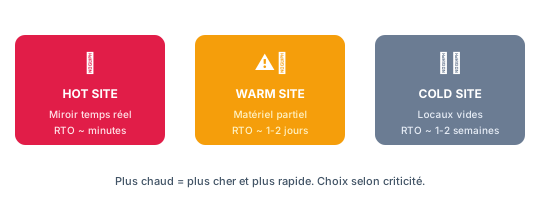
If the normal production environment no longer works, the organization needs alternate processing capability. Site types are classified by activation time. Mirrored: the mirror site runs in parallel with production, processing each transaction simultaneously, so at any instant two complete, current copies exist in two separate locations; the most expensive option, reserved for maximum-availability needs. Hot: a fully operational site with all hardware, software, and data to instantly resume critical functions; activation in minutes to hours. Warm: like a hot site but without the current data version and without certain functional aspects ready for instant failover (water, power connected but to be activated); activation in hours to days. Cold: an empty shell with no hardware/software/data, utilities possibly connected but inactive; the cheapest option but activation in weeks or months, heavily dependent on the IT supply chain. Mobile: a portable facility mounted on a vehicle, for a very limited number of critical users, but deployable anywhere. Cloud: data is with a CSP, and you resume from any location with broadband access.
Two contractual tools complete these options, especially in the public sector: the JOA (joint operating agreement) and the MOU (memorandum of understanding), by which two organizations share a site if one's environment is disrupted - effective for a localized impact (a single building fire) but not for a metropolitan disaster, which often affects both partners. The alternate site must be far enough to escape the primary disaster, yet close enough for key personnel to reach in a crisis. Relocation kits are also prepared (current build of critical IT assets, current data version, encryption keys, contacts), kept up to date by the BCDR team via change management.
To minimize downtime, multiple processing sites are also used: unlike mirroring (two complete copies), they collectively provide enough capacity to support critical functions, with replication of applications and data and consideration of bandwidth, hardware dependencies, and legal constraints (data localization, privacy).
For system resilience and high availability (HA), several techniques apply. Sufficient spare components in inventory allow replacing any critical-path element (but too many spares is expensive). Clustering combines systems (storage, processing, network) to provide constant capacity: in active-active all nodes handle a share of the load (load balancing), in active-passive a node stays idle and is brought online only on failure. Finally power: a UPS provides immediate temporary current long enough for a clean shutdown (deep-cycle batteries, or kinetic Flywheel Energy Storage, or supercapacitors); a generator produces local power from fuel (fire/explosion and toxic-exhaust risk) and must be paired with a transfer switch that detects utility loss and starts the generator automatically.
Exam trap: match activation time to site type - minutes/hours = hot, hours/days = warm, weeks/months = cold. A UPS only serves a clean shutdown or the bridge to a generator, never long autonomy.
System resilience rests on three levers the exam often groups together: high availability (HA) maximizes uptime through redundancy, fault tolerance keeps the system running despite a component failure (with no perceived interruption), and Quality of Service (QoS) guarantees critical flows the bandwidth, latency and priority they need even under congestion. HA targets availability, fault tolerance targets uninterrupted continuity, QoS targets guaranteed performance for priority services.
- Times: mirrored (real-time) < hot (min-hrs) < warm (hrs-days) < cold (weeks-months)
- JOA/MOU: site sharing, mostly public sector, for localized impacts
- Clustering: active-active (load balancing) or active-passive (standby node)
- UPS = clean shutdown/bridge; generator + transfer switch = extended runtime
- Resilience = HA (availability) + fault tolerance (uninterrupted continuity) + QoS (guaranteed performance).
9.6 Storage: RAID, SAN, and NAS
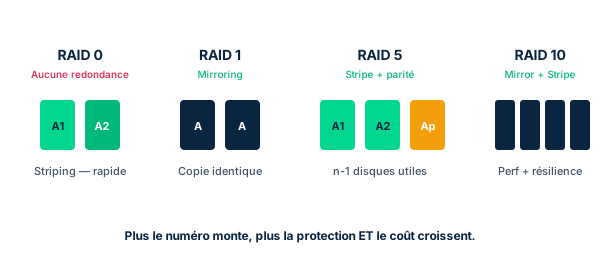
Beyond the cloud, two storage options deserve consideration: RAID and centralized storage. A RAID (redundant array of independent disks) increases availability by virtualizing a volume across several disks, so a data set is not lost if one disk fails. Writing data across multiple disks is called striping; some configurations add parity bits that allow rebuilding the full set if a disk fails (striped data from adjacent disks, combined with the parity bits, fills the gap).
The levels to know (Figure 7.18). RAID 0: striping without parity, optimized performance but NO redundancy. RAID 1: mirroring, data duplicated on two identical disks; if one fails, its mirror takes over. RAID 2: a legacy technique, hardly used anymore. RAID 3 and 4: striping plus a dedicated parity disk - RAID 3 stripes at the byte level, RAID 4 at the block level; the dedicated parity disk is a single point of failure, ill-suited to HA. RAID 5: data AND parity striped across several disks, provides HA. RAID 6: striping plus TWO parity sets, tolerates the loss of TWO disks while keeping RAID 5 performance. RAID 0+1: stripe (RAID 0) then mirror (RAID 1). RAID 1+0 ("RAID 10"): stripe across two duplicated disk sets simultaneously; preferable to RAID 0+1. RAID 15 and 51: combine RAID 1 and RAID 5 (parity striping + mirroring of all disks), reserved for highly sensitive environments given their cost and productivity impact.
Centralized storage avoids data scattered on endpoints being lost or hard to archive, but it creates a single point of failure and a single target if unprotected: centralizing therefore demands redundancy and secure backups. Two methods (Figure 7.19). The SAN (storage area network) is a network of storage arrays providing volume storage to servers; it relies on dedicated protocols such as Fibre Channel and iSCSI, and presents storage as volumes (raw disk space) mounted on the OS like an attached drive - you think in blocks. The NAS (network-attached storage) is a centralized file server accessed by many users; it maintains the file hierarchy and presents data as files. Many NAS (like SANs) use iSCSI, which manages storage space as logical blocks via internet protocols.
Exam trap: SAN = block access (raw volumes, Fibre Channel/iSCSI); NAS = file access (the server manages the hierarchy). For fault tolerance: RAID 0 = zero redundancy, RAID 5 = one disk, RAID 6 = two disks, and RAID 10 is preferred over RAID 0+1.
- RAID 0 = striping without redundancy; RAID 1 = mirroring
- RAID 5 tolerates 1 disk; RAID 6 (double parity) tolerates 2 disks
- RAID 3/4: dedicated parity disk = single point of failure; RAID 10 preferred over 0+1
- SAN = blocks/volumes (Fibre Channel, iSCSI); NAS = files (hierarchy managed by the server)
Case studies
How many versions? Keiko's planning
Context : Keiko orchestrates backups for SneakerNet's North American operations. Employees work 7 a.m. to 8 p.m. Eastern, Monday to Friday, eight-hour days, spread across several time zones. A full backup runs Saturday night, with integrity checks and a possible Sunday repeat if it fails. During the week, Keiko hesitates between differential and incremental.
Question : With differential, which data is captured Wednesday night? With incremental, which data Thursday night? And if Tuesday night's differential is corrupt, which data is lost?
Show analysis and answer
Differential Wednesday night: since differential does not reset the archive bit, it is cumulative since the last full (Saturday). Wednesday night therefore captures all data created or modified during the workdays of Monday, Tuesday, AND Wednesday.
Incremental Thursday night: incremental resets the bit on each pass, so each night captures only the changes since the previous backup. Thursday night captures only the data created or modified during Thursday's workday.
Tuesday's differential corrupt: because each differential is cumulative, Tuesday's differential holds Monday's and Tuesday's changes. If it is corrupt and Wednesday's differential (which would also hold them) does not yet exist or is not used, all data created or modified during Monday and Tuesday is lost. That is the trade-off: differential simplifies restore (full + one differential) but corruption of an intermediate differential loses the entire cumulative set it represented at that date.
Governance lesson: post-backup validation (integrity check, sampling) and keeping several versions prevent a single corrupt copy from becoming a single point of failure.
Takeaway : Differential = cumulative since the full (Mon-Wed on Wednesday); incremental = isolated day (Thu only on Thursday); a corrupt differential loses its whole cumulative set (Mon-Tue).
- Differential is cumulative because it does not reset the archive bit
- Incremental captures only the day's changes, because it resets the bit
- A corrupt differential loses the whole cumulative set since the full up to that date
- Validation and multiple versions prevent a single point of failure
Choosing the right recovery site
Context : A regional bank requires its critical payment functions to restart within one hour of a disaster, with near-current data. A second group entity, a noncritical archiving service, can tolerate several weeks of downtime and mainly seeks to minimize cost. Management asks which site strategy fits each.
Question : Which recovery-site type meets the bank's need, and which the archiving service's?
Show analysis and answer
For the bank, a one-hour RTO with near-current data demands a hot site: fully equipped with hardware, software, and data, its activation is measured in minutes to hours and critical functions restart almost instantly. A mirrored site would go further (two real-time copies) but at far higher cost, justified only if maximum availability is required. A warm site would miss the deadline (hours to days, stale data).
For the archiving service, tolerating several weeks and cost-conscious, the cold site fits: empty shell, activation in weeks or months, but the cheapest option. Investing in a hot or warm site for this service would waste safeguard.
The choice always aligns the acceptable activation time (close to the RTO) with site cost. The alternate site must also be far enough to escape the primary disaster yet close enough for key personnel, and the organization must keep relocation kits up to date.
Takeaway : Short RTO with current data = hot site; tolerance of weeks and minimal cost = cold site; align activation time with the RTO and cost.
- Hot site: minutes-hours activation, near-current data, high cost
- Cold site: weeks-months activation, cheapest
- Activation time must match the function's RTO
- Alternate site: far enough from the disaster, close enough for key staff
3-2-1: copies, media, offsite (not locations)
The correct phrasing of 3-2-1 is: three copies of the data (original + two backups), two different media types (tape, WORM, removable disk, cloud), and one offsite copy. The exam often offers distractors replacing "media types" with "locations" or "copies" with "locations." Remember the exact axis of each digit: 3 is about copies, 2 about media types, 1 about offsite location. A WORM copy is an excellent second media type.
Archive bit: differential does not reset it
The classic trap pits differential against incremental. Differential copies changes since the last full and does NOT reset the archive bit: it is therefore cumulative and grows each day. Incremental copies changes since the last backup (full or incremental) and DOES reset the archive bit: each incremental holds only one day. Restore impact: incremental = full + all incrementals (slow); differential = full + a single differential (fast). Journaling and snapshot, for their part, do not affect the archive bit.
RAID: fault tolerance and SAN vs NAS
RAID 0 provides NO redundancy (striping only, for performance). RAID 1 = mirroring. RAID 5 tolerates loss of ONE disk (data and parity striped). RAID 6 tolerates loss of TWO disks (double parity). RAID 3 and 4 have a dedicated parity disk, which is a single point of failure. RAID 10 (1+0) is preferred over RAID 0+1. For centralized storage: SAN = block-level access (raw volumes, Fibre Channel/iSCSI); NAS = file-level access (the server manages the hierarchy). Do not confuse a RAID's redundancy with a backup: RAID protects against disk crash, not logical deletion or ransomware.
Checkpoint — Checkpoint
-
Minimum protection recommends the 3-2-1 strategy. What does it consist of?
- A Three copies of the data, two different media types, one offsite copy
- B Three different locations, two media types, one offsite copy
- C Three copies of the data, two storage locations, one offsite copy
- D Three media types, two copies, one onsite location
Answer & rationale
Answer : A — Three copies of the data, two different media types, one offsite copy
3-2-1 = three copies (original + two backups), two media types (tape, WORM, removable disk, cloud), and one offsite copy. The distractors replace "copies" or "media types" with "locations": the "3" is about copies, the "2" about media types, the "1" about offsite.
-
A full runs Saturday night. With differential during the week, which data does Wednesday night's backup capture?
- A All data created/modified Monday, Tuesday, and Wednesday
- B Only data created/modified Wednesday
- C Only data created/modified since the last incremental
- D All environment data, like a full
Answer & rationale
Answer : A — All data created/modified Monday, Tuesday, and Wednesday
Differential does not reset the archive bit: it is cumulative since the last full. So Wednesday night it captures all changes from Monday, Tuesday, and Wednesday. The "Wednesday only" answer would describe an incremental, which resets the bit each night.
-
A full runs Saturday night. With incremental during the week, which data does Thursday night's backup capture?
- A Only data created/modified during Thursday's workday
- B All data created/modified from Monday to Thursday
- C All environment data
- D Only data changed since the last full, without resetting the bit
Answer & rationale
Answer : A — Only data created/modified during Thursday's workday
Incremental resets the archive bit on each pass; each night captures only the changes since the previous backup. Thursday night = only Thursday's data. "Mon to Thu" would describe a cumulative differential; "without resetting the bit" contradicts how incremental works.
-
With differential during the week, the copy made Tuesday night is corrupt (detected only afterward). Which data risks being lost?
- A All data created/modified during Monday and Tuesday
- B All data created/modified during Tuesday only
- C None, because Saturday's full always suffices
- D All data of the entire week
Answer & rationale
Answer : A — All data created/modified during Monday and Tuesday
Tuesday's differential is cumulative, so it holds Monday's and Tuesday's changes. If corrupt, both days are lost (the full does not contain post-full changes). "Tuesday only" would be the incremental case; "none" ignores that changes since the full are not in the full itself.
-
A volume changes 8 GB per workday. After a Saturday full, a restore is done Thursday night. Which option restores the FEWEST backup sets, and which the MOST?
- A Differential = full + 1 set (fewest); incremental = full + 4 sets Mon-Thu (most)
- B Incremental = full + 1 set (fewest); differential = full + 4 sets (most)
- C Both restore exactly full + 4 sets
- D Differential = full only; incremental = full only
Answer & rationale
Answer : A — Differential = full + 1 set (fewest); incremental = full + 4 sets Mon-Thu (most)
To restore as of Thursday night: with differential, you need the full plus Thursday's differential (cumulative = 32 GB), only two sets. With incremental, you need the full plus the four incrementals Mon, Tue, Wed, Thu (4 x 8 = 32 GB), five sets. Differential restores faster (fewer sets to chain); incremental backs up faster each night but restores more slowly.
-
An organization wants storage tolerating the simultaneous loss of TWO disks without data loss. Which RAID level should it choose?
- A RAID 6
- B RAID 5
- C RAID 0
- D RAID 3
Answer & rationale
Answer : A — RAID 6
RAID 6 uses striping and TWO parity sets: two disks can fail and data remains recoverable. RAID 5 tolerates only one disk. RAID 0 has no redundancy. RAID 3 has a dedicated parity disk, a single point of failure, and does not tolerate two failures.
Key takeaways
- 3-2-1: three copies (original + two), two media types (WORM possible), one offsite copy.
- Locations: onsite (immediate), offsite (network data vaulting), cloud BaaS (online/near-line).
- Full resets the archive bit to 0; differential does not reset it (cumulative); incremental resets it (one day).
- Restore: incremental = full + all incrementals (slow); differential = full + one differential (fast).
- Journaling and snapshot do not affect the archive bit; CDP snapshots each changed block; always validate the backup.
- Recovery sites by time: mirrored (real-time) < hot (min-hrs) < warm (hrs-days) < cold (weeks-months); JOA/MOU for sharing.
- HA: spare components, active-active/active-passive clustering, load balancing, UPS (clean shutdown) + generator + transfer switch.
- RAID: 0 = no redundancy; 1 = mirroring; 5 = one disk; 6 = two disks; 10 preferred over 0+1.
- Centralized storage: SAN = blocks/volumes (Fibre Channel, iSCSI); NAS = files; a centralized SAN/NAS is a single point of failure to protect.
Disaster recovery and business continuity
Prerequisites : Familiarity with incident management and risk management (BIA, risk appetite).
Business continuity and disaster recovery (Business Continuity and Disaster Recovery, BCDR) make up the most demanding environment an organization can face. The military analogy 'hard in training, easy in battle' sums up the philosophy : whatever has not been prepared, tested and rehearsed in calm conditions is paid for dearly during the crisis. This module covers the complete disaster recovery process (7.11), the types of tests ranked by intensity and cost (7.12), then business continuity planning with its key time-based metrics (7.13).
You will see who can trigger the BCDR response (a designated executive, not just anyone), how to organize people (critical-path personnel vs responders), how to manage internal and external communications, how to assess the total impact, then restore operations without worsening the disaster.
The examinable core of the module lies in the metrics : MTD, RTO and RPO, and the CBK's complementary WRT (Work Recovery Time). Knowing how to distinguish them and choose a fallback site based on RTO or MTD is tested through scenarios. The incident vs disaster distinction, and who has the authority to declare a disaster, is a recurring trap.
10.1 Triggering the BCDR response: criteria and authority
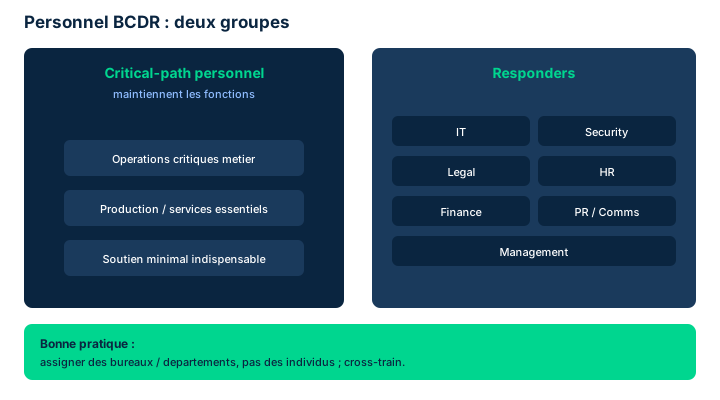
Business continuity and disaster recovery (BCDR) is arguably the most stressful environment an organization will face, and that is exactly why a well-rehearsed BCDR plan is the best battle-readiness training available. The mindset is military: "hard in training, easy in battle" - hard, intense, repeated training conditions teams to survive and act under pressure. Every organization tailors its BCDR plan to its own needs, but common principles shape a typical process.
Triggering the response carries considerable cost and significant impact, both financial and operational, often missing from the normal budget. Activating the plan must therefore rest on criteria for initiating the response action: not all contingency events can be predicted, but a set of guidelines aids the person who will ultimately decide. These criteria typically include the dollar value of affected assets, the number of affected users, the expected duration of downtime, and the threat to human health and safety.
The person authorized to make this decision must be trusted and hold a high degree of authority and insight: usually a member of senior management, if not the head of the organization. To decide correctly and at the right time, they rely on an information chain: a formal process for escalating incident-related information, external professional sources (government agencies, paid threat-intelligence providers), and informal means (news services, social media).
Exam trap: the authority to trigger the response - and to declare a disaster - never belongs to just any employee nor to IT alone; it is reserved for pre-designated senior management. Conversely, it is the objective criteria (dollar value, users, downtime, safety) that justify the decision, not intuition.
- "Hard in training, easy in battle": the BCDR plan is the best training
- Initiation criteria: dollar value, affected users, downtime, health/safety
- The deciding authority is trusted senior management
- The information chain feeds the decision (formal escalation + external/informal sources)
10.2 BCDR personnel: critical-path vs responders
Beyond the executive who authorizes the response, the plan must specifically task the people involved. The manual distinguishes two populations. Critical path personnel are the essential staff needed to continue the organization's operational functions during the contingency event. They may not handle the response itself: they have production tasks to perform. They must be trained for their crisis role: reaching the alternate operating site, accessing archived data, and logging transactions performed during the contingency.
Responders are the staff who manage the response process. They typically come from several functions: IT (administrators, architects, technicians), Security (crucial specific expertise), Legal (the general counsel ensures regulatory compliance and due diligence, and guides the collection/preservation of evidence for possible criminal or civil cases), HR (access to employees' private data to contact staff or families), Finance/accounting (tracking costs and making financial transactions during the event), Public relations/communications (a uniform external voice), and Management (an executive monitors, approves expenditures, and decides when the contingency ends).
The key examinable point concerns assignment: naming specific individuals has benefits (they can be trained and practice), but creates points of failure. During a disaster, the organization cannot count on every individual being present. It is better to assign offices/departments to tasks and cross-train the staff of those offices to handle contingency tasks as needed. A good plan details each assigned office to the point that any member, with no prior exposure to the material, can follow the instructions and complete the tasks.
Exam trap: confusing critical-path personnel (who keep the business running) with responders (who manage the crisis); and believing you should name individuals rather than cross-trained offices.
- Critical-path personnel keep the business running; responders manage the response
- Responders: IT, Security, Legal, HR, Finance, PR/Comms, Management
- Assign offices/departments, not individuals, and cross-train staff
- Naming an individual creates a point of failure during a disaster
10.3 Communications, impact assessment, and restoration
The organization must master two types of contingency communications: internal and external. Internally, it must reach all staff to inform them of expected actions (evacuate if on site, stay home if not yet arrived, report to an alternate site for responders and critical personnel). Two modes exist: push capability (automatic messages sent to all staff) and access capability (a central clearinghouse, e.g., a website, anyone can reach). Since normal channels may be unavailable (mobile, texting, Internet), alternate means of mass communication must be a priority. As employees rarely update their emergency contact details, regular tests and updates are required. Senior management must arbitrate the trade-off between disseminating information widely and exposing sensitive information outside authorized channels.
Externally, the organization will need to reach law enforcement/first responders, regulators, the public/news media, and business partners (vendors, clients, end customers). Three elements are crucial: a single voice (one voice is optimum, since multiple statements conflict and breed mistrust), trained communications professionals (able to inform without admitting liability), and managing a developing situation (better to say "the situation is developing, information is still unclear" than to publish data that will need revising, especially about resolution timing).
Assessment aims to calculate the total impact of the contingency: it combines the damage from the event itself and the cost of the response efforts (total impact = damage + response cost). Performed by accounting and audit teams with input from SMEs (asset value) and HR (production hours), it later supports criminal prosecution, civil action, investor reporting, and informing regulators.
Finally, restoration aims to resume full normal operations: returning to the primary site or creating a new primary site (many organizations keep the alternate site, which becomes the new primary). Data restoration is high-risk: re-importing the archive and the contingency transaction record can damage the archive, the record, and the production environment. Timing is critical: returning too soon threatens health/safety; staying in contingency too long is costly (expensive alternate sites, nonproductive staff on payroll, or departures if unpaid). The decision to return to normal rests with senior management.
- Internal: push (auto-send) vs access (clearinghouse) + alternate mass means
- External: single voice, trained communicators, manage a developing situation
- Total impact = event damage + response cost (accounting/audit)
- Restoration: return to primary or new site; high-risk data restore; critical timing
10.4 Training, awareness, and ongoing lessons learned
A BCDR plan is only worth as much as people's ability to execute it. The manual distinguishes two levels. Staff assigned to BCDR tasks (responders, critical path, and their alternates) must receive formal training for their roles, including involvement in all tests. Organization-wide, all personnel must be exposed to awareness activities preparing them for emergency actions: formal training (at hiring or during annual tests) complemented by recurring informal information (newsletters, reminders, posters).
The lessons learned process is often misunderstood. The classic view is to wait until everything is back to normal, then review the logs and glean the lessons. Yet one of the major lessons of the COVID-19 pandemic is that this process of active assessment, decision-making, direction, and lessons-learned review must be ongoing. Due diligence requires a prudent management team to glean every possible lesson from a painful experience: think of the cost of a disruptive event as tuition paid to be better prepared next time.
Embedding lesson-learning into the day-to-day (or week-to-week) of incident or disaster management has a concrete benefit: memories and impressions are fresher, evidence and artifacts are closer to their condition at the time of the event, and analysis is more revealing. You also learn from responses already underway while there is still a way to go toward the "new normal." Disruptive events such as a pandemic may require additional workplace health-and-safety measures; sources such as the WHO and the U.S. CDC provide guidelines and best practices.
Exam trap: lessons learned is not a single final step but an ongoing process; and awareness targets all personnel, whereas formal training targets staff assigned to BCDR.
- Formal training: responders, critical-path, and alternates, with test participation
- Awareness: all personnel, formal + recurring informal (newsletters, posters)
- Lessons learned = ongoing process (COVID-19 lesson), not a single end step
- Learning while hot keeps evidence and memories more reliable; WHO/CDC for health
10.5 The five DR test types, ranked by intensity
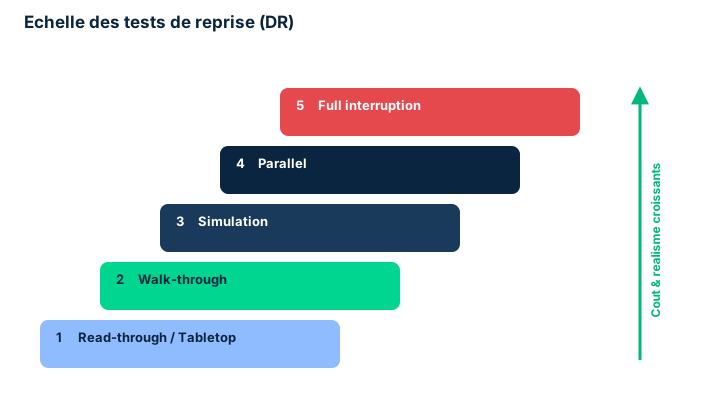
Testing your plans surfaces discrepancies and lets you fix them quickly, so no precious time is wasted on the day of a real disaster. The security professional must know the benefits and risks of each test type. The manual ranks them by increasing intensity, cost, and impact.
Read-through / tabletop: a controlled, isolated role-playing activity gathering only the staff tasked with DR plus a moderator, around a conference room with all DR documents. The moderator presents a situation warranting a DR response; participants verbally describe their actions and may consult the materials. It is the least intrusive and cheapest test; excellent for training new or unfamiliar staff and for spotting plan gaps.
Walk-through: similar to the tabletop, but instead of staying around the table, participants travel to each location they would need to visit during the response. They can still refer to written guidance and are monitored. More useful than the tabletop for assessing physical limitations and establishing activity timing; only slightly more expensive.
Simulation: a more complex, more involved walk-through that may mobilize all staff in an office in a scripted emergency (a fire drill with evacuation is an example). More costly and more disruptive to productivity (work is interrupted), but more people gain experience and training.
Parallel: for organizations that use alternate operating sites. Personnel and resources are actually mobilized to the alternate site and operations are run there - usually one department or team at a time. Far more expensive and impactful than the previous types, but it provides assurance that the fallback solution truly works.
Full interruption: involves the entire organization in a scripted situation mimicking a real contingency event. All BCDR resources, personnel, and activities are engaged. It is by far the most expensive, highest-impact option; great care is needed to ensure the exercise does not become an actual disaster. Reserved for organizations that can properly plan and execute it.
Communicating the test results to interested parties (internal and external: customers, partners, regulators) is part of the exercise. Reports describe the objective, the aspects tested, and above all the appropriateness of the DR strategy. These documented results are artifacts customers often require for their vendor due diligence, and are examined during SOC and ISO 27001 audits.
- Increasing cost/intensity: tabletop < walk-through < simulation < parallel < full interruption
- Tabletop = room discussion; walk-through = real travel without interruption
- Parallel = alternate sites mobilized; full interruption = whole organization cut over
- Documented results = due-diligence artifacts and SOC/ISO 27001 audit evidence
10.6 BCP, BIA, and the MTD, RTO, RPO (and WRT) metrics
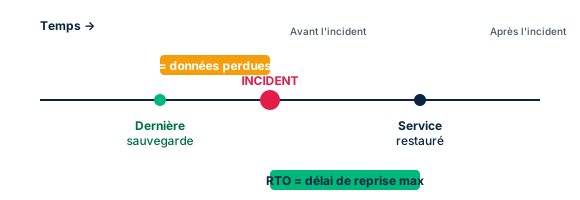
Business continuity planning (BCP) is a prudent, often required activity that prepares the organization for disruptive, business-altering events: natural disasters, disease outbreaks, geopolitical conflicts, critical-personnel loss. The goal is to ensure the organization can keep operating during and after a crisis. National and international standards serve as guidance or a starting point: NIST SP 800-34 (national, US) and ISO 22301 (international).
The Business Impact Analysis (BIA) first identifies mission-essential functions, then analyzes the effect of a disruption on them. It is conducted by engaging stakeholders - mostly mission/process owners, managers, and department staff - to determine the criticality of each process or service. The BIA produces time estimates, the well-known MTD, RTO, and RPO, for which the organization may rely on NIST templates.
The MTD (Maximum Tolerable Downtime) is the total outage duration leaders are willing to accept for a business process; it includes all impact considerations. Without an MTD, planners lack direction to select a recovery method and to size the detail of procedures. The RTO (Recovery Time Objective) is the maximum time a system resource can remain unavailable before an unacceptable impact on other resources, business processes, and the MTD: it guides the choice of recovery technologies. The RPO (Recovery Point Objective) is the point in time, before the disruption, to which data must be recovered (based on the most recent backup): it dictates backup frequency and bounds acceptable data loss. These objectives are often communicated to customers in an SLA.
ISC2 CBK supplement (beyond the D7 manual): the WRT (Work Recovery Time) is the time needed, once the system is technically restored (end of RTO), to reconfigure, validate, and resume normal business work. The key relationship to remember: MTD = RTO + WRT. The RTO can therefore never exceed the MTD, and must even leave room for the WRT.
The plan (BCP) must be maintained: reviewed, updated, and revised; some elements (contact lists) require more frequent updates. Testing the BCP is crucial and, for compliance, must occur at scheduled intervals - typically at least annually - and when significant organizational or environmental changes occur. Tests reuse the types seen for DR (tabletop, functional, full-scale).
Exam trap: choosing a recovery site means comparing its recovery time to the RTO/MTD - a hot site (near-immediate recovery) for a very short RTO, a cold site only if the RTO/MTD tolerates it. And do not confuse RTO (time to restore service) with RPO (amount of data lost, expressed as time).
- BCP: NIST SP 800-34 (national) and ISO 22301 (international); BIA identifies critical functions
- MTD = total tolerable downtime; RTO = restore time; RPO = acceptable data loss
- MTD = RTO + WRT (CBK supplement); RTO never exceeds MTD
- Choosing a recovery site = compare its recovery time to RTO/MTD; test the BCP at least annually
Case studies
SneakerNet BCDR review: incident or disaster?
Context : Keiko is finalizing a full review of SneakerNet's BCDR plans, with sites in multiple countries. One morning, a minor fire breaks out in a technical room at a secondary site. The fire-suppression system extinguishes it, the local team isolates the area, and the event is handled within hours with no disruption to operations. The next week, a prolonged power outage hits the main site at the same time a denial-of-service attack saturates the backup links: several controls fail simultaneously and the organization is overwhelmed.
Question : Which of these two events is an incident and which is a disaster? Who can identify the first, and who has authority to declare the second?
Show analysis and answer
An incident is an event with the potential to harm the organization: a trigger event. If handled swiftly and correctly, the problem stops there. The minor fire is an incident: extinguished and contained, it did not escalate. But if an incident is not controlled, grows in severity, or if several incidents occur simultaneously and controls fail, the organization can be overwhelmed: that is a disaster. The coincidence of a prolonged power outage + DoS attack + failure of backup links is that tipping point.
Who can identify an incident? Anyone and everyone - anyone can spot an anomaly with the potential to cause harm, especially with a strong security awareness program. That is precisely why identification is broadly distributed.
Who can declare a disaster? Only pre-designated staff, usually a member of senior management. Declaring a disaster triggers a costly, consequential plan (out-of-budget spending, failover to an alternate site); it can therefore rest only with a trusted authority holding sufficient insight and commitment power. Keiko, as a security professional, prepares and advises, but does not declare the disaster herself.
Takeaway : Incident = trigger event identifiable by anyone; disaster = overwhelm declared only by pre-designated senior management.
- A controlled incident stops; uncontrolled or compounded, it becomes a disaster
- Anyone identifies an incident; only a designated executive declares a disaster
- The security professional prepares and advises, but does not declare the disaster
Who can declare a disaster?
Carefully distinguish identifying from declaring. Anyone can identify an incident (any potentially harmful anomaly), all the more so with an awareness program. But declaring a disaster - and activating the BCDR plan - rests only with pre-designated staff, usually senior management. The reason: the decision commits high, out-of-budget costs. On the exam, beware of options that have IT, the SOC analyst, or "the first witness" declare a disaster: that is wrong.
RTO vs RPO vs MTD
Three time metrics never to be mixed. RTO = how long to restore a service after an outage (drives recovery technology). RPO = how far back data must be recovered, i.e., acceptable data loss (drives backup frequency). MTD = total tolerable outage for the business, the overall ceiling. CBK mnemonic: MTD = RTO + WRT, so RTO never exceeds MTD. To choose a recovery site, compare its recovery time to the RTO/MTD: short RTO -> hot site; long RTO tolerated -> cold site possible.
Ranking tests by cost and impact
The exam loves testing the order of DR tests. From least to most intense: read-through/tabletop (room discussion), walk-through (real travel but no interruption), simulation (scripted scenario involving an office, e.g., fire drill), parallel (real failover of one team to the alternate site, primary still running), full interruption (full cutover of the whole organization). Classic traps: thinking a walk-through interrupts production (no, that starts at simulation); confusing parallel (primary still running, fallback tested in parallel) with full interruption (primary cut, riskiest and costliest).
Checkpoint — Checkpoint
-
During a disaster, which external entities may the organization need to reach in its communication plan?
- A All of the answers below
- B Business partners (vendors, clients, end customers) only
- C Regulators only
- D The public at large and the news media only
Answer & rationale
Answer : A — All of the answers below
External communications may need to reach partners, regulators, the public/media, and law enforcement/first responders. No single category is sufficient alone: the correct answer is "all." The point is to establish a single voice (a designated spokesperson) to avoid conflicting statements that would breed public mistrust.
-
Why is a parallel test beneficial for an organization that uses alternate operating sites?
- A It actually verifies the fallback solution works and gives experience and procedure knowledge, without cutting the primary site
- B It is the cheapest and least intrusive test
- C It avoids any mobilization of personnel and resources
- D It removes the need to keep the plan up to date
Answer & rationale
Answer : A — It actually verifies the fallback solution works and gives experience and procedure knowledge, without cutting the primary site
The parallel test actually mobilizes personnel and resources to the alternate site and runs operations there: it provides assurance the solution exists and works, plus experience executing the procedures, while keeping the primary running. It is more expensive than tabletop/walk-through (false options) and precisely requires mobilizing resources.
-
A business process has an MTD of 12 hours. Three recovery sites are proposed: a hot site (1 h recovery), a warm site (10 h recovery), and a cold site (36 h recovery). Which one is unacceptable given the MTD?
- A The cold site, because its recovery time (36 h) exceeds the 12 h MTD
- B The hot site, because it is too fast
- C The warm site, because 10 h is too close to 12 h
- D None, because the MTD has no bearing on site choice
Answer & rationale
Answer : A — The cold site, because its recovery time (36 h) exceeds the 12 h MTD
Choosing a recovery site means comparing its recovery time to the RTO/MTD. The 12 h MTD is the absolute ceiling of tolerable outage. The cold site (36 h) far exceeds it: unacceptable. The hot site (1 h) and warm site (10 h) meet the MTD; nothing forbids a "too fast" site. The MTD is precisely the selection criterion, which rules out the last option.
-
In SneakerNet's BCDR review, who has the authority to officially declare a disaster?
- A Pre-designated staff, usually senior management
- B Any employee who notices the anomaly
- C The on-call system administrator
- D The SOC analyst who first detects the alert
Answer & rationale
Answer : A — Pre-designated staff, usually senior management
Declaring a disaster rests only with pre-designated staff, usually a senior-management executive, because the decision commits high, out-of-budget costs. Not to be confused with identifying an incident, which anyone can do (employee, admin, SOC analyst). The other three options conflate identification with declaration.
-
Which metric expresses the amount of data an organization accepts to lose, by designating the point in time to which data must be recovered?
- A RPO (Recovery Point Objective)
- B RTO (Recovery Time Objective)
- C MTD (Maximum Tolerable Downtime)
- D WRT (Work Recovery Time)
Answer & rationale
Answer : A — RPO (Recovery Point Objective)
The RPO designates the point in time, before the disruption, to which data must be recovered based on the most recent backup: it bounds data loss and dictates backup frequency. The RTO is the service restore time, the MTD the total outage ceiling (MTD = RTO + WRT), and the WRT the work-resumption time after technical restoration.
Key takeaways
- "Hard in training, easy in battle": a rehearsed, tested BCDR plan is the best crisis preparation.
- Only pre-designated senior management declare a disaster; anyone can identify an incident.
- Critical-path personnel keep the business running; responders (IT, Security, Legal, HR, Finance, PR, Management) manage the response; assign cross-trained offices, not individuals.
- Communications: internal (push vs access, alternate mass means) and external (single voice, trained communicators, developing situation).
- DR tests by increasing cost: tabletop < walk-through < simulation < parallel < full interruption; documented results for due diligence and SOC/ISO 27001 audits.
- BCP relies on NIST SP 800-34 and ISO 22301; the BIA identifies critical functions and produces MTD, RTO, RPO.
- MTD = total tolerable downtime, RTO = restore time, RPO = data loss; MTD = RTO + WRT (CBK); choose a recovery site by comparing its recovery time to the RTO/MTD.
- Lessons learned = ongoing process (COVID-19 lesson); test the BCP at least annually and after any significant change.
Physical security and personnel safety
Prerequisites : Familiarity with defense in depth and control categories (administrative, technical, physical).
Information security does not stop at the firewall. Protecting an asset means controlling who crosses the fence line, who enters the datacenter, and ensuring that the people who handle the information remain safe themselves. This module covers physical security from the perimeter inward (access controls, badges, CCTV, sensors), then personnel safety (travel, duress codes, emergency management, MDM).
The common thread is defense in depth applied to the physical world : you stack independent layers, from the property line to the vault, so that no single barrier becomes a point of failure. The same logic applies to people : training, monitoring, duress codes and evacuation plans form layers that reinforce one another.
The exam expects you to link an objective (preventing an intrusion, protecting a traveler, assigning accountability) to the right physical control or safety procedure, and to remember one golden rule : the safety of people always takes precedence over the protection of property.
11.1 The perimeter: from the property line to protected zones
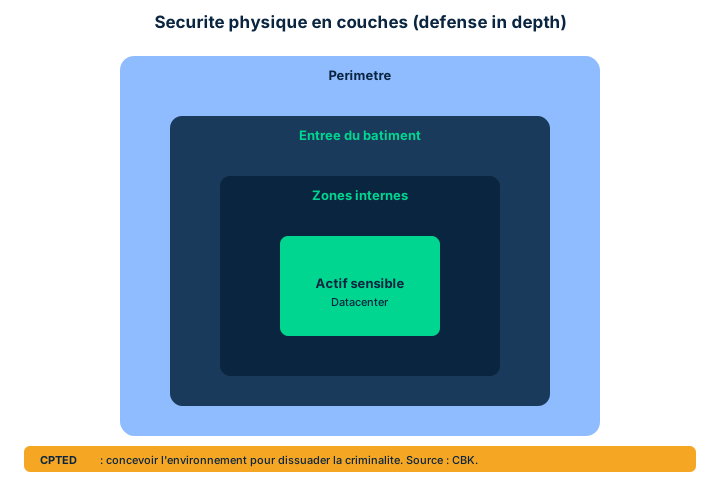
The primary function of an access control system is to ensure that only authorized people enter controlled areas, and to regulate the flow of materials moving in and out. The audience is broad : employees, visitors, customers, vendors, the general public. Each application calls for different measures, calibrated to its own security, cost and operational objectives.
Control is organized from the outside in, in concentric layers. It can begin as early as the security property line, encompassing parking lots for example, then tighten at the building entrances, then at any internal area as directed by management. It is always calibrated to the identified risk and the protective value sought. Typical protected areas are ground-level entrances, lobbies, loading docks, elevators, and sensitive internal zones housing customer data, proprietary or classified information.
Historically, access relied on physical keys. The shift to electronic systems simplifies rights management : you revoke a badge in one click, whereas a lost key required rekeying the locks. The security professional must often advocate for good facilities management practices and for integrating physical controls with logical and technical controls - the modern building being a true system of systems.
CPTED supplement (cheat sheet provenance) : Crime Prevention Through Environmental Design shapes the environment to discourage intrusion through three levers : natural surveillance (visibility, lighting, windows facing access points), natural access control (paths and entrances channeling traffic), and territoriality (markings, low fences, landscaping that signals ownership of the space). Exam pitfall : CPTED is prevention by design, not a sensor.
- Control is deployed in layers from the property line inward
- Measures are calibrated to risk, cost, and protective value
- Electronics replace physical keys and simplify rights revocation
- CPTED (cheat) prevents by design: natural surveillance, natural access control, territoriality
11.2 Badges, enrollment station, and card types
To recognize an authorized employee, the system needs an enrollment station : this is the workstation where the access device is assigned and activated. Most often, a badge is produced and issued with the employee's credentials, the enrollment station defining the specific zones that will be accessible to them. In high-security environments, enrollment may also capture biometric characteristics. The operating principle is a comparison : the system checks the person's badge against a verified database. If authentication succeeds, it issues the signals that open the door or gate.
These systems are typically integrated with the organization's logging systems to document access activity, both authorized and unauthorized. This logging is essential : it is what provides accountability in the event of an incident.
A variety of card types allows the system to be adapted to different environments. Barcode cards carry an optically readable barcode, inexpensive but easy to copy. Magnetic stripe cards store data on a magnetic stripe, like a standard bank card. Proximity cards are read contactlessly at short range (RFID), convenient for high-traffic flows. Smart cards embed a chip capable of processing and encrypted storage, offering the highest level of security. Hybrid cards combine several technologies (for example proximity for physical access and a contact chip for logical authentication).
Exam pitfall : a proximity card identifies contactlessly but is not a smart card ; only the latter performs embedded cryptographic processing.
- The enrollment station assigns the badge and defines accessible zones
- The system matches the badge against a verified database, then opens access
- Logging authorized AND unauthorized access ensures accountability
- Security hierarchy: barcode < magnetic stripe < proximity < smart; hybrid combines
11.3 CCTV, exterior sensors, and layered internal controls
CCTV (closed-circuit TV) links a network of cameras to recorders to monitor the environment. It is normally integrated into the overall security program and monitored centrally. Flexible, it excels where access is difficult or when a forensic record is required. But it has limits : placement must ensure coverage without infringing on individuals' expectations of privacy. Historically wired with dedicated coaxial cable (expensive, without redundancy), it is now often IP/wireless : cheaper to install, but the cameras become network devices exposed to numerous network attacks.
Outdoors, several motion sensors complement the CCTV : infrared, microwave, and lasers aimed at tuned receivers. Other sensors integrate into doors, gates and turnstiles. Fence-climbing attempts are detected by strain-sensitive cables and other vibration sensors. Well integrated, these perimeter sensors raise an alert as soon as an intruder crosses an open space or attempts to breach the fence line.
Indoors, the layered approach still applies. The card reader controls access to a specific room. The Balanced Magnetic Switch (BMS) uses a magnetic field or a mechanical contact to decide whether an alarm triggers (typically on an open door or window). Acoustic sensors passively listen to spaces. Infrared linear beam sensors project an IR beam from an emitter toward a reflector : interrupting the beam signals a passage. Passive infrared (PIR) sensors detect an intruder's heat signatures by comparing IR receivers against the usual background level. The automatic request to exit automatically detects a person approaching toward the exit. Finally, dual-technology sensors combine two principles (for example PIR + microwave) : the alarm is raised only if both agree, which sharply reduces false alarms.
CBK supplement : mantraps, turnstiles and sally ports allow only one person (or vehicle) at a time between two locked doors, countering tailgating ; HVAC under positive pressure pushes air outward to prevent the entry of contaminants or smoke.
- IP CCTV lowers cost but exposes cameras to network attacks
- Exterior sensors: IR, microwave, laser, strain-sensitive cables, vibration
- BMS detects an opening; PIR detects heat; IR beam detects a broken beam
- Dual-technology = two agreeing principles to reduce false alarms
- CBK: mantraps/sally ports counter tailgating; positive-pressure HVAC counters contaminants
11.4 Travel safety and duress codes
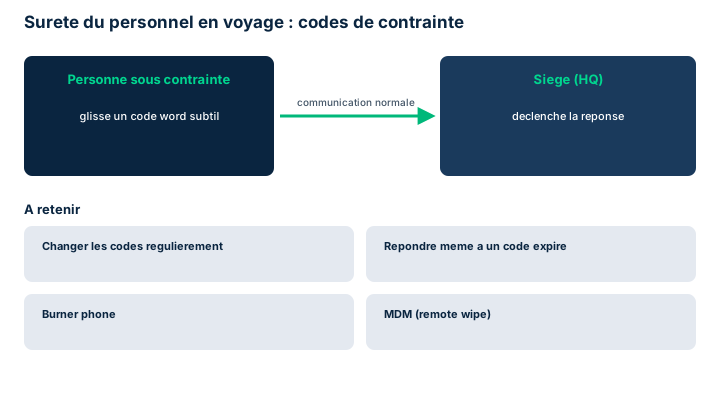
Protecting information means protecting the people who handle it. Individuals become targets, especially abroad, where risks differ sharply from their usual environment. Three major travel threats : kidnapping for ransom (in some countries a genuine business model, hence ransom insurance policies and advance preparation of management arrangements) ; surveillance by foreign intelligence services (questioning of local contacts, copying of passports and devices at the border or hotel, searching or monitoring of rooms, sometimes an obliging local who 'runs into' you) ; and facial recognition networks that track movements in public space, with hotel staff also reporting movements.
Safety aspects to consider when traveling or teleworking : do not carry what you do not need (information, money, electronics are safer at home) ; if you must carry it, legally protect the information, knowing that encryption may be restricted by the law of some jurisdictions ; set up secure remote access (also sometimes restricted depending on the jurisdiction) ; anticipate jurisdictional/cross-border concerns over data crossing borders ; ensure personnel protection (local orientation, training, medical/life insurance, physical protection) ; and organize condition monitoring with daily check-ins, which must also determine whether the person is acting under duress.
The duress code addresses precisely this last point. A person who is threatened or restricted in their movements must be able to discreetly signal their situation, using code words other than 'I am under duress', that can be woven into a normal conversation and remembered under extreme stress. The code must be transmittable through several channels. Personnel must be trained and drilled on the actions to take. Duress codes change regularly, but if a person transmits an expired code, a response process must still be triggered : an out-of-date code may reveal genuine distress.
2FA strengthens safety : trained before departure, the traveler must be able to receive verification codes or push notifications on a trusted platform, which mitigates spoofing. Social media also demands vigilance : avoid revealing information that could be exploited to track movements or activities, and disable applications' location-reporting.
- Travel threats: kidnapping/ransom, intelligence surveillance, facial recognition
- Baseline rule: if you do not need it, do not take it
- Encryption and secure remote access may be limited by some jurisdictions
- Duress code: subtle, multi-channel, changed regularly; respond even to an expired code
- 2FA on a trusted platform counters spoofing; disable social media location-reporting
11.5 Insider threat, emergency management, and MDM
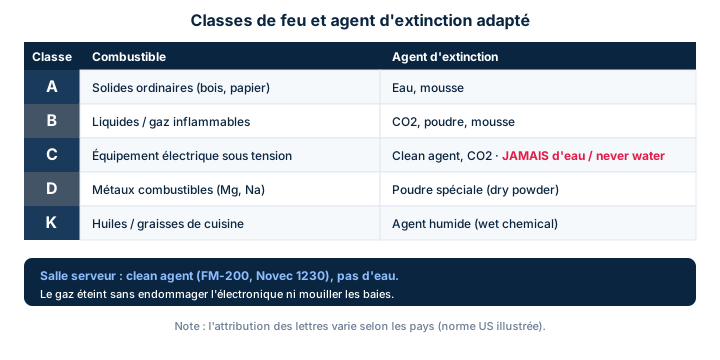
The insider threat is the risk originating from inside the organization. It materializes when a person with internal knowledge and authorizations uses them, knowingly or not, to the organization's detriment. Indicators exist (observable concerning behaviors), but detection remains difficult, precisely because the actor is legitimate.
In emergency management, one rule prevails over all others : the safety of people is the absolute priority. Every emergency and BCDR plan must place it at the top ; no asset-protection activity should put personnel in danger. The awareness program must cover : fire detection/suppression systems designed first to protect human health, with deluge systems on all evacuation routes and trained, drilled fire marshals (and alternates) per zone ; evacuation practiced regularly, with everyone knowing the exits and procedures ; advance coordination with external entities (law enforcement, fire services, medical responders) to establish communication and familiarity before the event ; consideration of localized threats (natural disaster, weather) in the plan and its trigger thresholds ; and, if the response involves relocating critical personnel to a remote site, a budget that also allows relocating their families.
CBK supplement on fire classes : Class A (ordinary solid combustibles : wood, paper - extinguished with water), Class B (flammable liquids/gases - CO2 or clean agents), Class C (energized electrical equipment - above all NO water ; CO2 or clean agent), Class D (combustible metals - specific dry agents), Class K (cooking oils and greases - wet chemical agents). Extinguishing agents include water (dry pipe and wet pipe depending on whether the piping is filled, and pre-action to limit accidental discharges in computer rooms), CO2, and FM-200/clean agents that do not damage electronics.
Finally, Mobile Device Management (MDM). It is inadvisable to bring a device into an area where its equipment is at risk : an expensive phone is merely a target for theft, or even seized or copied. It is better to buy a cheap burner phone and destroy it after use. MDM allows applications and updates to be deployed and controlled centrally, and above all to remote wipe (erase) or brick (render completely unusable) a lost or stolen device, depending on security needs.
- Insider threats are hard to detect because the actor is legitimate
- Top priority: personnel safety outranks asset protection
- Coordinate fire/medical/law enforcement BEFORE the event; budget family relocation
- CBK: electrical fire = Class C, never water; clean agents and pre-action protect electronics
- MDM: burner phone in risky zones; remote wipe or brick a lost device
Case studies
The rural site needs no protection?
Context : During a site visit, a facility manager tells Keiko that perimeter security controls are not a concern: the site is remote, rural, and gets few visitors. Yet the site hosts customer data and proprietary information for SneakerNet, a globally present organization.
Question : How should Keiko respond, and how should she combine perimeter and internal controls to protect critical assets while preserving confidentiality and integrity?
Show analysis and answer
Remoteness is not a security control: it may reduce visitor flow, but it removes neither the threats (intrusion, targeted theft, insider, disaster) nor the value of the hosted assets. Risk depends on asset value as much as on threat; customer and proprietary data keep a high value regardless of the postal code. Reasoning "no visitors, so no risk" confuses apparent exposure with real risk.
Keiko must apply layered physical defense in depth. At the perimeter: secure from the property line (fencing, lighting, CPTED for natural surveillance), exterior sensors (IR, microwave, strain-sensitive cables on the fence), centralized CCTV providing a forensic record. At the entrance: enrollment station, badges, biometrics in sensitive zones, and logging of authorized AND unauthorized access. Indoors, in layers: card readers on data rooms, BMS on doors and windows, PIR and dual-technology sensors to limit false alarms, mantraps at critical points against tailgating.
This stacking protects confidentiality (preventing unauthorized access to data) and integrity (preventing physical tampering with systems), while generating the traceability needed for accountability. SneakerNet's global presence further demands consistency of controls across all sites: a weak rural link can become the entry point to the whole.
Takeaway : Geographic isolation is not a control: asset value, not visitor flow, dictates the need for layered physical security.
- Risk follows asset value, not site footfall
- Stack perimeter, entrance, and internal controls in independent layers
- Log authorized and unauthorized access for accountability
- A weak site can compromise a globally present organization
Proximity card is not a smart card
A proximity card identifies contactlessly (RFID) but performs no cryptographic processing: it is a mere identifier. Only the smart card embeds a chip capable of computation and encrypted storage. The exam exploits this confusion: if the question asks for the card offering the highest security or embedded strong authentication, it is smart card, not proximity. The hybrid card combines both worlds (often proximity for physical access, contact chip for logical).
Electrical fire: never water (cbk)
A fire involving energized electrical equipment is Class C: water is dangerous there (conduction, electrocution, damage). The right answer is a non-conductive agent: CO2 or a clean agent (FM-200). In a server room, a pre-action system is preferred, requiring two conditions before discharge, limiting accidental discharges that would ruin the electronics. Trap: do not answer "water sprinkler" for an electrical fire. Class memo: A solids, B liquids/gases, C electrical, D metals, K kitchen.
Personnel safety always comes first
In any emergency or BCDR plan, personnel safety is the highest priority: no asset-protection activity may put people in jeopardy. If a question pits saving data or equipment against evacuating employees, the correct answer is always to protect people first. This is a guiding principle of Domain 7, not a cost/benefit trade-off.
Respond even to an expired duress code
Duress codes change regularly, but an expired code conveyed by a person must never be ignored: it may signal genuine distress from someone who lacked access to the current code. The trap expects "ignore it because the code is no longer valid"; best practice is to trigger the response process anyway.
Checkpoint — Checkpoint
-
Among the safety aspects to consider when an employee travels or works remotely, which is correctly stated per the manual?
- A If it is not needed, do not take it; encryption and secure remote access may be limited by some jurisdictions
- B Always carry as much equipment as possible to stay productive on the road
- C Since encryption is universally allowed, no legal constraint needs anticipating
- D Condition monitoring is optional as long as the employee answers emails
Answer & rationale
Answer : A — If it is not needed, do not take it; encryption and secure remote access may be limited by some jurisdictions
The manual stresses: do not take the unnecessary, legally protect the information, and know that encryption and remote access may be restricted by jurisdiction. Carrying the maximum increases exposure to theft/seizure. Encryption is not universally allowed. Condition monitoring with check-ins (and duress detection) is essential, not optional.
-
A Balanced Magnetic Switch (BMS) relies on which principle to decide whether to raise an alarm?
- A A magnetic field or mechanical contact signaling an opening
- B Comparing heat signatures against a background level
- C Passive listening to sounds in a space
- D Breaking an infrared beam between emitter and reflector
Answer & rationale
Answer : A — A magnetic field or mechanical contact signaling an opening
The BMS uses a magnetic field or mechanical contact, typically on a door or window, to detect an opening. Heat comparison describes the PIR; passive listening describes the acoustic sensor; beam interruption describes the infrared linear beam sensor.
-
A fire starts on an energized UPS in a server room. What is the fire class and the appropriate suppression agent?
- A Class C; CO2 or clean agent (FM-200), definitely not water
- B Class A; water sprinkler discharge
- C Class K; wet chemical agent
- D Class D; dry agent for metals
Answer & rationale
Answer : A — Class C; CO2 or clean agent (FM-200), definitely not water
Energized electrical equipment corresponds to a Class C fire: water is prohibited (conduction, electrocution). A non-conductive agent is used, CO2 or a clean agent. Class A targets ordinary solids, K cooking oils, D combustible metals. (Provenance cbk.)
-
CPTED proposes to prevent intrusion through environmental design. Which of these levers is part of it?
- A Natural surveillance, natural access control, and territoriality
- B Dual-technology sensors and pre-action sprinklers
- C Enrollment station, badges, and centralized CCTV
- D Remote wipe, bricking, and burner phones
Answer & rationale
Answer : A — Natural surveillance, natural access control, and territoriality
CPTED (provenance cheat) rests on three design principles: natural surveillance, natural access control, and territoriality. Sensors and sprinklers are active technical controls; enrollment/badges/CCTV are access and surveillance controls; remote wipe and burner phones belong to MDM. CPTED prevents through the design of the space, not through a device.
-
A traveler conveys a duress code that was replaced the previous week. What is the right course of action?
- A Trigger the response process anyway: an expired code may signal genuine distress
- B Ignore the signal since the code is no longer valid
- C Ask the traveler to repeat the current code before acting
- D Disable the traveler's account to prevent fraudulent use
Answer & rationale
Answer : A — Trigger the response process anyway: an expired code may signal genuine distress
The manual is explicit: if a person conveys an expired code, a response process must still be initiated. The person may be in real danger without having been able to obtain the current code. Ignoring it or demanding the right code endangers them; disabling their account does not address the duress situation.
Key takeaways
- Physical security is deployed in layers from the property line inward to sensitive internal zones; electronics replace physical keys.
- The enrollment station assigns badges and rights; card types by increasing security: barcode, magnetic stripe, proximity, smart, hybrid combining.
- IP CCTV lowers cost but exposes cameras to network attacks; dual-technology sensors reduce false alarms; the BMS detects an opening via magnetic field.
- When traveling: do not take the unnecessary, anticipate legal limits on encryption, ensure condition monitoring, 2FA on a trusted platform, and caution on social media.
- The duress code is subtle, multi-channel, changed regularly; an expired code still triggers a response.
- Personnel safety is the highest priority of any emergency plan; prior external coordination and family relocation if needed.
- CBK/cheat: CPTED (surveillance/access/territoriality), mantraps against tailgating, positive-pressure HVAC, fire classes A-K and agents (electrical fire = Class C, no water).
- MDM: burner phone in risky zones, remote wipe or brick a lost or stolen device.
Domain summary
Security operations are the day-to-day implementation of controls: investigations, logging and monitoring, incident and vulnerability management, recovery and continuity. Protecting the integrity of an investigation (order of volatility, chain of custody, admissibility) outweighs speed of remediation. Logging underpins all analysis: IDS/IPS, SIEM, SOAR, ISCM, DLP and UEBA are only valuable with trained people to interpret the signals. Foundational concepts (least privilege, need-to-know, separation of duties, PAM, job rotation, mandatory vacation, dual control) reduce fraud and error. Incident management follows a cycle (NIST 800-61: preparation, detection & analysis, containment/eradication/recovery, post-incident; ISO 27035 in 5 phases) where the SOC escalates but does not decide alone. Availability rests on backups (3-2-1, full/incremental/differential), RAID, high availability, recovery sites (cold/warm/hot/mobile/cloud) and quantified objectives (RTO/RPO/MTD). Finally, protecting information requires protecting people: layered physical security and personnel safety.
Glossary (Terms & Definitions)
The key Domain 7 terms, to master in English for the exam.
| Term | Definition |
|---|---|
| Order of volatility | Order in which to collect evidence, from most volatile (registers/cache, RAM) to least volatile (disk, archives). |
| Chain of custody | Documented, continuous traceability of evidence: who, what, when, where, from collection to presentation. |
| Write-blocking | Technology preventing any write to the original medium during forensic acquisition. |
| Admissibility | Acceptability of evidence by the court, based on its documentation and preservation. |
| eDiscovery | Electronic discovery: identification and production of digital evidence (ISO 27050). |
| Event | Any observable occurrence in a system or network. |
| Precursor | Signal of a possible change in conditions that may alter the threat landscape. |
| Indicator | Artifact suggesting an attack is imminent, ongoing or has occurred. |
| Indicator of Compromise (IoC) | Signal that an intrusion or malware is occurring or has occurred. |
| IDS | Intrusion Detection System: detects and alerts on unauthorized access. |
| IPS | Intrusion Prevention System: detects and automatically acts (blocks) on intrusions. |
| NIDS / NIPS | Network-based IDS/IPS, placed on segments to monitor traffic. |
| HIDS / HIPS | Host-based IDS/IPS, agents installed on endpoints. |
| SIEM | Security Information and Event Management: aggregates, normalizes and correlates logs from varied sources. |
| SOAR | Security Orchestration, Automation and Response: automates response via playbooks and runbooks. |
| Playbook / Runbook | Sequence of automated actions, linear (playbook) or with conditional logic (runbook). |
| ISCM | Information Security Continuous Monitoring: continuous security awareness (NIST SP 800-137, 6 phases). |
| Egress monitoring / DLP | Monitoring and regulation of data leaving the perimeter (Data Loss Prevention). |
| Data at rest / in motion / in use | Three data states protected by DLP (storage, transit, processing). |
| Threat intelligence | Threat information aggregated and analyzed to provide context for decisions. |
| ISAC | Information Sharing and Analysis Center: cyber information sharing between organizations. |
| UEBA | User and Entity Behavior Analytics: detects behavioral deviations of users and entities via ML. |
| Configuration Item (CI) | Named component, owned and managed by change management, treated as a single entity. |
| CMDB | Configuration Management Database: records the state of configuration items. |
| Baseline | Total inventory of the components making up a complete instance of a system. |
| Security baseline | Minimum acceptable set of security controls associated with each CI. |
| SCAP | Security Content Automation Protocol: automated ingestion of configuration changes. |
| Provisioning | Creating copies of a baseline and placing them in the right environments. |
| RFC | Request for Change: formal documentation of a proposed change. |
| CAB / CMB / CCB | Change Advisory / Management / Configuration Control Board: change approval body. |
| Regression testing | Tests verifying that only the approved change altered system behavior. |
| Least privilege | Minimum level of permissions needed for tasks, and nothing more. |
| Need to know | Restricting access to information based on the genuine need to know. |
| Separation of duties (SoD) | No single individual can complete an entire trusted action alone. |
| Privileged Account Management (PAM) | Strengthened management of privileged accounts (logging, MFA, JIT, audit). |
| Just-in-time (JIT) identity | Granting privileges restricted to a specific task and moment, then revoked. |
| Job rotation | Regular role rotation to detect fraud and avoid single points of failure. |
| Mandatory vacation | Mandatory leave (with access suspension) to reveal wrongdoing. |
| Dual control / dual custody | Two or more people acting simultaneously for a critical action (no lone zone). |
| SLA | Service-Level Agreement: binding agreement defining service level and penalties. |
| Sanitization | Secure erasure of a medium before disposal, proportional to classification. |
| Incident | Event that actually or potentially compromises the CIA of a system or information. |
| CSIRT / SOC | Incident response team / center that monitors and escalates urgent decisions. |
| Containment | Containment: isolating suspect elements to prevent spread. |
| Eradication | Removal of every instance of the causal agent and its files. |
| Recovery | Restoring and declaring systems, data and workflows operational. |
| Remediation | Configuration changes that immediately limit incident recurrence. |
| Root cause analysis | Identifying underlying causes (Pareto, Five Whys, Ishikawa, FMEA, fault trees). |
| Patch management | Systematic notification, testing, deployment and verification of patches. |
| Vulnerability management | Identifying, assessing, prioritizing and remediating weaknesses. |
| Allowed / blocked listing | Lists of allowed items (everything else blocked) or blocked items (everything else allowed). |
| Sandbox | Isolated test environment to evaluate or detonate suspect code/content. |
| Honeypot / honeynet | Decoy machine(s) with no real data to distract and observe attackers. |
| Zero-day | Exploitation of a vulnerability not yet published or patched. |
| 3-2-1 backup | 3 copies of the data, 2 media types, 1 offsite copy. |
| Archive bit | Bit indicating a file has been modified (1) or archived (0). |
| Full / Differential / Incremental | Backup types: everything; since the last full; since the last backup. |
| Journaling / Snapshot / CDP | Data-level protection techniques (transactions, block mirror, continuous capture). |
| RAID | Redundant Array of Independent Disks: virtualizes a volume across disks (striping, parity). |
| SAN / NAS | Central storage: by blocks/volumes via servers (SAN) or by files on the LAN (NAS). |
| Recovery site | Alternate processing site: mirrored, hot, warm, cold, mobile or cloud. |
| RTO | Recovery Time Objective: maximum time to restore a resource to service. |
| RPO | Recovery Point Objective: acceptable data loss (restore point). |
| MTD | Maximum Tolerable Downtime: total acceptable downtime (MTD = RTO + WRT). |
| BIA | Business Impact Analysis: analysis of a disruption's impact on essential functions. |
| DR test types | read-through/tabletop, walk-through, simulation, parallel, full-interruption (increasing intensity). |
| CPTED | Crime Prevention Through Environmental Design: natural surveillance, access control and territoriality. |
| Duress code | Subtle code word signaling a duress situation, changed regularly. |
| MDM | Mobile Device Management: centralized control of mobiles (remote wipe/bricking). |
Domain key takeaways
What you must remember
- Order of volatility and chain of custody first: poorly preserved or undocumented evidence becomes useless, however relevant.
- IDS detects and alerts; IPS detects and acts. SIEM aggregates/normalizes/correlates; SOAR automates via playbooks/runbooks; UEBA models the normal behavior of users and entities.
- Least privilege + need-to-know + separation of duties + PAM (with JIT) form a layered defense against fraud and privilege abuse.
- Incident management: NIST 800-61 (4 phases) or ISO 27035 (5 phases). The SOC escalates the decision; management decides the return to normal.
- Containment then eradication then recovery then remediation; the lessons-learned phase must produce verifiable behavior change, with no punitive spirit.
- 3-2-1 backups (3 copies, 2 media types, 1 offsite). Differential = since the last full (archive bit kept); incremental = since the last backup (archive bit reset to 0).
- RAID improves availability, not backup. RAID 5 tolerates 1 disk failure, RAID 6 tolerates 2, RAID 10 = striping + mirroring.
- Pick the recovery site by MTD: cold (weeks/months), warm (hours/days), hot (minutes/hours), mirrored (real time). RTO = time to restore service; RPO = acceptable data loss.
- DR tests by increasing intensity: read-through/tabletop, walk-through, simulation, parallel, full-interruption.
- Protecting information = protecting people: layered physical security (CPTED, badges, CCTV, sensors) and personnel safety (travel, duress codes, MDM).