By the end of this course you will be able to
- Distinguish classification (access, confidentiality) from categorization (impact, loss) and apply military and private schemes.
- Build and maintain an asset inventory and a CMDB, and correctly assign owner, custodian, controller and processor.
- Walk the data lifecycle (Create, Store, Use, Share, Archive, Destroy) and map controls onto it.
- Pick the right destruction method by media type (clearing, purging, degaussing, physical destruction, crypto-shredding).
- Protect data in its three states and select baselines through scoping and tailoring.
- Deploy DLP, DRM and CASB and tie it all to compliance requirements (GDPR, HIPAA, PCI DSS, NIST).
Prerequisites : Be comfortable with the CIA triad, the notion of control (administrative, technical, physical) and risk-management basics (Domain 1).
Suggested path
Suggested path: 4 sessions of about 3 to 4 hours, spread over 2 to 3 weeks. Redo each module checkpoint before moving to the next session, then take the full quiz (160 Q) as a final review.
-
Session 1 - Classify and handle
MODULE 1 · MODULE 2
Tangible/intangible assets, classification vs categorization, sensitivity levels, marking, handling, declassification.
-
Session 2 - Inventory, ownership and lifecycle
MODULE 3 · MODULE 4
ITAM, CMDB, owner vs custodian, GDPR roles (controller/processor), data lifecycle, data localization.
-
Session 3 - Retention, destruction and states
MODULE 5 · MODULE 6
Retention (min/max), remanence, sanitization (degaussing, crypto-shredding, NIST 800-88), 3 states and encryption (TLS, link vs end-to-end, enclaves).
-
Session 4 - Controls and compliance
MODULE 7
Control types and defense in depth, baselines, scoping vs tailoring, DLP/DRM/CASB, standards (PCI DSS, HIPAA, GDPR, NIST).
Identify and classify information and assets
Prerequisites : None. Starting point of Domain 2, study it first.
Before protecting, you must know what you protect and why. This module sets the founding definitions: what an asset is (tangible and intangible), the difference between classification and categorization, the level schemes (military and private), and the criteria that drive the decision. It is the most structuring step of the domain: a wrong upstream classification produces unfit downstream controls.
Classification is above all an asset-owner decision, because only the owner knows the business value of the asset. But that decision must be consistent and repeatable across the whole organization, otherwise security looks arbitrary and loses employee trust.
1.1 What is an asset?
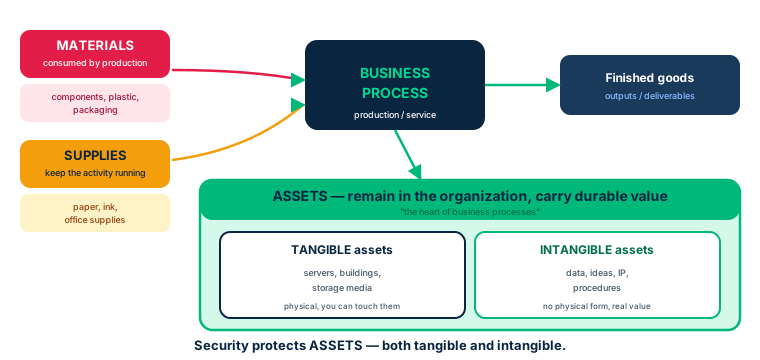
Every organization relies on three kinds of resources. Materials are inputs consumed by a production process (components, plastics, packaging). Supplies are consumables that keep the business running (paper, ink, office supplies). Assets, by contrast, stay with the organization and carry lasting value: they are what security protects.
An asset can be tangible (server, building, storage media) or intangible (idea, data, procedure, intellectual property). The central point of Domain 2 is that information holds value the moment it is conceived, even before it is written down. A database illustrates this layering: the data is one intangible asset, the DBMS that manages it is another, the server that hosts it is a tangible asset, and the procedural know-how in the employee's head is a tacit asset.
Identifying assets, especially information assets, is therefore the first act of any security program. You cannot protect what you have not inventoried.
- Asset = lasting value kept by the organization; materials and supplies are consumed.
- Information has value from creation, first tacit then explicit.
- A single business object (e.g. a database) blends tangible and intangible assets.
1.2 Classification vs categorization
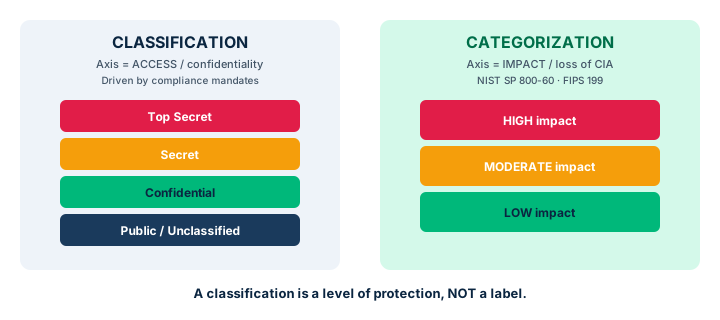
The two words are often confused, and that is a recurring exam trap. Classification is primarily about access: it recognizes the impact of a compromise (confidentiality, integrity, availability, but also authenticity, non-repudiation, privacy, safety) and is derived from the organization's compliance mandates. It is the world of 'Secret', 'Top Secret', 'Confidential' labels.
Categorization is primarily about impact: it is the process of grouping sets of data with comparable sensitivities and similar protection needs mandated by law, contracts or compliance. The official references are NIST SP 800-60 and FIPS 199, which categorize impact as low, moderate, high.
A phrase to remember: a classification is not a label. The label is part of implementing the controls that protect classified information. For a long time the conversation was limited to the CIA triad; the textbook insists on broadening to CRUD actions (Create, Read, Update, Delete) because creating, updating and deleting data directly affects its integrity, availability and authenticity.
- Classification = access/confidentiality; categorization = impact/loss.
- FIPS 199 and NIST SP 800-60 are the categorization references (low/moderate/high).
- A classification is NOT a label; the label is used to apply controls.
1.3 Schemes and levels: military and private
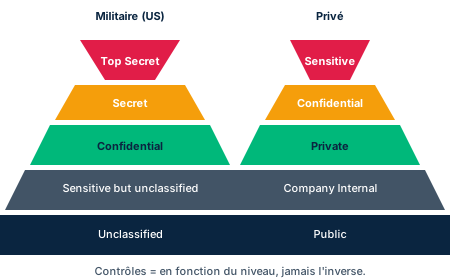
The military/government scheme has five levels, most to least sensitive: Top Secret, Secret, Confidential, Sensitive but Unclassified (SBU), Unclassified. Each level's compromise maps to a damage degree (exceptionally grave, serious, damage). These communities prioritize confidentiality above all.
The private/commercial scheme usually has four levels: Sensitive, Confidential, Private, Public, most to least sensitive. There is no mandatory nomenclature: each organization names its own levels. The Center for Internet Security, for example, offers a simple three-level scheme (sensitive, business confidential, public) mapping to low/medium/high.
Categorization, by contrast, is not always hierarchical: categories include PII, PHI, proprietary, human safety critical, time-critical, compliance data. A single asset can carry several labels at once, e.g. 'human safety critical, HIPAA, highly restricted'.
- Military: 5 levels (Top Secret → Unclassified) centered on confidentiality.
- Private: 4 levels (Sensitive → Public), free nomenclature.
- Categorization = non-hierarchical categories (PII, PHI, proprietary); multiple labels possible.
1.4 Sensitivity levels, labels and benefits
Beyond the level names, each level captures in a word or two the possible harm if data is compromised. A typical private scale has four notches. Highly restricted: compromise could threaten the organization's very existence, even lead to loss of life, damage and the litigation that follows. Moderately restricted: loss of temporary competitive advantage, revenue, or disruption of planned investments. Low sensitivity (often 'internal use only'): compromise causes only minor disruptions or delays. Unrestricted public: data already published, no further harm possible.
Categorization labels, by contrast, do not necessarily rank from worst to least: they reflect the source or nature of the requirement. Examples: human safety critical (risk of death or injury), equipment/property safety critical (physical damage), PII critical (identifies a person), private data (distribution limited by agreement), proprietary data (internal business logic), compliance data (specific legal or contractual requirements), time-critical data (a delay makes an activity fail). A single asset can stack several labels, e.g. 'human safety critical, HIPAA, highly restricted'.
Classifying well brings benefits beyond protection: awareness among employees and customers of the organization's commitment, identification of critical information and its vulnerability to modification, focus on integrity controls, understanding the value of information, and meeting legal requirements.
- 4 sensitivity notches: highly restricted, moderately restricted, low/internal, unrestricted public.
- Non-hierarchical categorization labels; an asset can stack several.
- Benefits: awareness, integrity focus, value of information, legal compliance.
1.5 Classification criteria and issues
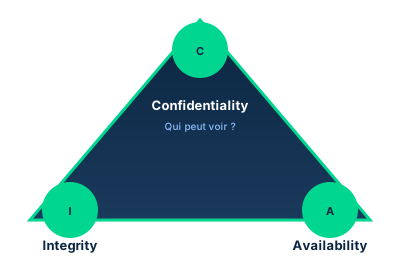
To set a classification, the asset owner answers a series of questions: who must access the data and under which roles? How is the data secured by default (open or off-limits)? How long must it be retained (e.g. seven years in finance)? How will it be destroyed? Must it be encrypted? What use is appropriate (internal, restricted, public)?
Classification is driven by the asset owner because they understand the asset's value. They may delegate the task (the responsibility) but never the accountability: they remain answerable for protection. The classic analogy is the ship's captain, who may delegate operation to a watch officer but remains ultimately accountable for the ship, crew and cargo.
Errors lurk: human error, inconsistent methods, arbitrary or capricious determinations, confusing or incomplete labeling. Inconsistent classification makes all security rules look arbitrary and destroys trust. When the data owner lacks knowledge, they tend to over-classify out of caution, needlessly inflating costs; a classification board with the right expertise corrects that bias.
- The owner may delegate the task but stays accountable (ship's captain).
- Criteria: access, securing, retention, destruction, encryption, use.
- Inconsistency = lost trust; over-classification = wasted cost; board = arbitration.
Case studies
Salhos Hospital: classifying a medical-device fleet
Context : Adriana, Senior Security Engineer at a 400-person hospital specialized in rare diseases, runs a network scan that reveals thousands of medical devices missing from the hardware inventory. Many process health data (PHI/EPHI) and some are critical to patient care.
Question : How should Adriana run the identification then classification of these devices, and on what criteria?
Show analysis and answer
Identification starts with the inventory: enrich the CMDB with each device (make, model, serial, version, location, use). That is the prerequisite to any protection. Then comes the dual assessment: criticality to care (impact categorization - a ventilator is human safety critical) and sensitivity of the data processed (PHI falls under HIPAA, hence highly restricted).
Classification follows sensitivity, and controls follow classification: a device handling EPHI will require encryption at rest and in transit, access control, logging. Since some devices were unknown, apply the principle: an unlabeled asset is treated at the highest sensitivity until analyzed.
Takeaway : Inventory first, then a dual lens of criticality (impact) and sensitivity (access); with no label, assume the worst.
Classification ≠ categorization
Classification is about ACCESS (confidentiality, who may read). Categorization is about IMPACT (the loss to the organization, low/moderate/high - FIPS 199). If the question mentions 'impact level', think categorization.
A classification is not a label
Classification is a decision (recognizing the impact of a compromise). The label is the visible means of applying protective controls. Do not confuse the decision with its marking.
Checkpoint — Identify and classify
-
In the PRIVATE-sector classification scheme, what is the descending order of sensitivity?
- A Public > Private > Confidential > Sensitive
- B Sensitive > Confidential > Private > Public
- C Top Secret > Secret > Confidential > Unclassified
- D Confidential > Sensitive > Private > Public
Answer & rationale
Answer : B — Sensitive > Confidential > Private > Public
Private sector (descending): Sensitive > Confidential > Private > Public. Option C is the military scheme.
-
Which process is primarily concerned with the IMPACT of a loss on the organization?
- A Classification
- B Categorization
- C Labeling
- D Declassification
Answer & rationale
Answer : B — Categorization
Categorization = impact (FIPS 199, NIST SP 800-60: low/moderate/high). Classification = access/confidentiality.
-
An asset owner delegates classification to an analyst. Who remains accountable for protecting the asset?
- A The analyst the task was delegated to
- B The asset owner
- C The data custodian
- D The CISO
Answer & rationale
Answer : B — The asset owner
You may delegate responsibility (the task), never accountability. The owner stays answerable (captain analogy).
-
A storage medium is found with no sensitivity label. How should it be handled?
- A As public, until proven otherwise
- B At the highest sensitivity until analyzed
- C Destroy it immediately
- D Return it to its last known user
Answer & rationale
Answer : B — At the highest sensitivity until analyzed
Prudence principle: an unlabeled medium is presumed highest level until analyzed.
-
Data whose compromise could threaten the organization's very existence falls into which sensitivity level?
- A Low sensitivity (internal use only)
- B Moderately restricted
- C Highly restricted
- D Unrestricted public
Answer & rationale
Answer : C — Highly restricted
Highly restricted = compromise can threaten the organization's existence (loss of life, litigation). Moderately restricted = loss of advantage or revenue.
-
Why is identifying and classifying information assets a critical first step in security?
- A It lets you treat all assets uniformly and simply
- B It helps determine the value of assets and choose appropriate controls
- C It only concerns confidential information, not public
- D Laws and regulations play no role in it
Answer & rationale
Answer : B — It helps determine the value of assets and choose appropriate controls
Identifying and classifying lets you understand each asset's value and tailor controls accordingly (efficient resource allocation). Treating everything uniformly is inefficient and costly.
Key takeaways
- Inventory and identification precede any protection: you only protect what you inventoried.
- Classification = access/confidentiality; categorization = impact/loss (FIPS 199).
- Military: 5 levels; private: 4 levels; categorization = non-hierarchical categories.
- The owner classifies and stays accountable even after delegating the task.
Information and asset handling requirements
Prerequisites : Module 1 (classification and sensitivity levels).
Once an asset is classified, it must still be handled in line with its sensitivity. This module covers marking and labeling, handling, storage, declassification, and recording destructions. The guiding idea: each classification level maps to a coherent set of controls, from marking to destruction.
Marking only has value if everyone understands and respects it. That is why training the people who handle sensitive media is inseparable from labeling policies.
2.1 Marking, labeling and enforcement
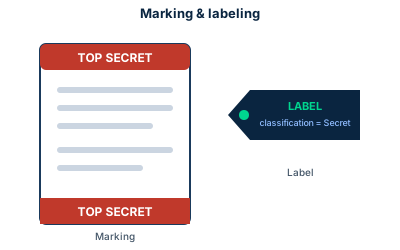
As with physical assets, classified information assets must be clearly marked and labeled. Ideally systems enforce those labels automatically - but in practice that only happens in mandatory access control (MAC) systems. Discretionary access control (DAC) systems do not enforce labels uniformly, and labels may be lost as information moves from one system to another.
A media label must show the sensitivity of the information, state whether the media is encrypted, and may carry a point of contact and a retention period. The golden rule seen earlier: media found without a label is labeled at the highest sensitivity until analysis proves otherwise.
Traditional marking (physical labels, color codes) is still relevant for removable media and paper documents. On the digital side, productivity suites are starting to use keyword scanning and sentiment analysis to spot incorrect labels, but these techniques are not yet widespread.
- Only MAC enforces labels uniformly; DAC lets them slip.
- A label shows: sensitivity, encryption, contact, retention.
- Unlabeled media = highest level until analyzed.
2.2 Handling and storage of sensitive media
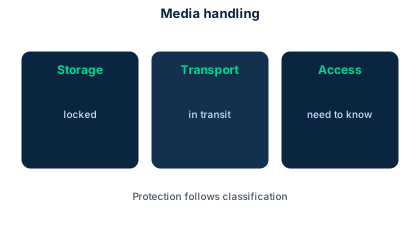
Only designated personnel should access sensitive media, and handling procedures must be distributed and taught. The security professional must remember that unencrypted media offers no digital accountability: heightened vigilance is required.
Storage combines physical and logical controls. Backup media should be encrypted and kept in a secure container (a safe). A separate encrypted off-site copy is recommended for disaster recovery, while on-site backups are placed in a fire-resistant box. In all cases the number of people with access to media is strictly limited, and separation of duties plus job rotation are implemented where cost-effective.
- Unencrypted media = no digital accountability, heightened vigilance.
- Encrypted backups, safe, off-site copy for DR, fire-resistant box on-site.
- Strictly limited access + SoD and job rotation when cost-effective.
2.3 Declassification and end of life
Declassification lowers an asset's sensitivity level. Marking, handling and storage requirements must then be adjusted accordingly, and the owner plays a central role in that decision. The process may rely on obfuscation techniques such as de-identification (removing identifiers) or tokenization (replacing a sensitive value with a token).
Media no longer needed or defective must be destroyed rather than simply discarded. A destruction record is kept, consistent with media-handling logs. When a medium's sensitivity is unknown, apply object-reuse controls rather than recycling it as is: you must ensure no exploitable residue remains.
- Declassify = adjust marking, handling, storage; owner's decision.
- De-identification and tokenization obfuscate data.
- Tracked destruction + object reuse when sensitivity is unknown.
Case studies
Salhos Hospital: device handling procedures
Context : After the scan, Adriana gathers an IT team to track the devices and add them to the inventory. It is the right time to define handling, physical-security and labeling procedures.
Question : What handling, physical-security and labeling procedures should she recommend, and how should usage restrictions be communicated?
Show analysis and answer
Each device gets a label reflecting the sensitivity of the data it processes and stating whether it is encrypted. Physical access is restricted to designated staff, with sensitive zones locked. Handling procedures are written, distributed and taught - marking that nobody understands protects nothing.
Usage restrictions are communicated through training, signed policies and, ideally, technical enforcement via MAC where the device allows it. For unencrypted devices transmitting EPHI in clear text (a risk found at the hospital), encryption at rest and in transit must be prioritized before any broader rollout.
Takeaway : Label + restricted access + taught procedures + technical enforcement: handling is managed in layers.
Only MAC enforces labels
If the question asks which model uniformly enforces sensitivity labels, it is MAC (Mandatory Access Control). DAC lets labels slip between systems.
Checkpoint — Handling and marking
-
Which access-control model automatically and uniformly enforces sensitivity labels?
- A DAC
- B MAC
- C RBAC
- D ABAC
Answer & rationale
Answer : B — MAC
MAC (Mandatory Access Control) enforces labels. DAC does not enforce them uniformly and lets them slip.
-
Which technique replaces a sensitive value with a token unusable out of context?
- A Degaussing
- B Tokenization
- C One-way hashing
- D Compression
Answer & rationale
Answer : B — Tokenization
Tokenization substitutes a token for the sensitive value; it is used in declassification and obfuscation.
-
A medium is no longer used and its sensitivity is unknown. What is the best practice?
- A Recycle it as is to cut costs
- B Apply object-reuse controls first
- C Resell it secondhand
- D Store it indefinitely untouched
Answer & rationale
Answer : B — Apply object-reuse controls first
Unknown sensitivity: apply object-reuse controls (ensure no residue is recoverable) rather than recycling.
-
What is the primary purpose of marking and labeling a sensitive asset?
- A Make assets visually appealing and organized
- B Implement encryption of digital assets
- C Easily identify security level, classification, distribution limits and handling caveats
- D Streamline physical storage and disaster recovery
Answer & rationale
Answer : C — Easily identify security level, classification, distribution limits and handling caveats
Marking/labeling helps quickly identify security level, classification, distribution limits and handling caveats. Encryption is a separate control.
Key takeaways
- One classification level = one coherent set of controls (marking → destruction).
- MAC enforces labels, DAC does not; an unlabeled medium is handled at the highest level.
- Declassification = owner decision + control adjustment + obfuscation techniques.
- Tracked destruction and object reuse guard against leakage via residue.
Provision resources securely: inventory and ownership
Prerequisites : Module 1 (classification). Domain 1 governance notions help.
Provisioning a resource securely means registering it, assigning an owner and tying it to policies before it is even used. This module covers the two lifecycles that structure the domain - the IT Asset Management Life Cycle and the Data Security Life Cycle - then focuses on inventory, CMDB and ownership roles.
The inventory is the foundation: it is the first step of any asset-management process, and it is itself an asset that must be protected and maintained.
3.1 The IT Asset Management Life Cycle
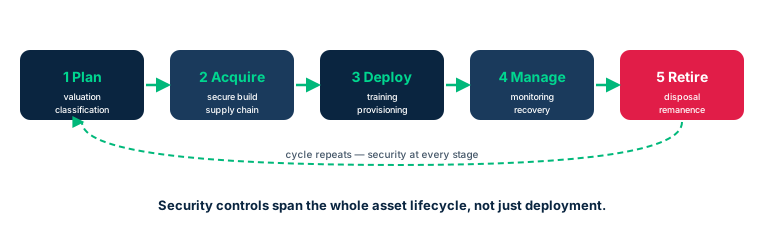
Two lifecycle models frame information security: the IT Asset Management Life Cycle (hardware, software, data) and the Data Security Life Cycle (the data itself). The first has five major stages.
Planning: align the asset with objectives, identify and value it (total cost to acquire and operate, expected revenues, competitive advantage, potential harm if compromised). It is also when security needs are assigned via classification and categorization. Acquiring: acquire or develop the asset, baking in the identified security requirements from design. Deployment: put into service, train users and support on security aspects. Managing: operate and monitor continuously (do controls still work? has the threat landscape shifted?), plan recovery and archive. Retiring: retire the asset, handling destruction and remanence, and briefing staff.
Two paths lead to management: a deliberate, requirements-driven path, and a discovery path (systems enumeration, baselining) for pre-existing assets. Both converge on the same first step: making the inventory.
- 5 stages: Plan, Acquire, Deploy, Manage, Retire.
- Valuation (cost, revenue, advantage, harm) happens at Planning.
- Deliberate path and discovery path converge on the inventory.
3.2 Inventory, ITAM and CMDB
The asset inventory lists all physical and virtual assets: hardware, software, data. IT Asset Management (ITAM) is the set of governance and management practices for those assets; the reference standard is ISO 19770.
The Configuration Management Database (CMDB) goes beyond a plain list: it records the make, model, serial number, type and version of each asset. It traces not only what you own but also how it is configured, and provides a restoration point (e.g. to rebuild a user's workstation to the right version, hardware and software included).
A subtle point stressed by the textbook: enumeration tools can tell which applications are installed and where files reside, but they cannot spot an information asset in the business sense - for example 'the annual budget', scattered across databases, spreadsheets and emails. That is why the information-asset inventory is also built top-down, from critical business processes. And the register itself is an asset to protect.
- ITAM = management practices (ISO 19770); inventory = complete list.
- CMDB = inventory + configuration + restoration point.
- Enumeration tools miss the business information asset: top-down approach needed.
3.3 Ownership: owner accountable, custodian executes
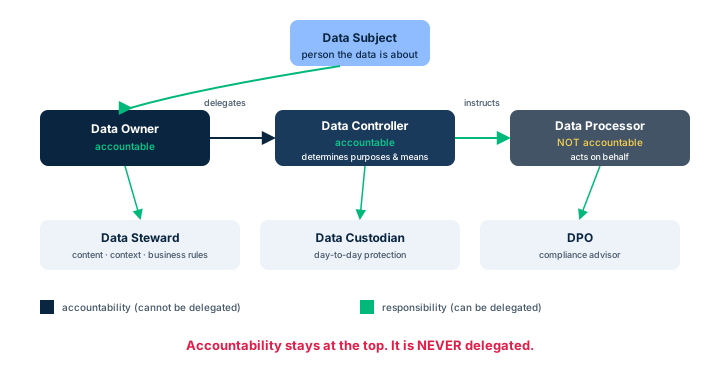
Identifying a responsible owner is a central act of asset management. The asset owner (or information owner, or information steward) imposes security and quality requirements for the asset: they decide who accesses it and at what permission level, how long it is kept, whether it may be shared. They do not build or maintain the controls themselves - it is a business function - but they are accountable.
Typical owner responsibilities: determine the information's impact on the mission, estimate its replacement cost, decide who needs access and under what release criteria, and know when information is inaccurate or should be destroyed.
The data custodian executes day to day: protecting, maintaining and keeping data accessible to the right operators. Their tasks: adhere to data policy, ensure access while maintaining the security level, perform fundamental maintenance (storage, archiving), document, and validate quality through periodic audits. The exam rule: the owner DECIDES, the custodian EXECUTES.
- Owner = business function, decides (classification, access, retention, destruction), accountable.
- Custodian = executes (protection, backups, maintenance, audits).
- Owner DECIDES, custodian EXECUTES: recurring exam trap.
Case studies
The hotel chain: visible and invisible assets
Context : A mentor of Adriana works with international hotel chains. Adriana asks about their approach to asset management: which assets, which are most valuable, why track them tightly.
Question : What are a hotel chain's assets, and what does the asset register represent for the organization?
Show analysis and answer
A hotel chain blends tangible assets (real estate, linens, TVs, coffee) and intangible ones (guest registries, marketing data, software licenses, OS versions, serial numbers). Both matter equally: even running out of coffee can hurt reputation. The most strategic value often lies in customer data, which calls for privacy protection.
The CMDB records make, model, serial, type and version of each asset. It tracks the fleet and also enables rebuilding a workstation identically after an incident. The register is itself an asset: without it you know neither what you own nor how it is configured. Tracking it tightly is what enables risk and business-impact assessment.
Takeaway : Tangible and intangible assets matter equally; the CMDB tells not just what you have but how it is configured; the register is an asset.
Owner vs custodian
The data owner DECIDES (classification, who accesses, retention, destruction) and stays accountable. The data custodian EXECUTES (day-to-day protection, backups, maintenance). Do not swap them.
CMDB ≠ plain list
A CMDB is more than an inventory: it records configuration (make/model/serial/version) and serves as a restoration point. If the question contrasts 'plain list' with 'details + restoration', pick the latter.
Checkpoint — Inventory and ownership
-
What does a CMDB primarily add over a plain inventory list?
- A It automatically encrypts assets
- B It records configuration and provides a restoration point
- C It replaces the classification policy
- D It removes the need for an owner
Answer & rationale
Answer : B — It records configuration and provides a restoration point
The CMDB records make/model/serial/version (configuration) and lets you rebuild an asset: it is a restoration point.
-
Who is responsible for day-to-day data protection, on the owner's instructions?
- A The data owner
- B The data custodian
- C The data subject
- D The auditor
Answer & rationale
Answer : B — The data custodian
The data custodian executes day-to-day protection (backups, maintenance, access) per the owner's instructions.
-
At which ITAM stage is asset valuation (cost, revenue, advantage, harm) performed?
- A Planning
- B Deployment
- C Managing
- D Retiring
Answer & rationale
Answer : A — Planning
Valuation and assigning security needs (classification) happen at Planning, ahead of acquisition.
-
What is a PRIMARY responsibility of asset owners in an information security framework?
- A Perform penetration testing on the assets
- B Keep the information asset inventory up to date
- C Enforce acceptable-use policies for processors
- D Oversee supply-chain management
Answer & rationale
Answer : B — Keep the information asset inventory up to date
The owner keeps the asset inventory up to date (tracking, documenting changes). Pen testing is for specialists; acceptable use and supply chain are not their primary responsibility.
Key takeaways
- Two lifecycles: ITAM (hardware/software/data) and Data Security Life Cycle (the data).
- ITAM: Plan, Acquire, Deploy, Manage, Retire; both paths converge on the inventory.
- CMDB = inventory + configuration + restoration point; ISO 19770 frames ITAM.
- Owner decides and is accountable; custodian executes.
Data lifecycle and roles
Prerequisites : Modules 1 and 3 (classification, inventory and ownership).
Data lives: it is created, stored, used, shared, archived, then destroyed. This module walks the Data Security Life Cycle and maps controls onto it, then details the roles that compliance (notably the GDPR) requires you to distinguish: subject, controller, processor, steward, custodian, owner, DPO.
The most exam-tested distinction pits the controller (accountable, decides purposes and means) against the processor (acts on the controller's behalf, with no accountability). Misassigning these roles misallocates legal responsibility.
4.1 The Data Security Life Cycle
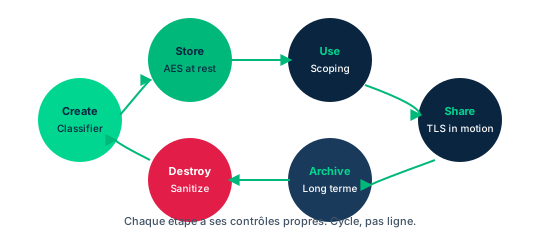
Data goes through six major stages. Create: generating or acquiring content - the preferred moment to classify, since controls depend on that classification. Store: committing to media, most often at the same time as creation; apply encryption, access control, logging, redundancy by classification. Use: data is read, processed, modified; often the most vulnerable state because it is in clear text; rely on DLP, DRM and access control. Share: information is shared with others; once shared, it escapes the organization's control, so share only by classification and with authorized recipients; DLP detects unauthorized sharing, DRM keeps control. Archive: data leaves active use for long-term storage; retention challenges (will the media still be readable in ten years?), protection maintained by classification, legal requirements. Destroy: defensible destruction, per written processes, by authorized personnel.
These stages are not a rigid sequence: creation comes first and destruction last, but storage, use, sharing and archiving chain in any order, as many times as needed. The model is a framework to map controls onto each phase.
- 6 stages: Create, Store, Use, Share, Archive, Destroy (order not rigid).
- Classify at creation; share by classification.
- Data in use = most vulnerable state (in clear text).
4.2 Data roles (GDPR and NIST)
Data protection requires a clear distinction of roles, their accountabilities and responsibilities. NIST SP 800-18 and the GDPR give comparable definitions.
Data subject: the natural person described or identified by the data. Data controller: determines the purposes and means of processing; accountable, ensures all obligations (GDPR or other) are met; negotiates data processing agreements with processors. Data processor: performs processing on the controller's behalf (acquire, use, modify, dispose); may be responsible for protecting the data, but accountability stays with the controller. Data owner: decides who accesses at which levels, ensures quality, integrity and protection; takes or delegates the controller role. Data steward: responsible for content, context and business rules of the data. Data custodian: protects the data while in their custody (safe transport, storage, processing). Data protection officer (DPO): advises on compliance and interfaces with supervisory authorities; becomes mandatory when the organization processes sensitive data (health, genetics, origin, religion).
The accountability hierarchy is the key: the subject has a reasonable expectation of privacy and integrity; the controller answers for everything; the processor is never accountable in the controller's place.
- Controller = accountable (purposes + means); processor = acts for it, not accountable.
- Owner decides access; steward handles content/rules; custodian protects daily.
- DPO mandatory for sensitive data; interfaces with authorities.
4.3 Collection, location and maintenance
Data collection is the first phase: creating and acquiring content, updating existing content. This is where data owners are appointed and classifications assigned, to apply the right controls as early as possible. Secure-defaults and privacy-by-design principles apply from this phase.
Data location and localization become critical with the cloud. Where to store data depends on local law, especially for personal data treated differently across countries. Before collecting, map local and global requirements: allowed storage locations, expected protection mechanisms, retention periods. Some data-localization laws can even gate the decision to operate in a region: expansion into a new market may be slowed by costly local requirements.
Data maintenance aims to preserve confidentiality, integrity and availability across the data's life, via controls fit for each state. Data at rest, seemingly the easiest to protect, still requires identifying all repositories, encrypting, managing access and backing up. This phase is also where the eternal functionality-versus-security trade-off is arbitrated.
- Appoint owners and classify at collection (privacy by design).
- Data localization can gate the decision to operate in a country.
- Maintenance = CIA per state; even at rest needs encryption, access, backups.
Case studies
Social platform: who plays which role?
Context : Adriana reviews the lifecycle and roles with a friend running a US social platform. Registration is required; once registered, the user has messaging, groups, posts and comments.
Question : How do data owner, controller, steward, custodian, processor and subject fit together on this platform, and where are conflicts of interest?
Show analysis and answer
The data owner is accountable for the data's value and sets access policies. The data controller, working for the owner, is accountable for protection through proper control implementation. The data steward handles content, context and business rules. The data custodian protects the data while in custody. The data processor processes on the controller's behalf: it may be responsible for protecting, but accountability stays with the controller. The data subject (the user) has a reasonable expectation of privacy (GDPR, HIPAA depending on context) and data integrity.
Friction points: user location changes legal expectations (an EU user falls under GDPR); a negligent processor exposes the controller; and the commercial interest in exploiting data can conflict with the subject's privacy expectation. That very conflict, mishandled, sits at the heart of the big data scandals.
Takeaway : Controller accountable, processor not; the subject's location changes the applicable law; the commercial-interest vs privacy conflict is structural.
Applying a data-lifecycle policy in your organization
Context : At an ISC2 chapter meeting, you are asked, as a manager, how you would concretely apply data-lifecycle policy considerations to a real dataset in your organization.
Question : For this dataset: who accesses it? What use is appropriate? How is it secured? How long is it retained? How is it destroyed?
Show analysis and answer
Access and use: the owner defines authorized roles under least privilege and the permitted use (internal, restricted, public), based on the data's classification. Securing: apply one control per state - encryption at rest, TLS/IPSec in transit, access control and secure enclaves in use - sized to the classification level.
Retention: the period is set by law or contract (minimums) and bounded by minimization (maximums), then documented in a retention schedule. Destruction: a defensible method fit to the media (clearing, purging, degaussing, physical destruction; crypto-shredding for SSDs), traced. Key point: all these decisions flow from the classification set at creation, and replay at each lifecycle phase.
Takeaway : A lifecycle policy answers, for each dataset, five questions - who accesses, what use, how to secure, how long, how to destroy - all driven by classification.
Controller vs processor
The data controller determines purposes and means and stays accountable. The data processor acts only on the controller's behalf and is never accountable in its place. Question 'who is accountable for compliance' → controller.
Checkpoint — Lifecycle and roles
-
In a GDPR environment, who is accountable for protecting personal data and ensuring compliance?
- A Data processor
- B Data subject
- C Data controller
- D Data steward
Answer & rationale
Answer : C — Data controller
The controller determines purposes and means and stays accountable. The processor acts on its behalf without accountability.
-
At which lifecycle stage is it best to classify data?
- A Create
- B Archive
- C Share
- D Destroy
Answer & rationale
Answer : A — Create
Classify at creation (Create), because all later controls depend on that classification.
-
Which role is responsible for the content, context and business rules of a dataset?
- A Data custodian
- B Data steward
- C Data processor
- D DPO
Answer & rationale
Answer : B — Data steward
The data steward handles content, context and business rules; the custodian protects daily; the DPO advises on compliance.
-
A company hesitates to enter a market because of laws mandating local storage of citizens' data. Which concept is this?
- A Data remanence
- B Data localization
- C Data masking
- D Data deduplication
Answer & rationale
Answer : B — Data localization
Data-localization laws dictate where data may reside and can gate the decision to operate in a region.
-
What is the primary purpose of the data lifecycle model in security?
- A Impose a rigid, uniform process on all organizations
- B Determine the physical location of data
- C Help organizations address security needs at each phase
- D Minimize the use of external systems
Answer & rationale
Answer : C — Help organizations address security needs at each phase
The model guides the organization to understand and address security needs at each phase (Create, Store, Use, Share, Archive, Destroy). It is not rigid and does not set location.
Key takeaways
- 6 stages: Create, Store, Use, Share, Archive, Destroy; classify at Create.
- Controller accountable, processor not; owner decides access; steward handles content.
- DPO mandatory for sensitive data; custodian protects daily.
- Data localization can gate geographic footprint.
Retention, destruction and remanence
Prerequisites : Module 4 (data lifecycle).
Keeping data has a cost and a risk; destroying it badly has another. This module covers retention (how long, why), remanence (what remains after deletion) and destruction methods, from simple erasure to physical destruction. It is one of the most trap-laden exam topics, especially around media: what works on an HDD may not work on an SSD.
The through-line: destruction must be defensible, i.e. conducted per written, traceable, compliant processes, not improvised under pressure.
5.1 Data retention: neither too much nor too little
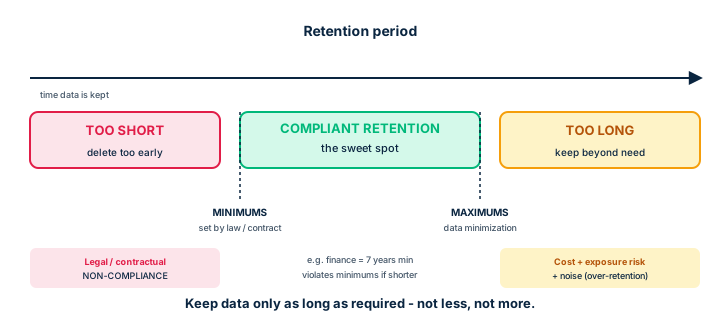
Information should be kept only as long as required. Industry standards, laws and regulations set durations (e.g. seven years in finance). Absent external requirements, the organization defines its own retention policy, applicable to paper and digital copies alike.
Retention has two bounds. Minimums are imposed by law or contract: keeping less is non-compliance. Maximums stem from minimization: keeping longer than needed raises storage cost, exposure risk and 'noise' in searches, and may violate external requirements. The classic mistake is to take the longest retention period and apply it blindly to everything: that is waste and risk.
A sound retention policy follows eight steps: evaluate legal, litigation and business requirements; classify record types; determine periods and destruction practices; draft and justify the policy; train staff; audit retention and destruction practices; review periodically; document policy, implementation, training and audits. To execute all this, an accurate inventory is essential (location, period, destruction requirements of each asset).
- Too little = non-compliance (minimums); too much = cost + risk + noise (maximums).
- Do not apply the longest period to everything without analysis.
- Retention policy = 8 steps, backed by an accurate inventory.
5.2 Data remanence: what remains
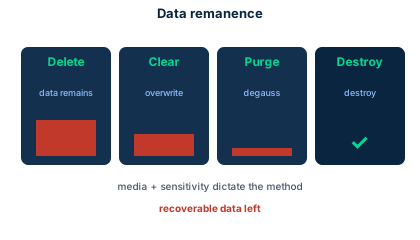
Data remanence is the residual representation of data on a medium after a supposed erasure. Insufficient deletion can compromise information. Almost all equipment retains data after the processing step: CPU or GPU registers, RAM, temporary files, display circuitry hold values until overwritten, from milliseconds to several minutes after power is removed.
The crucial point: deleting a file does not actually remove the data. The system merely marks the directory entry as deleted and returns the space to the free list; the data stays physically present until overwritten. That is why a disk 'emptied' by simple deletion remains recoverable with the right tools. Temporary files are an often-overlooked source of remanence.
- Remanence = data recoverable after a supposed erasure.
- Deleting a file merely marks the space as free.
- RAM, registers, temporary files retain data after use.
5.3 Destruction methods and media choice
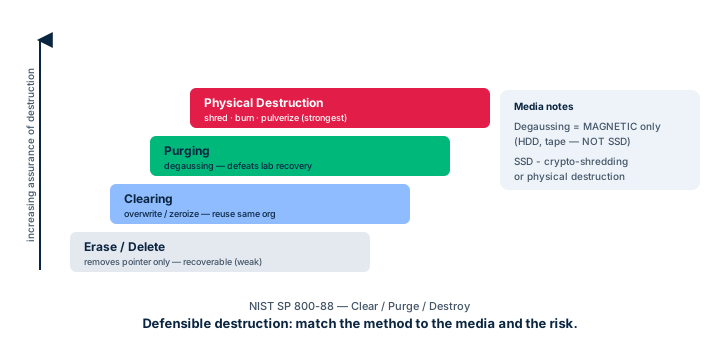
The official reference is NIST SP 800-88 (Guidelines for Media Sanitization). Methods escalate by assurance level. Clearing: rewrite patterns (often random) across the whole medium. 'Zeroizing' (writing zeros) is a variant, but with the risk that a missed block stays recoverable. Clearing protects against recovery via normal system functions and suffices in many operational environments. Purging: strongly eliminate the chance of recovery, even in a lab. Degaussing (a powerful magnetic field) belongs here - but it applies only to magnetic media (HDD, tapes) and also destroys the servo track, making the disk unusable. Physical destruction: shredding, incineration, pulverizing, acid - the ultimate remedy to remanence.
The major trap: degaussing does NOT work on SSDs (flash memory, non-magnetic). For an SSD, prefer crypto-shredding (destroy the encryption keys to render data unusable) or physical destruction. Finally, defensible destruction requires all this to be conducted per written processes, by authorized personnel, and traced - otherwise the destruction is not legally defensible.
- Ladder: clearing < purging/degaussing < physical destruction.
- Degaussing = magnetic only (HDD); destroys the servo track.
- SSD → crypto-shredding or physical destruction; NIST SP 800-88 is the bible.
Case studies
SolarWinds: retention and the supply chain
Context : Discovered in December 2020, the SolarWinds attack was a sophisticated supply-chain attack targeting the Orion software. Attackers compromised the development process and injected malicious code into updates distributed to many organizations, including government agencies.
Question : How does this incident touch asset security, retention and privacy?
Show analysis and answer
The attack shows that asset security does not stop at the organization's border: a widely deployed third-party software becomes a critical asset whose compromise exposes sensitive data. On retention and privacy, the incident raised fears of exposure of retained data, a reminder that any retained data is data at risk. The less you keep (minimization), the smaller the exposure surface in a breach.
The Domain 2 link: an up-to-date inventory and correct classification of data handled by third-party tools let you assess the real impact of such a compromise. Managing third-party relationships (contracts, audits, audit rights) extends asset security beyond the internal perimeter.
Takeaway : Any deployed third-party asset is a critical asset; minimizing retention shrinks the exposure surface.
Retiring a banking server
Context : A bank retires a server holding customer data. Some sits on magnetic HDDs, some on encrypted SSDs. The CISO requires defensible, auditable destruction.
Question : What destruction plan should be applied media by media?
Show analysis and answer
For magnetic HDDs: degaussing (purging) or multi-pass overwrite, then physical destruction (shredding) if sensitivity demands. For encrypted SSDs: degaussing is ineffective (non-magnetic); use crypto-shredding (destroying the encryption keys), which instantly renders data unusable, supplemented by physical destruction if needed. Each step is logged in a chain-of-custody record: who, when, which medium, which method, what result.
The logic: choose the method by media type (never the reverse), escalate assurance by data classification, and trace everything so the destruction is legally defensible.
Takeaway : Method follows media: HDD → degaussing/destruction; SSD → crypto-shredding/destruction. Everything is traced.
Waxbill project: multi-party retention and SOC 1 Type 2
Context : MLZ Systems is the lead contractor for an environmental-observation drone (Waxbill), with software partners in Israel, a screening team in Chicago, R&D in Boston and university partners. MLZ must update its data retention policy, applicable to all parties. The primary client, Dr Smythe-Beecham, additionally requests a SOC 1 Type 2 report for the last three years, on MLZ and its subcontractors.
Question : What should the retention policy prioritize, and why would a client request a SOC 1 Type 2 report?
Show analysis and answer
The retention policy must stay specific, succinct and easy to follow: a long, complex document would risk partners misunderstanding it. It must set durations by data type (aligned with legal and contractual requirements), be enforced, monitored, and any breach must trigger disciplinary consequences. In a multi-party project, it is shared with everyone who must comply.
The SOC 1 Type 2 report is third-party assurance: over a defined period, it attests to the operating effectiveness of an organization's controls (here on aspects that may affect the client's financial reporting). By requesting it for MLZ and its subcontractors, the client seeks to verify that the whole chain masters its risks - a supply-chain check. The scenario also recalls that underpaying key staff can create bribery or coercion risk: asset security includes the human factor, from researcher to janitor.
Takeaway : Short, enforced, monitored retention policy; SOC 1 Type 2 = third-party assurance on control effectiveness, extended to the supply chain.
Managing the health-data lifecycle (PHI / HIPAA)
Context : The hospital's HIPAA officer asks Adriana to define a process ensuring HIPAA compliance for the electronic protected health information (EPHI) generated by medical devices, from collection to destruction.
Question : What practices ensure HIPAA-compliant management of the EPHI lifecycle (collection, storage, transmission, retention, destruction)?
Show analysis and answer
Collection and classification: mark EPHI as highly restricted at creation and assign a data owner. Storage: compliant encryption at rest (FIPS algorithms), strict access control (least privilege), encrypted backups. Transmission: TLS or IPSec, never in clear (SSL banned). Use: logging and auditing, secure enclaves where possible, since data is in clear during processing.
Retention: a period compliant with HIPAA and state requirements, recorded in a documented schedule. Destruction: traced defensible destruction, fit to the media. Responsibilities: the data controller stays accountable; any cloud provider falls under shared responsibility framed by a dedicated contract (Business Associate Agreement, BAA).
Takeaway : PHI = highly restricted: encryption at rest and in transit, strict access, auditing, HIPAA-compliant retention and destruction, and contracted shared responsibility (BAA).
Securely decommissioning SSD laptops holding classified data
Context : An organization refreshes its fleet and must retire 200 laptops whose drives are SSDs (flash memory, non-magnetic). Some held Confidential data, others public data. Management proposes degaussing everything and reselling the machines to save money.
Question : Is degaussing suitable for SSDs? Which sanitization method fits each classification, and how do you ensure defensible destruction?
Show analysis and answer
Degaussing works through a magnetic field: it erases magnetic media (HDD, tape), but it is INEFFECTIVE on SSDs (flash memory, non-magnetic). Proposing it here would leave recoverable data: a classic exam trap.
The method follows classification (protection follows classification). For public data, clearing (overwrite) or crypto-erase suffices before resale. For Confidential data on SSDs, two reliable options: crypto-erase (purging the keys if the drive was end-to-end encrypted, making data unreadable) or physical destruction (shredding/incineration) if resale is not required or sensitivity demands it.
Defensible destruction means you can PROVE, in a dispute or audit, that destruction followed a policy, used the right method for the media, and was traced: destruction certificates, chain of custody, a log (who, what, when, method). Without this traceability, the organization stays exposed even if the data is wiped.
Takeaway : Degaussing does not erase SSDs; pick the method by media AND classification, and document it for defensible destruction.
- Degaussing erases MAGNETIC media (HDD, tape), not SSDs (flash).
- The sanitization method follows the media AND the data classification.
- Crypto-erase = wiping the keys of an encrypted drive makes data unreadable.
- Defensible destruction = being able to prove destruction (policy, method, traceability).
- Reuse/resale is possible only after suitable, verified sanitization.
Degaussing does not work on SSDs
Degaussing works via a magnetic field: effective on HDDs and tapes, useless on SSDs (flash memory). For an SSD: crypto-shredding or physical destruction. This is the most common D2 trap.
Clearing vs purging vs destruction
Clearing resists recovery via normal system functions. Purging resists even lab recovery (e.g. degaussing). Physical destruction = ultimate remedy. Assurance rises in that order.
Checkpoint — Retention and destruction
-
You replace laptops with SSD models. Which data-destruction method would be the LEAST effective on those SSDs?
- A Crypto-erasure
- B Degaussing
- C Shredding
- D Melting
Answer & rationale
Answer : B — Degaussing
Degaussing only acts on magnetic media. An SSD being flash memory, degaussing is ineffective.
-
What is the main consequence of retaining data well beyond its useful period?
- A Better automatic compliance
- B Higher storage cost, exposure risk and noise
- C Improved integrity
- D Reduced legal obligations
Answer & rationale
Answer : B — Higher storage cost, exposure risk and noise
Beyond the useful period (maximums/minimization): cost, exposure risk and noise rise, with non-compliance risk.
-
Why does 'deleting' a file not protect against data remanence?
- A Because the file is immediately encrypted
- B Because the system only marks the space as free, without erasing the data
- C Because the recycle bin keeps a legal copy
- D Because degaussing applies automatically
Answer & rationale
Answer : B — Because the system only marks the space as free, without erasing the data
Logical deletion marks the entry as free; data stays physically present and recoverable until overwritten.
-
Which term denotes destruction conducted per written, traceable, compliant processes?
- A Zeroizing
- B Defensible destruction
- C Clearing
- D Object reuse
Answer & rationale
Answer : B — Defensible destruction
Defensible destruction is controlled, legally defensible and regulation-compliant destruction.
Key takeaways
- Retention: legal minimums vs maximums (minimization); do not keep everything at the longest.
- Remanence: deleting is not enough; data stays until overwritten.
- Destruction: clearing < purging/degaussing < physical destruction (NIST SP 800-88).
- Degaussing magnetic only; SSD → crypto-shredding; always defensible and traced.
Data states and cryptographic controls
Prerequisites : Module 4 (lifecycle and data states).
At any moment, data is in one of three states: at rest, in transit (in motion) or in use. These states are assumed atomic and mutually exclusive, and each calls for its own controls. Grasping this grid is essential to picking the right protection mechanism.
The key message: data in use is the hardest to protect, because it must be in clear text to be processed. Secure enclaves are the emerging answer to that problem.
6.1 The three states: at rest, in transit, in use
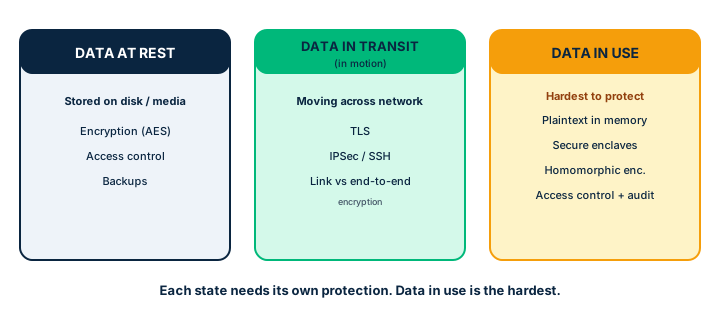
Data at rest: data stored on media, neither transmitted nor processed. The risk is unauthorized physical or logical access to the medium. The reference protection is encryption (algorithms limiting access to key holders), complemented by access controls, redundancy and backups. Removable media and mobile devices (laptops, tablets, smartphones, wearables) must be encrypted.
Data in transit (or in motion): data moving, typically over a network, not being processed. The risk - the same as data at rest - is interception, modification, unavailability. The protection is encryption, at the data level, network level, or both. Sensitive web interfaces use TLS; SSL, in all its forms, is considered breakable and deprecated. Email is not secure by default (sent in clear text): use PGP or S/MIME. Off the web, encrypt at the application level, or failing that at the network level via IPSec or SSH tunnels.
Data in use: data processed by software, hardware or a user. It is the hardest state to protect because the data must be in clear text for its structure and values to be readable. The main controls are access control, auditing and non-repudiation. A trivial example of risk: the over-the-shoulder attack, where a bystander reads a user's screen.
- At rest → encryption + access + backups; In transit → TLS/IPSec/SSH (not SSL).
- In use → clear text, most exposed; access control, auditing, non-repudiation.
- Email insecure by default: PGP or S/MIME for sensitive data.
6.2 Link vs end-to-end encryption
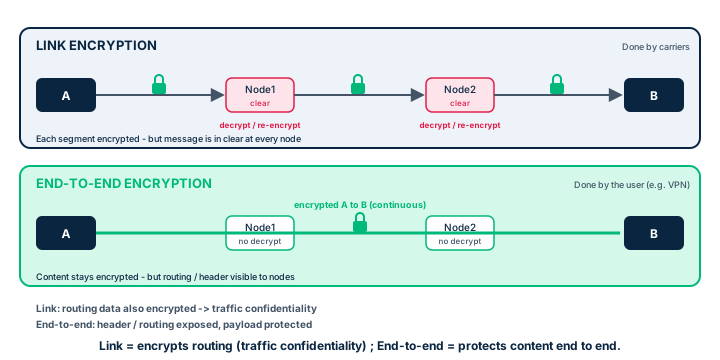
Data is encrypted over a network in two ways. Link encryption is done by carriers: it encrypts all data along a communications path (satellite link, telephone circuit, T-1 line), including routing information. Consequence: each node must decrypt to keep routing, then re-encrypt. An attacker compromising a node can therefore see the message in clear there. In return, since routing is encrypted, link encryption offers better traffic confidentiality: it hides addressing information and prevents inferences about the existence of exchanges between two parties.
End-to-end encryption is done by the end user: data is encrypted at the source and only decrypted at the destination. It stays encrypted across the network, but routing information remains visible. A VPN is an example. The trade-off is the reverse of link encryption: better end-to-end content protection, but routing stays observable.
- Link: carriers, encrypts routing, decrypts/re-encrypts at each node → traffic confidentiality.
- End-to-end: user, encrypted end to end, routing visible (VPN).
- Each approach protects what the other leaves exposed.
6.3 Protecting data in use: enclaves
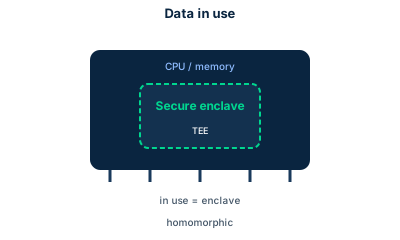
Protecting data during processing is the hardest challenge, since it must be decrypted to be processed. The industry approach is the secure enclave: a zone isolated from the rest of the architecture where processing happens. Data is still processed in clear text there, but the enclave is designed to be impervious to vulnerabilities and malware present elsewhere in the system. The word 'enclave' indeed denotes a territory isolated from another.
Beyond enclaves, classic controls remain relevant: strict access control, logging and auditing to detect abnormal use, non-repudiation. Detecting usage anomalies, combined with forensic techniques, uncovers fraud and abuse. The risk remains: accidental or malicious alteration, unauthorized exposure (the over-the-shoulder attack being the simplest example).
- Data in use = decrypted to process → hardest to protect.
- Secure enclave = isolated zone, impervious to the rest of the system's vulnerabilities.
- Add-ons: strict access, auditing, non-repudiation, anomaly detection.
Case studies
Medical devices transmitting EPHI in clear text
Context : During the inventory, Adriana finds some devices send and receive EPHI in clear text. Leadership asks for a plan ensuring stored and transmitted data is appropriately encrypted.
Question : How to apply encryption to data at rest and in transit, and ensure only authorized personnel interact with the devices?
Show analysis and answer
In transit: replace clear-text transmissions with TLS for the devices' web interfaces, and with application-level encryption or IPSec/SSH for non-web traffic. SSL is banned. At rest: encrypt local storage of the devices and adjacent servers with FIPS-compliant algorithms. In use, where data must be processed in clear text, rely on strict access controls and logging.
On access: restrict interaction to authorized personnel via strong authentication and periodic permission reviews (least privilege). As this is PHI, HIPAA compliance frames it all: encryption, access control, traceability, and managing shared responsibilities with any cloud providers.
Takeaway : One control per state: TLS/IPSec in transit, FIPS encryption at rest, strict access + audit in use; HIPAA frames PHI.
Data in use = hardest to protect
Data in use must be in clear text to be processed: it is the most exposed state. If the question asks the hardest state to protect, it is in use (answer: enclaves, access control, auditing).
SSL is deprecated
For data in transit, the right protocol is TLS. SSL (all versions) is breakable and deprecated - an 'SSL' answer to a modern protection question is a distractor.
Checkpoint — States and encryption
-
Which data state is hardest to protect and why?
- A Data at rest, because it is stored a long time
- B Data in transit, because it crosses the network
- C Data in use, because it must be in clear text to be processed
- D All states are equivalent
Answer & rationale
Answer : C — Data in use, because it must be in clear text to be processed
Data in use is in clear text (decrypted) to be processed, hence most exposed. Answers: enclaves, access control, auditing.
-
Which encryption approach hides routing information and offers better traffic confidentiality?
- A End-to-end encryption
- B Link encryption
- C Application TLS
- D Crypto-shredding
Answer & rationale
Answer : B — Link encryption
Link encryption also encrypts routing (decrypted at each node), hiding addressing: better traffic confidentiality.
-
To protect sensitive data in transit on a web interface, which protocol should you prefer?
- A SSLv3
- B TLS
- C FTP
- D Telnet
Answer & rationale
Answer : B — TLS
TLS is the modern standard. SSL (all versions) is deprecated; FTP and Telnet transmit in clear text.
-
Which data-state / primary-control mapping is correct?
- A At rest -> TLS ; in transit -> enclaves ; in use -> degaussing
- B At rest -> encryption ; in transit -> TLS/IPSec ; in use -> access control and enclaves
- C At rest -> enclaves ; in transit -> encryption ; in use -> TLS
- D All three states use exactly the same control
Answer & rationale
Answer : B — At rest -> encryption ; in transit -> TLS/IPSec ; in use -> access control and enclaves
At rest = encryption (+ access control, backups); in transit = TLS/IPSec/SSH; in use = access control, auditing and secure enclaves (data is in clear there).
Key takeaways
- 3 states: at rest (encryption, access, backups), in transit (TLS/IPSec/SSH), in use (hardest).
- Link encryption encrypts routing (traffic confidentiality); end-to-end protects content.
- Data in use → secure enclaves + access control + auditing + non-repudiation.
- TLS yes, SSL no; email insecure by default (PGP/S-MIME).
Baselines, scoping/tailoring, DLP and compliance
Prerequisites : Modules 1 and 6 (classification, data states, the notion of control).
How do you go from a generic control catalog to a setup fit for YOUR organization? Through baselines (minimum level of protection), then scoping and tailoring. This module also covers the technologies that enforce those choices - DLP, DRM, CASB - and the compliance standards to know.
The most-tested trap: scoping removes inapplicable controls, tailoring adjusts the remaining controls to context. Confusing the two is a classic exam error.
7.1 Control types and defense in depth
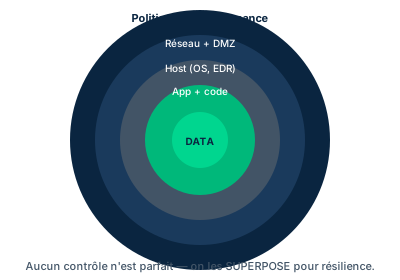
To protect assets, you combine three broad control types. Administrative controls are policies, procedures, standards and training - the human and organizational framework. Technical (or logical) controls are implemented by technology: encryption, access control, DLP, logging. Physical controls protect the environment: locks, badges, cameras, environmental controls.
Controls also sort by mode of action (preventive, detective, corrective, deterrent, recovery, compensating), but that categorization is not absolute: a single control can fall into several categories depending on its implementation.
The key point for asset security: relying on a single control type or category creates a single point of failure. By combining several types and categories, you force the attacker to prepare multiple attack paths instead of one - that is defense in depth, which deters, slows down and raises the chance of detecting an attack.
- 3 types: administrative (policies), technical/logical (encryption, DLP), physical (badges).
- A single control type = single point of failure.
- Combining types and categories = defense in depth (deters, slows, detects).
7.2 Baselines: the minimum reference
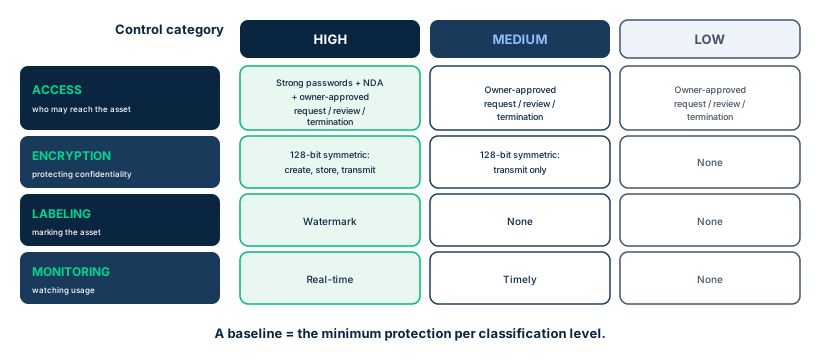
A security baseline is a minimum level of protection serving as a reference point. It ensures that any evolution of technology or architecture stays above an understood, accepted threshold. Once controls are in place, everything is measured against the baseline.
Baselines break down by classification level. If you classify as high, medium, low, you define a baseline for each: for example, high = strong passwords + NDA + 128-bit symmetric encryption for creation, storage and transmission + watermark + real-time monitoring; low = simple owner-approved access process, no encryption, no labeling, no monitoring. Baselines can also be technical (the minimum configuration of a Windows machine before joining the network) or non-technical (wearing a badge, escorting visitors). In short: a baseline is a consistent reference point, defining the minimum required and breaking down into per-architecture configurations.
- Baseline = minimum protection level serving as a reference.
- One baseline per classification level (high/medium/low).
- Technical (config) and non-technical (badge, escort) baselines.
7.3 Scoping and tailoring
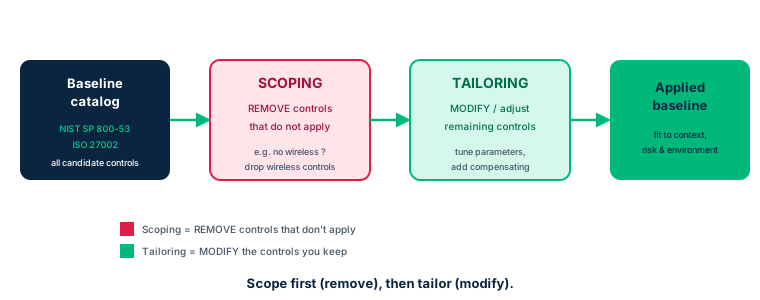
You rarely adopt a framework as is: you scope and tailor it to your context. These two operations are distinct and frequently confused at the exam.
Scoping: the process of determining which controls apply and to which assets, by removing from the general baseline the recommendations that do not apply. Several considerations influence how controls are applied; the system security plan must clearly identify which controls were scoped and describe the decisions made, approved by the authorizing official.
Tailoring: the process of modifying the control set to fit the organization's specific characteristics and requirements. It gives more flexibility and avoids costly or needlessly complex approaches. Formally, tailoring includes applying scoping, specifying compensating controls if needed, and defining organization-specific parameters. Remember: scoping REMOVES what does not apply, tailoring ADJUSTS what remains.
- Scoping = remove inapplicable baseline controls.
- Tailoring = adjust/modify remaining controls to context (+ compensating).
- The system security plan documents scoping decisions, approved by the authorizing official.
7.4 DLP, DRM and CASB
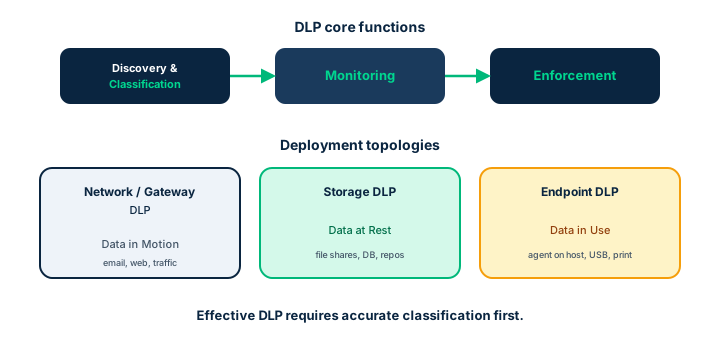
Data Loss Prevention (DLP) groups the controls that keep certain data compliant with policies. It rests on three components: discovery & classification (map and automatically classify data), monitoring (watch usage across locations and platforms, the key function), enforcement (interrogate data and compare its location, use or destination against policies, then alert, log, block, reroute or encrypt). DLP depends heavily on reliable data identification: without prior discovery, classification and labeling, it is much harder to operate. It is one of the few technologies effective against insider threat.
Three deployment topologies, aligned with states: Data in Motion (network/gateway DLP, near the gateway, watching HTTP/HTTPS/SMTP/FTP), Data at Rest (storage DLP, where data is stored), Data in Use (endpoint/client DLP, on workstations). DRM (Digital Rights Management) encrypts data within the file itself (format-preserving) and controls its use, modification and distribution across the intellectual property's life; if DLP does not integrate with DRM, it cannot read the protected files. Finally, the CASB (Cloud Access Security Broker) is a control point between the cloud consumer (CSC) and provider (CSP); it provides four functions - visibility, data security, threat protection, compliance - and deploys as a forward proxy, reverse proxy or via API.
- DLP = discovery/classification + monitoring + enforcement; effective against insider threat.
- DLP topologies: DIM (network), DAR (storage), DIU (endpoint).
- DRM encrypts within the file; CASB = control point CSC↔CSP, 4 functions, proxy/API.
7.5 Selecting compliance standards
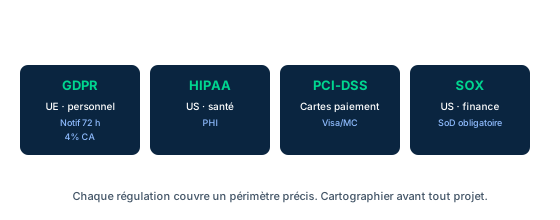
Organizations adopt standards (sometimes called frameworks) to structure their security posture, understand baseline controls and assess their maturity. Depending on activity, some are mandatory (law or regulation): PCI DSS for card data, HIPAA for health, GDPR for European personal data. On steering frameworks: NIST SP 800-37 (Risk Management Framework), NIST Cybersecurity Framework, NIST SP 800-53 (control catalog), ISO 27001/27002 (ISMS), plus entities like ENISA or the ITU.
The professional must know this landscape and that contractual or legal requirements can directly dictate a control (PCI DSS mandates encryption of card data, for instance). You rarely adopt a framework wholesale: you implement parts of it through scoping and tailoring, to target genuinely relevant risks without waste. The overall Domain 2 logic closes here: classify to know value, choose a baseline by that value, scope and tailor to fit it, and enforce it all with the right technical and compliance controls.
- Some standards are mandatory (PCI DSS, HIPAA, GDPR), others steering (NIST RMF/CSF, ISO 27001).
- A legal/contractual requirement can directly dictate a control (e.g. PCI DSS encryption).
- You implement parts via scoping and tailoring, not the whole framework.
Case studies
Cambridge Analytica / Facebook: the data that got away
Context : In 2018, the Cambridge Analytica scandal revealed the unauthorized exploitation of about 87 million Facebook users' data, harvested via a third-party app ('This Is Your Digital Life') and used for political psychographic profiling. Facebook was criticized for inadequate protections and lax control of third-party apps.
Question : Which data security controls would have limited the incident?
Show analysis and answer
Several Domain 2 levers failed. Requirements management: stricter vetting of third-party apps, with regular compliance audits. Security restrictions: enforce least privilege by limiting the types and volume of data accessible to third-party apps, via granular permission models. Retention and possession: rigorous lifecycle policies, with defined retention periods and secure deletion - unneeded data should have been destroyed, shrinking the exposure surface. Categorization and ownership: categorizing data by sensitivity and clearly defining ownership and permitted uses would have added protection layers against third-party misuse.
The cross-cutting lesson: asset security does not stop at collection; it plays out across the whole lifecycle, through destruction, and in mastering third-party relationships.
Takeaway : Least privilege on third parties, minimal retention + secure deletion, clear ownership and categorization: undestroyed data is data at risk.
Capstone: securing a multi-party project's data end to end
Context : An industrial consortium builds a complex system with several international subcontractors and shared cloud hosting. As the security professional, you must build the asset-security strategy end to end - from identification to destruction - and extend it to third parties.
Question : What end-to-end approach should you apply, which Domain 2 topics are involved, and what are the key learning elements?
Show analysis and answer
Topics covered (the whole of Domain 2): (1) asset inventory and identification via CMDB and ITAM; (2) classification (access axis) and categorization (impact axis); (3) ownership - owner accountable, custodian executes, controller/processor under GDPR; (4) data lifecycle (Create, Store, Use, Share, Archive, Destroy) with controls per phase; (5) data states (at rest, in transit, in use) and encryption (link vs end-to-end); (6) retention (minimums/maximums) and defensible destruction (degaussing, crypto-shredding, NIST SP 800-88); (7) scoped and tailored baselines; (8) DLP, DRM and CASB; (9) compliance (PCI DSS, HIPAA, GDPR) and third-party assurance (SOC 1/2, BAA, supply chain).
Approach: inventory then classify and categorize assets; assign owners and roles; apply a per-level baseline, scoped and tailored; protect each state with the right control; drive retention and destruction defensibly and traceably; govern third parties with contractual clauses, audit rights, SOC reports and BAAs. The single policy is shared with all parties who must comply, enforced and monitored.
Takeaway : Key learning elements: classify before protecting; the owner stays accountable (non-delegable); one control per state; degaussing useless on SSDs; scoping removes / tailoring adjusts; asset security extends to the supply chain (SOC, BAA).
Scoping (remove) vs tailoring (adjust)
Scoping = remove from the baseline the controls that do not apply. Tailoring = modify/adjust the retained controls to context (and add compensating ones). 'Limit by removing what does not apply' → scoping.
DLP ≠ DRM ≠ CASB
DLP prevents data leakage (discovery/monitoring/enforcement). DRM controls intellectual-property usage by encrypting within the file. CASB is the control point between cloud consumer and provider. Do not confuse them.
Checkpoint — Baselines, scoping and DLP
-
Which definition matches scoping?
- A Altering baselines to apply more specifically
- B Limiting baseline recommendations by removing those that do not apply
- C Adding compensating controls everywhere
- D Encrypting all data at rest
Answer & rationale
Answer : B — Limiting baseline recommendations by removing those that do not apply
Scoping = remove inapplicable controls from the baseline. Option A describes tailoring (modification/adjustment).
-
What are the three functional components of a DLP solution?
- A Encryption, hashing, signing
- B Discovery & classification, monitoring, enforcement
- C Forward proxy, reverse proxy, API
- D Clearing, purging, destruction
Answer & rationale
Answer : B — Discovery & classification, monitoring, enforcement
DLP rests on discovery & classification, monitoring (the key function) and enforcement. The proxies describe a CASB.
-
An organization wants a centralized control point between its users and several cloud services (visibility, data security, compliance). Which technology?
- A DRM
- B CASB
- C Degaussing
- D RAID
Answer & rationale
Answer : B — CASB
The CASB sits between CSC and CSP and provides visibility, data security, threat protection and compliance.
-
Which standard contractually mandates encryption of payment-card data?
- A HIPAA
- B PCI DSS
- C FERPA
- D ISO 19770
Answer & rationale
Answer : B — PCI DSS
PCI DSS is a contractual requirement mandating, among others, the encryption of card data.
-
Why should you not rely on a single control type to protect an asset?
- A Because it is more expensive
- B Because it creates a single point of failure
- C Because the law forbids it
- D Because technical controls are always enough
Answer & rationale
Answer : B — Because it creates a single point of failure
A single control type or category = single point of failure. Combining administrative, technical and physical = defense in depth.
Key takeaways
- Baseline = minimum reference, broken down per classification level.
- Scoping REMOVES inapplicable controls; tailoring ADJUSTS the remaining ones.
- DLP (discovery/monitoring/enforcement, DIM/DAR/DIU topologies) vs DRM vs CASB.
- Compliance: PCI DSS/HIPAA/GDPR mandatory; NIST RMF/CSF, ISO 27001 to steer.
Domain summary
Asset security distinguishes two forms of information assets: intangible assets (ideas, data, knowledge) and the tangible assets (hardware, software, media) that record and move them. Two lifecycles frame the practice: the IT asset management lifecycle (Plan, Acquire, Deploy, Manage, Retire) and the data lifecycle (Create, Store, Use, Share, Archive, Destroy).
The overall logic is cumulative: classify to recognize value and sensitivity, categorize to gauge impact, then derive the controls that due care and due diligence require, applied across the three data states (at rest, in transit, in use). The inventory and the assignment of an accountable owner form the foundation; baselines, scoped and tailored, set the minimum protection per level; controlled retention and defensible destruction bound end of life. Finally, compliance (PCI DSS, HIPAA, GDPR) and mastering third-party relationships (SOC reports, supply chain) extend protection beyond the internal perimeter.
Glossary (Terms & Definitions)
The key Domain 2 terms, to master in English for the exam.
| Term | Definition |
|---|---|
| Asset | Anything of value owned by an organization, tangible (systems, physical property) or intangible (intellectual property). |
| Accountability | Assurance that actions can be traced to a responsible party and only authorized users access the system properly. |
| Responsibility | Obligation for doing something; it can be delegated (unlike accountability). |
| Inventory | A complete list of all items owned by the organization. |
| Recovery | The process of jointly addressing business resiliency and restoring critical infrastructure and functionality after a disruption. |
| Classification | Recognizing the impacts to the organization if information suffers a compromise to its CIA, privacy, or safety characteristics. |
| Categorization | Grouping data with comparable sensitivities (impact or loss ratings) and similar security needs mandated by law or contracts. |
| Data Classification Levels | A sensitivity scale (e.g. public, internal, confidential, restricted/secret) that drives the controls applied at each level. |
| Baseline | A documented, lowest level of security configuration allowed by a standard or organization. |
| Scoping | Limiting general baseline recommendations by removing those that do not apply. |
| Tailoring | Modifying a control baseline through scoping, compensating controls, and organization-defined parameters. |
| Supplementation | Adding extra controls to a baseline to address specific risks not covered by default. |
| Clearing | Removing sensitive data so it cannot be reconstructed using normal system functions or software recovery utilities. |
| Purging | Removing sensitive data with the intent that it cannot be reconstructed by any known technique. |
| Degaussing | Applying a strong magnetic field to erase data on magnetic media (HDD, tape); ineffective on SSDs. |
| Crypto-shredding | Destroying the encryption keys so encrypted data becomes permanently unreadable (crypto-erase). |
| Defensible Destruction | Eliminating data in a controlled, legally defensible, and regulatory-compliant way. |
| Media Sanitization | The process of removing data from media per NIST SP 800-88 (Clear, Purge, Destroy), chosen by sensitivity. |
| Data Remanence | Residual data remaining on media after nominal erasure, a leakage risk if sanitization is insufficient. |
| Data Owner | The person accountable for classifying, protecting, and authorizing use of an information asset; a non-delegable role. |
| Data Custodian | The individual managing day-to-day permissions and protection of an asset per the data owner's instructions. |
| Data Controller | Entity (GDPR) that determines the purposes and means of processing personal data; legally responsible for the processing. |
| Data Processor | Entity (GDPR) that processes personal data on behalf of and on instruction from the data controller. |
| Data Steward | Responsible for data quality, consistency, and proper business use under data governance rules. |
| Data Subject | The identified or identifiable natural person to whom personal data relates. |
| PII | Personally Identifiable Information: any data that can directly or indirectly identify an individual. |
| PHI | Protected Health Information: identifiable health data protected notably by HIPAA in the US. |
| Cardholder Data (PCI) | Cardholder data (PAN, expiry, code) protected by the PCI DSS standard. |
| Sensitive Data | Data whose disclosure, alteration, or loss causes harm, requiring heightened controls. |
| Need-to-Know | Principle limiting access to only the information strictly necessary for a person's task. |
| Data States | The three states of data: at rest (stored), in transit/in motion (transmitted), and in use (in memory/processing). |
| Data at Rest | Data stored on media (disk, database, backup), protected mainly by encryption at rest. |
| Data in Transit | Data being transmitted over a network, protected by TLS/IPsec and transport encryption. |
| Data in Use | Data loaded in memory or being processed, protected by access control, isolation, and confidential computing. |
| Encryption at Rest | Encrypting stored data (FDE, TDE, object encryption) to protect it if the media is stolen. |
| Data Lifecycle | The data lifecycle: create, store, use, share, archive, and destroy. |
| Information Lifecycle Management | Managing policies applied to information at each phase of its lifecycle according to value. |
| IT Asset Management Lifecycle | The IT asset management lifecycle (acquire, deploy, maintain, retire) that influences classification. |
| Data Retention | The period data must be kept before deletion, driven by legal and business requirements. |
| Record Retention | Policies governing retention and scheduled destruction of records for legal compliance. |
| End-of-Life (EOL) | The point where a vendor stops selling a hardware or software product. |
| End-of-Support (EOS) | The point where vendor patches and support stop; an EOS asset becomes an unpatchable vulnerability. |
| Data Sovereignty | The principle that data is subject to the laws of the country where it is physically stored. |
| Data Residency | A requirement defining the geographic location where data must reside. |
| Data Localization | A legal mandate to store and process certain data within a country's borders. |
| GDPR | General Data Protection Regulation: EU regulation on personal data protection with fines and individual rights. |
| De-identification / Tokenization | Removing or substituting direct identifiers; tokenization replaces a sensitive value with a token that is not reversible without a mapping table. |
| Anonymization | Irreversible transformation preventing any re-identification, removing data from personal-data scope. |
| Pseudonymization | Replacing identifiers with pseudonyms reversible via a separately stored key (GDPR). |
| Data Masking | Hiding sensitive values (obscured or substituted) while preserving format for non-production use. |
| Watermarking | Embedding a visible or invisible mark in content to trace leak source or prove ownership. |
| DLP | Data Loss Prevention: technology detecting and blocking exfiltration of sensitive data by classification. |
| DRM | Digital Rights Management: technical controls restricting use, copying, and distribution of protected content. |
| CASB | Cloud Access Security Broker: a policy enforcement point between users and cloud services. |
| CMDB | Configuration Management Database: a repository of configuration items and their relationships. |
| Configuration Item | An identified component under configuration control (hardware, software, service) tracked in the CMDB. |
| ITAM | IT Asset Management: managing the financial, contractual, and inventory lifecycle of IT assets. |
| Asset Inventory | An up-to-date record of all hardware and software assets, the foundation of asset management and security. |
| Hardware Asset | A physical asset (server, endpoint, network device, storage media) to be inventoried and protected. |
| Software Asset | A software asset (applications, licenses) managed for license compliance and security posture. |
| Provenance / Lineage | Traceability of a data item's origin and successive transformations across processing. |
| Golden Record / MDM | Master Data Management: a single authoritative record consolidating reference data. |
| Data Audit | A review verifying data classification, access, compliance, and usage against policy. |
| Qualitative | Measuring without numbers, using adjectives, scales, or grades. |
| Quantitative | Measuring with numbers, usually monetary values (e.g. SLE, ALE). |
Domain key takeaways
What you must remember
- Assets are protected across their whole lifecycle, from creation to destruction, with technical, physical and administrative controls.
- Identifying and classifying assets is the founding step: you only protect well what you know the value, sensitivity and criticality of.
- Classification = access/confidentiality; categorization = impact (FIPS 199); a classification is not a label.
- The owner decides and stays accountable; the custodian executes; the controller is accountable, the processor is not.
- Controls are chosen by data state (at rest, in transit, in use) and combined into defense in depth to avoid any single point of failure.
- Balanced retention (legal minimums, maximums via minimization) and defensible destruction fit to the media (magnetic degaussing, crypto-shredding for SSD, NIST SP 800-88).
- Baselines are scoped and tailored; compliance (PCI DSS, HIPAA, GDPR) and third-party relationships (SOC, supply chain) extend security beyond the internal perimeter.